Introduzzjoni
The Sharkoon Skiller SGK30 is a mechanical gaming keyboard designed for performance and durability. It features customizable RGB lighting, N-Key rollover, and a 1000Hz polling rate for responsive gameplay and typing. This manual provides essential information for setting up, operating, and maintaining your keyboard.

Image: Sharkoon Skiller SGK30 Mechanical Gaming Keyboard banner displaying the product name and type.
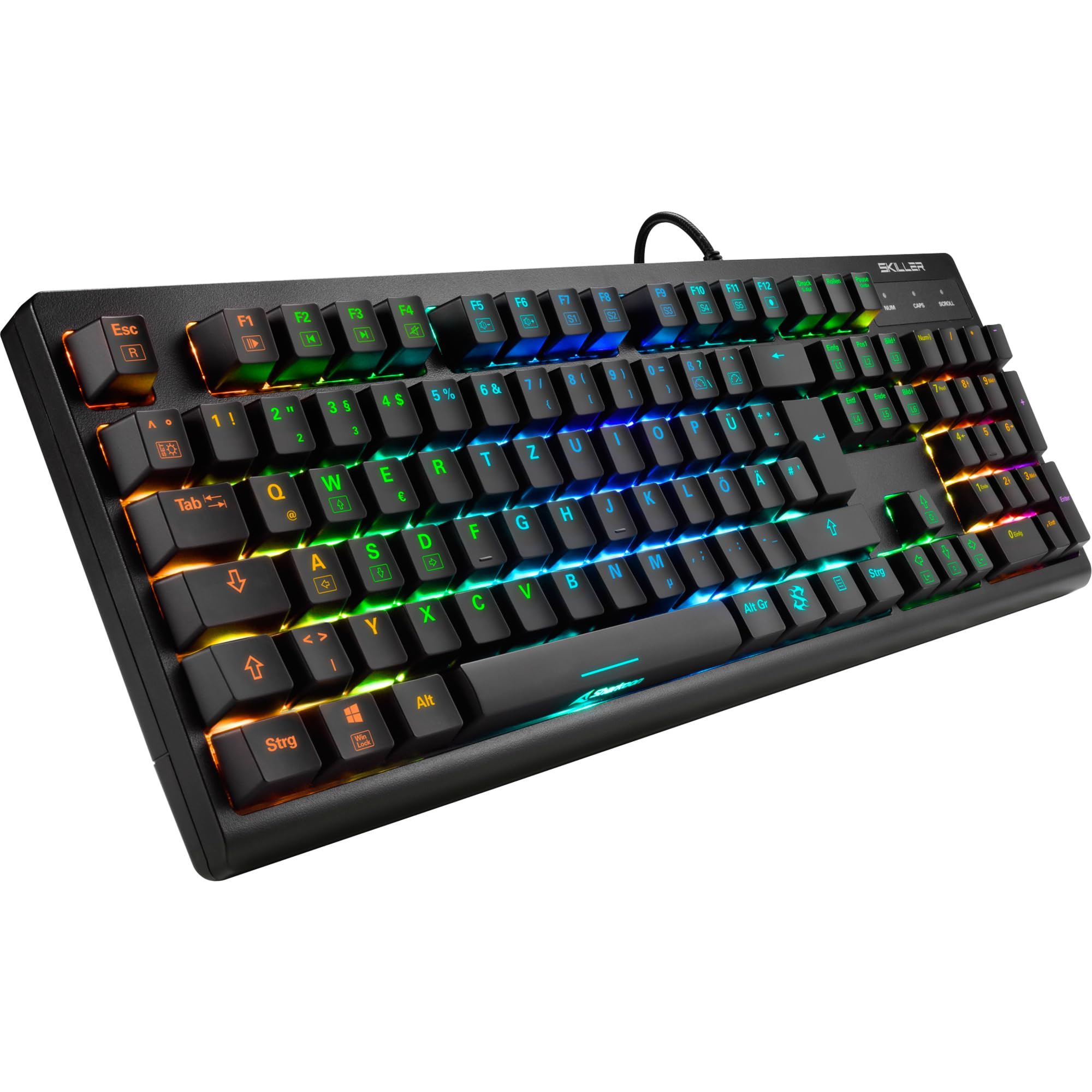
Immaġni: Minn fuq għal isfel view of the Sharkoon Skiller SGK30 mechanical gaming keyboard, showcasing id-disinn sħiħ tiegħu u d-dawl ta' wara RGB vibranti.
Prodott Overview Video
Vidjo: Prodott uffiċjali lestview of the Sharkoon Skiller SGK30 Mechanical Gaming Keyboard, demonstrating its features, RGB lighting effects, and mechanical switches.
Setup
Follow these steps to set up your Sharkoon Skiller SGK30 keyboard:
- Ħoll it-Tastiera: Oħroġ bir-reqqa t-tastiera u l-kejbil USB inkluż mill-imballaġġ tagħha.
- Qabbad mal-Kompjuter: Plug the Micro USB end of the cable into the keyboard's port and the standard USB-A end into an available USB port on your computer.
- Installazzjoni tas-sewwieq: The keyboard is plug-and-play. Your operating system (Windows 10 or later recommended) should automatically detect and install the necessary drivers.
- Installazzjoni tas-Softwer (Mhux obbligatorja): For advanced customization of RGB lighting and key assignments, download the official Sharkoon software from the manufacturer's websit.

Image: The Sharkoon Skiller SGK30 keyboard positioned on a desk, ready for connection.
Istruzzjonijiet Operattivi
Funzjonijiet Ewlenin Bażiċi
The Sharkoon Skiller SGK30 features a standard layout with additional function keys accessible via the FN ċavetta.
- FN + F1-F12: Access multimedia controls (e.g., play/pause, volume up/down, mute).
- FN + Ċavetta tal-Windows: Illokkja/iftaħ iċ-ċavetta tal-Windows biex tevita li tagħfas aċċidentalment waqt il-logħob.
- Qlib N-Key: All keys are registered simultaneously, ensuring every keystroke is detected, even during rapid input.
Kontroll tad-Dawl RGB
The keyboard offers extensive RGB lighting customization. Use the following combinations to adjust lighting effects:
- FN + Insert/Home/Page Up/Delete/End/Page Down: Cycle through various pre-programmed lighting effects.
- FN + Arrow Keys (Up/Down): Adjust brightness levels of the lighting.
- FN + Arrow Keys (Left/Right): Aġġusta l-veloċità tal-effetti tad-dawl dinamiku.
- Custom Illumination: Use the dedicated software for advanced per-key lighting customization.

Immaġni: Close-up view of the keyboard keys highlighting the adjustable RGB illumination capabilities.
Personalizzazzjoni tas-Softwer
For advanced settings, macro programming, and detailed RGB customization, download and install the Sharkoon Skiller SGK30 software from the official Sharkoon websit. Is-softwer jippermettilek li:
- Create and save custom lighting profiles.
- Program macros for specific keys.
- Immappja mill-ġdid il-funzjonijiet ewlenin.

Image: A screenshot showing the graphical user interface of the Sharkoon Skiller SGK30 customization software, illustrating various options for lighting and key remapping.
Manutenzjoni
Manutenzjoni xierqa tiżgura l-lonġevità u l-prestazzjoni tat-tastiera tiegħek:
- Tindif: Use a soft, dry cloth to wipe the surface of the keyboard. For deeper cleaning, use compressed air to remove dust and debris from between the keycaps.
- Tneħħija tal-Għatu taċ-Ċwievet: If necessary, keycaps can be carefully removed using a keycap puller (not included) for thorough cleaning of the switches. Reinstall keycaps by pressing them firmly onto the switch stems.
- Evita Likwidi: Tesponix it-tastiera għal likwidi. F'każ ta' tixrid, skonnettja t-tastiera immedjatament u ħalliha tinxef kompletament qabel ma terġa' tqabbadha.
- Ħażna: Aħżen it-tastiera f'post frisk u niexef 'il bogħod mix-xemx diretta u minn temperaturi estremi.

Immaġni: Close-up view of the mechanical switches on the Sharkoon Skiller SGK30 keyboard, illustrating their design for durability and ease of maintenance. Note: This model is available with Red switches, while the image shows Blue switches.
Issolvi l-problemi
If you encounter issues with your Sharkoon Skiller SGK30 keyboard, refer to the following common solutions:
| Problema | Kawża Possibbli | Soluzzjoni |
|---|---|---|
| It-tastiera ma tirrispondix | Konnessjoni USB maħlula, port USB difettuż, problema bis-sewwieq. |
|
| Id-dawl RGB mhux qed jaħdem jew mhux korrett | Lighting settings incorrect, software conflict. |
|
| Iċ-ċwievet mhux qed jirreġistraw | Trab/debris taħt il-keycap, swiċċ difettuż. |
|
Speċifikazzjonijiet
| Karatteristika | Dettall |
|---|---|
| Brand | Sharkoon |
| Numru tal-Mudell | 4044951030026 |
| Tip ta' Tastiera | Tastiera tal-Logħob Mekkanika |
| Tip ta' Swiċċ | Red Switch (Blue switches are also available for this model series) |
| Konnettività | Mikro USB |
| Ir-Rata tal-Votazzjoni | 1000Hz |
| Qlib N-Key | Appoġġjati |
| Dawl RGB | Customizable RGB |
| Sistema Operattiva | Windows 10 (u kompatibbli ma' verżjonijiet oħra tal-Windows) |
| Dimensjonijiet (LxWxH) | 44 x 14.4 x 3.5 ċm |
| Piż | 867 g |
X'hemm fil-Kaxxa
The Sharkoon Skiller SGK30 package includes:
- Sharkoon Skiller SGK30 Mechanical Gaming Keyboard
- Cable USB
Garanzija u Appoġġ
Għal informazzjoni dwar il-garanzija u appoġġ tekniku, jekk jogħġbok irreferi għas-sit uffiċjali ta' Sharkoon. webis-sit jew ikkuntattja lill-bejjiegħ lokali tiegħek. Żomm il-prova tax-xiri tiegħek għal talbiet ta' garanzija.
Nota: L-ispeċifikazzjonijiet u l-karatteristiċi tal-prodott jistgħu jinbidlu mingħajr avviż minn qabel.


