1. Prodott Aktarview
The UNIWEIGH UF200-1 Digital Gram Scale is a compact and precise electronic mini scale designed for accurate measurements of small items. It features a high-precision sensor, an easy-to-read LCD display with orange backlight, and multiple weighing modes. Its portable design with a protective lid makes it suitable for various applications.
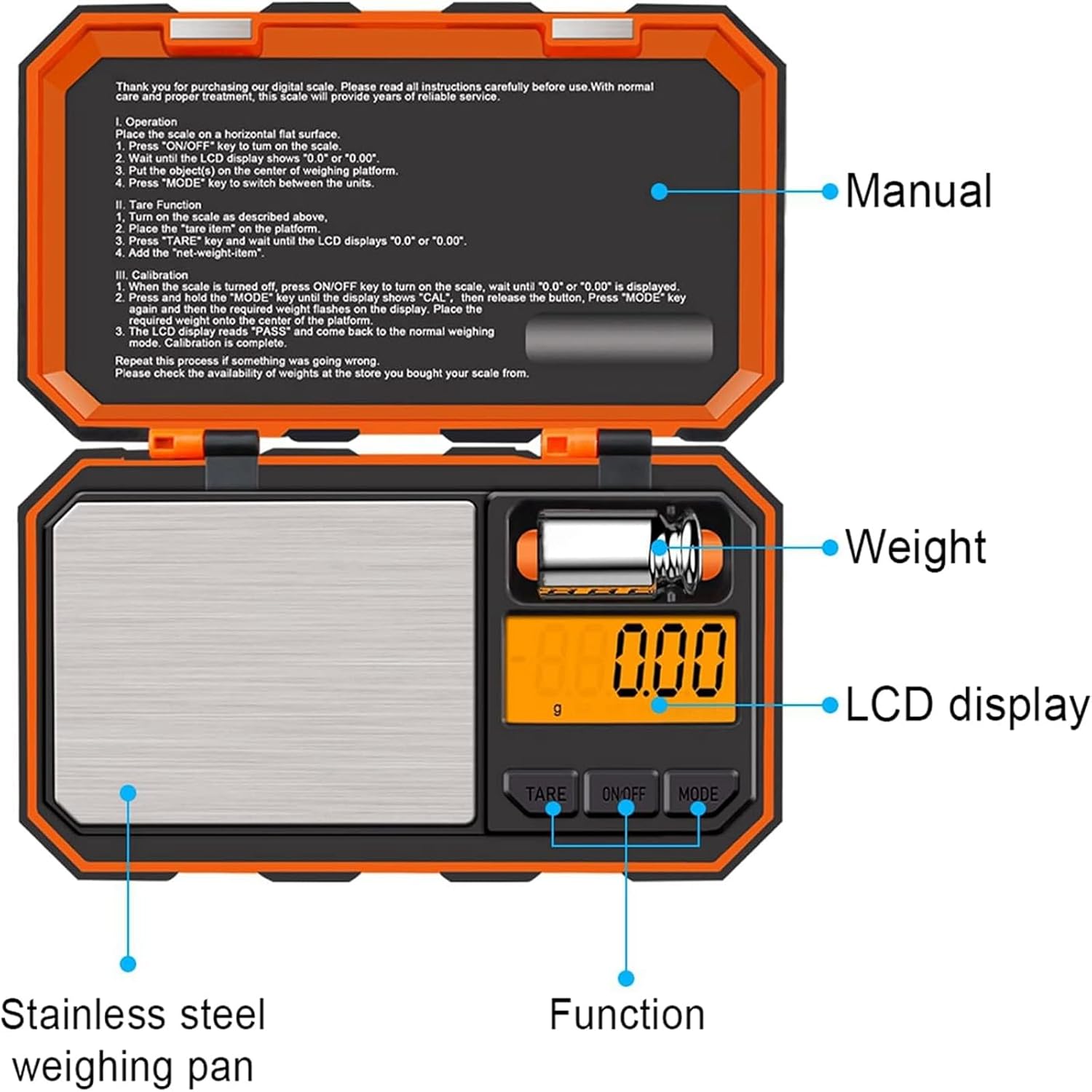
Figura 1: Aktarview of the UNIWEIGH UF200-1 Digital Gram Scale with key components labeled.

Figure 2: The compact dimensions of the scale (5.6" x 3.3" x 0.9") highlighting its portability.
2. Setup
- Installazzjoni tal-batterija: Open the battery compartment located on the underside of the scale. Insert 2 AAA batteries, ensuring correct polarity. Close the compartment securely.
- Pjazzament: Poġġi l-iskala fuq wiċċ iebes, ċatt u stabbli biex tiżgura qari preċiż. Evita li tpoġġiha fuq uċuħ rotob jew irregolari.
- Tneħħija tal-Film Protettiv: Gently remove any protective film from the weighing platform before first use.
3. Istruzzjonijiet Operattivi
3.1 Użin Bażiku
- Agħfas il- ON/OFF button to turn on the scale. Wait for the display to show "0.00" or "0.000".
- Place the item(s) to be weighed gently on the center of the stainless steel weighing platform.
- Aqra l-piż muri fuq l-iskrin LCD.
3.2 Konverżjoni tal-Unità
L-iskala tappoġġja 6 unitajiet ta' piż differenti: grammi (g), uqija (oz), qmuħ (gn), karati (ct), pennyweights (dwt), u uqija troy (ozt).
- With the scale turned on and displaying "0.00", press the MODALITÀ button repeatedly to cycle through the available units.
- Agħżel l-unità mixtieqa għall-kejl tiegħek.

Figure 3: The scale's display illustrating the six available weighing units.
3.3 Funzjoni tat-tara
The Tare function allows you to subtract the weight of a container, ensuring only the weight of the contents is measured.
- Poġġi kontenitur vojt fuq il-pjattaforma tal-użin.
- Agħfas il- TARE buttuna. Id-displej jerġa' lura għal "0.00" jew "0.000".
- Add the items to be weighed into the container. The display will show the net weight of the items.

Figure 4: Step-by-step guide for using the Tare function to measure net weight.
3.4 Auto-Off Feature
To conserve battery life, the scale is equipped with an automatic shut-off function. If there is no activity for 180 seconds, the scale will automatically turn off.

Figure 5: The backlit LCD screen clearly displays readings and indicates the 180-second auto-off feature.
4. Kalibrazzjoni
For optimal accuracy, it is recommended to calibrate the scale regularly, especially after moving it or if you suspect inaccurate readings. A 50g calibration weight is included with your scale.
- Dawwar l-iskala ON and wait until the display shows "0.00" or "0.000".
- Agħfas u żomm il- MODALITÀ button until "CAL" is displayed, then release the button.
- Agħfas il- MODALITÀ button again. The display will flash the required calibration weight (e.g., "50.00").
- Place the included 50g calibration weight gently on the center of the weighing platform.
- Id-displej se juri "PASS" u mbagħad jerġa' lura għall-modalità normali tal-użin, u dan jindika kalibrazzjoni b'suċċess.

Figure 6: The scale with the 50g calibration weight, demonstrating its use for various small items.
5. Manutenzjoni
- Tindif: Uża artab, damp cloth to clean the scale. Do not use abrasive cleaners or immerse the scale in water.
- Ħażna: Store the scale in a cool, dry place. Keep the protective lid closed to prevent dust and damage to the weighing platform.
- Immaniġġjar: Handle the scale with care. Avoid dropping it or subjecting it to strong impacts, as this can affect its accuracy.
6 Issolvi l-problemi
- "Lo" jew Indikatur ta' Batterija Baxxa: Ibdel il-batteriji b'oħrajn ġodda.
- "O-Ld" or Overload Indicator: Remove the item from the platform immediately. The weight exceeds the maximum capacity of 200g.
- Qari Instabbli: Ensure the scale is on a stable, flat surface and away from vibrations or air currents. Recalibrate if necessary.
- Qari mhux eżatt: Recalibrate the scale using the included 50g weight.
7. Speċifikazzjonijiet
- Kapaċità: 200g / 0.01g
- Unitajiet: g, oz, gn, ct, dwt, ozt
- Wiri: LCD b'dawl ta 'wara oranġjo
- Qawwa: 2 x batteriji AAA (inklużi)
- Mitfi Awtomatiku: 180 sekonda ta' inattività
- Materjal tal-Pjattaforma: Stainless Steel
- Dimensjonijiet tal-Prodott: 5.6 x 3.3 x 0.9 pulzieri
- Numru tal-Mudell tal-Oġġett: 609378946684
8. Vidjo Uffiċjali tal-Prodott
Video 1: An official demonstration of the UNIWEIGH mini weight multifunction pocket scale, showcasinil-karatteristiċi u l-faċilità tal-użu tiegħu.
9. Garanzija u Appoġġ
UNIWEIGH is committed to providing high-quality digital scales. If you encounter any issues or are not completely satisfied with your purchase, please contact our customer service. We aim to respond within 24 hours and provide a satisfactory solution.
For further assistance, please refer to the contact information provided with your purchase or visit the official UNIWEIGH store on Amazon: UNIWEIGH Store


