Prodott Overview
The Sharp HP-TW30 True Wireless Noise Cancelling Earphones are designed for an immersive audio experience with enhanced comfort and durability. Featuring active noise cancellation, these earphones reduce background noise, making them ideal for various environments. They offer wireless charging, Bluetooth 5.0 connectivity, and are splashproof for active lifestyles.
Karatteristiċi ewlenin:
- Kanċellazzjoni Attiva tal-Ħsejjes: Reduces ambient noise by 22dB for improved focus and enjoyment.
- Iċċarġjar bla fili: Convenient charging with the included case, providing up to 4 full charges.
- Bluetooth 5.0: Ensures stable and efficient wireless connectivity with a range of up to 33 feet.
- IPX4 Reżistenti għall-ilma: Resistant to splashes, sweat, and light rain, suitable for workouts and outdoor activities.
- Kontrolli touch: Intuitive controls for managing playback, calls, and voice assistants.
- Kontroll tal-Vuċi: Full integration with Apple Siri and Google Assistant for hands-free operation.
- Ħin twil tal-logħob: Sa 6 sigħat ta' daqq tal-awdjo b'ċarġ wieħed.

Figure 1: Sharp HP-TW30 True Wireless Earphones (Black)
Kontenut tal-Pakkett
Qabel ma tibda, jekk jogħġbok kun żgur li l-oġġetti kollha huma preżenti fil-pakkett:
- Sharp HP-TW30 True Wireless Earphones (Left and Right)
- Kawża tal-Iċċarġjar
- USB Type-C Charging Cable (not explicitly listed in 'whats_in_the_box' but implied by 'Charging Port: USB Type C')
- Small, Medium, and Large Ultra-comfortable Ear Tips (3 sizes)
- Manwal ta 'Istruzzjoni (dan id-dokument)
Setup
1. Iċċarġjar tal-Earphones u l-Kaxxa
For first-time use, fully charge the earphones and the charging case. The charging case provides approximately 4 full charges for the earphones.
- Place both earphones into their respective slots in the charging case. Ensure they are seated correctly.
- Qabbad il-kejbil tal-iċċarġjar USB Type-C mal-port tal-iċċarġjar fuq il-kaxxa u t-tarf l-ieħor ma' sors ta' enerġija USB (eż., adapter tal-ħajt, port USB tal-kompjuter).
- The LED indicators on the case will show charging status. Charging time for the case and earphones is approximately 2 hours.
- Ladarba tkun iċċarġjata kompletament, skonnettja l-kejbil tal-iċċarġjar.
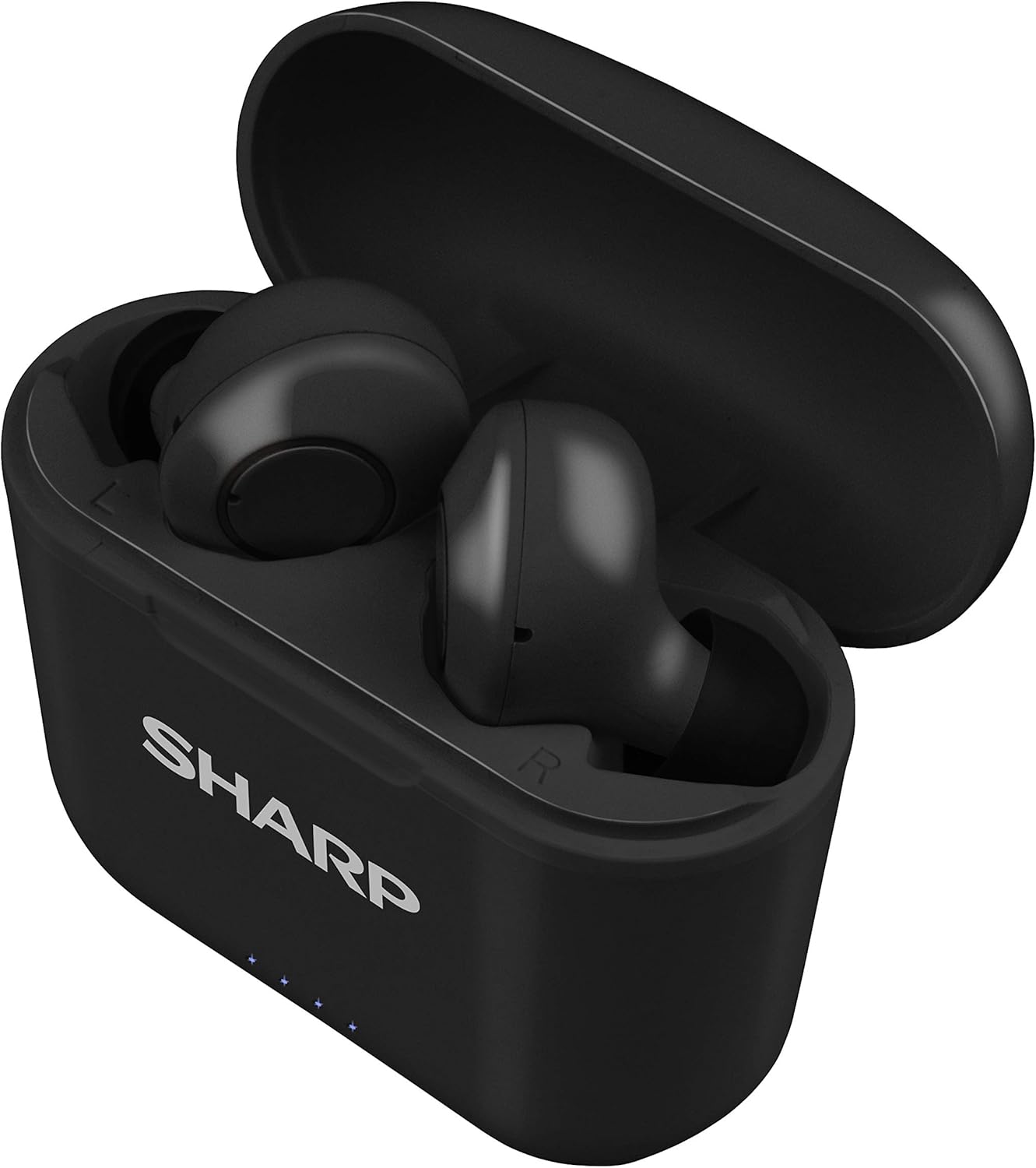
Figure 2: Earphones in Charging Case
2. It-tqabbil mat-Tagħmir Tiegħek
The HP-TW30 earphones feature auto-pairing for effortless setup.
- Iftaħ il-kaxxa tal-iċċarġjar. Il-earphones jixegħlu awtomatikament u jidħlu fil-modalità ta' tqabbil.
- Fuq l-ismartphone, it-tablet, jew apparat ieħor li jaħdem bil-Bluetooth tiegħek, mur fis-settings tal-Bluetooth.
- Fittex għal available devices and select "HP-TW30" from the list.
- Ladarba jkun konness, se tinstema' twissija bil-vuċi biex tikkonferma li l-akkoppjar sar b'suċċess.
- Il-earphones jerġgħu jikkonnettjaw awtomatikament mal-aħħar apparat imqabbad meta joħorġu mill-kaxxa, jekk il-Bluetooth ikun attivat fuq l-apparat.
Istruzzjonijiet Operattivi
Touch Kontrolli
The HP-TW30 earphones utilize touch-sensitive controls on each earbud for various functions:
- Play/Pawsa: Tektek wieħed fuq kull earbud.
- Track li jmiss: Tektek darbtejn fuq il-earbud tal-lemin.
- Track preċedenti: Tektek darbtejn fuq il-earbud tax-xellug.
- Tweġiba/Tmiem Sejħa: Tektek waħda fuq kwalunkwe earbud waqt telefonata li tkun dieħla.
- Irrifjuta Sejħa: Agħfas u żomm kwalunkwe earbud għal żewġ sekondi waqt telefonata li tkun dieħla.
- Activate Voice Assistant (Siri/Google Assist): Tektek tliet darbiet fuq kull earbud.
- Active Noise Cancellation (ANC) On/Off: Agħfas u żomm il-widna tal-lemin għal 2 sekondi.
Kanċellazzjoni Attiva tal-Istorbju (ANC)
The ANC feature reduces ambient background noise, providing a more focused listening experience. Activate or deactivate ANC using the touch control as described above.
Reżistenza għall-Ilma (IPX4)
The earphones are rated IPX4 splashproof, meaning they are resistant to water splashes from any direction. This makes them suitable for light rain, sweat, and gym use. Do not submerge the earphones in water.
Manutenzjoni
Manutenzjoni xierqa tiżgura l-lonġevità u l-prestazzjoni ottimali tal-earphones tiegħek.
- Tindif: Regularly clean the earphones and charging case with a soft, dry, lint-free cloth. Do not use abrasive cleaners or solvents.
- Tips tal-widnejn: Neħħi u naddaf il-ponot tal-widnejn perjodikament b'adamp drapp u sapun ħafif, imbagħad nixxef sew qabel ma terġa' twaħħal.
- Ħażna: Meta ma tkunx qed tużahom, aħżen il-earphones fil-kaxxa tal-iċċarġjar tagħhom biex tipproteġihom mit-trab u l-ħsara.
- Temperatura: Evita li tesponi l-earphones għal temperaturi estremi (sħana jew kesħa) jew umdità għolja.
- Kuntatti tal-Iċċarġjar: Ensure the charging contacts on both the earphones and inside the case are clean and free of debris to maintain proper charging.
Issolvi l-problemi
If you encounter issues with your Sharp HP-TW30 earphones, try the following solutions:
- Il-earphones mhux qed jitqabbdu/jikkonnettjaw:
- Kun żgur li ż-żewġ earphones huma ċċarġjati kompletament.
- Itfi l-Bluetooth fuq l-apparat tiegħek, imbagħad erġa' ixgħelu.
- Forget/delete "HP-TW30" from your device's Bluetooth list and attempt to re-pair.
- Place both earphones back into the charging case, close the lid for 5 seconds, then open it again to reset.
- Only one earbud playing sound:
- Kun żgur li ż-żewġ earbuds huma ċċarġjati.
- Poġġi ż-żewġ earbuds lura fil-kaxxa tal-iċċarġjar, agħlaq l-għatu, u mbagħad iftaħ mill-ġdid. Dan spiss jerġa' jissinkronizzahom.
- Naddaf il-kuntatti tal-iċċarġjar fuq iż-żewġ earbuds u ġewwa l-kaxxa.
- Try resetting and re-pairing the earphones as described above.
- Volum baxx jew kwalità ħażina tal-ħoss:
- Aġġusta l-volum kemm fuq l-apparat tiegħek kif ukoll fuq il-earphones.
- Ensure the ear tips are the correct size for a snug fit and are clean.
- Check for any obstructions in the earbud nozzles.
- Il-earphones mhux qed jiċċarġjaw:
- Kun żgur li l-kejbil tal-iċċarġjar huwa konness sew kemm mal-kaxxa kif ukoll mas-sors tal-enerġija.
- Ipprova kejbil USB tat-Tip Ċ u adapter tal-enerġija differenti.
- Naddaf il-kuntatti tal-iċċarġjar fuq il-earphones u ġewwa l-kaxxa.
Speċifikazzjonijiet
| Isem tal-Mudell | HP-TW30(BK) |
| Teknoloġija tal-Konnettività | Wireless (Bluetooth) |
| Verżjoni Bluetooth | 5.0 |
| Medda Bluetooth | Sa 33 pied (10 metri) |
| Kontroll tal-Ħoss | Active Noise Cancellation (22dB reduction) |
| Ħin tal-logħob | Appross. 6 sigħat |
| Ħin ta' Standby | Appross. 90 sigħat |
| Ħin tal-Iċċarġjar | Approx. 2 hours (earphones and case) |
| Port tal-Iċċarġjar | USB Tip-Ċ |
| Reżistenza għall-Ilma | IPX4 Splashproof |
| Tip ta' Kontroll | Touch Control |
| Kontroll tal-Vuċi | Apple Siri, Google Assistant |
| Komponenti Inklużi | Small, Medium, and Large Ultra-comfortable Ear tips |
| Materjal | Silikon (ponot tal-widnejn) |
| Piż tal-oġġett | 7.9 uqija |
Garanzija u Appoġġ
Sharp products are manufactured to the highest quality standards. For warranty information, technical support, or service inquiries, please refer to the warranty card included with your purchase or visit the official Sharp support website. Please have your model number (HP-TW30(BK)) and proof of purchase ready when contacting support.
For further assistance, you may visit the Sharp Store on Amazon: Sharp Official Store


