1. Setup
Before beginning your treasure hunt, ensure all components are present and correctly assembled. The PalliPartners Metal Detector is designed for straightforward assembly.

Figura 1: All components of the PalliPartners Metal Detector, including the main unit, search coil, control panel, armrest, foldable shovel, carrying bag, and batteries.
Istruzzjonijiet għall-immuntar:
- Waħħal il-Kojl tat-Tiftix: Securely connect the 12-inch search coil to the lower stem of the detector.
- Qabbad is-Sezzjonijiet tax-Xaft: Assemble the adjustable stem sections. The stem can be adjusted from 41.3 inches to 47.6 inches to suit different user heights.
- Immonta l-Kaxxa tal-Kontroll: Attach the control box, which houses the LCD display and operational buttons, to the upper part of the shaft.
- Installa l-Armrest: Secure the ergonomically designed armrest to the shaft for comfortable and less stressful operation.
- Qabbad il-Kejbils: Carefully connect the cable from the search coil to the control box. Ensure a secure connection.
- Daħħal Batteriji: Open the battery compartment on the control box and insert the two required 9V batteries.
- Optional Headphone Connection: For private listening and clearer audio signals, plug your headphones into the designated jack on the control panel.
Vidjo 1: A customer demonstration showing the unboxing and assembly process of the PalliPartners Metal Detector. This video also illustrates basic operation.
2. Istruzzjonijiet Operattivi
The PalliPartners Metal Detector features an intuitive LCD display and multiple operating modes for efficient metal detection.
Control Panel Matulview:
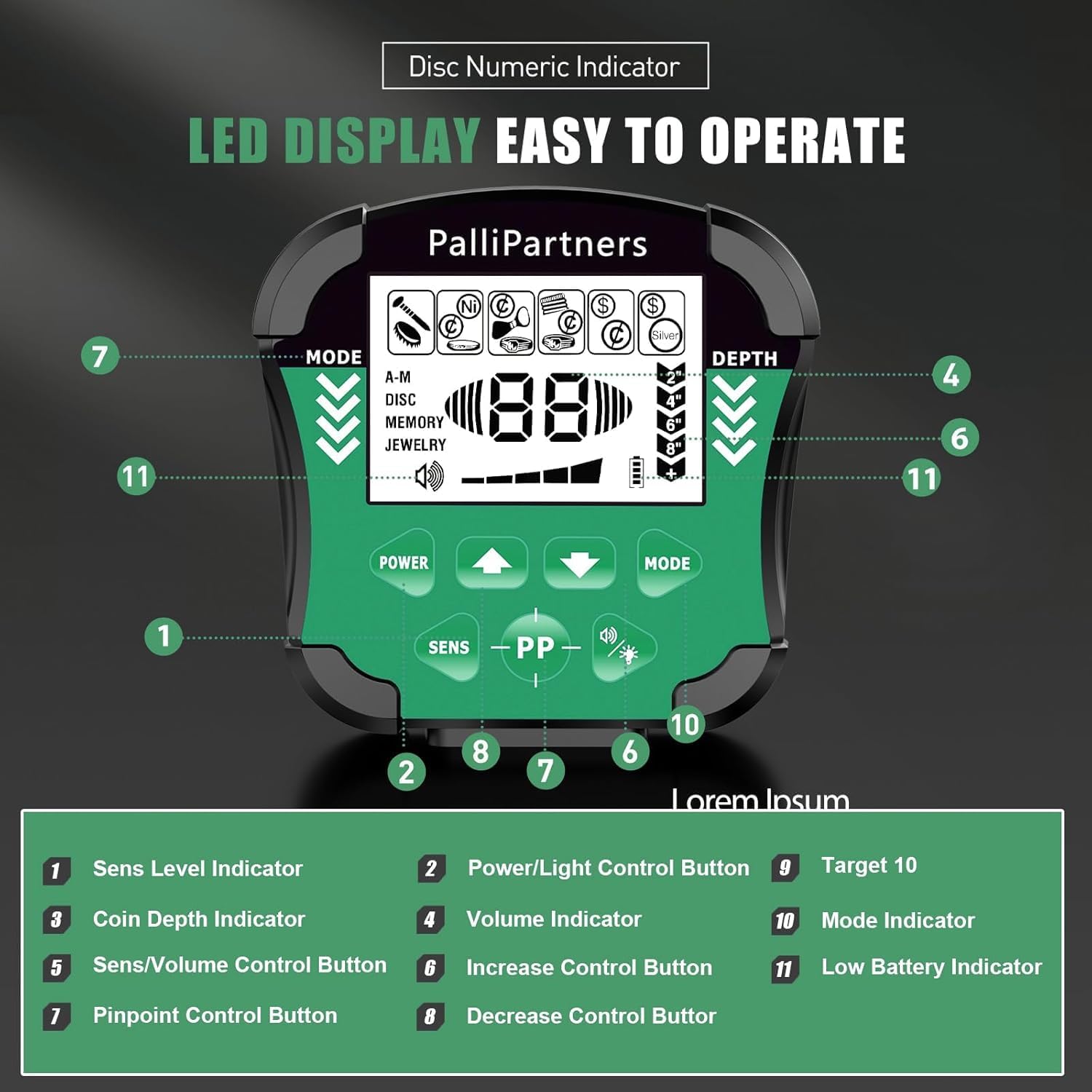
Figura 2: The main control panel of the metal detector, showing the LCD screen, mode buttons, sensitivity controls, and volume knob.
- Power/Light Control Button: Used to turn the device on/off and activate the backlight for low-light conditions.
- Buttuna tal-Modalità: Cycles through the different detection modes.
- SENS/Volume Control Button: Adjusts the sensitivity level and volume.
- Increase/Decrease Buttons (+/-): Used to adjust sensitivity, volume, or select targets in Notch mode.
- Pinpoint Control Button (PP): Used for precisely locating detected targets.
- Display LCD: Shows detection mode, sensitivity level, battery condition, volume level, and target identification.
Modi ta' sejbien:
The detector offers five distinct operation modes to optimize your search for various metal types.
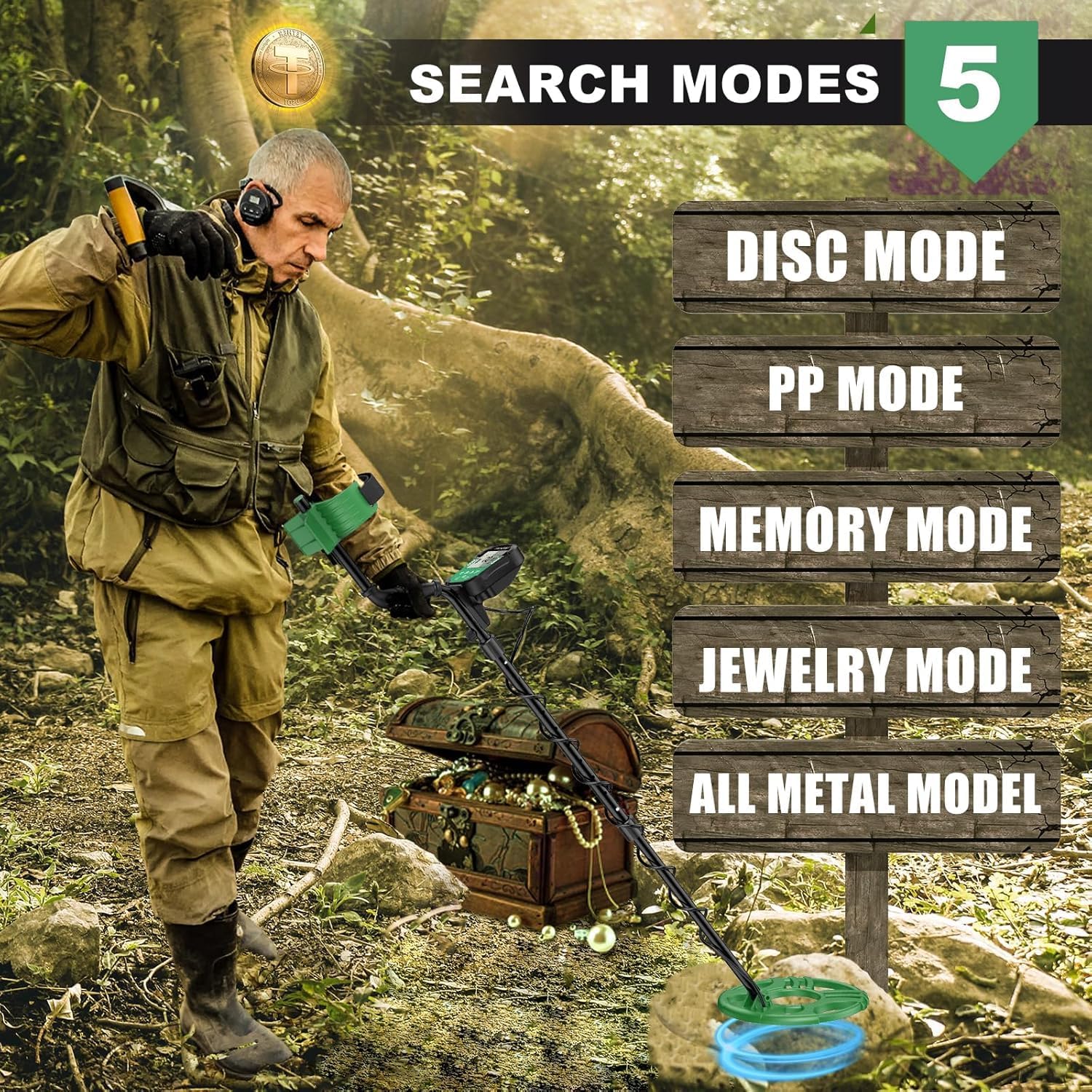
Figura 3: Visual representation of the five available search modes and their primary functions.
- Modalità tal-Metall Kollha: Detects all types of metal without discrimination. This mode offers the highest sensitivity and is ideal for general searching.
- Disc Mode (Discrimination): Allows you to eliminate certain types of metal from detection. This is useful for ignoring junk metal like iron and focusing on valuable targets.
- Modalità talja: Provides more precise control over discrimination. You can select specific target categories to be ignored by pressing "NOTCH" and using the +/- buttons.
- Modalità tal-memorja: Specifically configured to search for specific metal types you have previously identified and stored, while eliminating others.
- Modalità tal-Ġojjellerija: Specifically configured to eliminate iron signals and primarily respond to other metals commonly found in jewelry.
- PP Mode (Pinpoint): Used to precisely locate the exact position of a detected target before digging.
Target Identification and Depth:
The LCD display provides visual cues for target identification and estimated depth, enhancing your detection efficiency.

Figura 4: The LCD screen provides a numeric indicator for discrimination, showing different metal types and their corresponding target IDs. It also displays signal strength and estimated depth.
- ID tal-mira: The display shows a numeric value (00-99) and an icon indicating the probable type of metal detected (e.g., iron, zinc, silver, gold).
- Indikatur tal-Fond: Provides an estimated depth of the target, up to 8.7 inches.
- Toni tal-Awdjo: The detector produces different audio tones for various metal types, allowing for auditory identification.

Figura 5: The detector provides distinct audio tones for different target IDs, helping to identify the type of metal without looking at the screen.
Using the Detector:
Hold the detector comfortably with the armrest supporting your forearm. Sweep the search coil slowly and steadily from side to side, keeping it parallel to the ground and about 1-2 inches above the surface. When a target is detected, the display will show information, and an audio tone will sound.

Figura 6: The 12-inch search coil allows for detection up to 8.7 inches deep, providing good coverage for various terrains.
3. Manutenzjoni
Proper maintenance ensures the longevity and optimal performance of your PalliPartners Metal Detector.
- Cleaning the Search Coil: The 12-inch search coil is waterproof (IP54 rated). After use, especially in wet or muddy conditions, you can rinse the coil with fresh water.
- Nota Importanti: Il-kaxxa tal-kontroll MHIX reżistenti għall-ilma. Do not submerge the control box or expose it to heavy rain.
- Cleaning the Control Box and Shaft: Wipe the control box and shaft with a soft, damp drapp. Evita li tuża tindif jew solventi li joborxu.
- Sostituzzjoni tal-batterija: When the battery indicator on the LCD display shows low power, replace the two 9V batteries promptly to ensure consistent performance.
- Ħażna: When not in use, disassemble the detector and store it in the provided carrying bag. Store in a cool, dry place away from direct sunlight and extreme temperatures.

Figura 7: The waterproof search coil allows for detection in shallow water, but the control box must remain dry.
4 Issolvi l-problemi
Jekk tiltaqa' ma' problemi bid-ditekter tal-metall tiegħek, irreferi għall-problemi u s-soluzzjonijiet komuni li ġejjin:
| Problema | Kawża Possibbli | Soluzzjoni |
|---|---|---|
| No power/Device does not turn on. | Il-batteriji huma mejta jew installati ħażin. | Check battery orientation. Replace with fresh 9V batteries. |
| False signals or erratic beeping. | High sensitivity setting; electromagnetic interference; mineralized ground. | Reduce sensitivity. Move away from power lines or other electronic devices. Try adjusting the discrimination or notch settings. |
| L-ebda skoperta jew sinjali dgħajfa. | Low sensitivity; incorrect mode; coil not parallel to ground; deep target. | Increase sensitivity. Ensure you are in the correct detection mode (e.g., All Metal). Keep the search coil parallel to the ground. |
| Id-displej huwa mċajpar jew ma jistax jinqara. | Low battery; no backlight activated. | Replace batteries. Press the Power/Light button to activate the backlight. |
5. Speċifikazzjonijiet
- Ditta: PalliPartners
- Numru tal-Mudell: 940G
- Kulur: Iswed u Aħdar
- Materjal: Metall, plastik
- Sors tal-Enerġija: Mħaddma bil-batterija
- Batteriji: 2 x 9V batteries (required)
- Piż tal-oġġett: 3.9 Liri
- Dimensjonijiet tal-Prodott (L x W x H): 17" x 11" x 5.9"
- Tul estiż: 60.2 Pulzier
- Tul aġġustabbli: Iva
- Klassifikazzjoni tal-Protezzjoni Internazzjonali: IP54 (Kojl tat-Tiftix biss)
- Frekwenza tat-Tħaddim: 7.69 KHz
- Tip ta' wiri: LCD
- Number of Programs/Modes: 5
- Daqs tal-Kojl tat-Tiftix: 12 Pulzier
- UPC: 723117923450, 723117234457
6. Garanzija u Appoġġ
For warranty information, please refer to the documentation included with your product packaging. If you have any questions regarding the PalliPartners Metal Detector or require technical assistance, please feel free to contact PalliPartners customer support. Contact details can typically be found on the product packaging or the official PalliPartners websit.