1. Introduzzjoni
Thank you for choosing the ANJANK Wooden Digital Alarm Clock. This versatile device combines an alarm clock, FM radio, and a wireless charging station, designed to simplify your bedside or desk setup. This manual will guide you through the features and functions of your new device, ensuring optimal performance and user experience.
2. Kontenut tal-Pakkett
- ANJANK Wooden Digital Alarm Clock
- Adapter tal-Enerġija
- Wajer tal-antenna tal-FM
- Manwal għall-Utent
3. Prodott Aktarview

Figura 1: Quddiem view of the ANJANK Wooden Digital Alarm Clock with a smartphone charging wirelessly.

Figure 2: Top panel controls including wireless charging pad, time, alarm, radio, and volume buttons.

Figure 3: Rear panel with FM/BT Volume, DC 9V input, USB port, Night Light Dimmer, Alarm Set, Time Set, and Display Dimmer controls.
3.1 Wiri ta 'quddiem
- LED Time Display: Large, easy-to-read digits for current time.
- Indikatur AM/PM: Indicates morning or afternoon hours.
- Ikona tal-allarm: Appears when an alarm is active.
- Indikatur tal-Iċċarġjar: Displays when a device is wirelessly charging.
3.2 Kontrolli tal-Panel ta' Fuq
- Kuxxinett tal-Iċċarġjar mingħajr Fili: Għal apparati kompatibbli mal-Qi.
- Buttuna Snooze/Dimmer: Snoozes active alarm or adjusts display brightness.
- Time Set Buttons: Adjusts hour and minute during time setting.
- Alarm Set Buttons: Jikkonfigura l-ħin u l-ħoss tal-allarm.
- FM Radio/Bluetooth Buttons: Controls radio functions and Bluetooth pairing.
3.3 Rear Panel Ports and Controls
- Input DC 9V: Tqabbad mal-adapter tal-enerġija.
- Port tal-Iċċarġjar tal-USB: For charging additional devices (5V/2A).
- FM Antenna Jack: Connects the included FM antenna.
- Night Light Dimmer: Adjusts the brightness of the ambient night light.
- Display Dimmer: Adjusts the brightness of the LED time display.
- Buttuna ta' 12/24 siegħa: Jaqleb bejn il-formati tal-ħin ta' 12-il siegħa u 24 siegħa.
4. Setup
4.1 Konnessjoni tal-Enerġija
- Qabbad l-adapter tal-enerġija pprovdut mal- Input DC 9V port on the rear of the alarm clock.
- Ipplaggja l-adapter tal-enerġija f'sokit standard tal-ħajt. Id-displej se jixgħel.
4.2 Backup tal-Batterija
The device requires 2 AAA batteries (not included) for battery backup. This feature preserves time and alarm settings during a power outage, but the display will not be active and alarms will not sound.
- Iftaħ l-għatu tal-kompartiment tal-batterija fil-qiegħ tal-unità.
- Daħħal żewġ batteriji AAA, waqt li tosserva l-polarità korretta (+/-).
- Ibdel l-għatu tal-kompartiment tal-batterija.
4.3 Issettjar tal-Ħin Inizjali
- Agħfas u żomm il- Ħin Issettjat button on the top panel until the hour digits begin to flash.
- Uża l- Siegha u Minuta adjustment buttons (usually labeled with arrows or +/-) to set the correct hour and minute.
- Agħfas il- Ħin Issettjat Agħfas il-buttuna mill-ġdid biex tikkonferma u toħroġ mill-modalità tal-issettjar tal-ħin.
- Biex taqleb bejn il-format ta' 12-il siegħa u ta' 24 siegħa, agħfas il-buttuna 12/24H buttuna fuq il-pannell ta’ wara.
5. Istruzzjonijiet Operattivi
5.1 L-issettjar tal-allarm
The alarm clock supports multiple alarms and offers 9 different wake-up sounds, including a classic buzzer and FM radio.

Figure 4: The alarm clock offers 9 different wake-up sounds, including radio and beep, with a snooze function.
- Agħfas u żomm il- Sett ta 'allarm button (often depicted as a bell icon) until the alarm hour digits flash.
- Uża l- Siegha u Minuta adjustment buttons to set your desired alarm time.
- Agħfas Sett ta 'allarm again to confirm the time. The alarm sound selection will now flash.
- Uża l- Siegha u Minuta adjustment buttons to cycle through the 9 available alarm sounds (e.g., buzzer, bird chirping, ocean waves, FM radio).
- Agħfas Sett ta 'allarm one more time to confirm your sound selection. The alarm icon will appear on the display, indicating the alarm is active.
- Biex tattiva/tiddiżattiva l-allarm, agħfas fil-qosor il-buttuna Allarm mixgħul / mitfi buttuna.
- To snooze an active alarm, press the large Snooze / Dimmer button on the top. The alarm will pause for 9 minutes and then sound again.
5.2 Tħaddim tar-Radju FM
Connect the included FM antenna wire to the FM Antenna Jack on the rear panel for optimal reception.
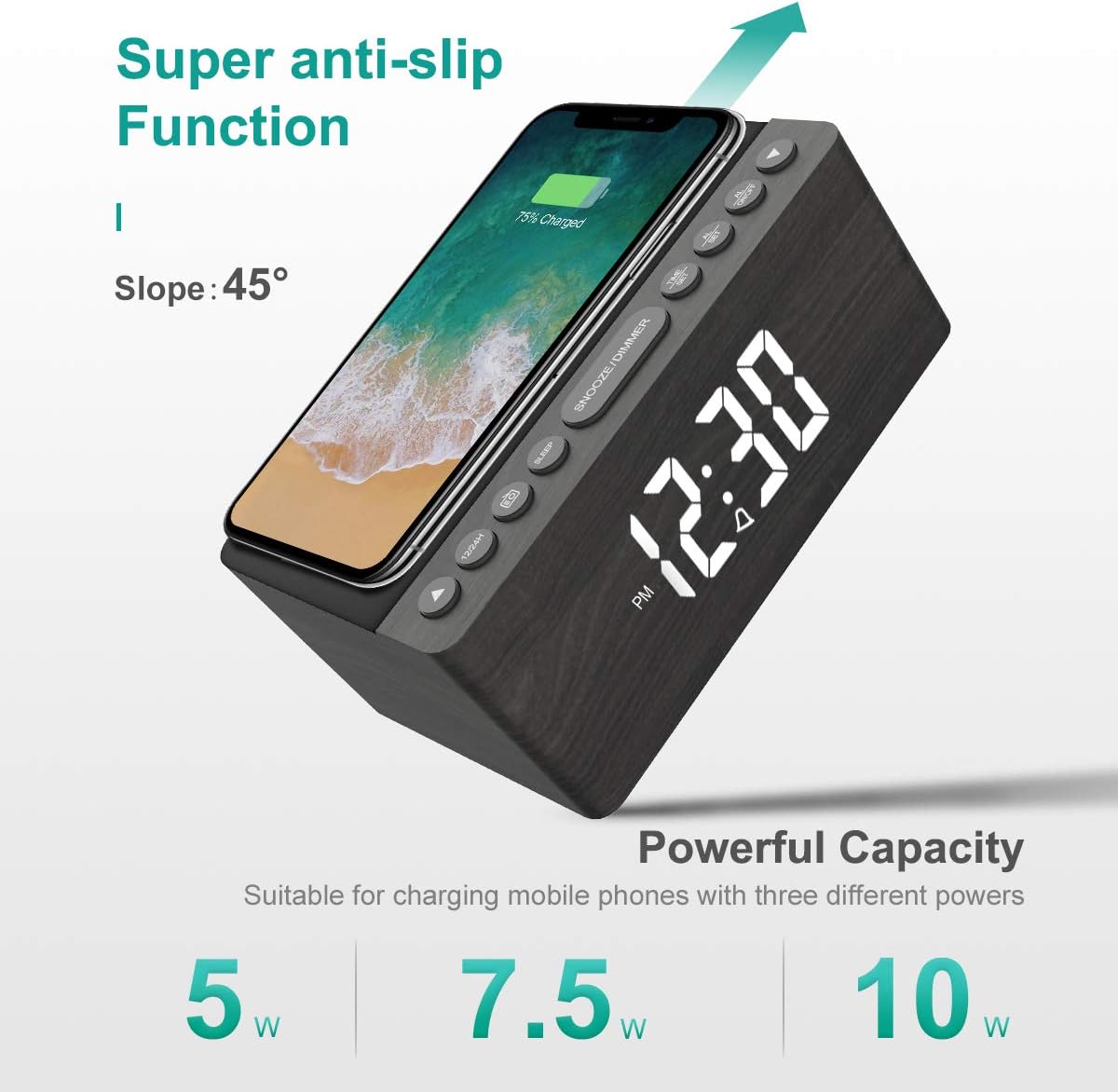
Figure 5: The alarm clock features an anti-slip surface for stable wireless charging and supports various charging powers.
Video 1: Demonstrates the FM Radio and Magnetic Wireless Charging features of a similar product.
- Agħfas il- Radju FM button (often labeled with a radio icon) to turn on the FM radio. The current frequency will be displayed.
- Skennjar Awtomatiku: Agħfas u żomm il- Radju FM buttuna biex tiskennja u ssalva awtomatikament l-istazzjonijiet FM disponibbli.
- Intunazzjoni manwali: Uża l- Siegha u Minuta adjustment buttons to manually tune to a specific frequency.
- Aġġustament tal-Volum: Uża l- FM/BT Volume slider on the rear panel to adjust the radio volume.
- Timer ta 'l-Irqad: Agħfas il- Sleep Timer button (often labeled with a crescent moon or 'SLEEP') to set a sleep timer (10-120 minutes). The radio will play for the set duration and then automatically turn off.
5.3 Wireless and USB Charging
The ANJANK alarm clock features Qi-certified wireless charging and an additional USB port for wired charging.

Figure 6: The alarm clock provides both wireless charging for smartphones and a USB port for other electronic devices.
Video 2: Shows the wireless charging function of an alarm clock.
- Iċċarġjar bla fili: Place your Qi-compatible smartphone on the wireless charging pad on the top of the unit. Ensure the phone is centered for optimal charging. The charging indicator on the display will activate. The device supports 5W, 7.5W, and 10W adaptive charging.
- Iċċarġjar USB: Connect your device (e.g., second phone, power bank, smartwatch) to the Port tal-Iċċarġjar tal-USB on the rear panel using a compatible USB cable.
5.4 Aġġustament tal-luminożità tal-wiri
The LED display offers 5 levels of brightness, allowing you to customize it for comfort.

Figure 7: Visual representation of the five adjustable brightness levels for the LED display.
- Uża l- Display Dimmer slider on the rear panel to adjust the brightness of the time display from low to high.
- The device also features an auto-dimmable function to adjust brightness based on ambient light.
5.5 Night Light Adjustment
The ambient night light can be adjusted to provide subtle illumination.
- Uża l- Dimmer tad-Dawl tal-Lejl button on the rear panel to cycle through different brightness levels or turn the night light off.
6. Manutenzjoni
- To clean the device, use a soft, dry cloth. Do not use liquid cleaners or abrasive materials.
- Żomm l-apparat 'il bogħod mill-ilma u umdità għolja.
- Evita li tpoġġi l-apparat fid-dawl tax-xemx dirett jew ħdejn sorsi tas-sħana.
7 Issolvi l-problemi
- Ebda Qawwa/Wiri Mitfi: Ensure the power adapter is securely connected to both the device and a working power outlet. Check if batteries are inserted correctly for backup.
- Iċċarġjar bla fili ma taħdimx: Ensure your device is Qi-compatible and properly centered on the charging pad. Remove any thick phone cases that might interfere with charging.
- Riċezzjoni ħażina tar-Radju FM: Fully extend the FM antenna wire. Try repositioning the antenna or the alarm clock for better signal.
- Allarm ma Ddoqq: Verify that the alarm is activated (alarm icon visible) and the volume is set to an audible level. Check if the correct alarm sound is selected.
- Wiri Wisq Qawwi/Mċajpar: Aġġusta l- Display Dimmer slider on the rear panel.
8. Speċifikazzjonijiet
| Karatteristika | Dettall |
|---|---|
| Brand | ANJANK |
| Mudell | Radju |
| Kulur | Griż |
| Tip ta 'Wiri | LED diġitali |
| Sors tal-Enerġija | Corded Elettriku |
| Iċċarġjar bla fili | 10W Qi Certified (5W, 7.5W, 10W adaptive) |
| Port tal-Iċċarġjar tal-USB | Yes (5V/2A) |
| Frekwenza tar-Radju FM | 87.5-108MHz |
| Ħsejjes ta' Allarm | 9 (including radio and buzzer) |
| Display Dimmer | 5 Levels, Auto Dimmable |
| Sleep Timer | 10-120 minuta |
| Backup tal-batterija | 2 batteriji AAA meħtieġa (mhux inklużi) |
| Dimensjonijiet tal-Prodott | 3.9"W x 2.9"H (approx. 6.4" L x 4" W x 2.9" H from image) |
| Piż tal-oġġett | 1.48 libbra (0.67 Kilogrammi) |
9. Garanzija u Appoġġ
ANJANK offers a worry-free 18-month warranty for this product. Additionally, a 45-day return policy is available. For any questions or support, please contact ANJANK customer service. Responses are typically provided within 24 hours.


