1. Introduzzjoni
This manual provides instructions for the installation, operation, and maintenance of the Grandstream GRP2604 IP Phone. The GRP2604 is a 3-line, 6-SIP account IP phone designed for ease of use and advanced functionality, featuring a 2.7-inch LCD display and dual-port Gigabit Ethernet.
2. Informazzjoni dwar is-Sigurtà
- Uża biss l-adapter tal-enerġija li jiġi mat-telefon.
- Tesponix l-apparat għall-ilma jew l-umdità.
- Evita li tpoġġi t-telefon ħdejn sorsi ta’ sħana jew dawl tax-xemx dirett.
- Tippruvax tiftaħ jew issewwi l-apparat int stess. Irreferi għal kull manutenzjoni f'idejn persunal kwalifikat.
- Kun żgur li jkun hemm ventilazzjoni xierqa madwar it-telefon.
3. Kontenut tal-Pakkett
Ivverifika li l-pakkett tiegħek fih l-oġġetti li ġejjin:
- GRP2604 IP Phone Unit
- Handset bil-Korda
- Stand tat-Telefon
- Cable Ethernet
- Adapter tal-Enerġija
- Quick Installation Guide (this manual serves as the full guide)
4. Prodott Aktarview
4.1. Layout tat-Telefon

Figura 4.1: Quddiem view of the Grandstream GRP2604 IP Phone. This image displays the phone's main body, handset, 2.7-inch LCD display, numeric keypad, function keys, and programmable line keys.
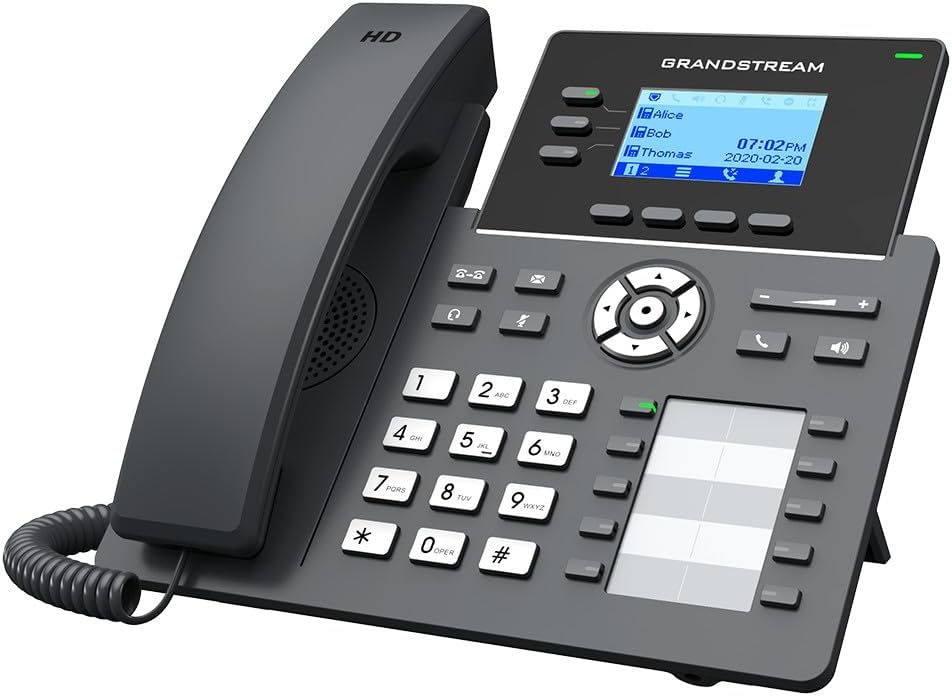
Figura 4.2: Angolat view of the Grandstream GRP2604 IP Phone. This perspective highlights the ergonomic design of the handset and the slight tilt of the main unit, providing a clearer view of the display and keypad.

Figura 4.3: Ġenb view of the Grandstream GRP2604 IP Phone with its stand attached. This image illustrates how the phone is positioned for desktop use, showing the angle provided by the stand.
4.2. Il-Pannell ta' Wara u l-Portijiet

Figura 4.4: Wara view of the Grandstream GRP2604 IP Phone, showing the various ports and connections. From left to right, these include the handset port, headset port, two Gigabit Ethernet ports (LAN and PC), and the DC 5V power input.
The rear panel of the GRP2604 features essential connection ports:
- Port tal-Handset: Jqabbad il-korda mkebba tal-idejn.
- Port tal-headset: Għall-konnessjoni ta' headset bil-fili.
- PC Port (LAN Out): Connects to a computer or other network device.
- LAN Port (Network In): Connects to your network switch or router.
- Input ta' Enerġija DC 5V: Tqabbad l-adapter tal-enerġija.
5. Setup
- Waħħal l-Istand tat-Telefon: Align the stand with the slots on the back of the phone and slide it into place until it clicks securely.
- Qabbad il-Handset: Plug one end of the coiled handset cord into the handset and the other end into the handset port on the rear of the phone.
- Qabbad man-Netwerk:
- Qabbad tarf wieħed tal-kejbil Ethernet mal-port LAN fuq it-telefon.
- Qabbad it-tarf l-ieħor tal-kejbil Ethernet ma 'swiċċ jew router tan-netwerk.
- If connecting a computer, use another Ethernet cable to connect the PC port on the phone to your computer.
- Qabbad l-Enerġija: Plug the DC 5V power adapter into the power input port on the phone, then plug the adapter into a power outlet. The phone will automatically power on and begin the boot-up sequence.
- Konfigurazzjoni Inizjali: Once the phone boots up, it will attempt to obtain an IP address via DHCP. You may need to access the phone's web interface for further SIP account configuration, as instructed by your VoIP service provider or network administrator.
6. Istruzzjonijiet Operattivi
6.1. Nagħmlu Sejħiet
- Sejħat mingħajr ma tqabbad: Aqbad l-idejn jew agħfas il-buttuna Speakerphone button. Dial the number and press the Ċempel soft key or wait a few seconds.
- Sejħa On-hook: Dial the number first, then pick up the handset or press the Speakerphone buttuna.
- Using Line Keys: Press an available line key, dial the number, and press the Ċempel soft key.
6.2. Jirċievu Sejħiet
- Answer with Handset: Aqbad l-idejn.
- Answer with Speakerphone: Agħfas il- Speakerphone buttuna.
- Answer with Headset: Agħfas il- Headset button (if a headset is connected).
6.3. Sejħa Karatteristiċi
- Żomm: Matul sejħa attiva, agħfas Żomm buttuna. Agħfasha mill-ġdid biex tkompli s-sejħa.
- Trasferiment: Matul sejħa attiva, agħfas Trasferiment button. Dial the transfer destination number and press the Trasferiment soft key again (attended transfer) or hang up (blind transfer).
- Konferenza: Matul sejħa attiva, agħfas Konferenza button. Dial the second party's number and press the Konferenza soft key to join all parties. The GRP2604 supports 5-way voice conferencing.
- Voicemail: Agħfas il- Messaġġ button to access your voicemail.
6.4. Volum ta 'aġġustament
Uża l- Volum +/- buttons located on the phone to adjust the ringer volume when idle, or the handset/speaker/headset volume during a call.
7. Manutenzjoni
- Tindif: Use a soft, dry cloth to clean the phone's surface. Do not use liquid cleaners or aerosol sprays.
- Ħażna: If storing the phone for an extended period, disconnect it from power and network, and store it in a cool, dry place.
- Aġġornamenti tal-Firmware: Regularly check the Grandstream websit għal aġġornamenti tal-firmware biex tiġi żgurata prestazzjoni u sigurtà ottimali.
8 Issolvi l-problemi
| Problema | Soluzzjoni Possibbli |
|---|---|
| It-telefon ma jixgħelx. |
|
| L-ebda ton tal-arloġġ. |
|
| Ma nistax nagħmel jew nirċievi telefonati. |
|
| Id-displej huwa vojt jew iffriżat. |
|
9. Speċifikazzjonijiet
- Mudell: GRP2604
- Linji: 3
- Kontijiet SIP: 6
- Wiri: 2.7-inch (132x48) LCD
- Portijiet Ethernet: Gigabit Ethernet b'żewġ portijiet
- Voice Conferencing: 5-mod
- Dimensjonijiet (L x W x H): 3.94 x 3.94 x 3.94 pulzieri
- Piż tal-oġġett: 1.1 libbra (500 Gramm)
- Materjal: Plastik
- Sors tal-Enerġija: Corded Electric (DC 5V)
- Kulur: Iswed
10. Garanzija u Appoġġ
The Grandstream GRP2604 IP Phone comes with a manufacturer's warranty. For detailed warranty information, please refer to the warranty card included with your product or visit the official Grandstream website. For technical support, product inquiries, or service, please contact Grandstream customer support through their official channels.
Grandstream Networks Inc.
www.grandstream.com


