Introduzzjoni
This manual provides detailed instructions for the installation, operation, maintenance, and troubleshooting of the ADVANTECH PS8-500FATX-GB 80+ Gold Flex ATX Power Supply. This power supply unit (PSU) is designed to deliver stable and efficient power to your system, featuring 500W output with 3.3V, 5V, 12V, and -12V outputs, and RoHS compliance.
Informazzjoni dwar is-Sigurtà
Please read all safety instructions carefully before installing or operating the power supply. Failure to follow these instructions may result in electric shock, fire, or damage to the product and connected equipment.
- Ensure the power supply is disconnected from the AC power source before installation or maintenance.
- Tiftaħx il-provvista tal-enerġija casing. Volum għolitage components inside pose a risk of electric shock.
- Installa l-provvista tal-enerġija f'żona ventilata sew biex tevita li tissaħħan iżżejjed.
- Use only the cables provided or approved by ADVANTECH for this power supply.
- Dan il-prodott huwa ddisinjat għall-użu fuq ġewwa biss.
Kontenut tal-Pakkett
Ivverifika li l-oġġetti kollha huma preżenti fil-pakkett:
- ADVANTECH PS8-500FATX-GB Power Supply Unit
- Kurdun tal-Enerġija AC
- Viti tal-Immuntar
- Manwal għall-Utent (dan id-dokument)
Setup u Installazzjoni
Follow these steps to properly install the power supply into your system:
- Ipprepara s-Sistema Tiegħek: Ensure your computer system is powered off and disconnected from the AC outlet. Open the computer case.
- Neħħi l-PSU l-Qadim (jekk applikabbli): Disconnect all cables from the old power supply. Unscrew and remove the old PSU from the chassis.
- Installa PSU Ġdid: Carefully place the ADVANTECH PS8-500FATX-GB into the power supply bay of your computer case. Ensure the fan is facing the correct direction for optimal airflow (usually facing down or out of the case). Secure the PSU with the provided mounting screws.
- Qabbad il-Kejbils tal-Enerġija Prinċipali:
- Connect the 20+4 pin ATX main power connector to the motherboard.
- Connect the 4+4 pin EPS/ATX 12V connector to the motherboard CPU power socket.
- Qabbad il-Kejbils Periferali: Connect SATA power connectors to hard drives, SSDs, and optical drives. Connect PCIe power connectors to graphics cards if required. Connect Molex connectors to other peripherals as needed.
- Ġestjoni tal-Kejbil: Irrota l-kejbils b'mod pulit biex ittejjeb il-fluss tal-arja u l-estetika.
- Agħlaq il-Kaxxa u Qabbad il-Qawwa AC: Close your computer case. Connect the AC power cord to the power supply and then to a wall outlet or surge protector.
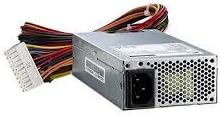
Stampa 1: The ADVANTECH PS8-500FATX-GB 500W Flex ATX Power Supply, showing its compact form factor and various power connectors. This image illustrates the physical appearance of the unit and its attached cabling.
Istruzzjonijiet Operattivi
Once installed, operating the power supply is straightforward:
- Qawwa Mixgħul: After connecting all necessary cables and the AC power cord, press the power button on your computer case. The power supply will automatically provide power to your system.
- Itfi: Shut down your computer through the operating system. The power supply will enter a low-power state. For complete power disconnection, switch off the power supply's main switch (if present) or unplug the AC power cord.
- Monitoraġġ: Modern motherboards and operating systems often provide tools to monitor power supply voltages. Refer to your motherboard manual for details.
Manutenzjoni
Manutenzjoni xierqa tiżgura l-lonġevità u l-prestazzjoni ottimali tal-provvista tal-enerġija tiegħek:
- Tindif tat-Trab: Periodically clean the power supply fan and vents to prevent dust buildup, which can impede airflow and cause overheating. Use compressed air for this purpose, ensuring the system is powered off and unplugged.
- Spezzjoni tal-Cable: Regularly check all power cables for any signs of wear, fraying, or damage. Replace damaged cables immediately.
- Kundizzjonijiet Ambjentali: Operate the power supply within its specified temperature and humidity ranges. Avoid extreme conditions.
Issolvi l-problemi
Jekk tiltaqa' ma' problemi bil-provvista tal-enerġija tiegħek, irreferi għall-problemi u s-soluzzjonijiet komuni li ġejjin:
| Problema | Kawża Possibbli | Soluzzjoni |
|---|---|---|
| Is-sistema ma tixgħel. |
|
|
| Is-sistema tixgħel iżda tintefa immedjatament. |
|
|
| Ħsejjes mhux tas-soltu mill-PSU. |
|
|
If the problem persists after trying these solutions, contact ADVANTECH customer support for further assistance.
Speċifikazzjonijiet
| Karatteristika | Dettall |
|---|---|
| Mudell | PS8-500FATX-GB |
| Brand | ADVANTECH |
| Fattur tal-Formola | Flex ATX |
| Output Wattage | 500 Watts |
| Klassifikazzjoni tal-Effiċjenza | 80+ Gold |
| Ħruġ Voltages | 3.3V, 5V, 12V, -12V |
| Tip ta' Konnettur | ATX (20+4 pin, 4+4 pin EPS/ATX 12V, SATA, PCIe, Molex) |
| Konformità | RoHS |
| Piż tal-oġġett | 12.99 liri |
| Manifattur | Advantech Co |
| ASIN | B08SMRH5V8 |
| UPC | 040048829683 |
Garanzija u Appoġġ
ADVANTECH products are designed for reliability and performance. For warranty information and technical support, please refer to the official ADVANTECH websit jew ikkuntattja lid-dipartiment tas-servizz tal-konsumatur tagħhom.
- Uffiċjali Websit: www.advantech.com
- Appoġġ għall-Klijent: Irreferi għat-taqsima "Ikkuntattjana" fuq il-paġna uffiċjali websit għal dettalji ta' appoġġ reġjonali.
Jekk jogħġbok żomm il-prova tax-xiri tiegħek għal pretensjonijiet ta' garanzija.


