1. Prodott Aktarview
The Nivian WiFi 2K Video Surveillance Kit provides a comprehensive solution for monitoring your property. This kit includes an 8-channel WiFi recorder and four 2K/3MP IP66-rated cameras, designed for both indoor and outdoor use.
Kontenut tal-Kit:
- 4 x Nivian Wi-Fi Surveillance Cameras
- 1 x 8-Channel Wi-Fi Recorder (NVR)
- Power adapters for cameras and recorder
- 1 x USB Mouse
- 1 x Cable tan-Netwerk
- Manwal ta' Istruzzjoni
The recorder supports a hard drive (not included) with a capacity of up to 8 TB for video storage.
Karatteristiċi ewlenin:
- 2K/3MP High Resolution: Delivers clear images day and night.
- Viżjoni bil-lejl infrared: Up to 20 meters range for effective monitoring in low-light conditions.
- IP66 Reżistenti għat-Temp: Aluminju ċasing suitable for outdoor use in temperatures from -20°C to 50°C.
- Sejbien tal-Bniedem AI: Reduces false alarms by distinguishing human movement from other environmental factors.
- Kompressjoni tal-Vidjo H.265+: Optimizes storage space by up to 80% without compromising video quality.
- Konnettività Wireless: Cameras and recorder communicate via long-range WiFi, minimizing cable requirements.
- WiFi Repeater Function: Each camera can extend the WiFi signal for other cameras located further away.
- Monitoraġġ mill-bogħod: Access live video and recordings via the free IP PRO or TUYA Smart app for mobile, tablet, and computer (iOS, Android, Mac, Windows).
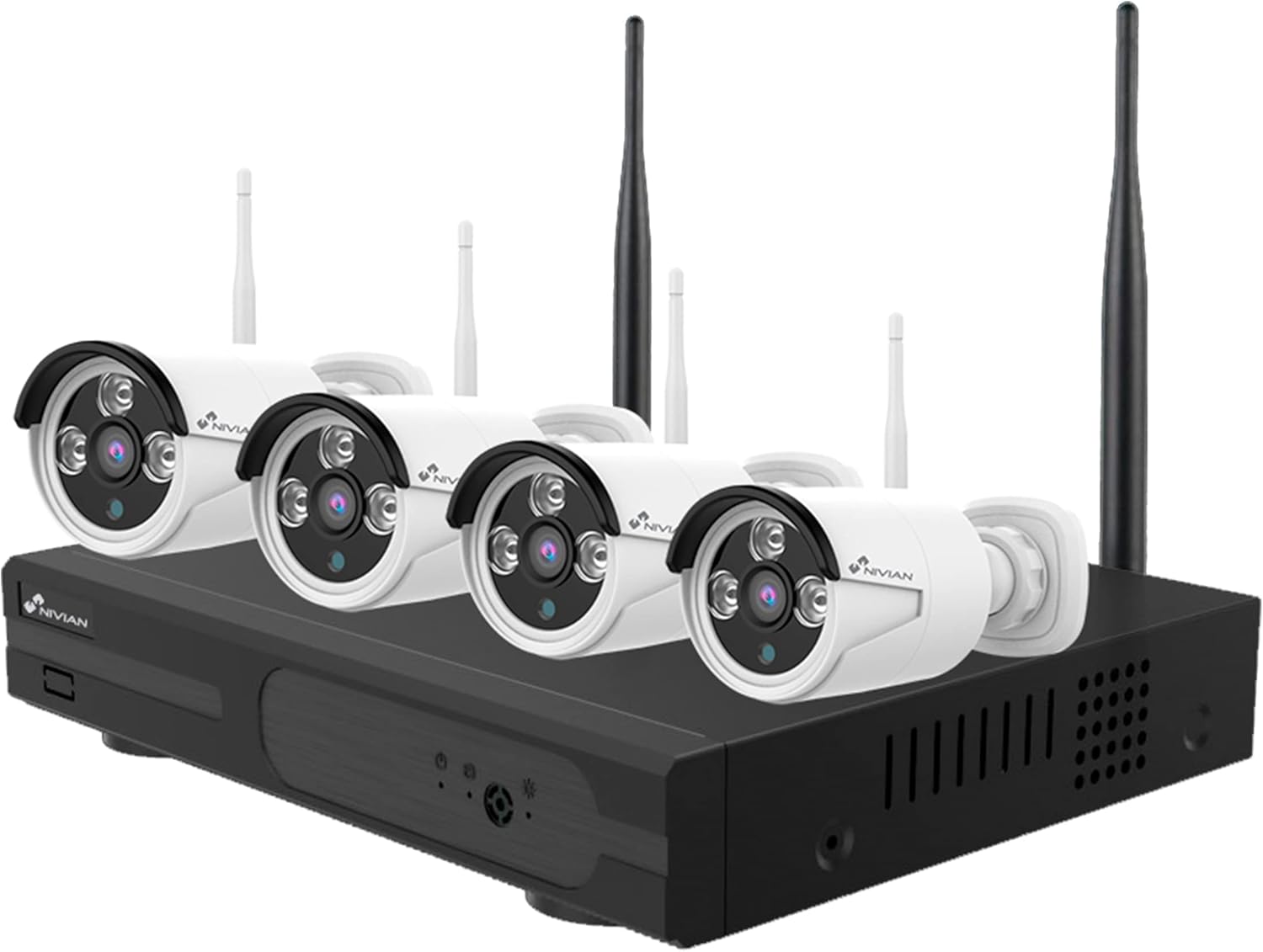
Image 1.1: The Nivian WiFi 2K Video Surveillance Kit, showing the 8-channel NVR and four wireless cameras.

Immaġni 1.2: Fuqview of the Nivian WiFi 2K Video Surveillance Kit highlighting WiFi connection, HDMI output, 2K resolution, indoor/outdoor use, and the 10-channel recorder with app compatibility.

Image 1.3: Nivian camera demonstrating weatherproof design, 24/7 monitoring capability, night vision, and suitability for various environments like homes, offices, stores, and warehouses.
2. Setup u Installazzjoni
The Nivian WiFi 2K Video Surveillance Kit is designed for easy and quick wireless installation. The cameras are pre-configured to connect with the recorder.
2.1 Passi Inizjali tas-Setup:
- Install Hard Drive (Optional): If you plan to record video, install a compatible hard drive (up to 8TB) into the NVR. Refer to the NVR's specific instructions for hard drive installation.
- Qawwa Mixgħul: Connect the power adapters to each camera and the NVR.
- Qabbad mal-Display: Connect an HDMI or VGA monitor to the NVR to view the camera feeds directly.
- Konnessjoni tan-Netwerk: Connect the NVR to your internet router using the included network cable or via WiFi for remote access.
- Konnessjoni tal-Kamera: The cameras will automatically connect to the NVR once powered on and within range.

Image 2.1: Diagram illustrating the easy and quick installation process, including connecting the NVR to an internet router and automatic camera connection.
2.2 Physical Installation:
Mount the cameras in desired locations, ensuring they have a clear line of sight and are within WiFi range of the NVR or another camera acting as a repeater. The IP66 rating ensures durability against outdoor elements.

Image 2.2: A person installing a Nivian surveillance camera on an exterior wall, demonstrating the physical setup process.
2.3 Kit Components Visual:

Image 2.3: Visual representation of the kit components, including four cameras, power adapters, the NVR, and a mouse.

Image 2.4: The packaging box for the Nivian WiFi 2K Video Surveillance Kit, showing the product and key features.
3. Tħaddim tas-Sistema
Once installed, the Nivian surveillance system offers various functionalities for monitoring and recording.
3.1 Remote Monitoring via App:
Download the free IP PRO or TUYA Smart app on your mobile device or computer. After connecting the NVR to your internet router, you can manage the system remotely. The app allows you to:
- View live video feeds from all cameras.
- Review irreġistrat footage.
- Receive instant notifications for detected events.

Image 3.1: The Nivian surveillance app interface displayed on both a smartphone and a laptop, showing remote monitoring capabilities.
3.2 Motion and Human Detection:
The system features advanced motion detection with artificial intelligence for human detection. This helps to significantly reduce false alarms caused by animals, vegetation, or lighting changes.
- Configure specific detection zones within the app.
- Receive notifications only when human presence is detected.

Image 3.2: Illustration of the advanced intelligent detection feature, combining motion detection with AI human detection to minimize false alarms.

Image 3.3: A Nivian camera detecting a person walking, with a green box highlighting the detected human figure, demonstrating the AI human detection feature.
3.3 Recording Modes:
The NVR supports flexible recording modes:
- Continuous 24h Recording: Records continuously throughout the day.
- Reġistrazzjoni Skedata: Records during specific times set by the user.
- Detection Recording: Records only when motion or human presence is detected.
3.4 WiFi Repeater Function:
Each camera can act as a WiFi repeater, extending the wireless signal to other cameras that are further away from the NVR, ensuring stable connectivity across larger areas.

Image 3.4: Diagram illustrating the signal repeater function, where cameras extend the WiFi range to reach more distant units.

Image 3.5: An illustration showing the WiFi coverage of Nivian cameras within a house, demonstrating how the repeater function extends the network.
4. Manutenzjoni
Regular maintenance ensures optimal performance and longevity of your surveillance system.
4.1 Camera Maintenance:
- Tindif: Periodically clean the camera lenses with a soft, damp cloth to remove dust, dirt, or water spots that may obscure the viewEvita prodotti tat-tindif li joborxu.
- Spezzjoni Fiżika: Check camera mounts and connections for stability, especially after severe weather conditions.
4.2 NVR Maintenance:
- Ġestjoni tal-Hard Drive: The H.265+ compression helps maximize storage. If the hard drive becomes full, the system is typically configured to overwrite the oldest recordings. Regularly back up important footage jekk meħtieġ.
- Aġġornamenti tal-Firmware: Check the Nivian website or app for any available firmware updates for the NVR and cameras to ensure the latest features and security patches.
- Ventilazzjoni: Ensure the NVR is placed in a well-ventilated area to prevent overheating.
5 Issolvi l-problemi
This section addresses common issues you might encounter with your Nivian surveillance system.
5.1 No Image/Video Feed:
- Iċċekkja l-Enerġija: Ensure all cameras and the NVR are properly powered on and connected to a power source.
- Konnessjoni WiFi: Verify that cameras are within range of the NVR or a repeater camera. Check the NVR's network status.
- NVR-Monitor Connection: If viewing directly on a monitor, ensure the HDMI/VGA cable is securely connected.
5.2 Poor Image Quality:
- Lenti Naddaf: Naddaf il-lenti tal-kamera kif deskritt fit-taqsima tal-Manutenzjoni.
- Settings tar-Riżoluzzjoni: Ensure the display resolution on your monitor or app is set correctly to 2K/3MP if supported.
- Dawl: While night vision is effective, extreme lighting conditions can affect image clarity.

Image 5.1: Comparison of 1080p Full HD versus 2K Super HD resolution, demonstrating the enhanced detail provided by 2K.

Image 5.2: A detailed comparison showing the difference in clarity between 1080p and 2K resolution, specifically on a car license plate, highlighting the improved readability with 2K.
5.3 Excessive False Alarms:
- Enable Human Detection: Ensure the AI human detection feature is activated in the app settings.
- Adjust Detection Zones: Refine the motion detection zones to exclude areas with frequent non-human movement (e.g., swaying trees, busy roads).
- Settings tas-Sensittività: Lower the motion detection sensitivity if necessary.
5.4 Remote Access Issues:
- Konnessjoni tal-Internet: Verify that your NVR is connected to the internet and your mobile device has a stable internet connection (WiFi or mobile data).
- App Login: Ensure you are logged into the correct account on the IP PRO or TUYA Smart app.
- Settings tal-router: In some cases, router firewall settings might need adjustment. Consult your router's manual or ISP if issues persist.
6. Speċifikazzjonijiet
| Karatteristika | Speċifikazzjoni |
|---|---|
| Brand | NIVIAN |
| Numru tal-Mudell | NV-KIT |
| Dimensjonijiet tal-Prodott (L x W x H) | 29 x 38 x 18 ċm |
| Piż | 3 Kilogrammi |
| Teknoloġija tal-Konnettività | Wireless |
| Riżoluzzjoni ta' Reġistrazzjoni tal-Vidjo | 1536p, 2K |
| Karatteristiċi Speċjali | App Control, Video Recording, Night Vision, Human Detection |
| Numru ta 'Kanali | 8 (Recorder), 4 (Cameras included) |
| Kapaċità tal-Ħżin tal-Memorja | Supports up to 8 TB (HDD not included) |
| Sors tal-Enerġija | Corded Elettriku |
| Materjal | Metal (Camera Casing) |
| Tip ta' bozza | Infra-aħmar |
| Batteriji Inklużi | Yes (AAA for mouse, if applicable) |
7. Garanzija u Appoġġ
Nivian is a European brand committed to quality and customer satisfaction. For any technical assistance or inquiries regarding your product, please contact Nivian customer service.
Nivian provides customer and technical support with extensive experience in security and smart home solutions. Please refer to your purchase documentation for specific warranty terms and contact information.


