1. Introduzzjoni
Thank you for choosing the FLOMASTA TD230W Programmable Digital Thermostat. This modern, wall-mounted thermostat is designed to provide precise and efficient control over your HVAC system. Featuring a touch control interface, LCD display with backlight, and BACnet MS/TP connectivity, it offers advanced functionality for optimal climate management in your space.
This manual provides detailed instructions for installation, operation, and maintenance of your TD230W thermostat. Please read it thoroughly before beginning installation or operation to ensure safe and correct usage.
2. Informazzjoni dwar is-Sigurtà
TWISSIJA: Riskju ta' Xokk Elettriku!
- Always disconnect power to the heating/cooling system at the main fuse or circuit breaker before installing or servicing the thermostat.
- Installation should only be performed by a qualified electrician or HVAC professional.
- Kun żgur li l-konnessjonijiet kollha tal-wajers huma sikuri u jikkonformaw mal-kodiċijiet elettriċi lokali.
- Do not operate the thermostat with wet hands or in damp kundizzjonijiet.
- This device operates on 230 Volts. Exercise extreme caution.
Żomm dan il-manwal għal referenza futura.
3. Karatteristiċi tal-prodott
- Programmable Control: Allows for setting custom temperature schedules.
- Interfaċċja tal-Kontroll tal-Mess: Intuitive and easy-to-use touch buttons.
- Wiri LCD b'Dawl ta' Wara: Clear temperature and setting visibility, even in low light.
- Disinn tal-muntaġġ tal-ħajt: Sleek and modern aesthetic for seamless integration.
- BACnet MS/TP Connectivity: For integration into building management systems.
- Electric Cable Power Source: Reliable wired power supply.
- Voltage: 230 Volts.
4. Kontenut tal-Pakkett
Jekk jogħġbok immarka l-kaxxa għall-oġġetti li ġejjin:
- FLOMASTA TD230W Digital Thermostat Unit
- Viti tal-Immuntar u Ankri tal-Ħajt
- Manwal għall-Utent (dan id-dokument)
5. Setup u Installazzjoni
The FLOMASTA TD230W thermostat is designed for wall mounting and requires a wired electrical connection. Professional installation is highly recommended to ensure proper functionality and safety.
5.1 Għażla ta' Post
Select a location on an interior wall, approximately 1.5 meters (5 feet) above the floor. Avoid locations near heat sources (e.g., direct sunlight, lamps, fireplaces), drafts (e.g., windows, doors), or areas with poor air circulation.
5.2 Istruzzjonijiet tal-Wiring
Before proceeding, ensure power to the HVAC system is OFF at the circuit breaker.
- Carefully remove the front cover of the thermostat to expose the wiring terminals.
- Connect the electrical cables from your HVAC system to the corresponding terminals on the thermostat. Refer to the wiring diagram provided with your HVAC system or consult a professional for specific connections. The thermostat operates on 230V.
- Kun żgur li l-konnessjonijiet kollha huma stretti u sikuri.
5.3 Immuntar tat-Termostat
- Once wired, secure the thermostat base to the wall using the provided mounting screws and wall anchors.
- Carefully reattach the front cover of the thermostat, ensuring it clicks securely into place.
- Restore power to the HVAC system at the circuit breaker.

Figura 1: Quddiem view of the FLOMASTA TD230W Thermostat. The display is dark, and two touch buttons are visible: one for day mode (sun icon) and one for night mode (crescent moon icon).
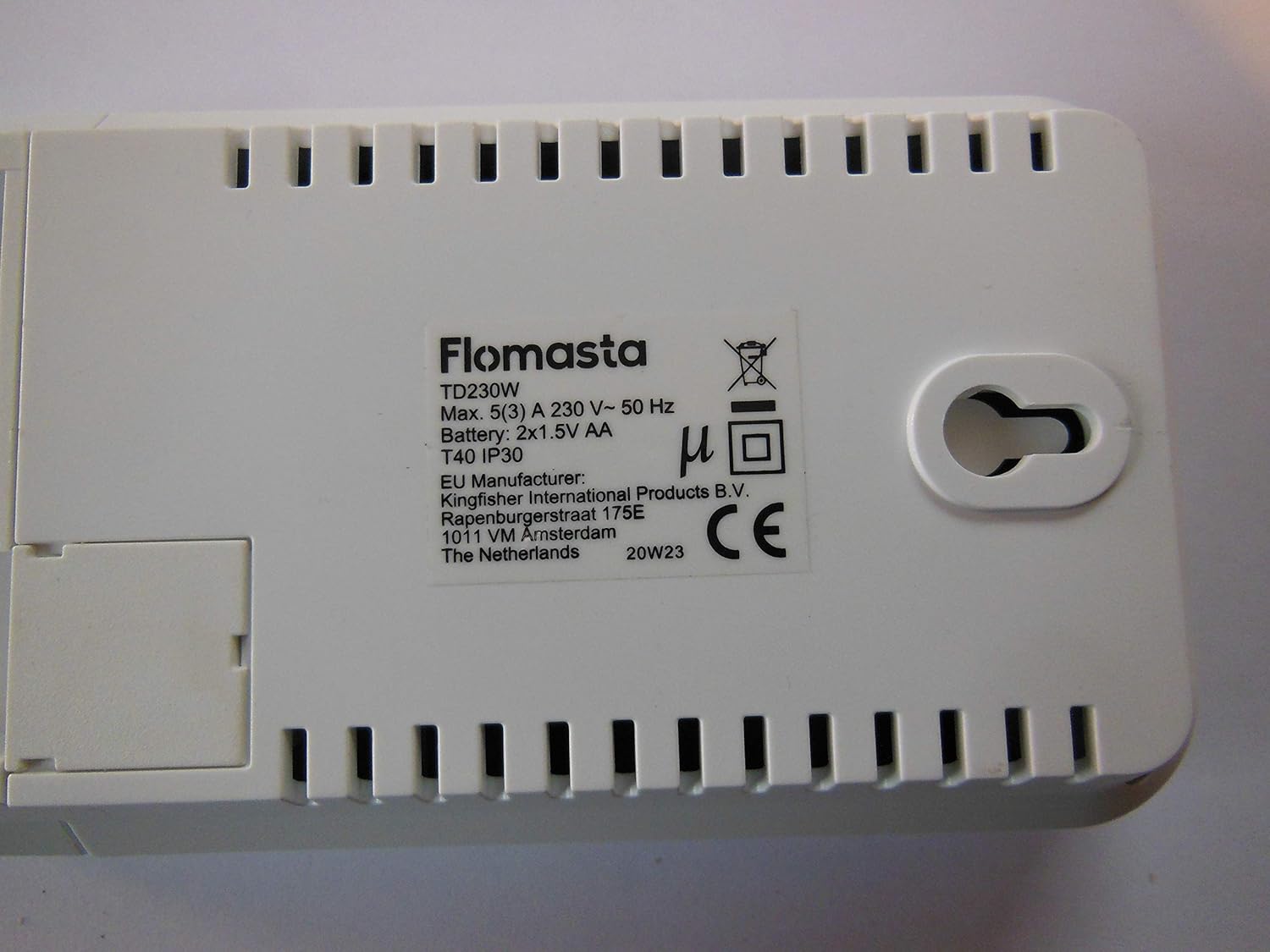
Figura 2: Lura view of the FLOMASTA TD230W Thermostat. The label clearly shows the model TD230W, electrical ratings, and indicates a battery compartment for 2x1.5V AA batteries, which are likely for memory backup or low-power functions.
6. Istruzzjonijiet Operattivi
The TD230W thermostat features a user-friendly touch control interface and an LCD display for easy operation.
6.1 Tixgħel Inizjali
Upon first power-on, the thermostat may prompt you to set the current time and day. Follow the on-screen instructions using the touch controls.
6.2 Kontroll Bażiku tat-Temperatura
- Aġġusta tat-Temperatura: Uża l- + u - touch buttons (if present, or implied by "Touch Control") on the display to increase or decrease the desired temperature.
- Għażla tal-Modalità: The thermostat typically supports heating, cooling, and auto modes. Use the mode button (if present) to cycle through these options.
- Dawl ta' wara: The LCD display features a backlight for improved visibility. It may activate automatically upon touch or have a dedicated button.
6.3 Skedi ta' Programmazzjoni
The TD230W is a programmable thermostat, allowing you to set different temperatures for various times of the day and days of the week. Refer to the on-screen menu for detailed programming steps. Common programming options include:
- Weekday/Weekend Schedules: Set different programs for weekdays and weekends.
- Multiple Periods: Typically allows for 4-6 temperature periods per day (e.g., Wake, Leave, Return, Sleep).
- Override Temporanju: Temporarily adjust the temperature without changing the programmed schedule.
- Żamma Permanenti: Maintain a set temperature indefinitely until manually changed.
6.4 BACnet MS/TP Integration
For advanced users and building management systems, the TD230W supports BACnet MS/TP protocol. Consult your building management system administrator or a qualified technician for integration details and configuration. This feature allows for remote monitoring and control of the thermostat within a larger network.
7. Manutenzjoni
Manutenzjoni regolari tiżgura prestazzjoni ottimali u lonġevità tat-termostat tiegħek.
- Tindif: Imsaħ bil-mod il-barra tat-termostat b'ċarruta ratba u damp cloth. Do not use abrasive cleaners, solvents, or spray cleaners directly onto the unit.
- Sostituzzjoni tal-batterija: The back of the unit indicates it uses 2x1.5V AA batteries. These are likely for memory backup or to power the display during power outages. Replace batteries annually or when a low battery indicator appears on the display. To replace, carefully remove the thermostat from its wall mount (refer to installation steps in reverse), access the battery compartment on the back, replace the batteries, and re-mount.
- Vents tal-arja: Ensure that any small vents on the thermostat casing huma ħielsa mit-trab u l-fdalijiet biex jippermettu skoperta preċiża tat-temperatura.
8 Issolvi l-problemi
If you experience issues with your FLOMASTA TD230W thermostat, try the following solutions:
| Problema | Kawża Possibbli | Soluzzjoni |
|---|---|---|
| Id-displej huwa vojt jew mudlam. | No power, loose wiring, dead batteries (if applicable for display). | Check circuit breaker. Ensure wiring is secure. Replace AA batteries if present. |
| Thermostat not controlling HVAC. | Incorrect wiring, HVAC system off, thermostat in wrong mode. | Verify wiring connections. Check HVAC system power. Ensure thermostat is in heating/cooling mode. |
| Il-qari tat-temperatura jidher li mhux preċiż. | Thermostat location, blocked air vents. | Ensure thermostat is not near heat sources or drafts. Clean any dust from vents. |
| Cannot program schedule. | Incorrect settings, user error. | Review "Operating Instructions" section on programming. Reset thermostat to factory defaults if necessary (consult manufacturer for procedure). |
If the problem persists after attempting these solutions, please contact a qualified HVAC technician or the manufacturer's support.
9. Speċifikazzjonijiet
| Karatteristika | Speċifikazzjoni |
|---|---|
| Mudell | TD230W |
| Manifattur | FLOMASTA TD230W |
| Stil | Moderna |
| Sors tal-Enerġija | Kejbil Elettriku |
| Voltage | 230 Volts |
| Tip ta 'Wiri | LCD b'lura ta 'wara |
| Tip ta 'Immuntar | Mount Wall |
| Karatteristiċi Speċjali | Programmabbli |
| Metodu ta' Kontroll | Touch Control |
| Protokoll tal-Konnettività | BACnet MS / TP |
| Battery (for backup) | 2x 1.5V AA (as per product image label) |
| Kurrent Max | 5(3) A (as per product image label) |
| Klassifikazzjoni tal-IP | IP30 (as per product image label) |
10. Garanzija u Appoġġ
Warranty information for the FLOMASTA TD230W thermostat is typically provided at the point of purchase or included with the product packaging. Please retain your proof of purchase for warranty claims.
For technical support, troubleshooting assistance beyond this manual, or inquiries regarding spare parts, please contact the manufacturer or your retailer. Information regarding spare parts availability is currently unavailable.
You may find further information on the manufacturer's official websit: www.flomasta.com (Nota: Dan huwa terminu riżervat) URL. Please refer to your product packaging for the correct manufacturer websit.)


