1. Introduzzjoni
Thank you for choosing the HOCO E52 Euphony Wireless Bluetooth Audio Receiver. This manual provides essential information for the safe and efficient use of your device. Please read it thoroughly before operation and retain it for future reference.
2. Prodott Aktarview
The HOCO E52 is a compact wireless Bluetooth audio receiver designed to convert wired audio devices into Bluetooth-enabled ones. It features an integrated microphone for hands-free calls and comes with a pair of in-ear earphones.

Figure 2.1: HOCO E52 Euphony Wireless Bluetooth Audio Receiver with included earphones.
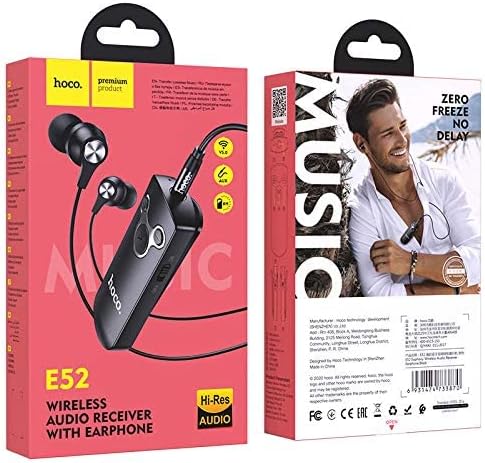
Figura 2.2: Dettaljat view of the HOCO E52 receiver, highlighting the control buttons and power switch.
3. Kontenut tal-Pakkett
Kun żgur li l-oġġetti kollha huma preżenti fil-pakkett:
- HOCO E52 Wireless Bluetooth Audio Receiver
- Earphones fil-widnejn
- Iċċarġjar Cable
- Kuxxini tal-widnejn (daqsijiet varji)
- Kawża Protettiva
- Manwal għall-Utent (dan id-dokument)
4. Setup
4.1 Iċċarġjar tal-Apparat
Before first use, fully charge the HOCO E52 receiver. Connect the provided charging cable to the micro-USB port on the receiver and the other end to a USB power source (e.g., computer USB port, wall adapter). The indicator light will show charging status and turn off or change color when fully charged.
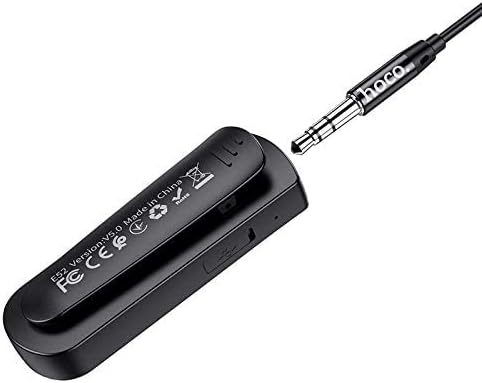
Figura 4.1: Wara view of the HOCO E52 receiver, illustrating the clip and the micro-USB charging port.
4.2 Tqabbil tal-Bluetooth
- Qawwa Mixgħul: Slide the power switch to the 'ON' position. The indicator light will flash, indicating it is in pairing mode.
- Attiva l-Bluetooth: Fuq l-ismartphone tiegħek jew apparat ieħor li jaħdem bil-Bluetooth, mur fis-settings tal-Bluetooth u kun żgur li l-Bluetooth huwa mixgħul.
- Agħżel Apparat: Look for 'HOCO E52' (or similar) in the list of available devices and select it to connect.
- Konferma: Once successfully paired, the indicator light on the E52 will stop flashing and remain solid, or flash slowly. A voice prompt may also confirm the connection.
- Qabbad il-Earphones: Plug the included earphones (or your own 3.5mm wired headphones) into the 3.5mm audio jack on the HOCO E52 receiver.
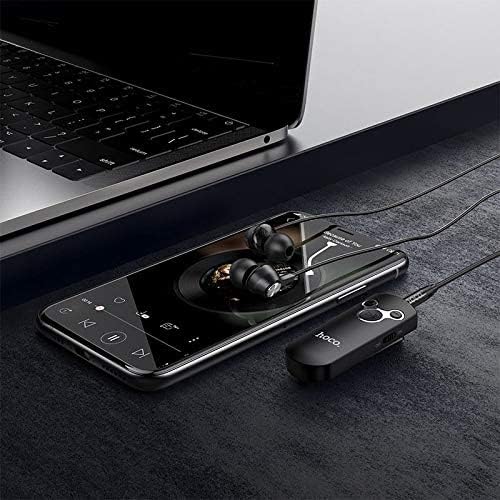
Figure 4.2: The HOCO E52 receiver connected to a smartphone, demonstrating its use with a media device.
5. Istruzzjonijiet Operattivi
5.1 Power On/Off
- Qawwa Mixgħul: Żerżaq is-swiċċ 'ON/OFF' għall-pożizzjoni 'ON'.
- Itfi: Żerżaq is-swiċċ 'ON/OFF' għall-pożizzjoni 'OFF'.
5.2 Daqq tal-Mużika
- Play/Pawsa: Agħfas iċ-ċentru Play/Pawsa buttuna darba.
- Track li jmiss: Agħfas u żomm il- Volum 'il fuq (+) buttuna.
- Track preċedenti: Agħfas u żomm il- Volum 'l isfel (-) buttuna.
5.3 Ġestjoni tas-Sejħiet
With the built-in microphone, you can manage calls directly from the receiver.
- Tweġiba/Tmiem Sejħa: Agħfas iċ-ċentru Play/Pawsa button once during an incoming call to answer, or during an active call to end.
- Irrifjuta Sejħa: Press and hold the central Play/Pawsa button for 2 seconds during an incoming call.
- Isemmi mill-ġdid l-Aħħar Numru: Double-press the central Play/Pawsa buttuna.
5.4 Kontroll tal-Volum
- Żid il-Volum: Agħfas il- Volum 'il fuq (+) buttuna.
- Naqqas il-Volum: Agħfas il- Volum 'l isfel (-) buttuna.
6. Manutenzjoni
- Żomm l-apparat niexef. Evita l-espożizzjoni għall-umdità jew likwidi.
- Naddaf l-apparat b'ċarruta ratba u niexfa. Tużax kimiċi ħarxa jew prodotti tat-tindif li joborxu.
- Aħżen l-apparat f'post frisk u niexef meta ma jkunx qed jintuża.
- Avoid extreme temperatures, as this can shorten the lifespan of electronic components.
- Tippruvax tiżżarma jew timmodifika l-apparat, għax dan jannulla l-garanzija u jista' jikkawża ħsara.
7 Issolvi l-problemi
| Problema | Kawża Possibbli | Soluzzjoni |
|---|---|---|
| L-apparat ma jixgħelx | Batterija baxxa | Iċċarġja l-apparat għal kollox. |
| Ma tistax tqabbad mat-tagħmir | Bluetooth not enabled on source device; E52 not in pairing mode; too far apart | Ensure Bluetooth is on. Power cycle E52 to enter pairing mode. Keep devices within 10 meters. |
| L-ebda ħoss | Volume too low; earphones not connected properly; incorrect audio output selected on source device | Increase volume on E52 and source device. Re-plug earphones. Check audio output settings on your phone/computer. |
| Ħajja qasira tal-batterija | Device not fully charged; high volume usage | Ensure full charge. Reduce volume if possible. |
8. Speċifikazzjonijiet
- Mudell: E52
- Verżjoni Bluetooth: 5.0
- Teknoloġija tal-Konnettività: Wireless (Bluetooth)
- Music & Talk Time: Madwar sagħtejn
- Mikrofonu: Integrata
- Fattur tal-Forma tal-headphones: Fil-widnejn
- Kulur: Iswed
- Dimensjonijiet tal-pakkett: 18.2 x 10.8 x 3.2 ċm
- Piż tal-oġġett: 72 g
- Manifattur: HOCO
9. Informazzjoni dwar is-Sigurtà
- Do not expose the device to extreme temperatures, direct sunlight, or fire.
- Evita li twaqqa’ jew tissuġġetta l-apparat għal impatti qawwija.
- Żomm fejn ma jintlaħaqx mit-tfal.
- Armi l-apparat u l-batterija tiegħu b'mod responsabbli skont ir-regolamenti lokali.
- Do not use the device while driving or in situations where your attention is critical.
10. Garanzija u Appoġġ
For warranty information and customer support, please refer to the documentation provided at the point of purchase or contact your retailer. HOCO products typically come with a limited warranty against manufacturing defects.


