JKING H2B Electric Skateboard Longboard User Manual
Model: H2B | Brand: JKING
1. Introduzzjoni
Thank you for choosing the JKING H2B Electric Skateboard Longboard. This manual provides essential information for the safe operation, maintenance, and troubleshooting of your electric skateboard. Please read this manual thoroughly before your first ride to ensure optimal performance and safety.
Image: JKING H2B Electric Skateboard Longboard.
2. Informazzjoni dwar is-Sigurtà
Riding an electric skateboard can be dangerous. Always wear appropriate safety gear, including a helmet, knee pads, and elbow pads. Ride within your skill level and be aware of your surroundings. Do not ride in traffic, on wet surfaces, or at night without proper lighting. Always check your skateboard before each ride for any loose parts or damage.
Dejjem ilbes elmu u tagħmir protettiv.
Tirkbux taħt l-influwenza ta 'alkoħol jew drogi.
Segwi l-liġijiet u r-regolamenti tat-traffiku lokali.
Evita li ssuq fuq uċuħ irregolari, ħofor, jew ostakli.
Ensure the remote control is fully charged and paired before riding.
Maximum load capacity: 210 lbs.
3. Kontenut tal-Pakkett
Upon unboxing, please verify that all items listed below are included:
JKING H2B Electric Skateboard Longboard
Kontroll mill-bogħod mingħajr fili
Adapter tal-Enerġija (Ċarġer)
T-Tool (for maintenance)
Manwal għall-Utent
Image: JKING H2B Electric Skateboard and its accessories.
4. Prodott Aktarview
Familiarize yourself with the main components of your JKING H2B Electric Skateboard:
Gverta: Constructed from two layers of bamboo and six layers of maple for durability and flexibility.
Hub Motors: Integrated into the rear wheels, providing power and a clean design.
Battery Enclosure: Houses the UL 2272 certified 29.4V 4000mAh lithium battery.
Port tal-Iċċarġjar: Located on the battery enclosure for recharging.
Buttuna tal-Qawwa: To turn the skateboard on/off.
Mankijiet: Integrated into the deck for easy carrying.
Image: Key components of the JKING H2B Electric Skateboard.
5. Setup
5.1. Iċċarġjar Inizjali
Locate the charging port on the side of the battery enclosure.
Ipplaggja l-adapter tal-enerġija fi żbokk elettriku standard.
The battery indicator lights on the remote control (or skateboard, if available) will show charging progress.
A full charge takes approximately 4 hours. Disconnect the charger once fully charged.
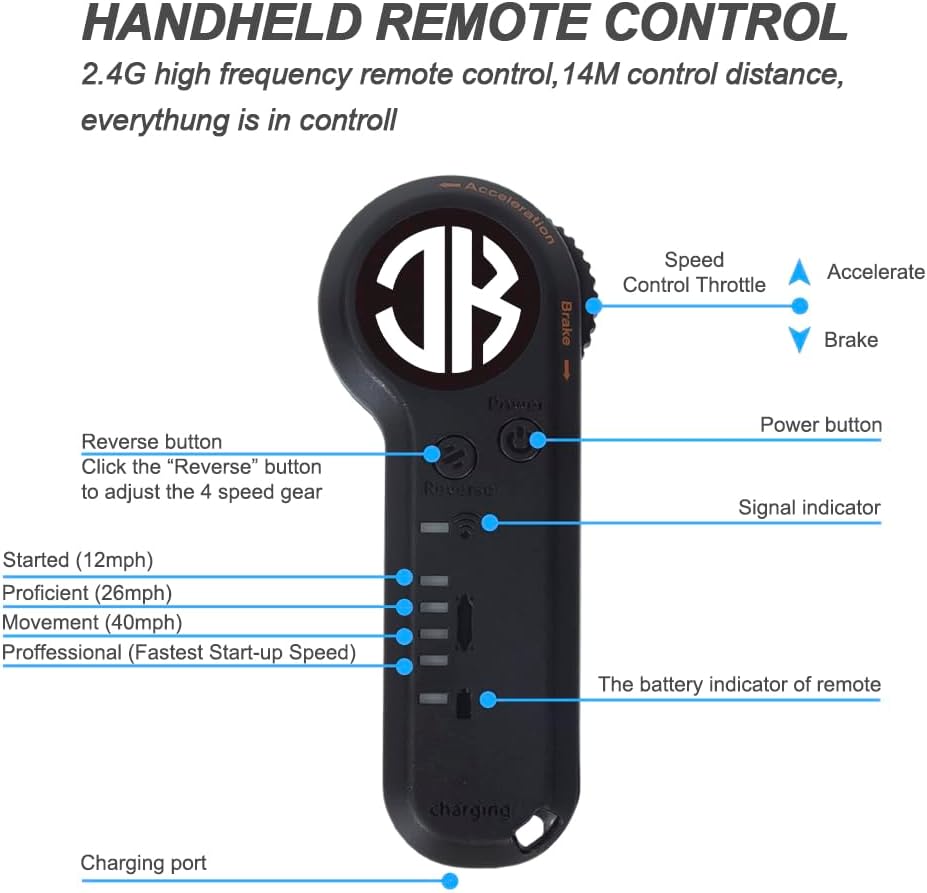
5.2. Tqabbil tal-Kontroll mill-bogħod
Your remote control should be pre-paired with the skateboard. If re-pairing is necessary:
Ensure both the skateboard and remote control are turned off.
Turn on the skateboard by pressing and holding its power button for about 1 second.
Turn on the remote control by pressing its power button.
The remote control display should show a connection status. If not, refer to the troubleshooting section.
Image: JKING Electric Skateboard Remote Control.
6. Istruzzjonijiet Operattivi
6.1. Power On/Off
To turn on the skateboard: Press and hold the power button on the battery enclosure for approximately 1 second.
To turn on the remote control: Press its power button.
To turn off the skateboard: Press and hold the power button on the battery enclosure until it powers down.
To turn off the remote control: Press and hold its power button until the display turns off.
6.2. Modi ta' Veloċità
The JKING H2B offers 3 speed modes (Low, Medium, High) for different riding preferences and skill levels. Use the speed adjustment buttons on the remote control to switch between modes.
Veloċità Baxxa: Ideal for beginners or crowded areas.
Veloċità Medja: Balanced speed for general cruising.
Veloċità Għolja: For experienced riders seeking maximum speed (up to 16.7 MPH).
6.3. Aċċelerazzjoni u Ibbrejkjar
The remote control features a throttle wheel for precise control:
Aċċelerazzjoni: Gently push the throttle wheel forward to accelerate.
Ibbrejkjar: Gently pull the throttle wheel backward to engage the brakes.
Practice accelerating and braking in a safe, open area before riding in public.
6.4. Pariri dwar ir-Rikba
Start in Low Speed mode to get accustomed to the board's response.
Żomm qagħda bilanċjata b'saqajk 'il bogħod minn xulxin daqs il-wisa' ta' spallejk.
Lean into turns to steer the board.
Be mindful of your speed, especially when turning or on downhill slopes.
Dejjem kun lest li tinżel minn fuqek mingħajr periklu jekk ikun hemm bżonn.
7. Manutenzjoni
Tindif: Imsaħ il-bord nadif b'reklamaramp cloth. Avoid direct water spray on electronic components.
Kura tal-batterija: Charge the battery regularly, even when not in use, to prolong its lifespan. Do not overcharge or completely drain the battery.
Spezzjoni tar-rota: Regularly check wheels for wear and tear. Replace worn wheels to maintain optimal performance and safety.
Issikka l-Ħardwer: Use the provided T-tool to periodically check and tighten all nuts and bolts, especially on the trucks and wheel axles.
Ħażna: Store the skateboard in a cool, dry place away from direct sunlight and extreme temperatures.
8 Issolvi l-problemi
Problema
Kawża Possibbli
Soluzzjoni
L-iskejtbord mhux qed jixgħel
Batterija baxxa; Il-buttuna tal-qawwa mhux ippressata sew
Charge the skateboard; Press and hold the power button for 1 second.
Remote mhux konnessjoni
Skateboard off; Remote battery low; Pairing issue
Ensure skateboard is on; Charge remote; Re-pair remote (see Section 5.2).
Firxa jew veloċità mnaqqsa
Low battery; Riding uphill; Heavy load; Worn wheels
Fully charge battery; Ride on flatter terrain; Check load capacity; Inspect and replace wheels.
Ħsejjes mhux tas-soltu
Loose hardware; Debris in wheels/motors
Tighten all bolts; Clean wheels and motor area.
Troubleshooting Video: Remote Connection
Video: Demonstrates how to troubleshoot remote connection issues with the JKING Electric Skateboard.
Materjal tal-Gverta: Two layers of bamboo and six layers of maple
Tul tal-Gverta: 31.7 Pulzier
Wisa' tal-Gverta: 9.5 Pulzier
Piż tal-oġġett: 12.3 Liri
Tagħbija Massima: 210 lbs
Daqs tar-rota: 83mm
Materjal tar-rota: Polyurethane
Angolu tat-Tlugħ: Massimu 12 °
10. Garanzija u Appoġġ
For warranty information, technical support, or service inquiries, please contact JKING customer service through the retailer where the product was purchased or visit the official JKING websit. Jekk jogħġbok żomm il-prova tax-xiri tiegħek għal talbiet ta' garanzija.
11. Vidjows tal-Prodott
JKING Electric Skateboard Longboard Overview
Vidjo: Fil-qosor dwarview of the JKING Electric Skateboard Longboard, highlighting its features and remote control.
JKING H2B Electric Skateboard Features
Vidjo: Wirjaasing the JKING H2B electric skateboard in action and its various features.
Riding the JKING Electric Skateboard
Video: A demonstration of the JKING Electric Skateboard being ridden, highlighting its smooth operation.
Dokumenti Relatati - H2B
H2B-02 Electric Skateboard User Manual Comprehensive user manual for the H2B-02 Electric Skateboard, covering preparation, parts identification, remote control operation, pairing instructions, technical specifications, charging information, and essential safety guidelines.
Instrukcja obsługi ekspresu do kawy HIBREW H2B 4w1 Poznaj ekspres do kawy HIBREW H2B 4w1. Niniejsza instrukcja obsługi zawiera szczegółowe informacje dotyczące instalacji, obsługi napojów gorących i zimnych, czyszczenia oraz konserwacji dla kapsułek Nespresso, Dolce, K-cup mie orazjkawy.
CP PLUS CarKam Quick Start Guide - Model CP-AD-H2B-W Quick start guide for the CP PLUS CarKam (Model CP-AD-H2B-W), providing instructions on installation, setup, operation, and troubleshooting for this car dashcam.
CP PLUS CarKam GPS CP-AD-H2B-PW Quick Start Guide A comprehensive quick start guide for the CP PLUS CarKam GPS device, model CP-AD-H2B-PW, covering product appearance, installation, power management, app usage, video storage, recording modes, and warranty information.