1. Introduzzjoni
The EasySMX V07W Wireless Gaming Headset offers a versatile audio solution for gamers across multiple platforms. Featuring 2.4G wireless, Bluetooth 5.2, and 3.5mm wired connectivity, it provides ultra-low latency for gaming and broad compatibility with various devices. Designed for comfort during extended use, it includes a detachable noise-cancelling microphone and immersive Hi-Fi stereo sound with 50mm drivers.
2. Kontenut tal-Pakkett
Jekk jogħġbok immarka l-kaxxa għall-oġġetti li ġejjin:
- EasySMX V07W Wireless Gaming Headset
- 2.4G USB Dongle
- Mikrofonu li Jikkanċella l-Ħoss li jinqala'
- Cable Awdjo 3.5mm
- Kejbil tal-Iċċarġjar tat-Tip C
- Manwal għall-Utent (dan id-dokument)

Figure 2.1: Contents of the EasySMX V07W Headset package, including the headset, USB dongle, detachable microphone, 3.5mm audio cable, and Type-C charging cable.
3. Prodott Aktarview
Familiarize yourself with the various components and controls of your EasySMX V07W Wireless Gaming Headset.

Figure 3.1: The EasySMX V07W Wireless Gaming Headset, showcasing its sleek design and integrated RGB lighting on the earcups.
3.1 Kontrolli u Indikaturi

Figure 3.2: Detailed diagram highlighting the LED button, Power button, USB-C Charging Jack, Indicator Light, Microphone, 3.5mm Audio Jack, Volume Control Wheel, and Mute button on the headset.
- Buttuna tal-Qawwa: Agħfas u żomm biex tixgħel/titfi l-headset.
- Buttuna LED: Controls the RGB lighting effects on the earcups.
- Rota tal-Kontroll tal-Volum: Jaġġusta l-volum tal-ħruġ tal-awdjo.
- Buttuna Mute: Issikket jew jitneħħa l-mikrofonu.
- USB-C Charging Jack: For charging the headset's internal battery.
- Jack Awdjo 3.5mm: For wired connection to compatible devices.
- Port tal-mikrofonu: Connects the detachable noise-cancelling microphone.
3.2 Karatteristiċi ewlenin
- Konnettività Multi-Modali: Supports 2.4G Wireless USB, Bluetooth 5.2, and 3.5mm Wired connections for broad compatibility.
- Awdjo Immersiv: Equipped with 50mm drivers and dual-chamber design for stereo Hi-Fi level sound and 3D surround sound experience.
- Detachable Noise-Cancelling Microphone: Provides clear voice communication and can be removed when not needed.
- Disinn komdu: Lightweight with soft memory foam earmuffs and an adjustable headband for extended wear.
- Dawl RGB: Dynamic RGB gradient lighting on earcups for enhanced aesthetics.
- Batterija fit-tul: Built-in 1200mAh lithium battery provides up to 25 hours of continuous use (at 50% volume in Bluetooth mode).
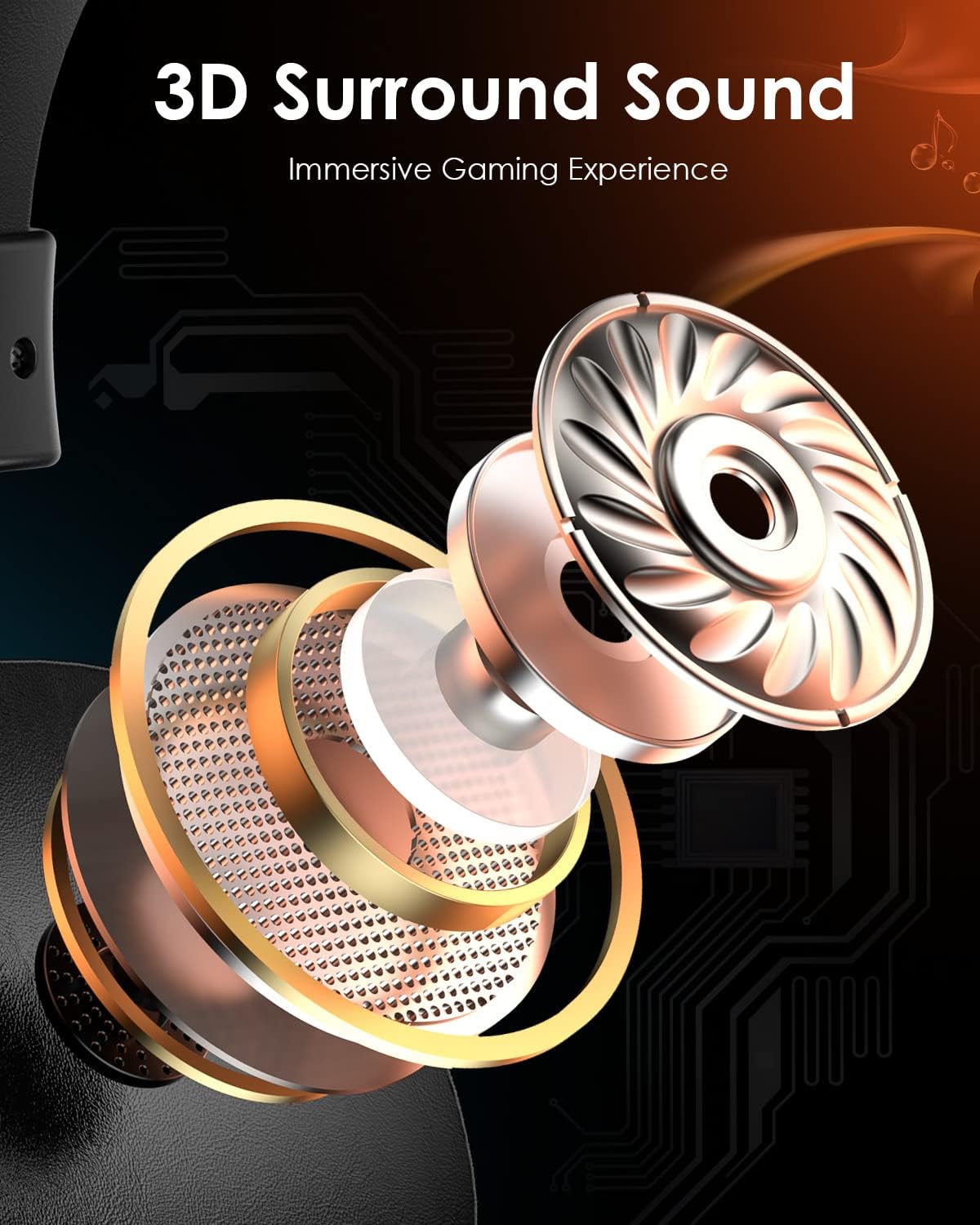
Figura 3.3: Sploda view illustrating the components that contribute to the headset's 3D surround sound capability, enhancing the immersive gaming experience.
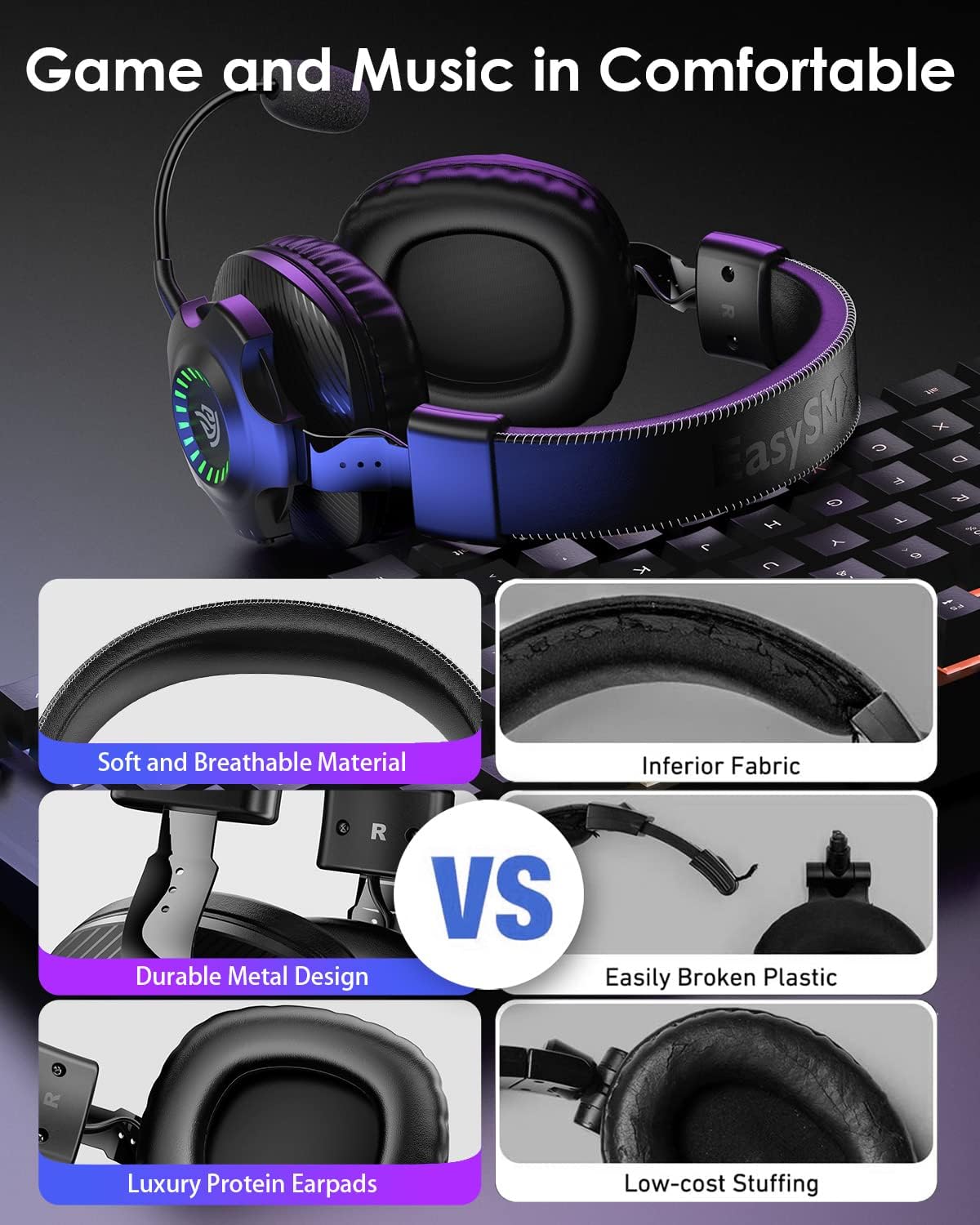
Figure 3.4: Visual comparison highlighting the soft and breathable material, durable metal design, and luxury protein earpads for superior comfort.
4. Setup
Before using your EasySMX V07W headset, ensure it is fully charged. Connect the Type-C charging cable to the headset's USB-C port and a power source. The indicator lights will show charging status.
4.1 It-twaħħil tal-Mikrofonu
The microphone is detachable. Align the microphone's 3.5mm jack with the port on the left earcup and push firmly until it clicks into place. To remove, gently pull the microphone straight out.
4.2 Tixgħel/Jitfi
Press and hold the Power Button on the earcup for approximately 3 seconds to turn the headset on or off. You will hear an audible prompt.
5. Istruzzjonijiet Operattivi
The EasySMX V07W headset supports three connection modes: 2.4G Wireless, Bluetooth, and 3.5mm Wired. Choose the appropriate mode based on your device and preference.

Figura 5.1: Aktarview of the three available connection modes and compatible devices for each mode.
5.1 2.4G Wireless Connection (for PC, PS4, PS5, Nintendo Switch)
- Plug the 2.4G USB dongle into an available USB port on your PC, PS4, PS5, or Nintendo Switch dock.
- Power on the headset by holding the Power Button. The headset will automatically attempt to pair with the dongle.
- Once connected, the indicator light on the dongle and headset will stabilize.
- On your device, ensure the EasySMX V07W headset is selected as the audio input and output device in sound settings.
5.2 Bluetooth Connection (for Mobile Phones, Laptops, Mac, Nintendo Switch)
- Qawwa fuq il-widna.
- Activate Bluetooth on your mobile phone, laptop, Mac, or Nintendo Switch.
- On your device, search for "EasySMX V07W" in the Bluetooth device list and select it to pair.
- The headset will indicate a successful connection.
5.3 3.5mm Wired Connection (for Xbox One/Series X/S, PC, PS4/PS5 Controller, Nintendo Switch, Mobile Phones)
- Ensure the headset is powered off for wired use.
- Connect one end of the provided 3.5mm audio cable to the 3.5mm audio jack on the headset.
- Connect the other end of the 3.5mm audio cable to the audio port on your device (e.g., Xbox controller, PC audio jack, phone).
- Audio will now be transmitted via the wired connection. Note: RGB lighting and wireless functions are not available in wired mode.
5.4 Device Compatibility Matrix

Figure 5.2: A detailed compatibility matrix showing audio and microphone support for different devices across 2.4GHz USB, Bluetooth, and Wired connections.
6. Manutenzjoni
To ensure the longevity and optimal performance of your EasySMX V07W headset, follow these maintenance guidelines:
- Tindif: Uża drapp artab u niexef biex timsaħ il-headset. Għall-earcups, drapp ftit niexef.amp cloth can be used, but ensure no moisture enters the speaker grilles.
- Ħażna: Aħżen il-headset f'post frisk u niexef 'il bogħod mix-xemx diretta u minn temperaturi estremi.
- Iċċarġjar: Charge the headset regularly, even if not in frequent use, to maintain battery health. Avoid overcharging.
- Immaniġġjar: Avoid dropping the headset or subjecting it to strong impacts. Do not pull on cables excessively.
7 Issolvi l-problemi
If you encounter issues with your EasySMX V07W headset, please refer to the following common troubleshooting steps:
- Ebda Ħoss/Volum Baxx:
- Check the volume control wheel on the headset and your device's volume settings.
- Ensure the headset is properly connected (dongle inserted, Bluetooth paired, or 3.5mm cable fully plugged in).
- Verify that the headset is selected as the default audio output device in your system settings.
- Mikrofonu Mhux Jaħdem:
- Ensure the detachable microphone is securely plugged into its port.
- Iċċekkja jekk il-buttuna tal-mute tal-mikrofonu fuq il-headset hijiex maħlula.
- Verify that the headset microphone is selected as the default input device in your system's sound settings.
- For PC, check privacy settings to ensure applications have access to the microphone.
- Connection Issues (Wireless/Bluetooth):
- Kun żgur li l-headset huwa kompletament iċċarġjat.
- Move closer to the USB dongle or Bluetooth device to reduce interference.
- Try re-pairing the headset (for Bluetooth) or re-inserting the USB dongle (for 2.4G wireless).
- Avoid using the headset near other strong wireless signals (e.g., Wi-Fi routers).
- Dwal RGB Ma Jaħdmux:
- Press the LED button on the earcup to cycle through lighting modes or turn them on/off.
- Kun żgur li l-headset għandu biżżejjed ċarġ tal-batterija.
Għal aktar dettalji dwar is-soluzzjoni tal-problemi, jekk jogħġbok irreferi għall-uffiċjal Gwida għas-Soluzzjoni tal-Problemi (PDF) disponibbli online.
8. Speċifikazzjonijiet
Key technical specifications for the EasySMX V07W Wireless Gaming Headset:
| Karatteristika | Speċifikazzjoni |
|---|---|
| Isem tal-Mudell | V07W |
| Teknoloġija tal-Konnettività | 2.4GHZ Wireless, Bluetooth 5.2, 3.5mm Jack Wired |
| Headphones Jack | 3.5 mm Jack |
| Tip ta' Sewwieq Awdjo | Sewwieq Dinamiku (50mm) |
| Medda ta' Frekwenzi | 20 Hz - 20,000 Hz |
| Latency tal-Awdjo | 15 Milliseconds (2.4G) |
| Medda Bluetooth | 10 Meters |
| Kapaċità tal-batterija | 1200mAh Lithium Ion |
| Ħin tal-Iċċarġjar | 4 Sigħat |
| Continuous Use (Wireless) | Up to 25 Hours (50% volume, Bluetooth mode) |
| Piż tal-oġġett | 0.085 uqija (madwar 2.4 gramma) |
| Tqegħid tal-widnejn | Fuq il-widnejn |
| Kontroll tal-Ħoss | Kanċellazzjoni Attiva tal-Istorbju (Mikrofonu) |
| Apparati Kompatibbli | Windows, Nintendo Switch, PlayStation 4, PlayStation 5, Xbox One (wired only) |
9. Garanzija u Appoġġ
EasySMX products are designed and manufactured to the highest quality standards. For information regarding warranty coverage, technical support, or service inquiries, please visit the official EasySMX webis-sit jew ikkuntattja lis-servizz tal-klijenti tagħhom direttament.
Tista' ssib ukoll aktar informazzjoni u riżorsi ta' appoġġ fuq Ħanut EasySMX fuq Amazon.


