1. Introduzzjoni
This manual provides comprehensive instructions for the installation, operation, and maintenance of your Aigo Warrior AK700 Max 700W Power Supply. Designed for high-performance desktop computers, this power supply unit (PSU) delivers stable and efficient power to your system components. Please read this manual thoroughly before installation and use to ensure proper functionality and safety.
2. Informazzjoni dwar is-Sigurtà
Always observe the following safety precautions to prevent injury or damage to the product and other components:
- Ensure the power supply is disconnected from the main power outlet before installation or handling.
- Tiftaħx il-provvista tal-enerġija casing. Volum għolitages are present inside, even when disconnected, and can cause electric shock.
- Installa l-provvista tal-enerġija f'żona ventilata sew biex tevita li tissaħħan iżżejjed.
- Uża biss il-kejbils provduti mal-provvista tal-enerġija.
- Evita li tesponi l-unità għall-umdità jew temperaturi estremi.
- Dan il-prodott huwa ddisinjat għall-użu fuq ġewwa biss.
3. Kontenut tal-Pakkett
Ivverifika li l-oġġetti kollha huma preżenti fil-pakkett tiegħek:
- Aigo Warrior AK700 Max 700W Power Supply Unit
- Kurdun tal-Enerġija AC
- Modular Cables (if applicable, otherwise fixed cables)
- Viti tal-Immuntar
- Manwal għall-Utent (dan id-dokument)
4. Prodott Aktarview
The Aigo Warrior AK700 Max is a 700-watt power supply designed to meet the demands of modern gaming and high-performance computing systems. It features an energy-efficient design with a silent 12cm hydraulic bearing fan for optimal cooling and quiet operation. The unit incorporates a built-in Power Factor Correction (PFC) and a dual magnetic ring magnetic amplifier circuit, along with high-frequency low-resistance filter capacitors, to ensure a pure and stable current output. Multiple protection circuits are integrated to safeguard against overvoltage, overcurrent, overload, undervoltage, u short circuits.
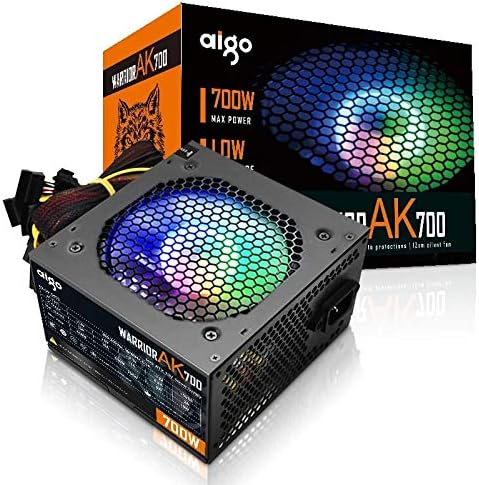
Figure 4.1: The Aigo Warrior AK700 Max 700W Power Supply, showcasing its RGB fan and retail packaging.
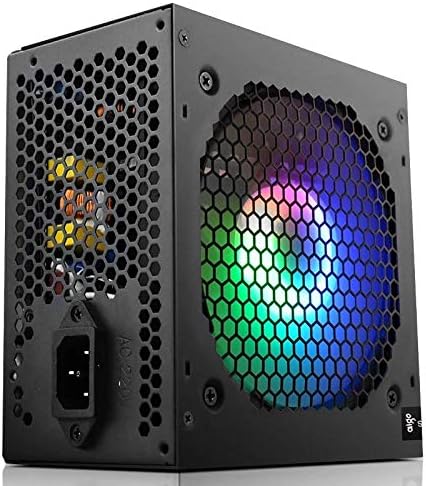
Figura 4.2: Ġenb view of the power supply, highlighting the 12cm RGB cooling fan and honeycomb grille.

Figura 4.3: Wara view of the power supply, illustrating the exhaust grille and AC power input socket.
5. Setup u Installazzjoni
Follow these steps to properly install the Aigo Warrior AK700 Max power supply into your computer system:
- Preparazzjoni: Kun żgur li l-kompjuter tiegħek huwa mitfi kompletament u skonnettjat mill-plakka tal-ħajt. Iftaħ il-kaxxa tal-kompjuter tiegħek.
- Neħħi l-PSU l-Qadim (jekk applikabbli): Skonnettja l-kejbils kollha mill-provvista tal-enerġija l-qadima tiegħek u neħħi l-viti tal-immuntar tagħha. Żerżaqha bir-reqqa 'l barra mill-kaxxa.
- Installa PSU Ġdid: Gently slide the Aigo Warrior AK700 Max into the power supply bay of your computer case. Ensure the fan is oriented correctly for optimal airflow (usually facing down or up, depending on your case design).
- PSU Sikura: Align the screw holes on the power supply with those on your case. Secure the power supply using the provided mounting screws.
- Qabbad Kejbils:
- Konnettur tal-Motherboard ATX ta' 24-pin: Connect the main 24-pin cable to your motherboard.
- CPU Power Connector (4+4 pin or 8-pin EPS): Connect the CPU power cable to the appropriate socket on your motherboard.
- PCIe Power Connectors (6+2 pin): Connect these to your graphics card(s) if required.
- Konnetturi tal-Enerġija SATA: Connect to your storage drives (HDDs, SSDs) and optical drives.
- Konnetturi Periferali (Molex): Connect to other peripherals as needed.
- Ġestjoni tal-Kejbil: Irrota l-kejbils b'mod pulit biex ittejjeb il-fluss tal-arja u l-estetika fil-kaxxa tiegħek.
- Agħlaq il-Każ: Once all connections are made and verified, close your computer case.
- Qabbad l-Enerġija AC: Ipplaggja l-korda tal-enerġija AC fil-provvista tal-enerġija u mbagħad f'sokit tal-ħajt.
6. Istruzzjonijiet Operattivi
After successful installation, follow these steps to operate your computer system with the Aigo Warrior AK700 Max power supply:
- Qawwa Mixgħul: Ensure the power switch on the back of the PSU is in the 'ON' (I) position. Press the power button on your computer case.
- Boot tas-Sistema: Your computer should now power on and begin its boot sequence. The RGB fan on the power supply will illuminate.
- Itfi: To turn off your computer, use the operating system's shutdown function. For a complete power cycle, switch the PSU to the 'OFF' (O) position after shutting down the computer.
The intelligent temperature control design automatically adjusts the fan speed to maintain optimal cooling and extend the lifespan of the unit, ensuring quiet operation under various loads.
7. Manutenzjoni
Manutenzjoni xierqa tiżgura l-lonġevità u l-prestazzjoni ottimali tal-provvista tal-enerġija tiegħek:
- Tindif tat-Trab: Periodically clean dust from the power supply's fan and vents using compressed air. Ensure the computer is powered off and unplugged before cleaning.
- Fluss tal-arja: Ensure that the power supply's intake and exhaust vents are not obstructed by cables or other components within the computer case.
- Kundizzjonijiet Ambjentali: Operate the power supply in a clean, dry environment with adequate ventilation.
- Żarmax: Never attempt to open the power supply unit. There are no user-serviceable parts inside, and doing so will void your warranty and poses a risk of electric shock.
8 Issolvi l-problemi
If you encounter issues with your Aigo Warrior AK700 Max power supply, refer to the following common problems and solutions:
| Problema | Kawża Possibbli | Soluzzjoni |
|---|---|---|
| Il-kompjuter ma jixgħelx. |
|
|
| Is-sistema tixgħel iżda tintefa immedjatament. |
|
|
| Fan is not spinning or is excessively loud. |
|
|
If the problem persists after attempting these solutions, please contact Aigo customer support for further assistance.
9. Speċifikazzjonijiet
Detailed technical specifications for the Aigo Warrior AK700 Max 700W Power Supply:
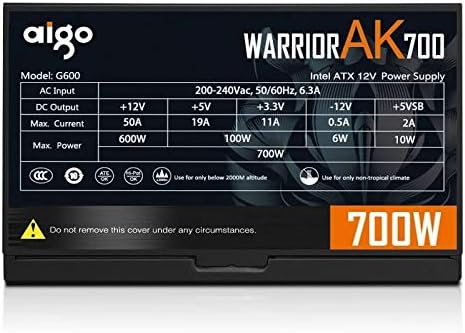
Figure 9.1: The specifications label found on the Aigo Warrior AK700 Max Power Supply.
| Karatteristika | Dettall |
|---|---|
| Mudell | AK700 Max |
| Wattage | 700 Watts |
| Fattur tal-Formola | ATX, ATX12V |
| Input Voltage | 220V (Minimum 220V, Maximum 220V) |
| Metodu tat-tkessiħ | Tkessiħ bl-Arja |
| Daqs tal-fann | 120 Millimeters (Hydraulic Bearing) |
| Apparati Kompatibbli | Kompjuter Personali |
| Tip ta' Konnettur | SATA, PCIe (6+2 pin), ATX 24-pin, EPS 4+4 pin |
| Karatteristiċi ta' Protezzjoni | Overvoltage, Overcurrent, Overload, Undervoltage, Short Circuit, Light Protection |
| Piż tal-oġġett | 1.9 Kilogrammi |
| Dimensjonijiet tal-Pakkett | 5 x 5 x 5 ċm (madwar) |
10. Garanzija u Appoġġ
For warranty information and technical support, please refer to the official Aigo webis-sit jew ikkuntattja lill-bejjiegħ lokali tiegħek. Żomm il-prova tax-xiri tiegħek għal talbiet ta' garanzija.
Aigo Official Websit: www.aigocorp.com (Nota: Dan huwa terminu riżervat) URL bħala l-ebda uffiċjal website was provided in the product data. Please refer to actual product documentation for correct contact information.)


