1. Introduzzjoni
The LAUNCH CRP MOT IV is an advanced diagnostic tool, building upon the MOT 3. It features comprehensive vehicle coverage, powerful functions, and precise test results. This device is designed to assist automotive professionals and enthusiasts in diagnosing and maintaining vehicle systems efficiently.
Utilizing wireless or wired communication between the Vehicle Communication Interface (VCI) and the display tablet, it performs full system diagnostics including Diagnostic Trouble Code (DTC) reading, DTC clearing, data stream reading, actuation tests, and special functions. Additional features include service functions, a toolbox, software updates, diagnostic history, diagnostic feedback, and a maintenance database search.
2. Twaqqif u Użu Inizjali
2.1 Żpakkjar u Komponenti
Oħroġ il-komponenti kollha mill-imballaġġ bir-reqqa. Kun żgur li l-oġġetti li ġejjin huma preżenti:
- LAUNCH CRP MOT IV Display Tablet
- Interface tal-Komunikazzjoni tal-Vetturi (VCI)
- Kejbil Dijanjostiku OBD-II
- Adapter tal-Enerġija
- Cable USB
- Manwal għall-Utent (dan id-dokument)

Figure 2.1: The LAUNCH CRP MOT IV diagnostic tool, showing its main display and robust casing.
2.2 Iċċarġjar tal-Apparat
Before first use, fully charge the CRP MOT IV tablet using the provided power adapter. Connect the power adapter to the tablet's charging port and plug it into a standard electrical outlet. The charging indicator will illuminate.
2.3 Connecting the VCI to the Vehicle
Locate the vehicle's OBD-II port, typically found under the dashboard on the driver's side. Connect the OBD-II diagnostic cable to the VCI, then plug the other end of the cable into the vehicle's OBD-II port. Ensure a secure connection.

Figure 2.2: The LAUNCH CRP MOT IV tablet connected wirelessly to the Vehicle Communication Interface (VCI).
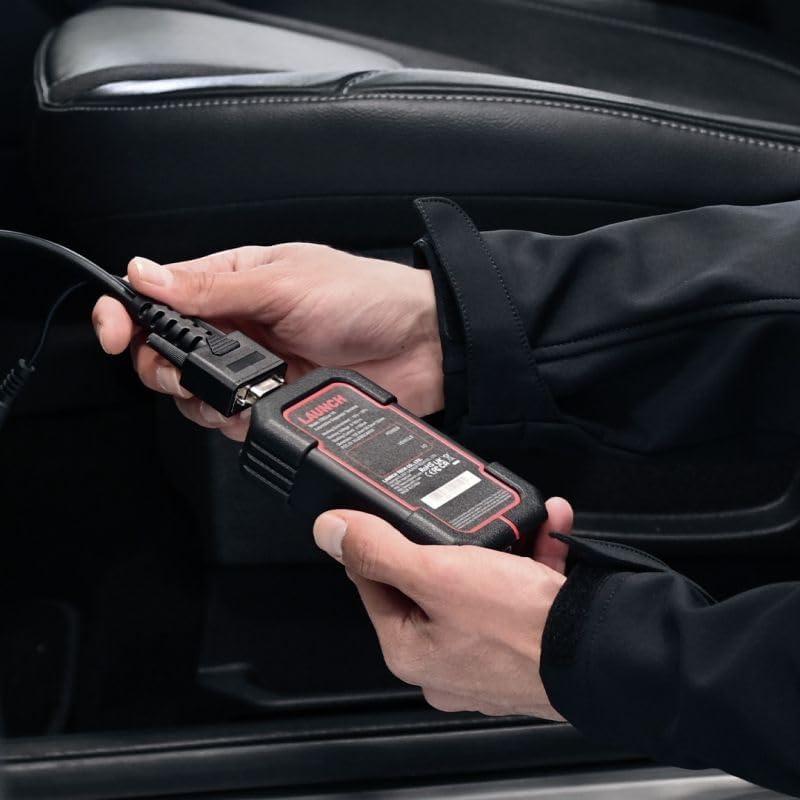
Figure 2.3: Demonstrates connecting the VCI to the vehicle's OBD-II port.
2.4 Ixgħel u Setup Inizjali
Press and hold the power button on the tablet to turn it on. Follow the on-screen prompts to complete the initial setup, including language selection (English is supported), Wi-Fi connection, and time zone settings. Ensure the VCI is powered on and connected to the vehicle for communication.
3. Istruzzjonijiet Operattivi
3.1 Funzjonijiet Dijanjostiċi Bażiċi
The CRP MOT IV provides comprehensive diagnostic capabilities for various vehicle systems. Navigate to the "Diagnose" section on the main menu to access these functions:
- Aqra d-DTCs: Retrieves Diagnostic Trouble Codes from the vehicle's Electronic Control Units (ECUs).
- Ċara DTCs: Erases stored DTCs from the ECUs. Ensure the underlying issue is resolved before clearing codes.
- Aqra Data Stream: Displays real-time data parameters from various sensors and components, providing insights into vehicle performance.
- Test tal-Azzjoni: Allows bidirectional control to test specific components, such as turning on/off relays, injectors, or solenoids, to verify their functionality.
- Iffriżar tad-Dejta tal-Qafas: Captures a snapshot of critical parameter values at the moment a DTC is set, aiding in diagnosis.

Figure 3.1: A user operating the LAUNCH CRP MOT IV to perform vehicle diagnostics.
3.2 Funzjonijiet tas-Servizz
The CRP MOT IV supports over 31 special service functions for various maintenance and reset procedures. Access these functions from the "Service Function" menu. Some key functions include:
- Anti-theft Matching
- Kodifikazzjoni tal-Injettur
- Riġenerazzjoni DPF
- Tqabbil tal-Gearbox
- Tire Reset (TPMS)
- Irrisettja tas-Sensor NOx
- Irrisettjar tal-AdBlue
- Vol Għolitage Battery Detection
- Irrisettja żejt
- Reset tal-brejk
- Steering Angle Sensor Calibration
- Adattament tat-Throttle
- Kalibrazzjoni tas-Sospensjoni
- Inizjalizzazzjoni tas-sunroof
- Kalibrazzjoni tas-Sedil
- Tqabbil tad-Dawl ta' Quddiem
- Adattament tal-EGR
- Crankshaft Position Sensor Learning
- U ħafna aktar...

Figure 3.2: A visual representation of the extensive list of 31+ service functions supported by the CRP MOT IV.
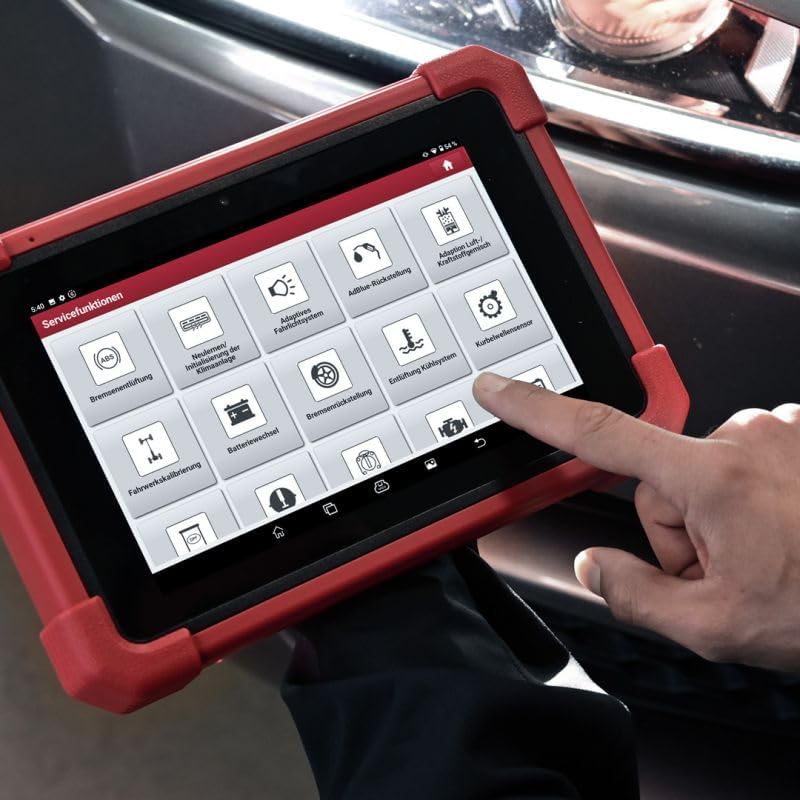
Figura 3.3: Close-up view of the service functions menu on the CRP MOT IV tablet.
3.3 Vehicle Coverage and Protocol Support
To determine if the device supports a specific function for a particular vehicle make and model, use the "Vehicle Coverage" feature. This online tool allows you to query supported brands, models, systems, and functions at any time.
The CRP MOT IV supports a wide range of communication protocols, including:
- CAN FD / CAN / SCAN / FCAN
- DoIP (requires additional DoIP cable, sold separately)
- KWP / L-line
- J1850 PWM
- VPW
- Chrysler CCD
- U aktar.

Figure 3.4: The VCI unit being connected to the vehicle's diagnostic port.
4. Manutenzjoni
4.1 Aġġornamenti tas-Software
Regular software updates are crucial for maintaining optimal performance and expanding vehicle coverage and functions. Connect the CRP MOT IV to a stable Wi-Fi network and navigate to the "Software Update" section on the main menu to check for and install available updates.
4.2 Kura tal-Apparat
- Żomm l-apparat nadif billi tuża drapp artab u niexef. Evita prodotti tat-tindif jew solventi li joborxu.
- Aħżen l-apparat f'post frisk u niexef 'il bogħod mix-xemx diretta u minn temperaturi estremi.
- Protect the screen from scratches using a screen protector if desired.
- Ensure all cables and connectors are free from damage before use.
5 Issolvi l-problemi
5.1 Kwistjonijiet Komuni u Soluzzjonijiet
- Apparat mhux mixgħul: Kun żgur li l-batterija hija ċċarġjata. Qabbad l-adapter tal-enerġija u erġa' pprova. Jekk il-problema tippersisti, ikkuntattja l-appoġġ.
- L-ebda komunikazzjoni mal-vettura:
- Verify the VCI is securely connected to the vehicle's OBD-II port.
- Check if the vehicle's ignition is in the ON position.
- Ensure the VCI is properly paired with the tablet (for wireless connection).
- Confirm the vehicle's make, model, and year are correctly selected in the software.
- Slow software performance:
- Ensure the device has sufficient free storage space.
- Agħlaq kwalunkwe applikazzjoni fl-isfond li mhix meħtieġa.
- Perform a software update to ensure you have the latest optimizations.
5.2 Diagnostic History and Feedback
The "Diagnostic History" function allows users to access detailed records of previously tested vehicles. This enables users to resume operations without starting from scratch.
If you encounter anomalies with models or functions while using the diagnostic software, utilize the "Diag Feedback" function. This allows you to submit detailed reports to LAUNCH for analysis and troubleshooting, helping to improve future software versions.
6. Speċifikazzjonijiet Tekniċi
| Karatteristika | Speċifikazzjoni |
|---|---|
| Manifattur | Tnedija |
| Brand | Tnedija |
| Mudell | Mot IV |
| Numru tal-Mudell | LE-MOT4-301190864 |
| Piż tal-oġġett | 1 g |
| Dimensjonijiet tal-Prodott (L x W x H) | 27.4 x 19.05 x 4.05 ċm |
| Batterija | 1 Lithium-ion (inkluża) |
| Karatteristiċi Speċjali | Touchscreen support |
| Sistema Operattiva | Android 10.0 |
| Daqs tal-Iskrin | 8 Pulzier |
| Lingwa | Ingliż |
| Sors tal-Enerġija | Mħaddma bil-batterija |
7. Garanzija u Appoġġ
7.1 Official Product and Service
Service and warranty support are exclusively available for original LAUNCH Europe products purchased from our official shop or authorized dealers. Authorized dealers can be identified by their seller number.
7.2 Appoġġ Tekniku
LAUNCH Europe provides technical support for its products. For assistance, please contact our support team via phone or email. Support is available to help with product operation, troubleshooting, and general inquiries.
For the most up-to-date contact information, please refer to the official LAUNCH Europe webis-sit jew id-dokumentazzjoni tax-xiri tiegħek.


