Introduzzjoni
This manual provides instructions for the VINABTY EN2A27ST replacement remote control. This remote is designed to function as a direct replacement for your original Sharp Smart TV remote, requiring no programming or setup for compatible models. Please read this manual carefully to ensure proper use and maintenance of your new remote control.
Prodott Overview
The VINABTY EN2A27ST remote control offers a comfortable, ergonomic design for ease of use. It is pre-programmed to work with a range of Sharp Smart TV models.
Compatible Sharp Smart TV Models:
- LC-50P5000U
- LC-60P6070U
- LC-40P5000U
- LC-43P5000U
- LC-55P5000U
- LC-55P6000U
- LC-60P6000U
- LC-32Q5230U
- LC-43Q5000U
- LC-32Q5280U
- LC-32Q5200U
- LC-55P6050U
- And other similar Sharp Smart TV models.
Setup
Installazzjoni tal-batterija
- Sib il-kompartiment tal-batterija fuq wara tal-kontroll remot.
- Żerżaq l-għatu tal-batterija 'l isfel jew 'il barra biex tiftaħ.
- Daħħal żewġ (2) batteriji AAA, waqt li tiżgura li t-terminali pożittivi (+) u negattivi (-) jaqblu mad-dijagrammi ġewwa l-kompartiment.
- Erġa’ poġġi l-għatu tal-batterija billi tiżżerżaqha lura f’postu sakemm tikklikkja sew.
Nota: The remote control does not require any programming. Once batteries are installed, it is ready for immediate use with compatible Sharp Smart TVs.
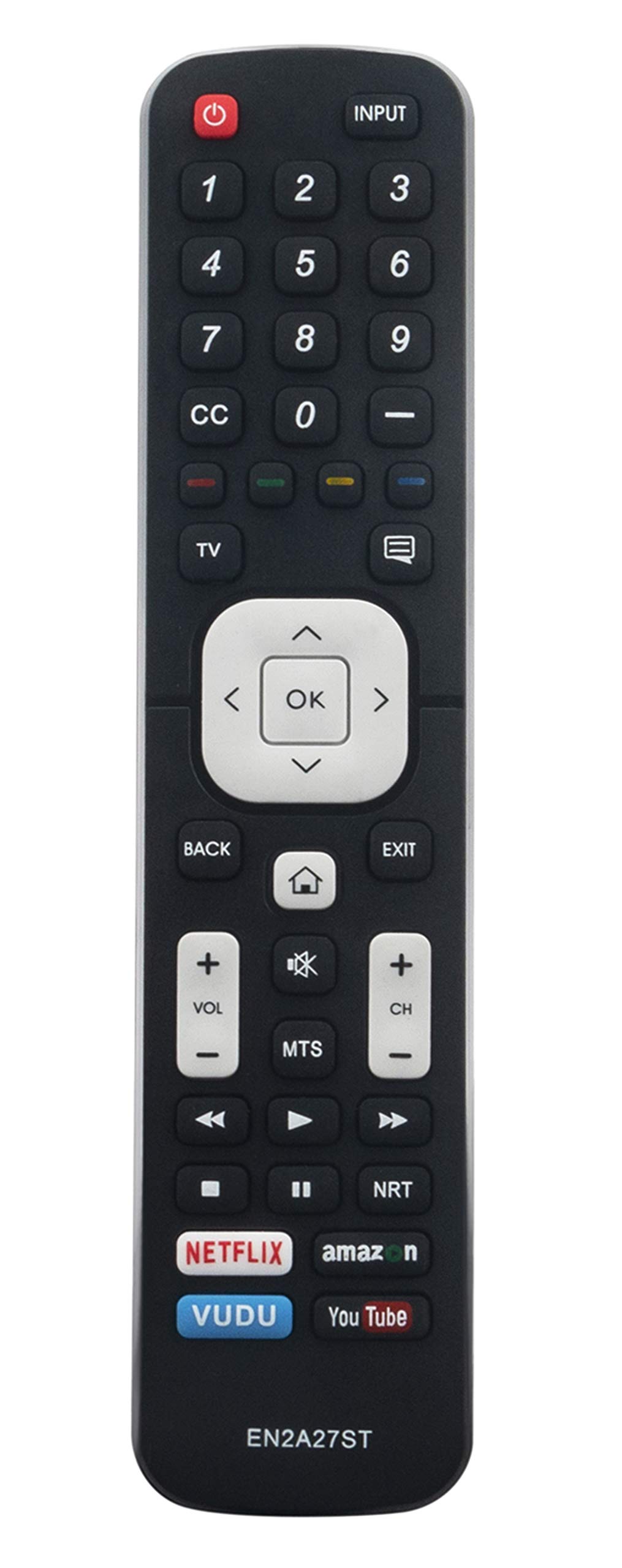
Image: A hand holding the VINABTY EN2A27ST remote control, demonstrating its use in front of a television and soundbar. This illustrates the remote's ergonomic design and readiness for operation.
Istruzzjonijiet Operattivi
To operate your Sharp Smart TV with the VINABTY EN2A27ST remote control, simply point the remote directly at the TV's infrared sensor and press the desired button.
Funzjonijiet Bażiċi:
- Buttuna tal-Qawwa: Ixgħel jew jitfi t-TV.
- Buttuni tan-Numri (0-9): Agħżel il-kanali direttament.
- Volum 'il fuq/Niżżel: Jaġġusta l-volum tat-TV.
- Kanal 'l fuq/'l isfel: Jibdel il-kanal tat-TV sekwenzjalment.
- Buttuna Mute: Iċċekkja jew jaqleb is-sordina l-awdjo tat-TV.
- Buttuna tad-Dħul/Sors: Iċċikla bejn is-sorsi ta' input disponibbli (HDMI, AV, eċċ.).
- Buttuna tal-menu: Jaċċessa l-menù prinċipali tat-TV.
- Buttuni tan-Navigazzjoni ('Il fuq, 'l isfel, Xellug, Lemin, OK): Innaviga fil-menus u kkonferma l-għażliet.
- Buttuna tat-TV Intelliġenti/Home: Accesses the Smart TV interface or home screen.
Manutenzjoni
Sostituzzjoni tal-batterija
Ibdel il-batteriji meta r-rispons tar-remote isir kajman jew jieqaf jaħdem. Dejjem ibdel iż-żewġ batteriji fl-istess ħin b'batteriji AAA ġodda. Tħallatx batteriji qodma u ġodda, jew tipi differenti ta' batteriji.
Tindif
Wipe the remote control with a soft, dry cloth. Do not use liquid cleaners, abrasive pads, or chemical solvents, as these may damage the remote's surface or internal components.
Ħażna
Store the remote control in a dry place away from direct sunlight and extreme temperatures. If the remote will not be used for an extended period, remove the batteries to prevent leakage.
Issolvi l-problemi
- Ir-remote mhux qed jirrispondi:
- Kun żgur li batteriji AAA ġodda huma installati sew.
- Iċċekkja għal xi ostruzzjonijiet bejn ir-remote u s-senser infra-aħmar tat-TV.
- Kun żgur li qed tipponta r-remote direttament lejn it-TV.
- Xi buttuni mhux qed jaħdmu:
- This remote is a replacement and may not have all the advanced functions of some original remotes. Verify if the button is standard for basic TV operation.
- Clean the remote surface, especially around the non-working buttons, to remove any debris.
Speċifikazzjonijiet
| Mudell | EN2A27ST |
| Brand | VINABTY |
| Dimensjonijiet | 7.9 x 2 x 0.7 pulzieri (madwar) |
| Piż tal-oġġett | 1.9 uqija (madwar) |
| Kulur | Iswed |
| Sors tal-Enerġija | 2 x Batteriji AAA (mhux inklużi) |
| Karatteristika Speċjali | Disinn Ergonomiku |
Garanzija u Appoġġ
For any issues or questions regarding your VINABTY EN2A27ST remote control, please refer to the retailer or manufacturer's support channels. Specific warranty details may vary by purchase location and are typically provided at the time of sale.
