1. Introduzzjoni
This manual provides detailed instructions for the setup, operation, and maintenance of your Symcode Bluetooth 2D QR Barcode Scanner (Model: MJ-2020DA-BL). Please read this manual thoroughly before using the device to ensure proper functionality and to maximize its lifespan.
2. Prodott Aktarview
2.1 Karatteristiċi ewlenin
- Konnettività 3 f'1: Supports 2.4G Wireless, Bluetooth 4.1, and USB 2.0 Wired connections for versatile operation.
- Rispons tattili: Provides a mild vibration alert upon successful scans, with an option to mute the buzzer for quiet environments.
- Firxa ta' Trażmissjoni Estiża: Up to 200m in open air via 2.4G wireless mode and 30m via Bluetooth mode.
- Industrial Durability: IP67 rated for dustproof and waterproof performance, capable of being rinsed with tap water and submerged for up to 30 minutes. Features a robust TPU protective case and withstands 6ft (1.8m) drops to concrete.
- Kompatibbiltà Wiesgħa: Connects with smartphones, tablets, and PCs running Windows XP/7.0/8.0/Win 10, Windows Mobile, Android OS, and iOS devices.
- Personalizzazzjoni Avvanzata: Offers over 180 configuration options, including editable prefixes/suffixes (up to 32 digits), partial barcode hiding, and adding keyboard keys/combinations.
- High Decoding Ability: Capable of decoding both 1D and 2D barcodes, including UPC/EAN, QR Code, Data Matrix, PDF417, Code 39, Code 128, and more, even with blurring or incompleteness.
- Kapaċità Kbira tal-Ħażna: Internal memory can store up to 10,000 codes before uploading.
2.2 Kontenut tal-Pakkett
Il-pakkett jinkludi l-oġġetti li ġejjin:
- Symcode Barcode Scanner (Model: MJ-2020DA-BL)
- Korda tal-Iċċarġjar
- Manwal għall-Utent (Dan id-dokument)
2.3 Dijagramma tal-Prodott

Figure 2.3.1: Symcode Bluetooth 2D QR Barcode Scanner with its charging stand. The scanner is black and orange, designed for comfortable handheld use, and rests securely in its black charging base.
3. Setup
3.1 Iċċarġjar tal-Iskaner
Before initial use, fully charge the scanner. Connect the charging cord to the scanner and a power source. The charging time is approximately 2.5 hours, providing a battery life of up to 30 hours of continuous use. Note that the base itself does not charge; the USB cable must be plugged directly into the scanner for charging.
3.2 Modi ta' Konnessjoni
The scanner supports three connection modes: Wired, 2.4GHz Wireless, and Bluetooth. Choose the mode that best suits your operational needs.

Figure 3.2.1: Visual representation of the scanner's three connection modes: Wired (USB cable for charging and data), 433MHz Wireless (with a dedicated dongle for PC), and Bluetooth (direct connection to mobile devices without a driver).
3.2.1 Konnessjoni bil-Fili
Connect the scanner directly to your computer using the provided USB cable. The cable serves as both a charging cable and a data transmission cable. This mode is plug-and-play and requires no additional drivers.
Konnessjoni bla fili 3.2.2 2.4GHz
For 2.4GHz wireless operation, plug the wireless dongle (if included, typically integrated with the charging stand) into your computer's USB port. The scanner will automatically pair with the dongle. This mode offers a transmission range of up to 200m in open air.
3.2.3 Konnessjoni Bluetooth
To connect via Bluetooth, ensure your device's Bluetooth is enabled. The scanner can pair with smartphones, tablets, and PCs. No driver installation is required. This mode provides a transmission range of up to 30m in open air.
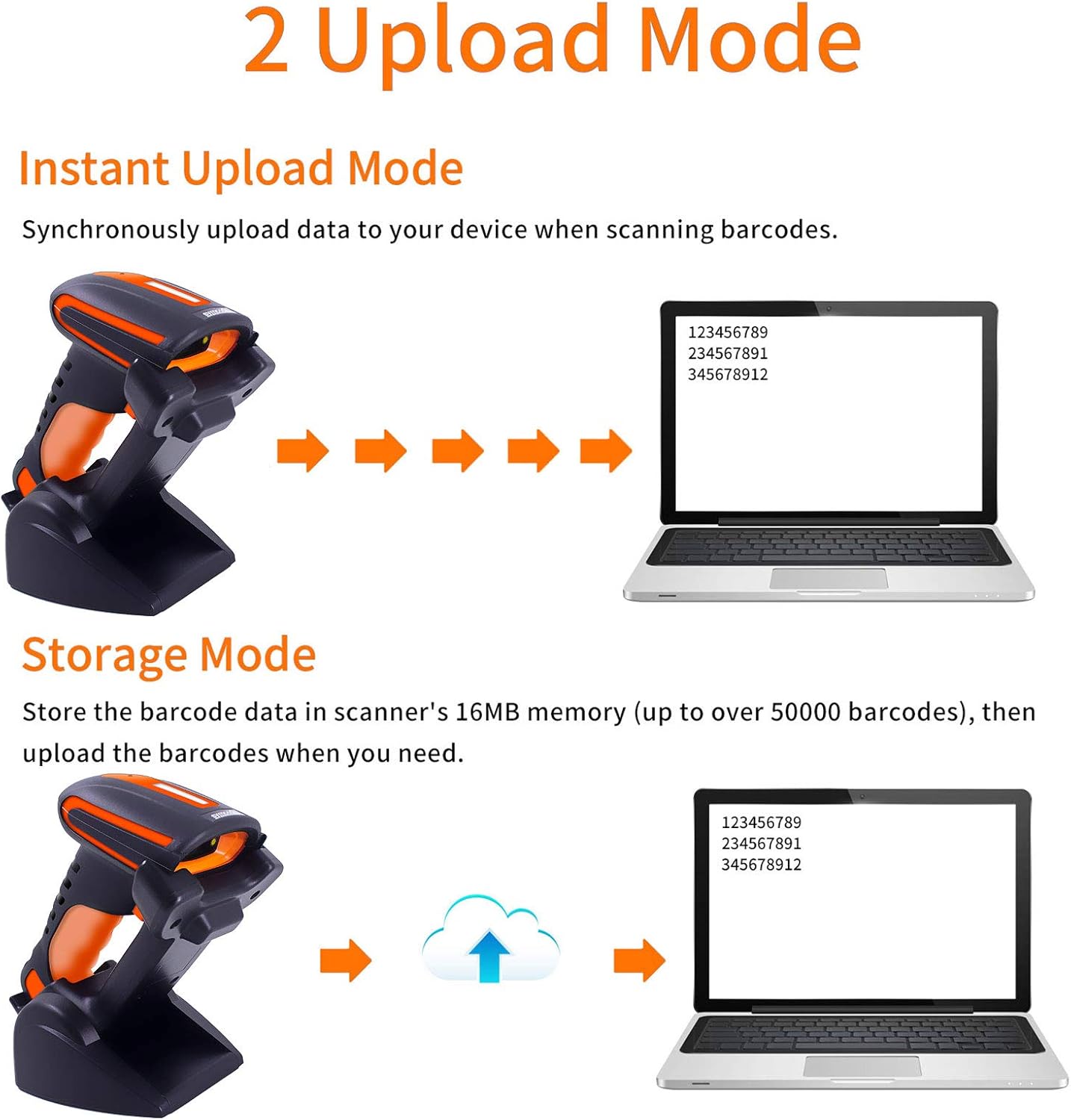
Figure 3.2.2: The scanner demonstrates strong compatibility with multiple operating systems, including Android, Apple (iOS/macOS), Windows, and Linux, allowing seamless integration with various devices.
4. Istruzzjonijiet Operattivi
4.1 Skennjar ta' Barcodes
Point the scanner's light beam at the barcode you wish to scan. A successful scan will be indicated by a mild vibration. The buzzer can be muted for quiet operation if desired.

Figure 4.1.1: The scanner possesses superior decoding capabilities for both 1D and 2D barcodes, including Data Matrix, QR Code, and PDF417. It can even decode blurred or incomplete codes. Example barcodes shown include 20123456789, 2125551212, 4603146002134, u 1234567890135.
4.2 Modi ta' Tella' tad-Data
The scanner supports two primary data upload modes:
- Modalità ta' Upload Instant: Data is synchronously uploaded to your connected device immediately after scanning.
- Mod ta 'Ħażna: Scanned barcodes are stored in the scanner's 16MB internal memory (up to over 50,000 barcodes). Data can be uploaded to your device later when needed.

Figure 4.2.1: Comparison of Instant Upload Mode, where data transmits immediately, and Storage Mode, where data is saved internally for later batch upload.
4.3 Adjusting the Charging Stand
The charging stand's base can be rotated 45 degrees, allowing for flexible positioning of the scanner during charging or when used in presentation mode.

Figure 4.3.1: The scanner's base can be adjusted by rotating 45 degrees, providing ergonomic flexibility for various scanning setups.
4.4 Xenarji ta' Applikazzjoni
The Symcode barcode scanner is designed for various industrial and commercial applications, including but not limited to:
- Express and Logistics
- Ġestjoni tal-maħżen
- Supermarket and Retail
- File Room and Document Management

Figura 4.4.1: Eżamples of the scanner's use in different environments, highlighting its versatility in express delivery, warehouse operations, retail, and file ġestjoni.
5. Manutenzjoni
Biex tiżgura l-lonġevità u l-prestazzjoni ottimali tal-iskaner tal-barcode Symcode tiegħek, segwi dawn il-linji gwida tal-manutenzjoni:
- Tindif: Regularly wipe the scanner's exterior with a soft, damp cloth. For the scanning window, use a lint-free cloth and a mild cleaning solution if necessary. Avoid abrasive cleaners.
- Reżistenza għall-Ilma: The scanner is IP67 rated, meaning it is dustproof and can withstand immersion in water up to 1 meter for 30 minutes. It can be rinsed with tap water. However, ensure the charging port is dry before connecting the charging cable.
- Protezzjoni kontra l-qatra: The scanner is designed to withstand drops from 6ft (1.8m) onto concrete due to its robust TPU protective case and internal consolidation. While durable, avoid unnecessary drops.
- Ħażna: Aħżen l-iskaner f'post frisk u niexef 'il bogħod mix-xemx diretta u minn temperaturi estremi.
- Kura tal-batterija: To preserve battery life, avoid fully discharging the battery frequently. If storing for extended periods, charge the battery to about 50% and recharge every few months.
6 Issolvi l-problemi
If you encounter issues with your Symcode barcode scanner, please refer to the following common problems and solutions:
| Problema | Kawża / Soluzzjoni Possibbli |
|---|---|
| L-iskaner ma jixgħelx. | Battery is low or depleted. Charge the scanner for at least 2.5 hours. |
| Scanner does not connect via Bluetooth/2.4GHz. |
|
| L-iskaner ma jaqrax il-barcodes. |
|
| Id-dejta skennjata mhijiex korretta jew mhux kompluta. |
|
If the problem persists, please contact Symcode customer support for assistance. Refer to the "Support" section for contact information.
7. Speċifikazzjonijiet
| Karatteristika | Dettall |
|---|---|
| Mudell | MJ-2020DA-BL |
| Input Voltage | DC5V±0.25V |
| Kurrenti | 25 mA (work); 95 mA (instantaneous) |
| Decoding Speed | 100 darbiet / sek |
| Wireless Range (2.4G) | Up to 200m (open air) |
| Firxa bla fili (Bluetooth) | Up to 30m (open air) |
| Ħin tal-Iċċarġjar | 2.5 Sigħat |
| Ħajja tal-batterija | 30 Sigħat |
| Tip ta 'batterija | 1 batterija tal-jone tal-litju (inkluża) |
| Dimensjonijiet tal-Prodott | 8 x 8 x 3 pulzieri |
| Piż tal-oġġett | 1.59 liri |
| Klassifikazzjoni tal-IP | IP67 (Dustproof, Waterproof) |
| Reżistenza għall-qatra | Withstands 6ft (1.8m) drops to concrete |
| Tipi ta' Barcode Appoġġjati | 1D: UPC/EAN, Code 39, Code 128, Codabar, Interleaved 2 of 5, Code 93, MSI, Code 11, RSS variants, Chinese 2 of 5. 2D: PDF417, QR-code, Data Matrix. |
| Ħażna Interna | 16MB (up to 50,000 barcodes) |
| Sistemi Operattivi Kompatibbli | Windows XP/7.0/8.0/Win 10, Windows Mobile, Android OS, iPhone/iPad (iOS), Linux |
8. Appoġġ u Garanzija
Symcode is committed to providing high-quality products and customer satisfaction. While specific warranty details are not provided in this manual, please retain your proof of purchase for any warranty claims.
For technical support, troubleshooting assistance, or product customization inquiries, please contact Symcode customer service. Contact information can typically be found on the Symcode official websit jew permezz tal-bejjiegħ bl-imnut tiegħek.
You can also visit the official Symcode store on Amazon for more information and support: Symcode Amazon Store.


