1. Introduzzjoni
This manual provides comprehensive instructions for the One For All URC4912 Sony TV Replacement Remote Control. Designed to function identically to your original Sony TV remote, the URC4912 offers immediate compatibility with all Sony TV models (LCD, LED, Plasma) without requiring any setup. It also includes a learning feature for personalized customization of functions.
2. Setup
2.1 Installazzjoni tal-Batteriji
The URC4912 remote control requires two AA batteries (not included). Follow these steps to install them:
- Sib l-għatu tal-kompartiment tal-batterija fuq wara tal-kontroll remot.
- Żerżaq l-għatu 'l isfel jew agħfas il-lukkett biex tiftaħu.
- Daħħal żewġ batteriji AA, waqt li tiżgura li t-terminali pożittivi (+) u negattivi (-) ikunu allinjati sew mal-marki ġewwa l-kompartiment.
- Erġa’ poġġi l-għatu tal-kompartiment tal-batterija billi tiżżerżaqha lura f’postu sakemm tikklikkja sew.
Note: Always use new batteries and dispose of old batteries responsibly.
2.2 Initial Setup (No Configuration Required)
The One For All URC4912 remote control is pre-programmed for all Sony televisions. No setup or programming is required. Simply insert the batteries, and the remote is ready for immediate use with your Sony TV.
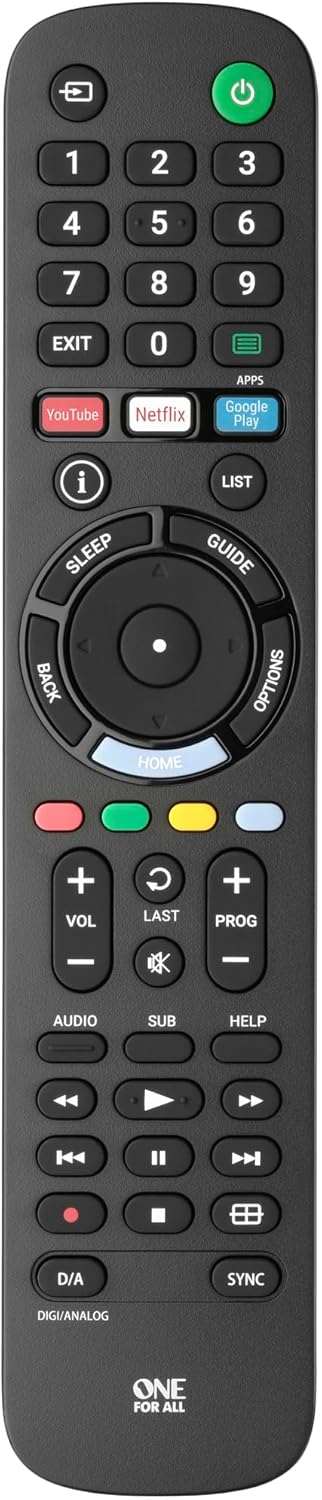
Stampa 1: Quddiem view of the One For All URC4912 remote control. This image displays the remote's layout, including number buttons, navigation pad, volume and channel controls, and dedicated app buttons for services like YouTube and Netflix.
3. It-tħaddim tal-Kontroll mill-bogħod
3.1 Funzjonijiet Bażiċi
The URC4912 remote provides all standard functions found on an original Sony TV remote:
- Buttuna tal-Qawwa: Ixgħel jew jitfi t-TV.
- Buttuni tan-Numri (0-9): Għall-għażla diretta tal-kanal.
- Volum 'il fuq/Niżżel (+/-): Jaġġusta l-volum tat-TV.
- Kanal 'il fuq/'l isfel (PROG +/-): Jibdel il-kanali tat-TV.
- Buttuna Mute: Jissikket l-awdjo tat-TV.
- Pad tan-Navigazzjoni ('Il fuq, 'l isfel, Xellug, Lemin, OK): Għan-navigazzjoni u l-għażla tal-menù.
- Buttuna Lura: Terġa' lura għall-iskrin jew il-menu preċedenti.
- Buttuna tad-dar: Jaċċessa l-iskrin ewlieni tat-TV jew l-interfaċċja tat-TV intelliġenti.
3.2 Specific Sony Functions
This remote supports common Sony-specific functions, including:
- Teatru: Activates or deactivates Theatre mode.
- i-Manual: Accesses the TV's electronic instruction manual.
- Għażliet: Juri għażliet sensittivi għall-kuntest għall-iskrin kurrenti.
3.3 Learning Feature
The URC4912 remote includes a learning feature, allowing you to copy functions directly from your original remote control. This is useful for any specific functions not pre-programmed or for personalizing button assignments.
- Place the URC4912 remote and your original remote on a flat surface, facing each other, with their IR emitters approximately 1-2 inches apart.
- On the URC4912, press and hold the SETUP button (if available, or refer to the full manual for specific button combination to enter learning mode) until the LED indicator blinks twice and then stays lit.
- Press the button on the URC4912 that you wish to program. The LED will blink rapidly.
- On your original remote, press and hold the corresponding function button until the URC4912's LED blinks twice to confirm successful learning.
- Repeat steps 3 and 4 for any other buttons you wish to program.
- Biex toħroġ mill-modalità tat-tagħlim, agħfas il-buttuna SETUP buttuna għal darb'oħra. L-LED se jintefa.
Note: If the LED shows a long blink, the learning was unsuccessful. Try again, ensuring both remotes are stable and the original remote's batteries are fresh.

Immaġni 2: Angolata view of the One For All URC4912 remote control, highlighting its ergonomic design and button placement for easy access to various functions.
4. Manutenzjoni
Biex tiżgura l-lonġevità u l-prestazzjoni ottimali tal-kontroll remot tiegħek:
- Tindif: Wipe the remote with a soft, dry cloth. Do not use abrasive cleaners or liquids.
- Sostituzzjoni tal-batterija: Replace batteries when the remote's response becomes sluggish or the LED indicator (if present) signals low power. Always replace both batteries simultaneously.
- Ħażna: Aħżen ir-remote f'post xott, 'il bogħod mix-xemx diretta u minn temperaturi estremi.
5 Issolvi l-problemi
| Problema | Soluzzjoni |
|---|---|
| Ir-remote ma jirrispondix. |
|
| Xi buttuni ma jaħdmux. |
|
| Learning feature fails. |
|
6. Speċifikazzjonijiet
| Brand | Wieħed Għal Kulħadd |
| Mudell | URC4912 |
| Apparati Kompatibbli | Television (All Sony TV types: LCD, LED, Plasma) |
| Karatteristiċi Speċjali | Infrared, Learning Function |
| Numru ta' Oġġetti | 1 |
| Tip ta 'batterija | 2 x batteriji AA (mhux inklużi) |
| Dimensjonijiet tal-Prodott | 19.5 x 4.4 x 2.5 ċm |
| Piż tal-oġġett | 100 g |
7. Informazzjoni dwar Garanzija
For detailed warranty information regarding your One For All URC4912 remote control, please refer to the official One For All webis-sit jew il-karta tal-garanzija inkluża max-xiri tiegħek. It-termini u l-kundizzjonijiet tal-garanzija jistgħu jvarjaw skont ir-reġjun.
8. Appoġġ
Should you require further assistance, technical support, or have questions not covered in this manual, please visit the official One For All support website or contact their customer service. You can often find FAQs, additional guides, and contact information on their brand page:


