1. Introduzzjoni
This manual provides detailed instructions for the setup, operation, and maintenance of your Uniden AT4401 Cordless Answering System with Smart Call Blocker. Please read this manual thoroughly before using your new phone system to ensure proper functionality and to take full advantage tal-karatteristiċi tiegħu.
2. Prodott Aktarview u Karatteristiċi Ewlenin
The Uniden AT4401 is a versatile cordless telephone system designed for enhanced communication and call management. Key features include:
- 2-Line Operation: Manage two separate phone lines with one system.
- Smart Call Blocker: Block unwanted calls with a directory of up to 1,000 names and numbers.
- Sistema espansibbli: Supports up to 12 devices using a single phone jack.
- Sistema ta' Tweġiba Diġitali: Integrated answering machine with voice guide and up to 22 minutes of recording time per line.
- Full-Duplex Speakerphones: High-quality speakerphones on both the handset and base unit.
- ID tas-Sejħiet/Sejħa ta' Stennija: FSK Caller ID stores up to 50 calls.
- Large Backlit Base Display: Clear and easy-to-read display on the base unit.
- Għażliet ta 'Immuntar: Can be placed on a table or mounted on a wall.
- Ġestjoni tas-Sejħiet: Features include call screening, call intercept, remote access, message retrieval from handset, message time and date stamp.
- Direttorju tal-ktieb tat-telefon: Jaħżen sa 50 isem u numru.
- Intercom & Conferencing: Intercom between handsets and base, and conference calls with outside lines.
- Speed Dial: 10-number speed dial for frequently called contacts.
- Trilingual Prompts: Voice prompts available in English, Spanish, and French.
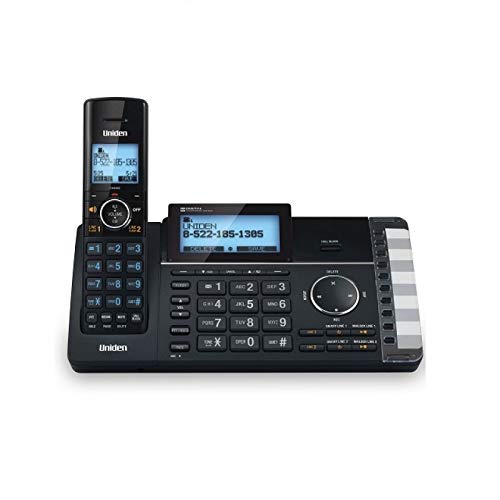
Figure 2.1: The Uniden AT4401 Cordless Answering System, showcasing the base unit with its large display and keypad, alongside the cordless handset.
3. Setup
3.1. Kontenut tal-Pakkett
Ivverifika li l-pakkett tiegħek fih l-oġġetti li ġejjin:
- Unità Bażi
- Handset mingħajr fili
- Adapter tal-Qawwa AC
- Telephone Line Cord(s)
- Rechargeable Battery for Handset
- Kopertura tal-idejn
3.2. Konnessjoni tal-Unità Bażi
- Qabbad l-adapter tal-enerġija AC mal-unità bażi u pplaggjah f'sokit elettriku standard.
- Connect the telephone line cord(s) to the appropriate jacks on the base unit and to your telephone wall jack(s). For 2-line operation, ensure both lines are connected.
3.3. Installing and Charging the Handset Battery
- Open the battery compartment on the back of the cordless handset.
- Daħħal il-batterija rikarikabbli, waqt li tiżgura l-polarità korretta.
- Agħlaq l-għatu tal-kompartiment tal-batterija.
- Place the handset on the base unit or charger cradle. Allow the handset to charge for at least 12-16 hours before initial use to ensure optimal battery performance.
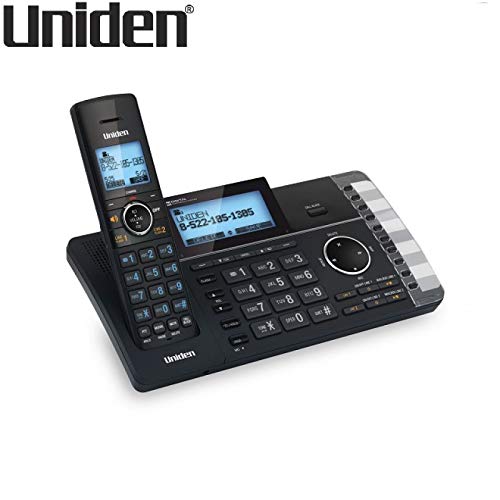
Figura 3.1: Angolat view of the Uniden AT4401, highlighting the ergonomic design of the cordless handset docked in its base unit.
4. Istruzzjonijiet Operattivi
4.1. Tagħmel u Riċeviment Sejħiet
- Biex Tagħmel Sejħa: Aqbad l-idejn jew agħfas il-buttuna TALK button, then dial the number. Alternatively, dial the number first and then press TALK.
- Biex Tirċievi Sejħa: Press any key (Any Key Answer) or the TALK buttuna meta jdoqq it-telefon.
- Biex Intemm Sejħa: Place the handset back on the base/charger or press the TMIEM buttuna.
4.2. Using the Digital Answering System
- Attivazzjoni/Diżattivazzjoni: Access the answering system menu via the base unit or handset to turn it on or off.
- Reġistrazzjoni ta' Tislima: Follow the voice guide prompts to record your personalized outgoing message.
- Daqq tal-Messaġġ: Agħfas il- PLAY button on the base or access through the handset menu.
- Screening tas-Sejħiet: Listen to incoming messages as they are being recorded.
- Aċċess mill-bogħod: Access your messages from an outside line using a PIN.
4.3. Imblokkatur Intelliġenti tas-Sejħiet
The Smart Call Blocker helps filter unwanted calls. You can add numbers to a block list or allow specific numbers. Refer to the detailed manual for advanced settings and blocking options.
- Imblukkar ta' Numru: During or after a call, use the dedicated BLOCK button or menu option to add the number to the block list.
- Reviewing Block List: Access the Smart Call Blocker directory to view and manage blocked numbers.
4.4. Phonebook and Speed Dial
- Żieda ta' Kuntatti: Enter names and numbers into the 50-entry phonebook directory.
- Speed Dial: Assign frequently called numbers to the 10-number speed dial slots for quick access.
5. Manutenzjoni
5.1. Tindif
Wipe the phone's surfaces with a soft, damp cloth. Avoid using harsh chemicals or abrasive cleaners, as these can damage the finish. Ensure the phone is unplugged before cleaning.
5.2. Kura tal-batterija
To prolong battery life, avoid overcharging the handset for extended periods after it is fully charged. If the phone will not be used for a long time, remove the battery from the handset.
6 Issolvi l-problemi
If you experience issues with your Uniden AT4401, please refer to the following common troubleshooting steps. For more detailed solutions, consult the comprehensive user guide available on the Uniden support websit.
| Problema | Soluzzjoni Possibbli |
|---|---|
| L-ebda ton tal-arloġġ | Check all cable connections. Ensure the AC adapter and telephone line cords are securely plugged in. Test with another phone. |
| Il-mowbajl mhux qed jiċċarġja | Ensure the handset is correctly seated in the base/charger. Clean the charging contacts on both the handset and base. Verify the battery is properly installed. |
| Kwalità tal-ħoss fqira | Move closer to the base unit. Check for interference from other electronic devices. Ensure the telephone line cord is not damaged. |
| Answering system not recording messages | Ensure the answering system is turned on. Check if the memory is full and delete old messages if necessary. |
| Caller ID not displaying | Ensure you have subscribed to Caller ID service from your telephone service provider. Check the phone line connection. |
7. Speċifikazzjonijiet
- Ditta: Uniden
- Mudell: AT4401
- Tip tat-Telefon: Bla fili
- Tip ta' wiri: LCD
- Sors tal-Enerġija: Corded Elettriku
- Kapaċità tar-reġistrazzjoni: Up to 22 Minutes (per line)
- Tip ta 'Immuntar: Tabella jew Wall Mount
- Piż tal-oġġett: Madwar 995 g
- Kulur: Iswed
- Apparati Kompatibbli: Landline phone systems and accessories
- Tip ta' Dialer: Tastiera Doppju
8. Garanzija u Appoġġ
Specific warranty details for the Uniden AT4401 are not provided in this document. Please refer to the warranty card included with your product or visit the official Uniden website for warranty information and customer support contact details.
For technical assistance or further inquiries, please contact Uniden customer support through their official channels.


