1. Introduzzjoni
This manual provides comprehensive instructions for the setup, operation, and maintenance of your Acctim Karminski Digital Crescendo Alarm Clock. Please read this manual thoroughly before using the device to ensure proper function and longevity.
2. Karatteristiċi tal-prodott
- Luminous reflection display for reduced glare.
- Crescendo alarm with adjustable volume.
- Touch-activated snooze and backlight function.
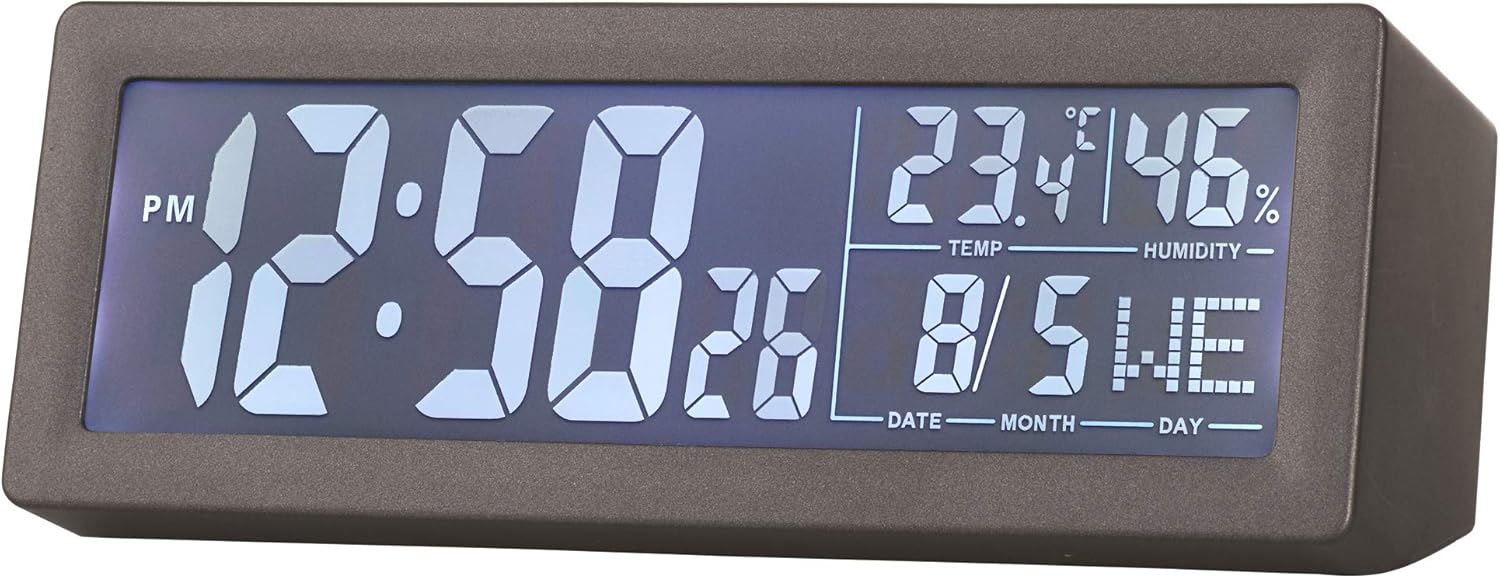
- LCD screen displaying time, date, day, temperature, and humidity.
- Disinn kompatt u modern.
3. Kontenut tal-Pakkett
- Acctim Karminski Digital Crescendo Alarm Clock (Model 16007)
- Manwal għall-Utent (dan id-dokument)
Nota: Huma meħtieġa 2 batteriji AA għall-operazzjoni u mhumiex inklużi fil-pakkett.
4. Kontrolli u Wiri
4.1 Wiri ta 'quddiem
The front LCD screen displays the current time, AM/PM indicator, seconds, temperature, humidity, date, and day of the week.

4.2 Rear Controls
The rear panel houses all control buttons and the battery compartment.

- Buttuna SET: Used to enter and confirm settings for time, date, and alarm.
- Alarm Button (Bell Icon): Used to set and activate/deactivate the alarm.
- DOWN Button (V): Used to decrease values during setting.
- UP Button (^): Used to increase values during setting.
- Buttuna SNZ: Snooze function, also activates the backlight.
- Buttuna tal-VOLUM: Jaġġusta l-volum tal-allarm.
5. Installazzjoni tal-batterija
- Locate the battery compartment cover on the rear of the clock.
- Żerżaq l-għatu miftuħ.
- Daħħal 2 batteriji AA ġodda, waqt li tiżgura l-polarità korretta (+ u -) kif indikat ġewwa l-kompartiment.
- Ibdel l-għatu tal-kompartiment tal-batterija b'mod sikur.
The clock will power on and display default settings or the last saved settings.
6. Setup Inizjali: Issettjar tal-Ħin u d-Data
- Agħfas u żomm il- SET button for approximately 3 seconds until the time display starts flashing.
- Uża l- UP (^) or DOWN (V) buttuni biex taġġusta s-siegħa.
- Agħfas il- SET button to confirm the hour and move to minute setting.
- Uża l- UP (^) or DOWN (V) buttuni biex jaġġustaw il-minuti.
- Agħfas il- SET button to confirm minutes and proceed to year setting.
- Repeat the process using UP (^) or DOWN (V) u SET biex tissettja s-sena, ix-xahar u l-jum.
- Wara li tissettja l-jum, agħfas SET darba oħra għall-aħħar darba biex toħroġ mill-modalità tas-settings.
7. Issettjar tal-Allarm
- Agħfas u żomm il- Alarm Button (Bell Icon) for approximately 3 seconds until the alarm time display starts flashing.
- Uża l- UP (^) or DOWN (V) buttuni biex taġġusta s-siegħa tal-allarm.
- Agħfas il- Buttuna ta 'l-allarm biex tikkonferma s-siegħa u tmur għall-issettjar tal-minuti.
- Uża l- UP (^) or DOWN (V) buttuni biex taġġusta l-minuti tal-allarm.
- Agħfas il- Buttuna ta 'l-allarm one last time to confirm the alarm time and exit the setting mode.
- Biex tattiva jew tiddiżattiva l-allarm, agħfas fil-qosor il-buttuna Buttuna ta 'l-allarm. An alarm icon will appear on the display when the alarm is active.
8. Using the Alarm and Snooze Function
- When the alarm sounds, it will begin with a soft tone and gradually increase in volume (Crescendo alarm).
- To activate the snooze function, briefly touch the top of the clock or press the SNZ button. The alarm will pause for a few minutes and then sound again.
- To turn off the alarm completely, press any button other than the SNZ buttuna. L-allarm jerġa' jiġi ssettjat mill-ġdid għall-għada.
9. Aġġustament tal-Volum tal-Allarm
Il-volum tal-allarm jista' jiġi aġġustat bl-użu tal- VOLUM knob located on the rear of the clock. Rotate the knob clockwise to increase volume and counter-clockwise to decrease volume.
10. Display Backlight
To temporarily illuminate the display, briefly touch the top of the clock or press the SNZ button. The blue backlight will activate for a few seconds.
11. Manutenzjoni
- Tindif: Imsaħ l-arloġġ b'ċarruta ratba u niexfa. Tużax prodotti tat-tindif jew solventi li joborxu.
- Sostituzzjoni tal-batterija: Replace batteries when the display becomes dim or functions become erratic. Always replace both batteries at the same time with new AA batteries.
- Ħażna: Jekk taħżen l-arloġġ għal perjodu estiż, neħħi l-batteriji biex tevita t-tnixxija.
12 Issolvi l-problemi
- Id-displej huwa vojt jew mudlam: Check battery installation. Replace with new AA batteries.
- L-allarm ma jdoqqx: Ensure the alarm is activated (alarm icon visible on display). Check alarm time setting. Adjust alarm volume.
- Ħin/data mhux korretti: Re-enter time and date settings as per Section 6.
- Temperatura/umdità mhux preċiża: Ensure the clock is placed in a location with good air circulation, away from direct heat sources or extreme cold. Allow time for readings to stabilize after initial setup or relocation.
13. Speċifikazzjonijiet
| Brand | Aċċezzjoni |
| Numru tal-Mudell | 16007 |
| Dimensjonijiet (L x W x H) | 14.7 x 3.81 x 5.5 ċm |
| Piż | 500 g |
| Tip ta 'Wiri | LCD diġitali |
| Sors tal-Enerġija | 2 x Batteriji AA (mhux inklużi) |
| Karatteristiċi Speċjali | Crescendo Alarm, Snooze, Backlight, Date, Day, Temperature, Humidity |
14. Garanzija u Appoġġ
Information regarding specific warranty terms and customer support contacts for the Acctim Karminski Digital Crescendo Alarm Clock is not provided in the product details. Please refer to the retailer or manufacturer's official websit għal dettalji dwar il-garanzija u l-għażliet ta' appoġġ.


