Introduzzjoni
This manual provides detailed instructions for the setup, operation, and maintenance of your Xoopar Mini Xboy Portable Bluetooth Speaker. Please read this manual thoroughly before using the product to ensure proper function and longevity.

Immaġni: Quddiem view of the Xoopar Mini Xboy Portable Bluetooth Speaker, showcasing its compact, character-like design with a mesh speaker grille on top.
Prodott Overview
X'hemm fil-Kaxxa
- Xoopar Mini Xboy Portable Bluetooth Speaker
- Kejbil tal-Iċċarġjar (USB)
- Manwal ta' Istruzzjoni
- Emoji Stickers (for customization)
Identifikazzjoni tal-Komponent
Familiarize yourself with the various parts of your Mini Xboy speaker:
- Grille tal-Ispeaker: Located on the top of the head.
- LED Light-Up Face: Jixgħel waqt l-operazzjoni.
- Buttuna b'ħafna funzjonijiet: Typically located on the back or side, used for power, pairing, and selfie remote.
- Port tal-Iċċarġjar: Micro-USB or USB-C port for charging.
- Mikrofonu: Għal sejħiet hands-free.
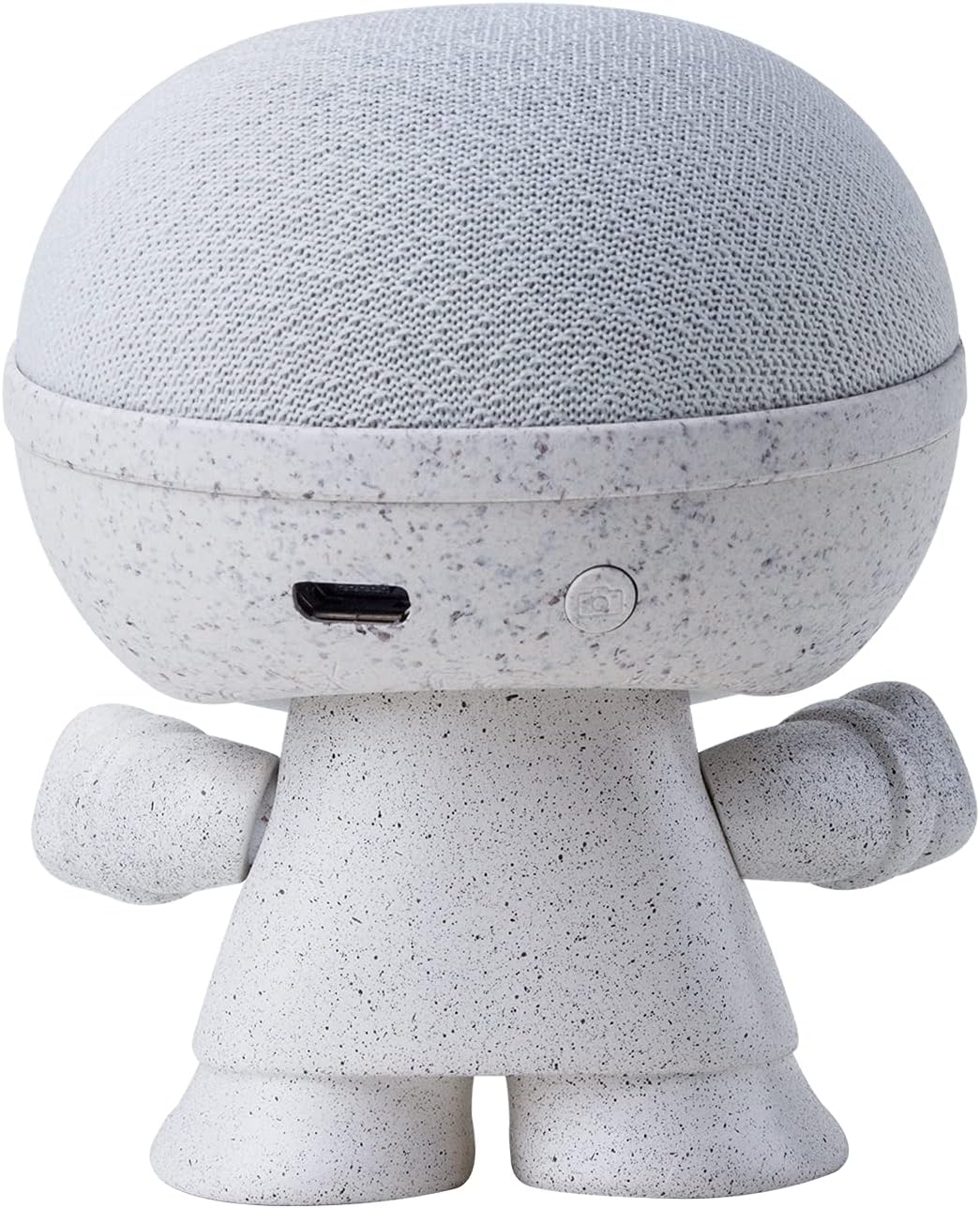
Immaġni: Wara view of the Xoopar Mini Xboy speaker, highlighting the charging port and the multi-function button.
Setup
1. Iċċarġja l-Ispeaker
Before first use, fully charge your Mini Xboy speaker. Connect the provided USB charging cable to the speaker's charging port and the other end to a USB power source (e.g., computer, wall adapter). The LED indicator will show charging status.
2. Tixgħil / Mitfi
- Biex Tixgħel: Press and hold the multi-function button for approximately 3 seconds. You will hear an audible prompt indicating the speaker is on.
- Biex Tifi: Press and hold the multi-function button for approximately 3 seconds. You will hear an audible prompt indicating the speaker is off.
3. Tqabbil Bluetooth (Speaker Uniku)
- Ensure the Mini Xboy speaker is powered on and in pairing mode (indicated by a flashing LED).
- On your smartphone, tablet, or computer, enable Bluetooth.
- Fittex għal available devices and select "XooparBoy Mini" from the list.
- Ladarba tkun konness, tisma' ħoss ta' konferma, u l-indikatur LED jieqaf iteptep.
Video: This video demonstrates how to power on/off the Xoopar Mini Xboy speaker, connect it via Bluetooth to a smartphone, play music, and use the selfie remote function. It also shows how to pair two speakers for stereo sound.
Istruzzjonijiet Operattivi
Daqq tal-Mużika
After successfully pairing your Mini Xboy speaker with your device, you can play music through any audio application. Control playback (play/pause, skip tracks) directly from your connected device.
Selfie Remote Function
The Mini Xboy speaker can act as a remote shutter for your smartphone camera:
- Ensure the speaker is connected to your phone via Bluetooth.
- Iftaħ l-applikazzjoni tal-kamera tat-telefon tiegħek.
- Press the multi-function button on the Mini Xboy speaker twice to trigger the camera shutter.
Stereo Pairing (TWS - True Wireless Stereo)
To enjoy enhanced stereo sound, you can pair two Mini Xboy speakers together:
- Ensure both Mini Xboy speakers are powered on and not connected to any device.
- On wieħed of the speakers, quickly press the multi-function button three times. You will hear a pairing sound.
- Iż-żewġ kelliema jikkonnettjaw ma' xulxin awtomatikament. Ladarba jkunu mqabbdin, tisma' ħoss ta' konferma.
- Now, connect your device to one of the speakers (it will appear as "XooparBoy Mini" on your device's Bluetooth list). Both speakers will play audio in stereo.

Image: Two Xoopar Mini Xboy speakers positioned on a desk next to a laptop and smartphone, illustrating a stereo audio setup.
Manutenzjoni
- Naddaf l-ispiker b'ċarruta ratba u niexfa. Tużax prodotti tat-tindif jew solventi li joborxu.
- Avoid exposing the speaker to extreme temperatures, direct sunlight, or moisture. The speaker is not waterproof.
- Aħżen l-ispiker f'post frisk u niexef meta ma jkunx qed jintuża.
Issolvi l-problemi
| Problema | Soluzzjoni |
|---|---|
| L-ispiker ma jixgħelx. | Kun żgur li l-ispiker huwa ċċarġjat kompletament. Qabbad ma' sors ta' enerġija u erġa' pprova. |
| Ma tistax tgħaqqad ma' apparat Bluetooth. |
|
| L-ebda ħoss jew volum baxx. |
|
| Ir-remote għas-selfies mhux qed jaħdem. |
|
Speċifikazzjonijiet
| Brand | Xoopar |
| Isem tal-Mudell | Mini XBOY |
| Numru tal-Mudell tal-Oġġett | XBOY81001.14WT |
| Tip ta' Kelliem | Speaker li jista ’jinġarr |
| Teknoloġija tal-Konnettività | Bluetooth |
| Teknoloġija tal-Komunikazzjoni mingħajr Fili | Bluetooth |
| Apparati Kompatibbli | Smartphone, Tablet, Laptop |
| Qawwa tal-Ħruġ Massimu tal-Ispeaker | 5 Watts |
| Modalità tal-Ħruġ tal-Awdjo | Mono (Stereo with TWS pairing) |
| Medda Massimu | 10 Meters |
| Sors tal-Enerġija | Powered Battery (batterija tal-Lithium Polymer inkluża) |
| Metodu ta' Kontroll | Remote, Touch (via multi-function button) |
| Materjal | Recycled Plastic, Biodegradable Wheat Fiber |
| Dimensjonijiet tal-Prodott | 1.9"D x 1.9"W x 3.14"H |
| Piż tal-oġġett | 1.76 uqija (50 Grammi) |
| Huwa Waterproof | Falza |
Garanzija u Appoġġ
The Xoopar Mini Xboy Portable Bluetooth Speaker comes with a limited warranty. For detailed warranty information, please refer to the warranty card included with your product or visit the official Xoopar websit.
For technical support or customer service, please contact Xoopar customer support through their official channels. Contact information can typically be found on the product packaging or the Xoopar websit.


