1. Introduzzjoni
This manual provides essential information for the installation, operation, and maintenance of your Sapphire Nitro+ AMD Radeon RX 6800 XT graphics card. Please read this manual thoroughly before installing and using the product to ensure proper functionality and to prevent damage.

Figura 1.1: The Sapphire Nitro+ AMD Radeon RX 6800 XT graphics card and its retail packaging. This image displays the overall design of the card with its triple-fan cooling solution and the product box.
2. Informazzjoni dwar is-Sigurtà
Observe the following safety precautions to prevent injury or damage to the graphics card and other components:
- Dejjem skonnettja l-provvista tal-enerġija mill-kompjuter tiegħek qabel ma tinstalla jew tneħħi xi komponenti.
- Wear an anti-static wrist strap or frequently touch a grounded metal object to discharge static electricity before handling the graphics card.
- Immaniġġja l-karta grafika mit-truf tagħha biex tevita li tmiss komponenti sensittivi.
- Żgura ventilazzjoni adegwata fil-kaxxa tal-kompjuter tiegħek biex tevita li jisħon iżżejjed.
- Tesponix il-karta grafika għall-umdità jew temperaturi estremi.
3. Setup u Installazzjoni
3.1 Rekwiżiti tas-Sistema
Qabel l-installazzjoni, kun żgur li s-sistema tiegħek tissodisfa r-rekwiżiti minimi li ġejjin:
- Motherboard abilitata għall-PCI Express b'slott grafika wieħed x16.
- Sufficient power supply unit (PSU) with appropriate PCIe power connectors. Consult your PSU manufacturer for compatibility.
- Minimu ta' 16GB ta' memorja tas-sistema (RAM) huwa rakkomandat għal prestazzjoni ottimali.
- Compatible operating system (e.g., Windows 10 64-bit or later).
- Sufficient space within the PC case for the graphics card dimensions (approximately 17 x 9.5 x 3.5 inches).
3.2 Installazzjoni Fiżika
- Ipprepara s-Sistema Tiegħek: Itfi l-kompjuter tiegħek u skonnettja l-kejbils kollha. Iftaħ il-kaxxa tal-kompjuter.
- Sib is-Slott tal-PCIe: Identifika slot PCI Express x16 disponibbli fuq il-motherboard tiegħek. Neħħi kwalunkwe għata tas-slots ta' espansjoni li tostakola l-installazzjoni.

Figura 3.1: Fuq view of the graphics card, showing the triple-fan cooling system. This perspective highlights the length and width of the card, which is important for case compatibility.
- Daħħal il-Karta tal-Grafika: Carefully align the graphics card with the PCIe slot and press down firmly until it is securely seated. Ensure the retention clip on the motherboard's PCIe slot locks into place.

Figura 3.2: Angolat view tal-karta grafika, wirjaasing its robust cooling design and the PCIe connector. This view helps in understanding the card's physical dimensions and how it would sit in a motherboard slot.
- Sikura l-Kard: Fasten the graphics card to the computer case using the screws from the expansion slot covers.
- Qabbad l-Enerġija: Connect the required PCIe power cables from your power supply unit to the graphics card. The Sapphire Nitro+ RX 6800 XT typically requires two 8-pin PCIe power connectors. Ensure all connections are firm.

Figura 3.3: Ġenb view of the graphics card, highlighting the power connectors and the illuminated Sapphire logo. This image is useful for identifying where power cables connect and observing the card's aesthetic features.
- Agħlaq il-Każ u Erġa' Qabbad: Close your computer case and reconnect all external cables (monitor, keyboard, mouse, power).
3.3 Installazzjoni tas-sewwieq
- Qawwa Mixgħul: Turn on your computer. It may boot into a basic display mode.
- Niżżel is-Sewwieqa: Żur l-AMD uffiċjali websit (www.amd.com/en/support) jew il-paġna ta' appoġġ ta' Sapphire (www.sapphiretech.com/en/consumer/nitro-radeon-rx-6800-xt-16g-gddr6) to download the latest AMD Radeon Software Adrenalin Edition drivers for your RX 6800 XT.
- Installa Sewwieqa: Run the downloaded installer and follow the on-screen instructions. It is recommended to perform a clean installation to avoid conflicts with previous drivers.
- Erġa' ibda s-Sistema: Erġa' ibda l-kompjuter tiegħek wara li titlesta l-installazzjoni tas-sewwieq.
4. It-Tħaddim tal-Karta tal-Grafika
4.1 Output tal-Wiri
Connect your monitor(s) to the display outputs on the graphics card. The Sapphire Nitro+ RX 6800 XT typically features DisplayPort and HDMI outputs. Ensure your monitor is set to the correct input source.
4.2 AMD Radeon Software
The AMD Radeon Software Adrenalin Edition provides a comprehensive interface for managing your graphics card. Through this software, you can:
- Adjust display settings and resolutions.
- Optimize game settings for performance and visual quality.
- Monitor GPU performance, temperature, and fan speeds.
- Access features like Radeon Anti-Lag, Radeon Boost, and FidelityFX.
- Aġġorna s-sewwieqa tal-grafika.
4.3 Sapphire TriXX Software
For advanced control and customization, Sapphire offers the TriXX software. This utility allows you to:
- Monitor hardware status in real-time.
- Aġġusta l-kurvi tal-fann għal livelli ottimali ta' tkessiħ u storbju.
- Control and synchronize the external RGB LED lighting on the card.
- Utilize features like Fan Check and Nitro Glow.
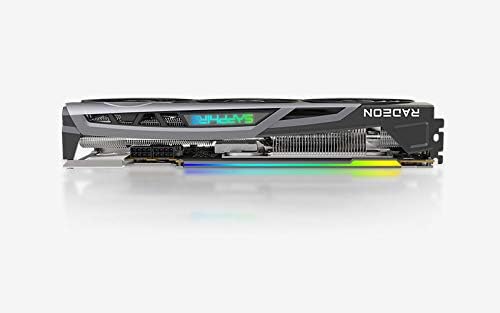
Figura 4.1: The Sapphire Nitro+ graphics card showcasing its customizable RGB LED lighting. This feature can be controlled via the Sapphire TriXX software for personalized aesthetics.
5. Manutenzjoni
Manutenzjoni regolari tgħin biex tiżgura l-lonġevità u l-prestazzjoni ottimali tal-karta grafika tiegħek.
- Tneħħija tat-Trab: Periodically clean dust from the heatsink fins and fan blades using compressed air. Ensure the fans are held stationary during cleaning to prevent damage to the bearings.
- Aġġornamenti tas-Software: Keep your graphics drivers and Sapphire TriXX software updated to benefit from performance improvements and bug fixes.
- Monitoraġġ tat-temperatura: Use AMD Radeon Software or Sapphire TriXX to monitor GPU temperatures, especially during heavy loads, to ensure it operates within safe limits.
6 Issolvi l-problemi
If you encounter issues with your graphics card, refer to the following troubleshooting steps:
- L-ebda Output tal-Wiri:
- Kun żgur li l-kejbil tal-monitor huwa konness sew kemm mal-karta grafika kif ukoll mal-monitor.
- Ivverifika li l-monitor ikun mixgħul u ssettjat għas-sors tad-dħul korrett.
- Check that the graphics card is fully seated in the PCIe slot and all power cables are connected.
- Ittestja b'kejbil tad-displej jew monitor differenti jekk possibbli.
- Instabbiltà jew Ħabtiet tas-Sistema:
- Kun żgur li l-unità tal-provvista tal-enerġija (PSU) tiegħek tissodisfa l-qawwa rakkomandatatage for your system, including the graphics card.
- Aġġorna s-sewwieqa tal-grafika tiegħek għall-aħħar verżjoni.
- Monitor GPU temperatures. Overheating can cause instability.
- Check for conflicts with other installed drivers or software.
- Prestazzjoni Fqira fil-Logħob/Applikazzjonijiet:
- Verify that the latest graphics drivers are installed.
- Iċċekkja s-settings fil-logħba; naqqas ir-riżoluzzjoni jew il-kwalità tal-grafika jekk meħtieġ.
- Ensure your CPU and RAM are not bottlenecking the GPU.
- Monitor GPU utilization and clock speeds using AMD Radeon Software.
- Ħoss jew Ħsara fil-Fann:
- Naddaf it-trab mill-paletti tal-fann u s-sink tas-sħana.
- Use Sapphire TriXX software to adjust fan curves or check fan health.
- Ensure no cables are obstructing fan rotation.
7. Speċifikazzjonijiet
| Karatteristika | Dettall |
|---|---|
| Proċessur tal-Grafika | AMD Radeon RX 6800 XT |
| Memorja | 16GB GDDR6 |
| Veloċità tal-Memorja | 16 GHz |
| Arloġġ tal-Logħba | Sa 2110 MHz |
| Boost Arloġġ | Sa 2360 MHz |
| Interface | PCIe 4.0 x16 |
| Interface tal-Output tal-Vidjo | DisplayPort, HDMI |
| Riżoluzzjoni Massima tal-Iskrin | 3840x2160 (4K) |
| Dimensjonijiet (LxWxH) | 17 x 9.5 x 3.5 pulzieri (madwar) |
| Piż tal-oġġett | 4.53 liri |
| Numru tal-Mudell | 11304-02-20G |

Figura 7.1: Wara view of the graphics card, showing the backplate and the overall robust construction. This view emphasizes the structural integrity and cooling design from the back.
8. Garanzija u Appoġġ
Sapphire products are manufactured to the highest quality standards. For information regarding the warranty period and terms for your Sapphire Nitro+ AMD Radeon RX 6800 XT graphics card, please refer to the warranty card included with your product or visit the official Sapphire websit.
For technical support, driver downloads, and frequently asked questions, please visit the Sapphire support portal: www.sapphiretech.com/en/support.


