1. Introduzzjoni
This manual provides essential information for the safe and efficient installation, operation, and maintenance of your Onforu 100W 14000lm LED Shop Lights. Please read this manual thoroughly before use and retain it for future reference.
2. Informazzjoni dwar is-Sigurtà
Dejjem segwi l-prekawzjonijiet bażiċi tas-sigurtà biex tnaqqas ir-riskju ta 'nar, xokk elettriku, u korriment personali.
- Ensure the power is disconnected before installation or maintenance.
- Do not look directly into the LED light when it is on, as it may cause eye damage.
- Żomm il-prodott 'il bogħod minn materjali li jaqbdu.
- This product is IP66 waterproof, suitable for outdoor use, but avoid submerging it in water.
- L-installazzjoni għandha titwettaq minn elettriċista kwalifikat jekk m'intix ċert.
- Kun żgur li l-wiċċ tal-immuntar jista' jsostni l-piż tal-apparat.
3. Kontenut tal-Pakkett
Ivverifika li l-komponenti kollha huma preżenti u mhux imħassra malli tiftaħ il-pakkett:
- LED Shop Light (2 units)
- Lamp Brackets (2 pairs)
- M6 Hex Screw Key (1 unit)
- M6 Screws (2 units)
- Plastic Expansion Nails (2 units)
- Screws for Mounting (2 units)
- Additional connectors for linking (as shown in assembly video)

4. Setup u Installazzjoni
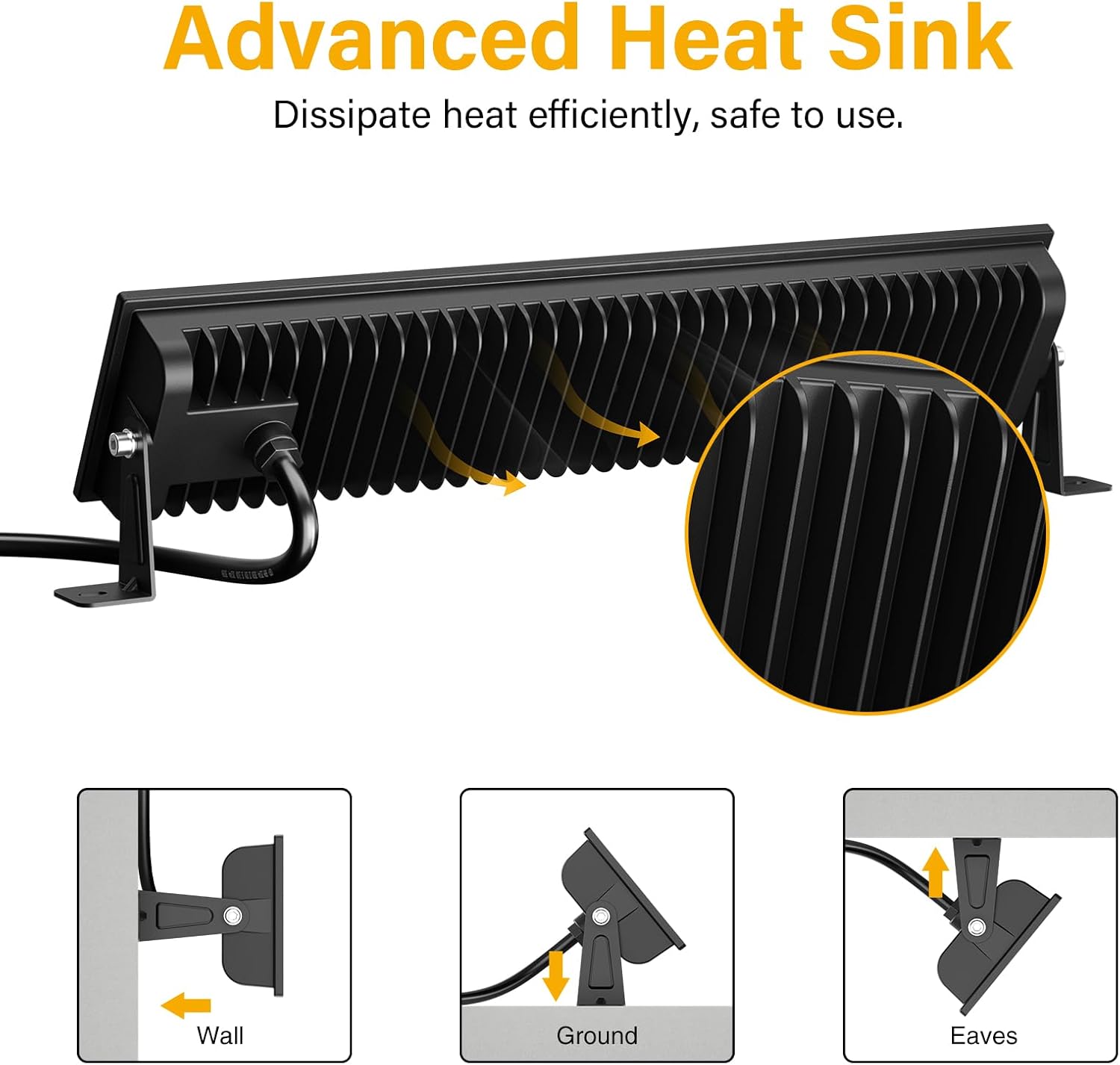
The Onforu LED Shop Lights are designed for easy installation and can be mounted in various configurations (wall, ground, or ceiling) and can also be linked horizontally or vertically.
4.1 Single Unit Installation
- Waħħal il-parentesi: Sikura l-lamp brackets to the sides of the LED light fixture using the provided M6 screws and hex key. Do not overtighten initially to allow for angle adjustment.
- Immonta l-Apparat: Choose your desired mounting location (wall, ground, or ceiling). Use the plastic expansion nails and mounting screws to firmly attach the brackets to the surface.
- Aġġusta Angolu: Once mounted, adjust the angle of the light fixture to direct illumination as needed. The fixture allows for 180° adjustment. Tighten the M6 screws on the brackets to secure the angle.
- Qabbad l-Enerġija: Plug the power cord into a standard 120V AC outlet. The light features an in-line switch for convenient power control.

Vidjo 1: Preżentazzjoni qasiraview demonstrating the installation process and adjustable features of the Onforu LED Flood Light.
4.2 Linking Multiple Units
The lights can be connected horizontally or vertically to create a longer or wider lighting solution. Use the provided connectors and hex key to secure the units together.
- Horizontal Connection: Align two light units side-by-side. Use the small connecting brackets and screws to join them securely. Ensure the power cables are routed appropriately.
- Vertical Connection: Align two light units one above the other. Use the small connecting brackets and screws to join them securely.
Video 2: An official product video from Onforu demonstrating the various installation methods, including linking multiple units horizontally and vertically, and showcasing the included hardware.
5. Istruzzjonijiet Operattivi
Operating your Onforu LED Shop Light is straightforward:
- Once installed and plugged into a power outlet, locate the in-line switch on the power cord.
- Press the switch to turn the light ON.
- Press the switch again to turn the light OFF.

6. Manutenzjoni
To ensure optimal performance and longevity of your LED Shop Lights:
- Tindif: Periodically clean the glass cover with a soft, damp drapp. Evita prodotti tat-tindif jew solventi li joborxu li jistgħu jagħmlu ħsara lill-wiċċ.
- Spezzjoni: Regularly check the power cord and plug for any signs of damage. Ensure all mounting screws remain tight.
- Dissipazzjoni tas-Sħana: The fixture is designed with a fin-type heat sink. Ensure it is not obstructed to allow for efficient heat dissipation.
7 Issolvi l-problemi
If you encounter issues with your LED Shop Light, refer to the following common solutions:
| Problema | Kawża Possibbli | Soluzzjoni |
|---|---|---|
| Id-dawl ma jixgħelx. | No power supply; faulty switch; loose connection. | Check if the plug is securely inserted and the power outlet is functional. Ensure the in-line switch is ON. Inspect the power cord for damage. |
| Teptip ħafif. | Provvista tal-enerġija instabbli; konnessjoni maħlula. | Ensure the power supply is stable. Check all connections for tightness. |
| Luminożità mnaqqsa. | Dirt or debris on the glass cover. | Clean the glass cover with a soft, damp drapp. |
8. Speċifikazzjonijiet
| Karatteristika | Dettall |
|---|---|
| Brand | Onforu |
| Numru tal-Mudell | CT08 |
| Wattage | 100 watt |
| Luminożità | 14000 Lumen |
| Temperatura tal-Kulur | 6500 Kelvin (Daylight White) |
| Materjal | Aluminju, Ħġieġ ittemprat |
| Livell ta 'Reżistenza għall-Ilma | IP66 Waterproof |
| Dimensjonijiet tal-Prodott | 15.27"T x 3.46"W x 1.37"Għ |
| Angolu tar-raġġ | 120° |
| Karatteristika Speċjali | With Plug, Thick die-cast aluminum, Waterproof, Not Dimmable |
9. Garanzija u Appoġġ
Onforu products come with a limited warranty. For specific warranty details or technical support, please refer to the official Onforu websit jew ikkuntattja lis-servizz tal-konsumatur.
Pjanijiet ta' protezzjoni fakultattivi huma disponibbli għax-xiri separatament:
- Pjan ta' Protezzjoni ta' Sentejn
- Pjan ta' Protezzjoni ta' Sentejn
- Complete Protect (abbonament ta' kull xahar)
Għal aktar għajnuna, żur il- Onforu Store on Amazon.


