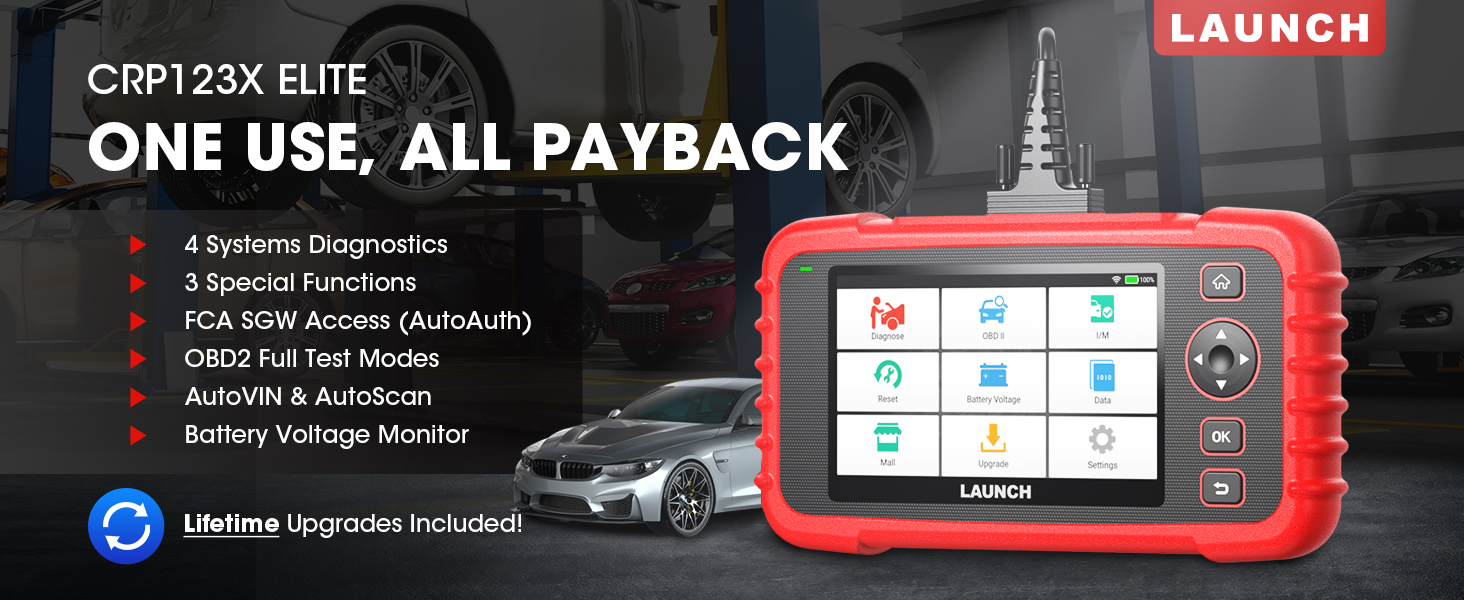
The LAUNCH CRP123X Elite is an advanced OBD2 diagnostic scan tool designed for comprehensive vehicle system analysis. It offers a wide range of functions including 4-system diagnostics (Engine, Transmission, ABS, SRS), 3 special reset services (Oil Reset, Electronic Throttle Relearn, Steering Angle Sensor Calibration), full OBD2 functions, AutoVIN technology, and lifetime free software updates via Wi-Fi. This manual provides detailed instructions for setting up, operating, and maintaining your CRP123X Elite scanner.
2. Karatteristiċi ewlenin
Aġġornamenti tas-Softwer Ħieles tul il-Ħajja: Ensures compatibility with future vehicles and systems, updated wirelessly via Wi-Fi.
3 Hottest Special Functions: Includes Oil Reset, Electronic Throttle Relearn (ETC Reset), and Steering Angle Sensor Calibration (SAS Reset).
4-System Diagnostics: Comprehensive diagnostics for Engine, Anti-lock Braking System (ABS), Supplemental Restraint System (SRS), and Transmission Control Module (TCM). Read and clear DTCs, view live data, and read ECU information.
Kopertura Wiesgħa tal-Vetturi: Supports over 72 car brands across US, EU, and Asia, including 2018+ FCA SGW (AutoAuth required).
AutoVIN & AutoScan: Automatically identifies vehicle information and quickly scans all modules in all systems for 2006+ vehicles.
All 10 OBD2 Test Modes: Supports all standard OBD2 functions for basic car issue diagnosis, including reading/clearing codes, live data, freeze frame, I/M readiness, O2 sensor test, EVAP system test, on-board monitor test, component test, and vehicle information retrieval.
Real-Time Voltage Monitor: Displays dynamic graphic representation of the car's battery voltage.
4-in-1 Graphic Live Data: Allows merging up to 4 PIDs data on one screen for easier analysis.
Kondiviżjoni ta' Rapport Dijanjostiku: Save and share diagnostic reports for further analysis or record-keeping.
Disinn faċli għall-utent: Features a 5-inch HD touchscreen, Android 7.0 OS, 16GB memory, and anti-slip, shock-resistant casing.
3. Kontenut tal-Pakkett
Ivverifika li l-oġġetti kollha huma preżenti fil-pakkett tiegħek:
LAUNCH CRP123X Elite Scanner (Red unit with 5-inch touchscreen)
DC 5V Charging Cable (USB cable)
OBD2 Cable (DB-15 diagnostic connector)
Carrying Bag (Black zippered case)
User Manual (Printed document)
Figure 3.1: LAUNCH CRP123X Elite Package Contents. This image displays the main scanner unit, a USB charging cable, an OBD2 diagnostic cable, a black carrying bag, and the printed user manual.
4. Gwida ta' Setup
4.1 L-Ewwel Tixgħel u l-Iċċarġjar
Before first use, ensure the device is fully charged. Connect the provided DC 5V Charging Cable to the scanner's charging port and a suitable USB power adapter (not included) or computer USB port. The device will power on automatically or can be powered on by pressing the power button.
Figure 4.1: Scanner Ports and Buttons. This image highlights the 5V charging port, the DB-15 diagnostic connector, and the power button on the top side of the scanner.
4.2 Konnessjoni Wi-Fi
From the main menu, tap on "Settings".
Agħżel "Wi-Fi" u ixgħelha.
Agħżel in-netwerk Wi-Fi mixtieq tiegħek mil-lista u daħħal il-password jekk tintalab.
Ladarba tkun konness, l-ikona tal-Wi-Fi tidher fil-bar tal-istatus.
4.3 Aġġornament Inizjali tas-Softwer
It is recommended to perform a software update after connecting to Wi-Fi to ensure you have the latest vehicle coverage and functions.
From the main menu, tap on "Upgrade".
The system will check for available updates. Select all necessary updates and tap "Download".
Allow the updates to complete. The device may restart during this process.
Figure 4.2: One-Click Wi-Fi Update. This image illustrates the simple process of updating the scanner's software via a Wi-Fi connection, highlighting its ease of use compared to other methods.
5. Istruzzjonijiet Operattivi
5.1 Konnessjoni mal-Vettura
Locate the vehicle's OBD2 port, usually under the dashboard on the driver's side. Connect the provided OBD2 cable to the scanner and then to the vehicle's OBD2 port. Turn the vehicle's ignition to the "ON" position (engine off or running, depending on the test).
Figure 5.1: Scanner Connected to Vehicle. This image shows the LAUNCH CRP123X Elite scanner connected to a vehicle's diagnostic port, ready for operation.
5.2 System Diagnostics (Engine, ABS, SRS, Transmission)
The CRP123X Elite can diagnose four core vehicle systems:
Sistema tal-Magna: Read and clear engine fault codes, view live data streams, and check engine light status.
Sistema ta' Ibbrejkjar Anti-lock (ABS): Diagnose ABS issues, read and clear ABS fault codes, and view ABS sensor data.
Supplemental Restraint System (SRS/Airbag): Read and clear airbag fault codes. Note: Crash data cannot be cleared from memory even with a new airbag.
Transmission Control Module (TCM): Diagnose transmission problems, read and clear transmission fault codes, and view transmission live data.
To perform a system diagnostic:
From the main menu, tap "Diagnose".
Select the vehicle make and model. The AutoVIN feature (for 2006+ vehicles) can automatically detect this.
Choose the system you wish to diagnose (e.g., "Engine", "ABS").
Select "Read Codes" to view Diagnostic Trouble Codes (DTCs) or "Clear Codes" to erase them.
Agħżel "View Data Stream" to monitor real-time sensor data.
Figure 5.2: 4 Systems Diagnostic Overview. This image visually explains the diagnostic capabilities for Engine, Transmission, SRS, and ABS systems, including reading/clearing codes and viewing data streams.Video 5.1: LAUNCH Code Reader - CRP123X OBD2 Scanner for Engine Transmission ABS SRS. This video demonstrates the diagnostic capabilities of the CRP123X scanner across engine, transmission, ABS, and SRS systems, showing how to read and clear codes and view data diretta.
5.3 Reset Functions (Oil, ETC, SAS)
The scanner supports three common reset services:
Irrisettja Żejt: Resets the oil life reminder after an oil change or maintenance service.
Electronic Throttle Relearn (ETC Reset): Relearns the electronic throttle body for optimal engine performance and smooth idle.
Steering Angle Sensor Calibration (SAS Reset): Jikkalibra s-senser tal-angolu tal-istering wara l-allinjament jew is-sostituzzjoni tal-komponent.
To perform a reset function:
From the main menu, tap "Reset".
Select the desired reset function (e.g., "Oil Reset").
Segwi l-istruzzjonijiet fuq l-iskrin biex tlesti l-proċedura.
Figure 5.3: 3 Hottest Reset Functions. This image illustrates the three primary reset functions: Oil Reset, Electronic Throttle Control (ETC) Reset, and Steering Angle Sensor (SAS) Reset, which are crucial for vehicle maintenance.
5.4 All 10 OBD2 Test Modes
The CRP123X Elite supports all 10 modes of OBD2 testing, providing comprehensive diagnostic capabilities for emissions-related issues and general vehicle health:
Aqra Kodiċijiet: Juri l-Kodiċijiet Dijanjostiċi tal-Problemi (DTCs) kurrenti, pendenti u permanenti.
Fluss ta' Dejta Diretta: Juri dejta f'ħin reali mis-sensuri tal-vettura f'format ta' test jew graff.
Iffriżar tad-Dejta tal-Qafas: Juri stampa tal-kundizzjonijiet operattivi fil-ħin li seħħ ħsara relatata mal-emissjonijiet.
Lest I / M: Jivverifika l-prontezza tas-sistemi ta' monitoraġġ tal-emissjonijiet.
Test tas-Sensor O2: Retrieves and displays O2 sensor monitoring test results.
Test tal-Monitor Abbord: Jikseb ir-riżultati tat-testijiet għal komponenti u sistemi tal-powertrain relatati mal-emissjonijiet li mhumiex immonitorjati kontinwament.
Test tas-Sistema EVAP: Jibda test tas-Sistema ta' Kontroll tal-Emissjonijiet Evaporattivi.
Test tal-Komponent: Jippermetti l-bidu ta' test tat-tnixxija għas-sistema EVAP tal-vettura.
Informazzjoni dwar il-Vettura: Retrieves Vehicle Identification Number (VIN), Calibration ID (CID), and Calibration Verification Number (CVN).
Figure 5.4: Complete OBD2 Test Modes. This image displays icons and brief descriptions for each of the 10 OBD2 test modes, including Read Codes, Erase Codes, Live Data Stream, Freeze Frame, I/M Readiness, On-Board Monitor Test, O2 Sensor Test, EVAP System Test, Vehicle Information, and DTC Library.
5.5 Live Data Stream & Recording
The scanner can display live sensor data in various formats. You can select up to four data parameters to view simultaneously in a graphical format for easier comparison and analysis.
From the main menu, tap "Data".
Select "Live Data" and choose the parameters you wish to monitor.
Tap the "Record" icon to begin recording the data for later review.
Figure 5.5: 4-in-1 Live Data Stream. This image shows the scanner's ability to display multiple live data parameters simultaneously in a graphical format, along with options for data recording and playback.
5.6 Rapport Dijanjostiku
After completing a diagnostic session, you can generate and save a diagnostic report. This report can be printed via PC or emailed for record-keeping or sharing with a mechanic.
After a scan, navigate to "Data" and then "Diagnostic Report".
Tista' view, playback, or share the report via email (requires Wi-Fi connection).
Figure 5.6: Diagnostic Report Generation and Sharing. This image highlights the scanner's capability to generate detailed diagnostic reports and offers options to print them via PC or share them electronically.
5.7 Real-Time VoltagMonitoraġġ
The scanner includes a feature to monitor the vehicle's battery voltage in real-time, displayed graphically.
From the main menu, tap "Battery Voltage".
Observe the real-time voltage readings and dynamic graphic.
Figure 5.7: Real-Time Voltage Monitor. This image demonstrates the scanner's ability to display the vehicle's battery voltage in real-time, including a dynamic graphical representation.
6. Manutenzjoni
Tindif: Uża artab, damp drapp biex tnaddaf il-barra tal-iskaner. Tużax prodotti tat-tindif jew solventi li joborxu.
Ħażna: Store the device in its carrying bag in a dry, cool place away from direct sunlight and extreme temperatures.
Aġġornamenti tas-Software: Regularly connect the device to Wi-Fi and perform software updates to ensure optimal performance and access to the latest vehicle data and features.
Kura tal-batterija: Iċċarġja l-apparat regolarment, anke jekk ma jintużax ta' spiss, biex iżżomm il-batterija f'kundizzjoni tajba. Evita li tiċċarġja kompletament il-batterija għal perjodi twal.
7 Issolvi l-problemi
Problema
Kawża Possibbli
Soluzzjoni
L-apparat ma jixgħelx.
Low battery; faulty connection.
Charge the device fully. Ensure OBD2 cable is securely connected to vehicle and scanner.
Żball fil-komunikazzjoni mal-vettura.
Loose connection; vehicle not OBD2 compliant; ignition off; blown fuse in vehicle.
Check all connections. Verify vehicle is OBD2 compliant (1996 and newer for US). Turn ignition ON. Check vehicle's fuse for the OBD2 port.
Screen freezes or device is unresponsive.
Problema fis-softwer; żball temporanju tas-sistema.
Press and hold the power button to force a restart. If issue persists, perform a factory reset (data will be lost).
Ma tistax tikkonnettja mal-Wi-Fi.
Password mhux korretta; barra mill-firxa; problema tan-netwerk.
Verify Wi-Fi password. Move closer to the Wi-Fi router. Restart the router.
For further assistance, please contact LAUNCH customer support.
8. Speċifikazzjonijiet
Karatteristika
Dettall
Numru tal-Mudell
launch crp123x
Sistema Operattiva
Android 7.0
Wiri
5-inch HD Touch Screen (LCD touch screen)
Memorja
16GB ROM, 2GB RAM
CPU
1.5GHz
Konnettività
Wi-Fi
Dimensjonijiet tal-Prodott
10.24 x 3.15 x 7.48 pulzieri (7.48"T x 3.15"W x 10.24"Għ)
Piż
2.36 Liri
Lingwa
English (and 9 other languages)
L-Ewwel Data Disponibbli
16 ta’ Novembru, 2020
Figure 8.1: Feature Comparison. This table compares the specifications of the CRP123X with other models, emphasizing its advantages in reset functions, wider coverage, Android OS, screen size, battery, memory, Wi-Fi update, AutoVIN, touchscreen, vehicle coverage, languages, system diagnosis, code search, online feedback, and battery voltagit-test.Figure 8.2: Wide Car Compatibility & Language Options. This image illustrates the extensive vehicle compatibility of the scanner, covering American, European, and Asian car brands, along with the availability of 10 language options.
9. Garanzija u Appoġġ
LAUNCH stands behind the quality of the CRP123X Elite scanner with an extended 5-year product quality backup. Enjoy free lifetime software updates to ensure compatibility with future vehicles and systems.
For technical assistance or any inquiries, please contact LAUNCH Support:
Numru bla ħlas: 1-888-756-2936
Sigħat ta' Operazzjoni: Monday - Friday, 9:00 AM - 6:00 PM EST
Email: Tech_Launchoriginal@outlook.com
LAUNCH also offers a 30-day money-back policy.
Figure 9.1: 24/7/365 Service & Multi-Language Menu. This image highlights the comprehensive customer support offered by LAUNCH, including one-on-one technical assistance, 100% original LAUNCH products, 5-year quality backup, and lifetime update included, along with support for multiple languages.
Dokumenti Relatati - CRP123X Elite
TNEDI L-ISKANER OBD2 CRP123X: Informazzjoni Ewlenija Qabel ix-Xiri Gwida essenzjali li tkopri 10 punti kruċjali għall-utenti tal-iskaner LAUNCH CRP123X OBD2, inkluż kompatibilità, aġġornamenti, garanzija, pariri dwar l-użu, u aċċessorji inklużi. Tgħallem dwar il-karatteristiċi tal-prodott, l-appoġġ, u l-politiki ta' ritorn.
Gwida għall-Proċess ta' Aġġornament ta' LAUNCH CReader VII+ Gwida pass pass dwar kif taġġorna l-għodda tal-iskannjar dijanjostiku tal-karozzi LAUNCH CReader VII+ permezz ta' TF card jew kejbil USB. Tinkludi struzzjonijiet dwar it-tniżżil, l-installazzjoni u r-reġistrazzjoni tas-softwer.
Manwal tal-Utent LAUNCH Creader Professional 123i - Gwida Komprensiva Esplora l-karatteristiċi u t-tħaddim tal-għodda dijanjostika tal-karozzi LAUNCH Creader Professional 123i. Dan il-manwal tal-utent jipprovdi struzzjonijiet dettaljati dwar id-dijanjosi tal-vettura, il-kontrolli tas-sistema, l-aġġornamenti, u s-settings.