Introduzzjoni
Welcome to the user manual for your new Astro Men's Digital Watch, model A9916-PPHB. This guide provides comprehensive instructions on how to set up, operate, and maintain your watch to ensure optimal performance and longevity. Please read this manual carefully before using your watch.
Prodott Overview u Funzjonijiet tal-Buttuni
Your Astro digital watch features a clear display and intuitive button controls for various functions.
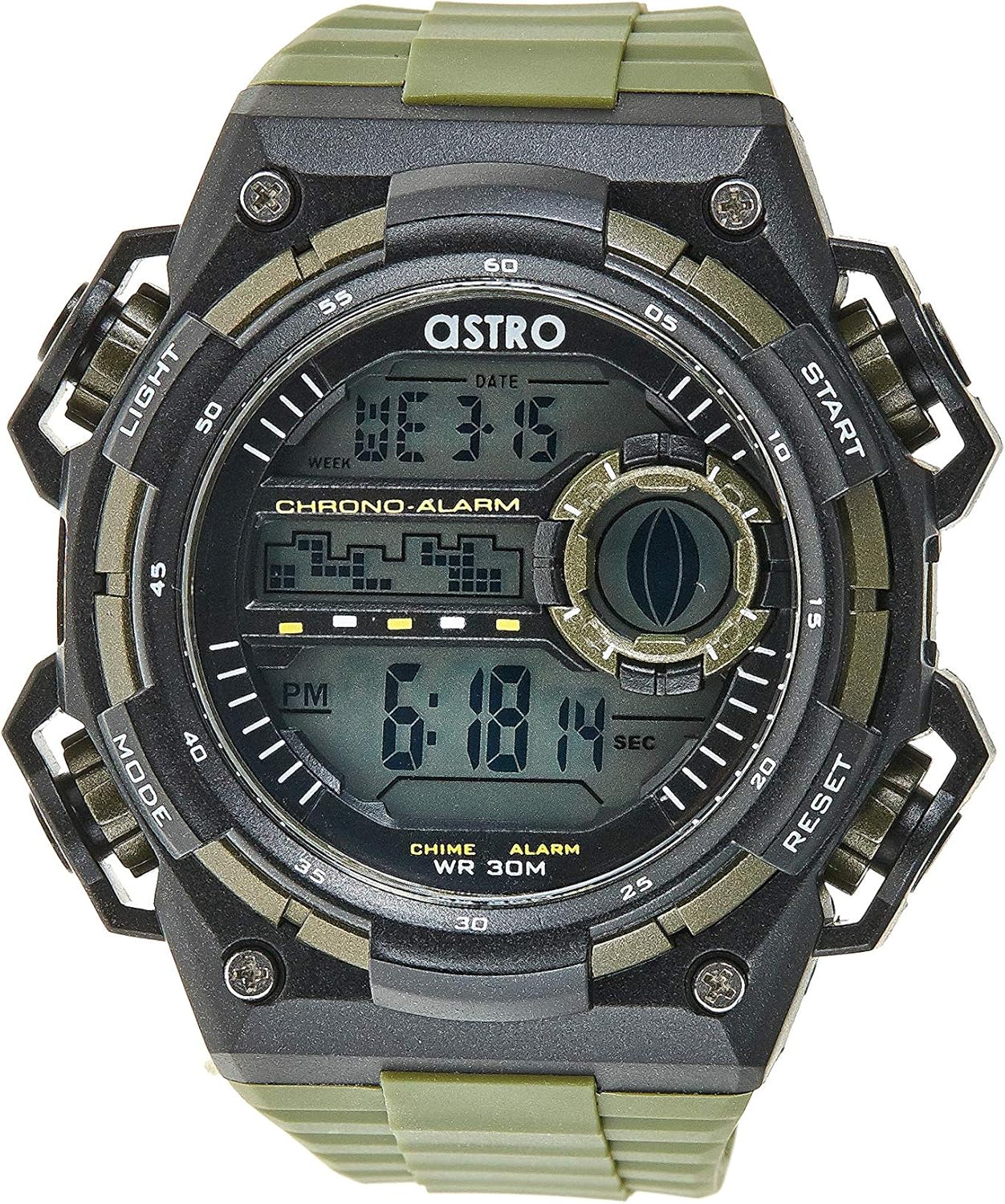
Figura 1: Quddiem View of the Watch. This image displays the watch face, highlighting the digital display and the four primary control buttons: LIGHT (top left), MODE (bottom left), START (top right), and RESET (bottom right). The display shows the time, day of the week, and date, along with indicators for chronograph and alarm functions.

Figura 2: Ġenb View of the Watch. This image provides a profile view of the watch, clearly showing the placement and design of the "LIGHT" and "MODE" buttons on the left side of the watch case. These buttons are essential for navigating through the watch's functions and activating the backlight.

Figura 3: Lura View of the Watch. This image shows the reverse side of the watch, featuring the stainless steel case back secured by four screws. The durable olive green plastic strap, with its buckle closure, is also visible, indicating the watch's robust construction.
Funzjonijiet tal-buttuna:
- Buttuna DAWL (Fuq ix-Xellug): Activates the backlight for viewtixgħel id-displej f'kundizzjonijiet ta' dawl baxx.
- Buttuna MODE (Fil-qiegħ tax-xellug): Cycles through different modes: Time Display, Alarm Setting, Chronograph (Stopwatch), and Date Setting.
- Buttuna START (Fuq il-Lemin): Used to start/stop the chronograph, adjust values during setting, or activate the alarm.
- Buttuna RESET (Fil-qiegħ tal-lemin): Used to reset the chronograph, confirm settings, or switch between 12/24-hour format.
Setup u Konfigurazzjoni Inizjali
1. Unboxing u Spezzjoni
Upon receiving your watch, carefully unbox it and inspect for any visible damage. Ensure all components, including the watch and any accompanying documentation (like the guarantee card), are present.

Figure 4: Watch Packaging and Guarantee Card. This image shows the watch's protective tin packaging and the included guarantee card, which is important for warranty claims.
2. L-issettjar tal-Ħin u d-Data
- Mill-modalità normali tal-wiri tal-ħin, agħfas il-buttuna MODALITÀ Agħfas il-buttuna tliet darbiet biex tidħol fil-modalità tal-issettjar tal-ħin. Iċ-ċifri tas-sekondi jibdew jteptpu.
- Agħfas il- RESET button to cycle through the settings: Seconds → Hour → Minute → Month → Date → Day of the Week.
- Waqt li ċifra tkun qed teptip, agħfas il-buttuna BIDU buttuna biex iżżid il-valur. Żomm il-buttuna BIDU buttuna biex tavvanza ċ-ċifri malajr.
- Ladarba s-settings kollha jkunu aġġustati, agħfas il-buttuna MODALITÀ biex toħroġ mill-modalità tas-settings u terġa' lura għall-wiri normali tal-ħin.
3. Għażla tal-Format ta' 12/24 Siegħa
Fil-modalità normali tal-wiri tal-ħin, agħfas il-buttuna RESET button to toggle between 12-hour (with 'AM'/'PM' indicator) and 24-hour formats.
Istruzzjonijiet Operattivi
1. Funzjoni ta 'allarm
- Mill-wiri normali tal-ħin, agħfas il-buttuna MODALITÀ Agħfas il-buttuna darba biex tidħol fil-modalità tal-Allarm. Il-ħin tal-allarm se jintwera.
- Agħfas il- RESET Agħfas il-buttuna biex tagħżel is-siegħa jew il-minuta li trid tissettja. Iċ-ċifra magħżula se teptip.
- Agħfas il- BIDU buttuna biex taġġusta ċ-ċifra li teptip.
- Biex tattiva/tiddiżattiva l-allarm, agħfas il-buttuna BIDU button while in Alarm mode (without any digits flashing). An alarm icon will appear/disappear on the display.
- Agħfas il- MODALITÀ buttuna biex terġa' lura għall-wiri normali tal-ħin.
2. Hourly Chime
Biex tattiva jew tiddiżattiva l-hourly chime (which beeps at the top of every hour):
- In Alarm mode, press the RESET buttuna biex taqleb il-hourly chime on/off. A chime icon will appear/disappear on the display.
3. Kronografu (Stopwatch)
- Mill-wiri normali tal-ħin, agħfas il-buttuna MODALITÀ button twice to enter the Chronograph mode. The display will show "00:00:00".
- Agħfas il- BIDU buttuna biex tibda l-ħin.
- Agħfas il- BIDU Agħfas il-buttuna mill-ġdid biex twaqqaf il-ħin.
- Agħfas il- RESET button while paused to reset the chronograph to "00:00:00".
- Agħfas il- MODALITÀ buttuna biex terġa' lura għall-wiri normali tal-ħin.
4. Funzjoni tad-Dawl ta' Wara
Agħfas il- DAWL button (top left) at any time to illuminate the display for a few seconds, making it visible in dark environments.
Manutenzjoni u Kura
1. Tindif tal-Arloġġ Tiegħek
To keep your watch looking its best, wipe it regularly with a soft, dry cloth. For stubborn dirt, a slightly damp Jista' jintuża drapp, segwit minn tnixxif immedjat. Evita li tuża kimiċi ħarxa jew materjali li joborxu.
2. Water Resistance (WR 30M)
Your Astro watch is water resistant up to 30 meters (3 ATM). This means it is suitable for daily use and can withstand splashes or brief immersion in water, such as during hand washing or light rain. It is NOT suitable for showering, swimming, diving, or any water sports. Do not operate buttons when the watch is wet.
3. Sostituzzjoni tal-batterija
When the display becomes dim or functions become erratic, it may be time to replace the battery. Battery replacement should ideally be performed by a qualified watch technician to ensure proper sealing and water resistance integrity.
Issolvi l-problemi
| Problema | Kawża Possibbli | Soluzzjoni |
|---|---|---|
| Id-displej huwa vojt jew mudlam. | Batterija baxxa. | Ibdel il-batterija. |
| Il-ħin mhux korrett. | Il-ħin mhux issettjat sew jew għafast buttuna aċċidentalment. | Refer to "Setting the Time and Date" section to reset the time. |
| Il-buttuni ma jirrispondux. | Watch may be in a frozen state or battery is extremely low. | Try pressing all buttons simultaneously for a few seconds to reset. If problem persists, replace battery. |
| L-allarm ma jdoqqx. | L-allarm mhux attivat. | Ensure the alarm icon is displayed on the screen. Refer to "Alarm Function" section. |
Speċifikazzjonijiet
- Numru tal-Mudell: A9916-PPHB
- Tip ta' wiri: Diġitali
- Materjal taċ-ċinga: Plastik
- Materjal tal-Każ: Plastic / Stainless Steel Back
- Reżistenza għall-Ilma: 30 Metru (3 ATM)
- Funzjonijiet: Time (12/24-hour), Date, Day, Alarm, Hourly Chime, Chronograph, Backlight
- Manifattur: Astro
Garanzija u Appoġġ
Your Astro A9916-PPHB watch comes with a manufacturer's guarantee. Please refer to the included guarantee card (Figure 4) for specific terms and conditions of your warranty. Keep your purchase receipt and guarantee card in a safe place as proof of purchase.
For technical support, warranty claims, or any inquiries not covered in this manual, please contact your retailer or the official Astro customer service channel as indicated on your guarantee card or product packaging.


