1. Introduzzjoni
This manual provides detailed instructions for the installation, operation, and maintenance of your xmartO DT3034 2K Wireless Security Camera. Please read this manual thoroughly before using the product to ensure proper functionality and safety. The xmartO DT3034 is an outdoor WiFi security camera featuring 2K Super HD resolution, auto-tracking, pan-tilt-zoom control, enhanced two-way audio, auto floodlights, and IP66 weatherproofing. It can operate standalone via the xmartO WallPixel App or integrate with an xmartO NVR system.
2. Kontenut tal-Pakkett
Ivverifika li l-oġġetti kollha huma preżenti fil-pakkett tiegħek:
- 1 x xmartO DT3034 WiFi Security Camera
- 2 x Antenni WiFi
- 1 x 12V DC 1A Power Adapter
- 1 x Manwal tal-Utent (dan id-dokument)
- 1 x Mounting Kits (screws and wall anchors)
3. Prodott Aktarview
The xmartO DT3034 camera is designed for outdoor surveillance, offering a range of features for comprehensive security monitoring.


4. Setup
4.1 Power and Connectivity Requirements
The camera requires a continuous power supply from a nearby electrical outlet. It can connect to your network wirelessly via WiFi or through a wired Ethernet connection.

4.2 Installazzjoni Fiżika
- Agħżel Post: Select a mounting location that provides the desired viewing angle and is within range of a power outlet and your WiFi network. Ensure the location offers good signal strength for wireless operation.
- Immonta l-Kamera: Use the provided mounting kit to securely attach the camera to a wall or ceiling.
- Qabbad l-Enerġija: Plug the 12V DC 1A power adapter into the camera and then into a power outlet.
4.3 App Installation and Initial Configuration
- Niżżel l-App: Fittex għal 'xmartO WallPixel' in your smartphone's app store (available on Google Play and Apple App Store) and install it.
- Oħloq Kont: Iftaħ l-app u segwi l-istruzzjonijiet fuq l-iskrin biex toħloq kont ta' utent ġdid.
- Żid Kamera: Follow the in-app guide to add your DT3034 camera. This typically involves scanning a QR code on the camera or manually entering its ID.
- Qabbad man-Netwerk: Configure the camera's network settings within the app. You can choose to connect via WiFi or a wired Ethernet cable.
- Aġġornament tal-Firmware: It is important to perform an Over-The-Air (OTA) firmware upgrade to the latest version upon initial setup to enable features like Auto-Track and Home Point.
5. Istruzzjonijiet Operattivi
5.1 Traċċar Awtomatiku
The camera features automatic motion tracking. When movement is detected, the camera will automatically pan and tilt to follow the subject and record the activity. You can enable or disable this feature in the xmartO WallPixel app.

5.2 Night Vision and Auto Flood Lights
The DT3034 camera is equipped with both infrared (IR) LEDs and professional floodlights for night vision capabilities.
- Viżjoni Lejl IR: Six built-in IR LEDs provide clear black-and-white video in complete darkness.
- Auto Flood Lights & Color Night Vision: Four professional LED floodlights automatically activate upon motion detection at night, illuminating the area and enabling the camera to capture full-color night vision video. The floodlights can be configured to turn on or off based on your preferences.


5.3 Awdjo b'żewġ direzzjonijiet
The camera includes a high-gain microphone and enhanced speakers, allowing for clear two-way communication through the xmartO WallPixel app. You can listen to the camera's surroundings and speak through the camera from your smartphone.

5.4 Deterrence Protection
With auto floodlights and an integrated siren, the camera can deter intruders. These features can be activated automatically upon motion detection or manually controlled via the app. You have the option to enable or disable the siren and floodlights independently.

5.5 Għażliet ta' Ħażna
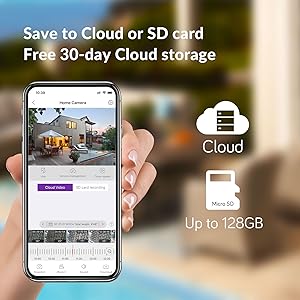
The xmartO DT3034 supports two primary storage methods for recorded video:
- Karta Micro SD: The camera supports up to a 128GB TF (Micro SD) card for local storage.
- Ħażna Cloud: Encrypted AWS Cloud storage is available, often with a free trial period (e.g., 30 days).

5.6 Integrazzjoni ta' Alexa
The xmartO DT3034 camera is compatible with Amazon Alexa. You can use voice commands to view the camera feed on compatible Alexa-enabled devices.

6. Manutenzjoni
- Tindif: Naddaf il-lenti u l-kaxxa tal-kamera perjodikament b'drapp artab u dryer.amp drapp biex tneħħi t-trab u l-fdalijiet. Tużax kimiċi ħarxa.
- Aġġornamenti tal-Firmware: Regularly check for and install firmware updates via the xmartO WallPixel app. Updates often include performance improvements, new features, and security enhancements.
- Ċiklu tal-Enerġija: Jekk il-kamera tesperjenza problemi, ipprova itfiha u erġa' tqabbad l-adapter tal-enerġija.
7 Issolvi l-problemi
If you encounter problems with your xmartO DT3034 camera, refer to the following common issues and solutions:
| Problema | Kawża / Soluzzjoni Possibbli |
|---|---|
| Camera is offline or disconnects frequently |
|
| Auto-tracking is not working or inaccurate |
|
| Allarmi foloz minn skoperta ta' moviment |
|
| Floodlights or siren do not activate |
|
| Camera rotation (Pan/Tilt) issues |
|
8. Speċifikazzjonijiet
| Karatteristika | Speċifikazzjoni |
|---|---|
| Numru tal-Mudell | DT3034 |
| Riżoluzzjoni tal-Qbid tal-Vidjo | 3 MP (2K Super HD) |
| Teknoloġija tal-Konnettività | Wireless (Wi-Fi) |
| Sors tal-Enerġija | Elettriku bil-Fili (12V DC) |
| Użu fuq ġewwa/barra | Barra |
| Klassifikazzjoni tal-Protezzjoni Internazzjonali | IP66 reżistenti għat-temp |
| Medda tal-Viżjoni Lejl | 30 Meters |
| Għażliet ta' Ħażna | Karta Mikro SD (sa 128GB), Ħażna fis-Sħab |
| Karatteristiċi Awdjo | Enhanced 2-Way Audio |
| Karatteristiċi Speċjali | Auto-Track, Auto Flood Lights, Color Night Vision, Auto Siren, Motion Sensor, Alexa Integration |
| Dimensjonijiet (L x W x H) | 8.35 x 8.23 x 5.51 pulzieri |
| Piż tal-oġġett | 1 lira |
9. Garanzija u Appoġġ
xmartO is committed to providing reliable products and customer support.
- Garanzija ta' Flus Lura fi żmien 30 Jum u Ritorn B'Xejn: Jekk m'intix sodisfatt bix-xiri tiegħek, tista' tirritornah fi żmien 30 jum għal rifużjoni sħiħa.
- Garanzija limitata ta' sentejn: The xmartO DT3034 camera is covered by a 1-year limited warranty against manufacturing defects.
- Appoġġ onlajn 24/7: Access 1-on-1 online support for any technical assistance or inquiries.