VOCOO Digital Kitchen Timer
Mudell: 5260
Manwal ta' Istruzzjoni għall-Utent
Introduzzjoni
Thank you for choosing the VOCOO Digital Kitchen Timer. This device is designed for precise time management in various settings, including cooking, studying, fitness, and more. Featuring a large LED display, adjustable volume, and magnetic backing, it offers ease of use and versatility for all ages.

Immaġni: Quddiem view of the VOCOO Digital Kitchen Timer, displaying "08:24" on its large LED screen. The timer is white with a black display area.
Informazzjoni dwar is-Sigurtà
- Keep the device away from water and excessive moisture to prevent damage.
- Do not expose the timer to extreme temperatures or direct sunlight for prolonged periods.
- Handle with care; avoid dropping or subjecting the device to strong impacts.
- Kun żgur li l-batteriji huma mdaħħla b'mod korrett skont il-marki tal-polarità.
- Żomm il-batteriji fejn ma jintlaħaqx mit-tfal.
Kontenut tal-Pakkett
Malli tiftaħ il-pakkett, jekk jogħġbok ivverifika li l-oġġetti kollha huma preżenti u f'kundizzjoni tajba:
- 1 x VOCOO Digital Kitchen Timer (Model 5260)
- 3 x Batteriji AAA (installati minn qabel jew inklużi separatament)
- 1 x Manwal tal-Utent (dan id-dokument)
Prodott Overview
The VOCOO Digital Kitchen Timer features a sleek design with intuitive controls. Key components include:
- Display LED Kbir: Shows time clearly.
- Dial li jdur: Used for setting minutes and seconds.
- Buttuna Start / Stop: Integrated into the display, press to start or pause.
- Sostenn manjetiku: Jippermetti twaħħil ma' uċuħ tal-metall.
- Kuxxinetti li ma jiżolqux: Provide stability on flat surfaces.
- Swiċċ tal-Volum: Located on the back, for adjusting alarm volume (Loud, Soft, Mute).
- Swiċċ tal-luminożità: Located on the back, for adjusting display brightness (Bright, ECO).

Image: A person's hands holding the VOCOO Digital Kitchen Timer, highlighting its compact and ergonomic design for easy handling.
Setup
1. Installazzjoni tal-batterija
The timer requires three AAA batteries. These are typically included. If not, or if replacing, follow these steps:
- Locate the battery compartment cover on the back of the timer.
- Żerżaq l-għatu miftuħ.
- Insert three AAA batteries, ensuring the correct polarity (+/-) as indicated inside the compartment.
- Agħlaq l-għatu tal-kompartiment tal-batterija sew.
2. L-Ewwel Tixgħil
Once batteries are installed, the timer should automatically power on and display "00:00". If not, check battery installation.
3. Twaħħil manjetiku
The timer features powerful magnets on its back, allowing it to be securely attached to any iron surface, such as a refrigerator or oven. Ensure the transparent film on the silicone pads is removed for stronger magnetic adhesion.
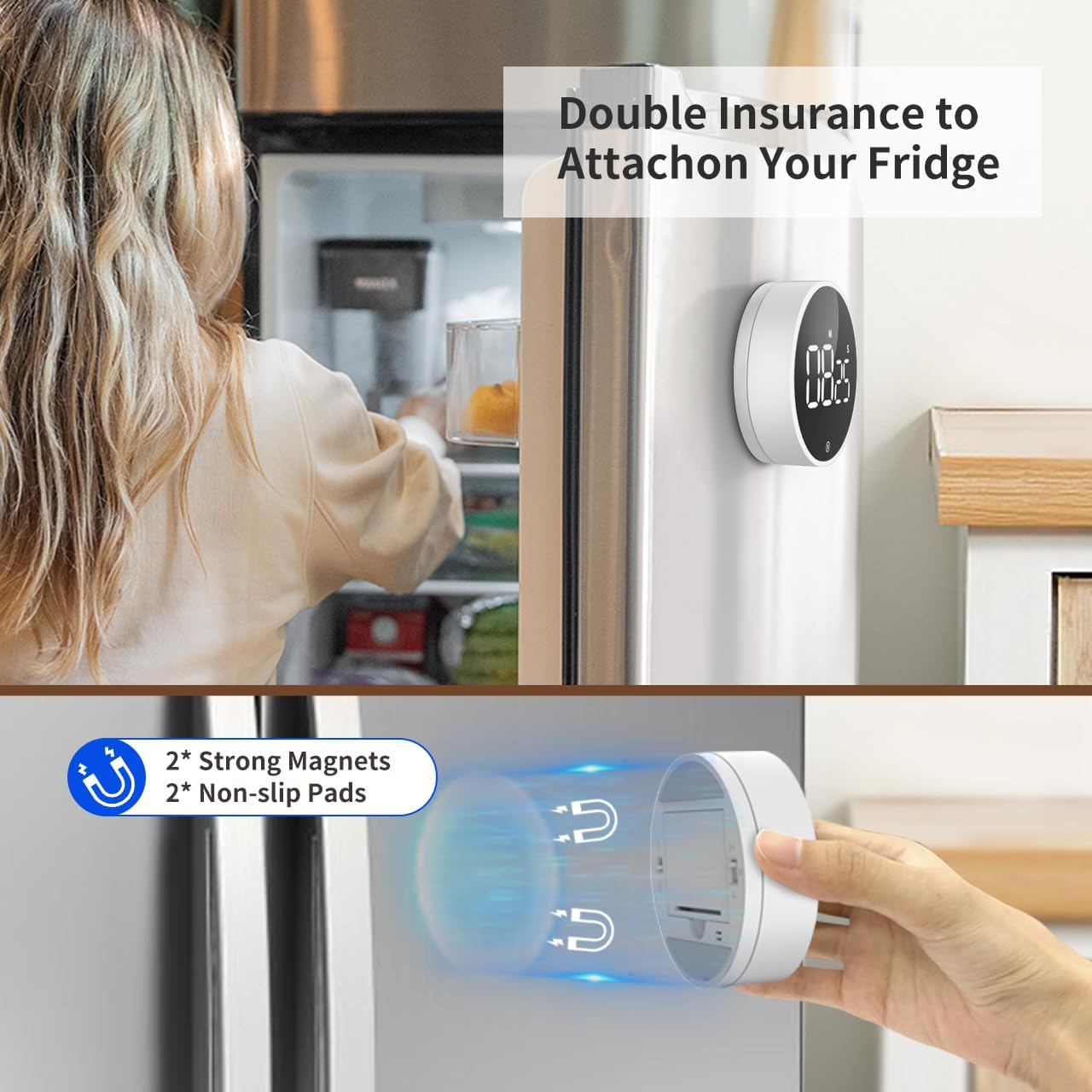
Image: The VOCOO Digital Kitchen Timer magnetically attached to the side of a refrigerator, demonstrating its convenient placement.

Immaġni: Dettaljata view of the back of the timer, illustrating the two strong magnets and two non-slip silicone pads designed for secure attachment.
Istruzzjonijiet Operattivi
1. Setting Time (Countdown Mode)
Biex tissettja ħin tal-countdown:
- Ensure the display shows "00:00". If not, press and hold the front button to reset it.
- Rotate the outer dial clockwise to increase the time.
- Rotate slowly to adjust seconds.
- Rotate quickly to adjust minutes.
- The maximum countdown time is 99 minutes and 55 seconds.
2. Starting and Pausing the Timer
Once the desired time is set, press the front button (the large circular area on the display) once to start the countdown. To pause the timer, press the button again. Pressing it a third time will resume the countdown.
3. Irrisettjar tat-Tajmer
To reset the timer to "00:00" at any point, press and hold the front button for approximately 3 seconds.
4. Count-Up Mode (Stopwatch)
Biex tuża t-tajmer bħala kronometru:
- Ensure the display shows "00:00". If not, press and hold the front button to reset it.
- Press the front button once to start counting up from "00:00".
- Press the button again to pause the count-up.
- Press and hold the button to reset the stopwatch to "00:00".

Image: Illustration of the two counting modes: Count-up (stopwatch) from 00:00 to 99:55, and Countdown from 99:55 to 00:00. Examples show the timer used during exercise and baking.
5. Aġġustament tal-Volum tal-Allarm
On the back of the timer, locate the volume switch. You can select from three alarm levels:
- Għoli: Approximately 80-90dB, suitable for noisy environments.
- Artab: Approximately 60-75dB, for quieter settings.
- Siekta: The numbers will blink on the display to indicate time is up without an audible alarm, ideal for silent environments like libraries or meetings.

Image: The timer's volume settings are illustrated, showing a loud setting (80-90dB) for a kitchen environment, a soft setting (60-75dB) for a quiet home, and a mute setting where numbers blink, suitable for an office or classroom.
6. Aġġustament tal-Luminożità tal-Wiri
Also on the back of the timer, there is a switch to adjust the display brightness:
- Bright: For optimal visibility in well-lit conditions.
- EKO: A dimmer setting to conserve battery life, suitable for low-light conditions.
The timer automatically enters power-saving mode 5 seconds after being paused or stopped. Press the front button to reactivate the display.
Manutenzjoni
Tindif
To clean the timer, wipe it gently with a soft, dry, or slightly damp drapp. Tużax tindif li joborxu jew tgħaddas l-apparat fl-ilma.
Sostituzzjoni tal-batterija
When the display dims significantly or the timer stops responding, it's time to replace the batteries. Follow the battery installation steps outlined in the "Setup" section.
Ħażna
If storing the timer for an extended period, it is recommended to remove the batteries to prevent leakage and potential damage to the device.
Issolvi l-problemi
| Problema | Kawża Possibbli | Soluzzjoni |
|---|---|---|
| It-tajmer ma jixgħelx. | Il-batteriji huma mejta jew installati ħażin. | Ibdel il-batteriji jew kun żgur li l-polarità hija korretta. |
| Il-wiri huwa dim. | ECO brightness mode is selected or batteries are low. | Switch to "Bright" mode on the back. Replace batteries if still dim. |
| L-allarm mhux qed idoqq. | Mute volume mode is selected. | Switch to "Loud" or "Soft" mode on the back. |
| Timer does not stick to surface. | Transparent film on silicone pads not removed or surface is not iron. | Remove the transparent film. Ensure the surface is magnetic (iron/steel). |
| Time setting is too sensitive. | Rapid rotation of the dial. | Rotate the dial more slowly for precise second adjustments. Rotate quickly for minute adjustments. |
Speċifikazzjonijiet
| Karatteristika | Dettall |
|---|---|
| Numru tal-Mudell | 5260 |
| Dimensjonijiet | 3.07"D x 3.07"W x 1.06"H (7.8 x 7.8 x 2.7 CM) |
| Piż | 4.2 uqija (120 Grammi) |
| Materjal | Acrylonitrile Butadiene Styrene (ABS) |
| Max Count Time | 99 Minuti 55 Sekondi |
| Sors tal-Enerġija | 3 x Batteriji AAA (inklużi) |
| Livelli tal-Volum tal-Allarm | Loud (80-90dB), Soft (60-75dB), Mute (blinking digits) |
| Il-luminożità tal-wiri | Bright, ECO |
| Karatteristiċi | Magnetic Backing, Non-slip Pads, Memory Function |
Garanzija u Appoġġ
Informazzjoni dwar Garanzija
VOCOO products are manufactured with high-quality materials and undergo strict quality control. For specific warranty details, please refer to the product packaging or contact VOCOO customer support. Typically, electronic devices come with a limited warranty covering manufacturing defects.
Appoġġ għall-Klijent
If you encounter any issues or have questions regarding your VOCOO Digital Kitchen Timer, please contact our customer support team. You can usually find contact information on the product packaging, the official VOCOO webis-sit, jew permezz tal-pjattaforma tax-xiri tiegħek.
When contacting support, please have your product model number (5260) and purchase details ready to assist in a quicker resolution.


