Introduzzjoni
This manual provides comprehensive instructions for the safe and efficient operation of your InFocus IN119BB Multimedia Projector. Please read this manual thoroughly before using the projector and retain it for future reference.
The InFocus IN119BB projector is designed for versatile use, offering a very long lamp life, high brightness, and extensive connectivity options. Its compact and lightweight design ensures ease of portability and installation.
Informazzjoni dwar is-Sigurtà
Dejjem osserva l-prekawzjonijiet ta' sigurtà li ġejjin biex tevita nar, xokk elettriku, jew korriment:
- Twaqqafx il-fetħiet tal-ventilazzjoni.
- Tesponix il-proġettazzjoni għax-xita jew għall-umdità.
- Irreferi l-manutenzjoni kollha lil persunal tas-servizz kwalifikat.
- Evita li tħares direttament fil-lenti tal-proġekter meta l-lamp hija mixgħula.
- Aċċerta ruħek li l-korda tal-enerġija hija ertjata kif suppost.
Prodott Overview
Komponenti u Kontrolli
Familiarize yourself with the main components and controls of your InFocus IN119BB projector.

Figura 1: Angolat view of the InFocus IN119BB projector, showing the lens, ventilation grilles, and top panel controls.

Figura 2: Quddiem view of the InFocus IN119BB projector, highlighting the main projection lens.

Figura 3: Angolat minn fuq għal isfel view of the InFocus IN119BB projector, showing the control panel layout.

Figura 4: Ġenb view of the InFocus IN119BB projector, illustrating its compact profile.
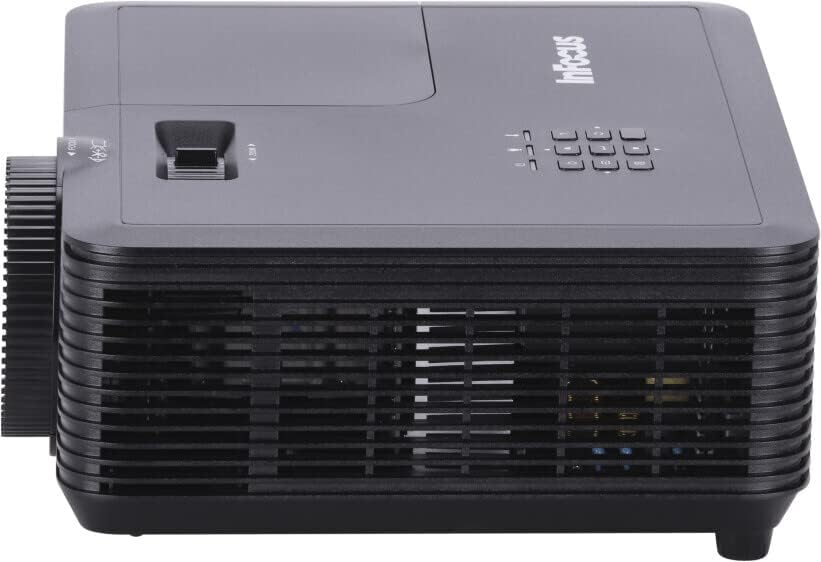
Figura 5: Wara view of the InFocus IN119BB projector, displaying all available input and output ports including HDMI, VGA, S-Video, and audio connections.
Setup
Pjazzament
Choose a stable, flat surface for the projector. Ensure adequate ventilation around the unit. For optimal image quality, position the projector perpendicular to the projection surface.
Qawwa tal-Konnessjoni
- Qabbad il-korda tal-enerġija mad-dħul tal-enerġija tal-proġettazzjoni.
- Plug the other end of the power cord into a grounded electrical outlet (240V recommended).
Konnessjoni ta' Sorsi ta' Input
The IN119BB projector supports multiple input sources:
- HDMI: Uża kejbil HDMI biex tqabbad il-kompjuter, il-plejer tal-Blu-ray, jew apparat ieħor li jaħdem bl-HDMI tiegħek mal-port HDMI 1 jew HDMI 2.
- VGA: Connect your computer's VGA output to the VGA IN port using a VGA cable.
- Vidjo S: For older video sources, connect an S-Video cable to the S-VIDEO port.
- Awdjo: Connect external audio devices to the AUDIO IN port. Audio output is available via the AUDIO OUT port.
Istruzzjonijiet Operattivi
Tixgħel/Jitfi
- To power on, press the Power button on the projector or remote control. The power indicator light will turn blue.
- To power off, press the Power button twice. The projector will enter a cooling down cycle before shutting down completely.
L-aġġustament tal-Immaġini
- Fokus: Dawwar iċ-ċirku tal-fokus fuq il-lenti sakemm l-immaġni tkun qawwija u ċara.
- Zoom: Adjust the zoom lever next to the lens to change the image size.
- Korrezzjoni Keystone: Jekk l-immaġni tidher trapezojdali, uża l-funzjoni ta' korrezzjoni tat-trapezoidali fil-menù OSD biex tikkwadra l-immaġni.
Għażla tas-Sors tad-Dħul
Press the "Source" button on the projector's control panel or remote control to cycle through available input sources (HDMI 1, HDMI 2, VGA, S-Video).
Menu tal-Wiri fuq l-Iskrin (OSD).
Press the "Menu" button to access the OSD menu. Use the arrow keys to navigate and the "Enter" button to select options. Adjust settings such as brightness, contrast, color, and aspect ratio.
Manutenzjoni
Lamp Sostituzzjoni
Il-lamp life of the IN119BB is very long, but eventually, it will need replacement. When the lamp l-indikatur jixgħel jew l-immaġni tiċċara, wasal iż-żmien li tissostitwixxi l-amp. Refer to the detailed lamp replacement guide in the full user manual for specific steps.
Tindif tal-Proġekter
- Lenti: Uża drapp artab u mingħajr suf iddisinjat speċifikament għal lentijiet ottiċi. Tużax prodotti tat-tindif li joborxu.
- Casing: Imsaħ il-proġettazzjoni casing b'artab, damp drapp. Evita li tuża kimiċi ħarxa.
- Filtri tal-arja: Regularly check and clean the air filters to ensure proper ventilation and prevent overheating.
Issolvi l-problemi
| Problema | Kawża Possibbli | Soluzzjoni |
|---|---|---|
| Ebda immaġini murija | Power cord disconnected; Incorrect input source selected; Lamp kwistjoni. | Check power connection; Select correct input source; Replace lamp jekk meħtieġ. |
| L-immaġni hija mċajpra | Lenti mhux iffukata; Proġettur qrib/bogħod wisq mill-iskrin. | Adjust focus ring; Reposition projector. |
| Il-proġekter iżżejjed | Ventilazzjoni mblukkata; Filtru tal-arja maħmuġ. | Ensure clear ventilation; Clean air filter. |
Speċifikazzjonijiet
| Karatteristika | Dettall |
|---|---|
| Numru tal-Mudell | IN119BB |
| Teknoloġija tal-Wiri | DLP |
| Riżoluzzjoni Nattiva | 1280 x 800 (WUXGA) |
| Luminożità | 3500 Lumens |
| Konnettività | HDMI (x2), VGA In, VGA Out, S-Video, Audio In, Audio Out, RS232 |
| Provvista tal-Enerġija | 240V, 267W |
| Dimensjonijiet tal-Prodott (L x W x H) | 23.62 x 31.24 x 10.67 ċm |
| Piż tal-Prodott | 2.6 kg (5.5 libbra) |
| Fattur tal-Formola | Portabbli |
| Użu Rakkomandat | Home Cinema |
Garanzija u Appoġġ
For warranty information and technical support, please visit the official InFocus webis-sit jew ikkuntattja s-servizz tal-konsumatur tagħhom. Żomm l-irċevuta tax-xiri tiegħek bħala prova tax-xiri.
Appoġġ onlajn: www.infocus.com/support


