1. Introduzzjoni
The OttLite Entertain LED Speaker Lamp (Model S83WGW) is a versatile lighting and audio solution designed for various indoor environments. This device integrates an LED lamp with adjustable brightness and color modes, a Bluetooth speaker for wireless audio streaming, and a detachable emergency light feature. This manual provides detailed instructions for the proper setup, operation, and maintenance of your lamp.

Image 1.1: The OttLite Entertain LED Speaker Lamp, wirjaasinid-disinn integrat tiegħu.
2. Kontenut tal-Pakkett
Ivverifika li l-oġġetti kollha huma preżenti fil-pakkett:
- Kelliem OttLite Entertainment LED Lamp (S83WGW)
- Kejbil tal-Enerġija
3. Setup
- Spakkjar: Neħħi bir-reqqa l-komponenti kollha mill-imballaġġ.
- Pjazzament: Poġġi l-lamp fuq wiċċ stabbli u ċatt.
- Konnessjoni tal-Enerġija: Connect the provided power cable to the lamp's power input port and then plug it into a standard 120V AC wall outlet. The lamp's internal battery will begin charging automatically.
4. Istruzzjonijiet Operattivi
4.1. Funzjonijiet tad-Dawl
Il-lamp features touch-activated controls located on the top of the shade for easy adjustment of light settings.
- Power On/Off: Lightly touch the metallic button on the top center of the lamp shade to turn the light on or off.
- Aġġusta l-luminożità: With the light on, repeatedly touch the metallic button to cycle through three brightness levels.
- Ibdel il-Modalità tal-Kulur: Press and hold the metallic button for approximately 2 seconds to switch between the three color temperature modes: warm white, bright white, and natural daylight. Release the button when the desired mode is active.
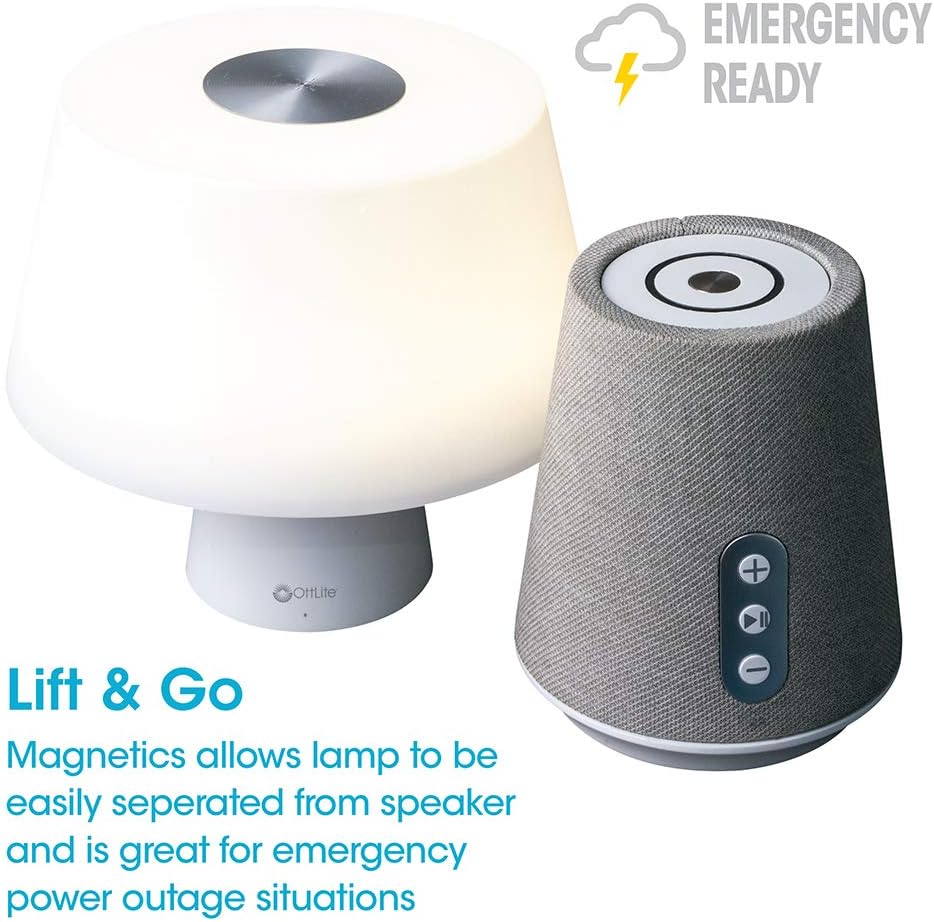
Image 4.1: Activating the lamp's light functions via the touch control on top of the shade.

Immaġni 4.2: L-lamp offers three distinct color temperature modes for varied lighting needs.
4.2. Bluetooth Speaker
The integrated Bluetooth speaker allows for wireless audio playback from compatible devices.
- Ixgħel l-Ispeaker: Press the Play/Pause button on the front of the speaker base to turn the speaker on. A tone will indicate it is ready for pairing.
- Tqabbil: On your audio device (e.g., smartphone, tablet), enable Bluetooth and search for available devices. Select "OttLite Entertain" from the list. A confirmation tone will sound upon successful pairing.
- Kontroll tal-awdjo:
- Agħfas il- + buttuna biex iżżid il-volum.
- Agħfas il- - buttuna biex tnaqqas il-volum.
- Agħfas il- Play/Pawsa buttuna biex iddoqq jew waqqaf l-awdjo.
- Power Off Speaker: Press and hold the Play/Pause button for approximately 3 seconds to turn the speaker off.

Image 4.3: The speaker base with clearly labeled controls for volume and playback.

Image 4.4: The speaker base highlights its Bluetooth connectivity feature.
4.3. Emergency Light Feature (Lift & Go)
Il-lamp portion can be detached from the speaker base to function as a portable emergency light.
- Detaching the Light: Neħħi bil-mod il-lamp shade portion straight up from the speaker base. It is held in place by magnets.
- Using the Emergency Light: The detached light will operate on its internal rechargeable battery. Use the touch control on top of the shade to turn it on/off and adjust brightness as described in Section 4.1. The light can provide illumination for 5 to 30+ hours depending on the brightness setting.
- Iċċarġjar mill-ġdid: To recharge the emergency light, simply place it back onto the speaker base. Ensure it is properly seated for charging to commence.

Image 4.5: The 'Lift & Go' feature allows the lamp to be used as a portable emergency light.
5. Manutenzjoni
To ensure the longevity and optimal performance of your OttLite Entertain LED Speaker Lamp, segwi dawn il-linji gwida tal-manutenzjoni:
- Tindif: Skonnettja l-lamp from the power source before cleaning. Use a soft, dry cloth to wipe down the exterior surfaces. Do not use abrasive cleaners, solvents, or harsh chemicals, as these may damage the finish.
- Ħażna: Meta ma tkunx qed tużaha għal perjodi twal, aħżen l-amp f'post frisk u niexef 'il bogħod mid-dawl tax-xemx dirett u temperaturi estremi.
- Kura tal-batterija: For the internal rechargeable battery, avoid fully discharging it frequently. Recharge the lamp regularly, even if not in constant use, to maintain battery health.
6 Issolvi l-problemi
Jekk tiltaqa' ma' problemi bil-l tiegħekamp, irreferi għall-passi li ġejjin għas-soluzzjoni tal-problemi:
| Problema | Kawża Possibbli | Soluzzjoni |
|---|---|---|
| Lamp id-dawl ma jixgħelx. | Mhux imdaħħal fil-plagg; mitfitage; internal battery depleted; faulty connection. | Ensure power cable is securely plugged in. Check power outlet. Recharge the lamp by placing it on the base. |
| L-ispiker Bluetooth mhux qed jikkonnettja. | Speaker not in pairing mode; device Bluetooth off; already connected to another device. | Ensure speaker is on and in pairing mode. Turn Bluetooth on your device. Disconnect from other devices. |
| Emergency light does not work when detached. | Batterija interna eżawrita. | Place the light back on the speaker base to recharge its internal battery. |
| Poor audio quality from speaker. | Device too far from speaker; interference; low battery. | Move device closer to speaker. Avoid obstacles. Ensure speaker is charged. |
7. Speċifikazzjonijiet
| Karatteristika | Dettall |
|---|---|
| Numru tal-Mudell | S83WGW |
| Brand | OttLite |
| Dimensjonijiet tal-Prodott | 3.12"D x 3.12"W x 10.87"H |
| Piż tal-oġġett | 2.6 Liri |
| Tip ta' Sors tad-Dawl | LED |
| Wattage | 3 watt |
| Luminożità | 337 Lumen |
| Temperatura tal-Kulur | 5000 Kelvin (Dawl tal-jum) |
| Metodu ta' Kontroll | Mess |
| Sors tal-Enerġija | Corded Electric (with rechargeable battery for emergency light) |
| Batteriji | 1 batterija tal-jone tal-litju (inkluża) |
| Materjal | Plastik |
| UPC | 761712019116 |
8. Garanzija u Appoġġ
For warranty information or technical support, please refer to the official OttLite webis-sit jew ikkuntattja lid-dipartiment tas-servizz tal-konsumatur tagħhom. Żomm l-irċevuta tax-xiri tiegħek bħala prova tax-xiri għal kwalunkwe talba ta' garanzija.
Informazzjoni ta' Kuntatt: Jekk jogħġbok żur OttLite's official store page for current support options and contact details.


