1. Introduzzjoni
This manual provides comprehensive instructions for the installation, operation, and maintenance of the Cisco C9200L-24T-4G-E 24-Port Full Gigabit Layer 2 Access Switch. This device is designed to provide reliable network connectivity with advanced features for various network environments.
2. Informazzjoni dwar is-Sigurtà
Please read all safety warnings and instructions before installing or operating this equipment. Failure to follow these guidelines may result in injury or damage to the device.
- Aċċerta ruħek li l-apparat għandu ert xieraq.
- Tħaddimx l-apparat fl-imxarrab jew damp kundizzjonijiet.
- Use only the power supply provided or specified by the manufacturer.
- Evita li timblokka l-fetħiet tal-ventilazzjoni biex tevita sħana żejda.
- Irreferi l-manutenzjoni kollha lil persunal kwalifikat.
3. Prodott Aktarview
The Cisco C9200L-24T-4G-E switch features 24 Gigabit Ethernet ports and 4 1G SFP uplink ports, designed for efficient network access and aggregation.
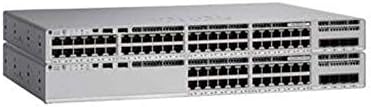
Figura 3.1: Quddiem view of the Cisco C9200L-24T-4G-E switch, showing 24 Ethernet ports and 4 SFP uplink ports.

Figura 3.2: Angolat view of the Cisco C9200L-24T-4G-E switch, highlighting the port layout and chassis design.
Karatteristiċi tal-Panew ta 'quddiem:
- 24 x 10/100/1000Base-T Ports: For connecting network devices.
- 4 x 1G SFP Uplink Ports: For high-speed fiber or copper uplinks to other switches or routers.
- Indikaturi LED: System status, port status, and power indicators.
4. Setup u Installazzjoni
4.1 Disimballaġġ
Carefully unpack the switch and verify that all components are present. Inspect the device for any signs of damage during shipping. If any items are missing or damaged, contact your vendor immediately.
4.2 Installazzjoni Fiżika
- Immuntar fuq l-ixtilliera: The switch is designed for standard 19-inch rack mounting. Secure the switch using the provided rack-mount brackets and screws.
- Poġġiment fuq id-Desktop: If not rack-mounting, place the switch on a flat, stable surface, ensuring adequate ventilation around the device.
4.3 Qawwa tal-Konnessjoni
- Qabbad il-korda tal-enerġija mad-daħla tal-enerġija AC fuq il-pannell ta' wara tas-swiċċ.
- Ipplaggja t-tarf l-ieħor tal-korda tad-dawl fi żbokk elettriku ertjat.
- Verify that the power LED on the front panel illuminates, indicating the switch is receiving power.
4.4 Konnessjonijiet tan-Netwerk
- Portijiet Ethernet: Connect network devices (computers, servers, other switches) to the 24 10/100/1000Base-T ports using standard Ethernet cables.
- SFP Uplink Ports: Insert compatible 1G SFP transceivers into the 4 SFP uplink ports. Connect fiber optic or copper cables from these transceivers to your core network or other switches.
5. Istruzzjonijiet Operattivi
The Cisco C9200L-24T-4G-E is a Layer 2 access switch with Layer 3 capabilities. Initial configuration typically involves accessing the switch via a console port, Telnet, SSH, or a web- interface ibbażat.
5.1 Konfigurazzjoni Bażika
- Aċċess għall-Konsola: Connect a console cable to the console port and use a terminal emulator (e.g., PuTTY) to access the command-line interface (CLI).
- Assenjazzjoni ta' l-indirizz IP: Configure an IP address for the management VLAN interface to enable remote access.
- Kontijiet tal-Utenti: Create secure user accounts with appropriate privilege levels.
5.2 Karatteristiċi ewlenin
- Appoġġ VLAN: Create and manage Virtual Local Area Networks to segment network traffic.
- QoS (Kwalità tas-Servizz): Prioritize critical network traffic for optimal performance.
- SNMP (Protokoll Sempliċi għall-Ġestjoni tan-Netwerk): Monitor and manage the switch remotely.
- LACP (Protokoll ta' Kontroll tal-Aggregazzjoni tal-Links): Bundle multiple physical links into a single logical link for increased bandwidth and redundancy.
- Layer 3 Capabilities: Supports OSPF, EIGRP, ISIS, RIP, and routed access for advanced routing functionalities.
6. Manutenzjoni
- Tindif regolari: Keep the switch free from dust and debris. Use a soft, dry cloth for cleaning.
- Aġġornamenti tal-Firmware: Periodically check the Cisco websit għal aġġornamenti tal-firmware biex tiġi żgurata prestazzjoni u sigurtà ottimali.
- Kontroll Ambjentali: Ensure the operating environment maintains appropriate temperature and humidity levels as specified in the product's technical specifications.
7 Issolvi l-problemi
7.1 Ebda Qawwa
- Iċċekkja li l-korda tal-enerġija hija konnessa sew kemm mas-swiċċ kif ukoll mas-sokit tal-enerġija.
- Iċċekkja s-sokit tal-enerġija b'apparat ieħor biex tiżgura li jaħdem.
- Ensure the power supply unit (if external) is correctly connected and functional.
7.2 Ebda Konnettività man-Netwerk
- Check the Ethernet cable connections to ensure they are secure and not damaged.
- Verify the link/activity LEDs on the switch ports are illuminated for connected devices.
- Confirm IP address settings and VLAN configurations are correct.
- Test with a different cable or port.
7.3 Prestazzjoni bil-mod tan-netwerk
- Check for network congestion or excessive broadcast traffic.
- Ensure duplex settings match between the switch and connected devices.
- Verify that QoS policies are correctly configured if prioritizing traffic.
8. Speċifikazzjonijiet
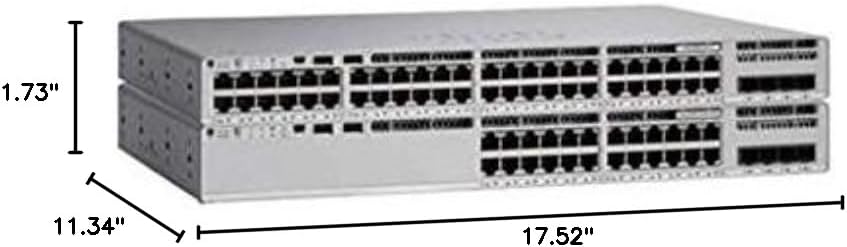
Figura 8.1: Physical dimensions of the Cisco C9200L-24T-4G-E switch.
| Karatteristika | Deskrizzjoni |
|---|---|
| Numru tal-Mudell | C9200L-24T-4G-E |
| Portijiet | 24 x 10/100/1000Mbps Ethernet, 4 x 1G SFP Uplink |
| Rata ta' Trażmissjoni | 10/100/1000Mbps |
| Kapaċità tal-Qlib | 56 Gbps |
| Rata ta ’Trasmissjoni | 41.66 Mpps |
| Modalità ta' Komunikazzjoni | Full-Duplex & Half-Duplex |
| Dimensjonijiet (W x D x H) | 44.5 x 28.8 x 4.4 ċm (17.52" x 11.34" x 1.73") |
| Provvista tal-Enerġija | PWR-C5-125WAC (Default Primary AC) |
| Layer 3 Capabilities | OSPF, EIGRP, ISIS, RIP, Routed Access |
| Ċertifikazzjonijiet | FCC, CE, RoHS, ISO9001 |
| UPC | 764256220338 |
9. Garanzija u Appoġġ
The Cisco C9200L-24T-4G-E switch typically comes with a 1-year warranty. For detailed warranty information, technical support, or to download the latest drivers and firmware, please visit the official Cisco webis-sit jew ikkuntattja lis-bejjiegħ awtorizzat tiegħek.
Official Cisco Store: Ħanut Cisco fuq Amazon


