1. Introduzzjoni
Grazzi tax-xiriasing the SHARP XL-B512 Stereo Sound System. This micro sound system offers a rich 45-watt sound experience with versatile connectivity options including Bluetooth, CD player, USB, and FM radio. Its elegant design with a wooden speaker housing and LED display complements any living space. This manual provides essential information for setting up, operating, and maintaining your device to ensure optimal performance and longevity.
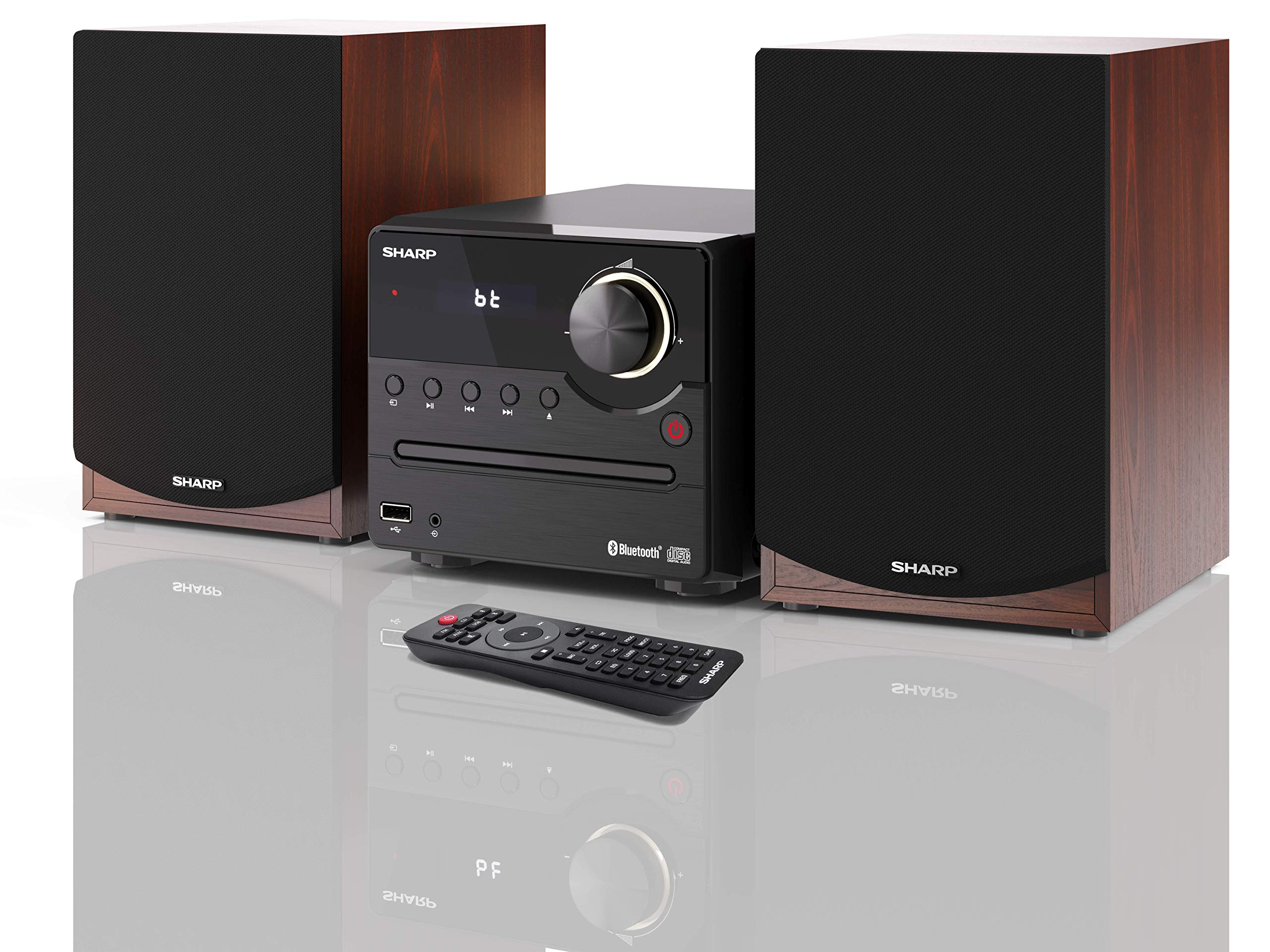
Figura 1: SHARP XL-B512 Stereo Sound System. This image shows the central unit flanked by two wooden-cased speakers, reflecting on a polished surface.
2. Informazzjoni dwar is-Sigurtà
Jekk jogħġbok aqra l-istruzzjonijiet kollha tas-sigurtà bir-reqqa qabel ma tuża l-prodott. Żomm dan il-manwal għal referenza futura.
- Sors tal-Enerġija: Use only the specified power supply. Ensure the voltage taqbel mal-provvista tal-enerġija lokali tiegħek.
- Ventilazzjoni: Timblokkax xi fetħiet tal-ventilazzjoni. Ħalli biżżejjed spazju madwar l-unità għal fluss tal-arja xieraq.
- Ilma u Umdità: Tesponix l-unità għax-xita, umdità, jew likwidi li jqattru/jitilqu. Tpoġġix oġġetti mimlija b'likwidi, bħal vażuni, fuq l-apparat.
- Sħana: Żomm l-unità 'l bogħod minn sorsi ta' sħana bħal radjaturi, reġistri tas-sħana, stufi, jew apparat ieħor (inkluż amplifiers) li jipproduċu sħana.
- Tindif: Skonnettja l-unità mill-plagg tal-ħajt qabel ma tnaddafha. Uża biss drapp niexef.
- Servizzi: Tippruvax isservi dan il-prodott int stess. Irreferi l-manutenzjoni kollha lil persunal tas-servizz kwalifikat.
3. Kontenut tal-Pakkett
Iċċekkja li l-oġġetti kollha elenkati hawn taħt huma inklużi fil-pakkett tiegħek:
- SHARP XL-B512 Micro Sound System (Main Unit)
- Two Speakers (with wooden housing)
- Kejbil tal-Enerġija
- Kontroll mill-bogħod (bil-batteriji)
- Manwal ta 'Istruzzjoni (dan id-dokument)
- Gwida Quick Start
4. Setup
4.1 Konnessjoni tal-Ispeaker
Connect the two speakers to the main unit using the provided speaker cables. Ensure correct polarity (positive to positive, negative to negative) for optimal sound quality.
4.2 Konnessjoni tal-Enerġija
Connect the power cable to the AC IN port on the rear of the main unit, then plug it into a wall outlet.

Figura 2: Rear panel connections. This image displays the back of the central unit with ports for speaker wires and the AC power input, alongside the rear of the two speakers.
4.3 Qawwa Inizjali
Press the Power button on the main unit or the remote control to turn on the system. The LCD display will illuminate.
5. Istruzzjonijiet Operattivi
5.1 Kontrolli ta' Front Panel

Figura 3: Front panel controls. This close-up shows the central unit's display, volume knob, and various control buttons for playback and source selection.
- Buttuna tal-Qawwa: Ixgħel jew jitfi l-unità.
- Buttuna tas-Sors: Cycles through available input sources (CD, FM, Bluetooth, USB, AUX).
- Buttuna tal-Volum: Jaġġusta l-livell tal-volum ewlieni.
- Kontrolli tal-daqq: Play/Pause, Stop, Skip Forward/Backward for CD and USB modes.
- Port USB: For connecting USB storage devices for music playback.
- Input AUX: Jack ta' 3.5mm għall-konnessjoni ta' apparati awdjo esterni.
5.2 Daqq ta' CD
- Agħfas il- Sors button to select 'CD' mode.
- Open the CD tray by pressing the Eject button.
- Place a CD (CD/CD-R/CD-RW/MP3 format) with the label side up into the tray.
- Close the CD tray. The system will read the disc and begin playback automatically or display track information.
- Use the playback controls (Play/Pause, Stop, Skip) to manage your music.
5.3 Radju FM
- Agħfas il- Sors button to select 'FM' mode.
- The system will automatically search for available stations or you can manually tune.
- To save a station as a preset, tune to the desired station, then press and hold the Issettjati minn qabel button (if available on remote) or follow on-screen instructions. The system supports 40 preset memories.
- Uża l- Issettjat minn qabel 'l fuq / 'l isfel buttuni biex tinnaviga fl-istazzjonijiet salvati.
5.4 Tqabbil tal-Bluetooth
- Agħfas il- Sors button to select 'Bluetooth' mode. The display will show 'bt' and flash, indicating it's in pairing mode.
- Fuq it-tagħmir mobbli tiegħek, ippermetti l-Bluetooth u fittex tagħmir disponibbli.
- Select 'SHARP XL-B512' from the list of devices.
- Once paired, the 'bt' indicator on the system's display will stop flashing. You can now stream audio from your device.
5.5 Daqq tal-USB
- Insert a USB storage device into the USB port on the front panel.
- Agħfas il- Sors button to select 'USB' mode.
- Is-sistema awtomatikament tiskopri u ddoqq awdjo kompatibbli files (MP3).
- Uża l-kontrolli tal-plejbek biex tinnaviga t-traċċi.
5.6 Input AUX
- Connect an external audio device (e.g., smartphone, MP3 player) to the AUX IN jack on the front panel using a 3.5mm audio cable (not supplied).
- Agħfas il- Sors button to select 'AUX' mode.
- Play audio from your connected device. The sound will be output through the SHARP XL-B512 system.
5.7 Issettjar tal-Ekwilizzatur
The system features 6 preset equalizers with independent treble and depth control. Use the EQ button on the remote control or main unit to cycle through the presets and adjust sound to your preference.
6. Manutenzjoni
6.1 Tindif tal-Unità
Imsaħ l-unità b'ċarruta ratba u niexfa. Tużax prodotti tat-tindif li joborxu, xama', jew solventi għax jistgħu jagħmlu ħsara lill-finitura. Kun żgur li l-unità tkun skonnettjata qabel ma tnaddafha.
6.2 Kura tas-CD
Handle CDs by their edges. Keep them clean and free of scratches. Store CDs in their cases when not in use.
6.3 Kura tal-Ispeaker
The wooden speaker housing can be cleaned with a soft, dry cloth. Avoid placing heavy objects on the speakers or exposing them to direct sunlight or extreme temperatures.
7 Issolvi l-problemi
If you encounter any issues with your SHARP XL-B512 system, refer to the following table for common problems and solutions.
| Problema | Kawża Possibbli | Soluzzjoni |
|---|---|---|
| Ebda qawwa | Power cable not connected securely; Power outlet not active. | Iċċekkja l-konnessjoni tal-kejbil tal-enerġija; Ipprova sokit tal-enerġija differenti. |
| L-ebda ħoss | Volume too low; Incorrect source selected; Speaker cables disconnected. | Increase volume; Select correct input source; Check speaker cable connections. |
| Bluetooth mhux pairing | System not in pairing mode; Device too far; Bluetooth disabled on device. | Ensure system is in Bluetooth pairing mode; Move device closer; Enable Bluetooth on your device. |
| Is-CD mhux qed idoqq | CD inserted incorrectly; CD is dirty or scratched; Incorrect format. | Reinsert CD correctly; Clean CD; Ensure CD is a supported format (CD/CD-R/CD-RW/MP3). |
| Il-kontroll mill-bogħod ma jaħdimx | Il-batteriji huma mejta jew imdaħħla ħażin; Ostruzzjoni bejn ir-remote u l-unità. | Ibdel il-batteriji; Kun żgur li l-polarità tal-batterija hija korretta; Neħħi kwalunkwe ostaklu. |
Jekk il-problema tippersisti wara li tipprova dawn is-soluzzjonijiet, jekk jogħġbok ikkuntattja l-appoġġ għall-klijenti.
8. Speċifikazzjonijiet
Below are the technical specifications for the SHARP XL-B512 Stereo Sound System:
- Mudell: XL-B512
- Qawwa tal-Ħruġ Totali: 45 Watts
- Modalità tal-Ħruġ tal-Awdjo: Stereo
- Speaker Output Channel Quantity: 2
- Formati Awdjo Appoġġjati: MP3, CD, CD-R, CD-RW
- Teknoloġija tuner: FM PLL Tuner
- Medda tal-Frekwenza FM: 87.5 sa 108 MHz
- FM Preset Memory: 40 stazzjon
- Konnettività: Bluetooth, USB, Auxiliary (3.5mm)
- Karatteristiċi Speċjali: 6 Preset Equalizers, LCD Display with white backlight
- Sound System Dimensions (W x H x D): 17 x 22 x 15 ċm
- Speaker Dimensions (W x H x D): 14.5 x 17.7 x 22.3 cm (each)
- Piż tal-oġġett: 4 kg
- Sors tal-Enerġija: Corded Elettriku
- Kontroll mill-bogħod: Iva (batteriji inklużi)
9. Garanzija u Appoġġ
Your SHARP XL-B512 Stereo Sound System comes with a standard manufacturer's warranty. Please refer to the warranty card included in your package for specific terms and conditions, including the warranty period and coverage details.
For technical support, service inquiries, or further assistance, please contact your local SHARP customer service center. Contact information can typically be found on the manufacturer's webis-sit jew fid-dokumentazzjoni tal-garanzija.


