1. Introduzzjoni
This manual provides detailed instructions for the setup, operation, and maintenance of your Epson PowerLite 982W LCD Projector. Designed for classroom and educational environments, this projector delivers bright, clear images and offers versatile connectivity options. Please read this manual thoroughly before using the projector to ensure optimal performance and safety.
2. X'hemm fil-Kaxxa
Iċċekkja li l-oġġetti kollha elenkati hawn taħt huma inklużi fil-pakkett tiegħek:
- PowerLite 982W 3LCD WXGA Classroom Projector with Dual HDMI
- Korda tal-Enerġija
- Kejbil VGA
- Kontroll mill-bogħod tal-proġettazzjoni
- Batterija
- Software CD
- Manwal għall-Utent (dan id-dokument)
- Karta ta' Garanzija
3. Prodott Aktarview
Familiarize yourself with the physical components and controls of your Epson PowerLite 982W projector.

Figura 3.1: Quddiem View. This image displays the front of the projector, highlighting the main projection lens and the large ventilation grille on the left side. The Epson logo is prominently featured above the lens.
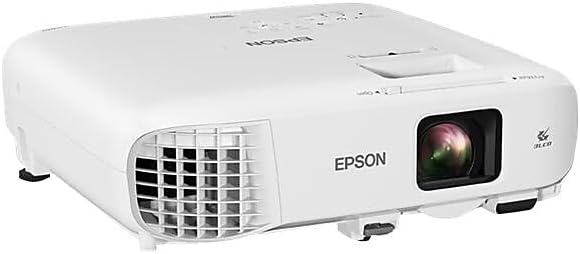
Figura 3.2: Angolat View. An angled perspective of the projector, providing a view of both the top panel and the front lens area. This view helps in understanding the overall compact design.

Figure 3.3: Top Control Panel. This image shows the top surface of the projector, featuring the control panel with various buttons for navigation, source selection, menu access, and power. The focus and zoom rings are also visible near the lens opening.

Figure 3.4: Rear Connectivity Panel. The rear panel of the projector is shown, detailing the comprehensive array of input and output ports, including HDMI, VGA, USB, Audio In/Out, Video, and LAN connections.
4. Istruzzjonijiet ta' Setup
Proper setup ensures optimal projection quality and longevity of your device.
4.1 Tqegħid u Immuntar
The PowerLite 982W is designed for versatile placement, including ceiling mounting, as commonly seen in classroom installations. Ensure the projector is securely mounted and positioned to project onto your screen or wall without obstruction.
4.2 Il-Konnessjoni tal-Apparati Tiegħek
Il-proġettur joffri diversi għażliet ta' konnettività:
- HDMI: Connect devices like laptops, Blu-ray players, or streaming devices using an HDMI cable to either HDMI1 or HDMI2 port.
- VGA (Kompjuter): Use a VGA cable to connect to a computer's VGA output. There are two VGA input ports (Computer1, Computer2) and one VGA output port (Monitor Out).
- USB: Connect USB devices for display or control.
- LAN: Għall-konnettività u l-kontroll tan-netwerk.
- Awdjo: Separate audio input (Audio1, Audio2, Mic) and output ports are available for external audio systems.
Ensure all cables are securely connected to prevent signal loss.
4.3 Tixgħel
- Qabbad il-korda tad-dawl mal-proġekter u żbokk tad-dawl.
- Press the power button on the projector's control panel or the remote control. The projector will emit a beeping sound and begin its warm-up sequence.
- Wait for the projector to fully warm up and display the input source.
Video 4.1: Projector Installation and Basic Operation. This video demonstrates the Epson PowerLite 982W projector mounted in a classroom setting. It shows the physical controls on the projector, the various input ports, and the use of the remote control to power on the device and select input sources. The video also illustrates the projection quality on a screen with ambient lighting.
5. Istruzzjonijiet Operattivi
Learn how to effectively use your projector for presentations and media display.
5.1 Għażla tas-Sors
Biex taqleb bejn is-sorsi tad-dħul:
- Press the 'Source Search' button on the remote control or the 'Source' button on the projector's control panel.
- Use the arrow keys to navigate through the available sources (HDMI1, HDMI2, Computer1, Computer2, Video, USB Display, LAN).
- Press 'Enter' to select the desired source. The projector will search for a signal from the selected input.
5.2 Aġġustament tal-Immaġni
- Fokus: Dawwar iċ-ċirku tal-fokus madwar il-lenti biex tiċċara l-immaġni.
- Zoom: Adjust the zoom ring to enlarge or reduce the image size.
- Korrezzjoni Keystone: Use the keystone correction buttons on the control panel or remote to correct trapezoidal distortion if the projector is not perfectly perpendicular to the screen.
- Modalità tal-Kulur: Select different color modes (e.g., Dynamic, Presentation, Cinema) from the menu to optimize image quality for various content types and ambient lighting conditions.
5.3 Karatteristiċi Avvanzati
- Moderator Function: Connects up to 50 devices, allowing multiple users to share content from laptops or mobile devices.
- Kapaċità tal-Iskrin maqsum: Display content from two different sources side-by-side simultaneously.
- Projezzjoni bla fili: Project wirelessly from compatible laptops and mobile devices (PC, Mac, Chromebook, iOS, Android).
6. Karatteristiċi ewlenin
The Epson PowerLite 982W projector is equipped with several features to enhance your viewing and presentation experience:
- Utilizes 3 LCD panels and 4,200 lumens of color and white brightness for vivid images.
- Provides WXGA resolution (1280 x 800) for a bright, wide-screen experience.
- Features a long lamp life of up to 17,000 hours in ECO mode.
- Includes optical zoom for clear, sharp images without digital distortion.
- Supports connectivity for up to 50 devices to display a variety of content or compare students' work side-by-side.
7. Manutenzjoni
Regular maintenance helps ensure the longevity and optimal performance of your projector.
- Tindif tal-Lenti: Imsaħ il-lenti bil-mod b'ċarruta ratba u mingħajr suf iddisinjata għal uċuħ ottiċi. Tużax prodotti tat-tindif li joborxu.
- Tindif tal-Filtru tal-Arja: Periodically clean or replace the air filter to prevent dust buildup, which can affect cooling and image quality. Refer to the full user manual for specific instructions on filter access.
- Lamp Sostituzzjoni: The projector features a long-life lamp. When replacement is necessary, a notification will appear. Always use genuine Epson replacement lamps.
- Ħażna: Meta ma tkunx qed tużah għal perjodi twal, aħżen il-proġettur f'post frisk u niexef, protett mit-trab u minn temperaturi estremi.
8 Issolvi l-problemi
Jekk tiltaqa' ma' problemi bil-proġettur tiegħek, irreferi għas-soluzzjonijiet komuni li ġejjin:
- Ebda Immaġni murija:
- Ensure the projector is powered on and the input source is correctly selected.
- Check all cable connections (HDMI, VGA) between the projector and the source device.
- Verify that the source device (e.g., laptop) is outputting a signal.
- L-immaġni hija mċajpra:
- Aġġusta ċ-ċirku tal-fokus fuq il-lenti tal-proġekter.
- Kun żgur li l-wiċċ tal-projezzjoni huwa ċatt u li l-proġettur jinsab f'distanza xierqa.
- L-Immaġni hija Distorta (Forma ta' Trapeżojde):
- Use the keystone correction function on the projector or remote control to adjust the image shape.
- Ebda Ħsejjes:
- Iċċekkja s-settings tal-volum kemm fuq il-proġettazzjoni kif ukoll fuq l-apparat tas-sors.
- Ensure audio cables are correctly connected if using separate audio inputs.
- Twissija ta' tisħin żejjed:
- Ensure the projector's ventilation vents are not blocked.
- Clean or replace the air filter if it is dirty.
For more complex issues, consult the full user manual or contact Epson support.
9. Speċifikazzjonijiet
| Karatteristika | Dettall |
|---|---|
| Dimensjonijiet tal-Prodott | 11.1 x 12.1 x 3.5 pulzieri |
| Piż tal-oġġett | 6.83 liri |
| Numru tal-Mudell tal-Oġġett | 982W |
| Manifattur | Epson Corporation |
| Riżoluzzjoni tal-Wiri | 1280 x 800 (WXGA) |
| Teknoloġija tal-Konnettività | HDMI, USB, VGA, LAN |
| Użi Rakkomandati | Class Room, Education |
| Karatteristika Speċjali | UHE (Ultra High Efficiency lamp) |
| Lamp Life (ECO Mode) | Sa 17,000 sigħat |
10. Garanzija u Appoġġ
Your Epson PowerLite 982W projector comes with a warranty. Please refer to the included Warranty Card in your product package for specific terms and conditions. For technical support, service, or additional information, please visit the official Epson support websit jew ikkuntattja lid-dipartiment tas-servizz tal-konsumatur tagħhom.


