1. Introduzzjoni
This manual provides detailed instructions for the installation, operation, and maintenance of your Fractal Design Pop Silent Black Solid ATX Silent PC Case. Designed for optimal noise reduction and efficient component housing, this case offers a clean aesthetic and practical features for building a high-performance, quiet computer system.

Figura 1.1: Naħa ta' quddiem view of the Fractal Design Pop Silent Black Solid ATX PC Case.
2. Informazzjoni dwar is-Sigurtà
Please read and understand all safety instructions before installing or operating your PC case. Failure to do so may result in personal injury or damage to your equipment.
- Dejjem skonnettja l-provvista tal-enerġija mis-sokit tal-ħajt qabel ma twettaq kwalunkwe installazzjoni, manutenzjoni, jew issolvi l-problemi.
- Immaniġġja l-komponenti kollha b'attenzjoni biex tevita l-ħsara.
- Avoid exposing the case to moisture or extreme temperatures.
- Żomm partijiet żgħar u għodda 'l bogħod mit-tfal.
- Ensure proper grounding to prevent electrostatic discharge (ESD) damage to sensitive components.
3. Kontenut tal-Pakkett
Verify that all items are present in your package. If any items are missing or damaged, please contact your retailer or Fractal Design support.
- Fractal Design Pop Silent Black Solid ATX PC Case
- Accessory box with screws, zip ties, and mounting hardware
- Three (3) pre-installed 120mm Aspect fans
- Manwal għall-Utent (dan id-dokument)
4. Setup u Installazzjoni
Follow these steps to install your computer components into the Fractal Design Pop Silent case.
4.1. Tħejjija tal-Każ
- Remove the side panels. For the solid side panel, unscrew the thumbscrews at the rear and slide the panel backward.
- Identify the accessory box containing all necessary screws and mounting hardware.

Figura 4.1: Intern view of the case with side panels removed, showing fan mounts and internal structure. (Image shows white variant for illustration)
4.2. Installazzjoni tal-Motherboard
- The Pop Silent case accommodates ATX, mATX, and Mini ITX motherboards.
- Installa l-I/O shield (jekk mhux imwaħħal minn qabel mal-motherboard tiegħek).
- Align your motherboard with the pre-installed standoffs. Additional standoffs may be required for smaller form factors; install them as needed.
- Waħħal il-motherboard billi tuża l-viti xierqa mill-kaxxa tal-aċċessorji.
4.3. Installazzjoni ta' Apparat tal-Ħażna
The case supports up to three 3.5" HDDs and six 2.5" SSDs (or two 3.5" HDDs and five 2.5" SSDs with one optical bay in use).
- Installazzjoni ta' HDD ta' 3.5": Locate the HDD cage beneath the PSU shroud. Slide the HDDs into the trays and secure them with screws.
- Installazzjoni ta' SSD ta' 2.5": Mount SSDs to the dedicated brackets behind the motherboard tray.
- 5.25" Optical Drive Bays: The case features two neatly concealed 5.25" bays. Remove the magnetic cover and storage drawer to access them.
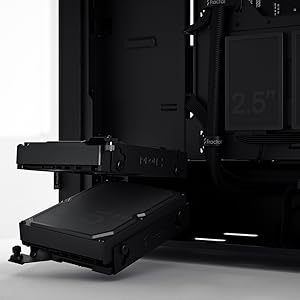
Figure 4.2: Illustrates the mounting points for 2.5" SSDs and 3.5" HDDs.

Figure 4.3: The accessible 5.25" bay with its removable storage drawer and magnetic cover.
4.4. Installazzjoni tal-Unità tal-Provvista tal-Enerġija (PSU)
The PSU mounts from the rear of the case, at the bottom. Slide the PSU into its designated compartment and secure it with screws from the rear.
4.5. Fan Installation and Airflow
The Pop Silent case comes with three 120mm Aspect fans pre-installed for optimal silent operation. Additional fan mounts are available for customization.
- Ensure fans are oriented correctly for intake and exhaust to maintain positive airflow and minimize dust buildup.
- The "Silent" variant features a closed front and top panel design, along with bitumen side panels and sound-damping foam, to reduce noise output.

Figura 4.4: Intern view highlighting fan placement and component layout. (Image shows white variant for illustration)
4.6. Ġestjoni tal-Kejbil
Utilize the cable routing channels and tie-down points behind the motherboard tray to organize cables. This improves airflow and maintains a clean interior.

Figure 4.5: Dedicated channels and Velcro straps for efficient cable routing.
4.7. Konnessjonijiet I/O ta 'quddiem
Connect the front panel cables (power switch, reset switch, USB-A, audio jacks) to the corresponding headers on your motherboard. Note that the USB-C port is an optional accessory and not natively active on all models.
4.8. Closing the Case
Once all components are installed and cables are managed, reattach the side panels. Ensure they are securely fastened with the thumbscrews.
5. Kif Tħaddem il-Kaxxa tal-PC Tiegħek
The Fractal Design Pop Silent case is designed for quiet operation. Its features contribute to a low-noise computing environment.
- Power On/Off: Use the power button on the top I/O panel to turn your system on or off.
- Tnaqqis tal-Ħsejjes: The solid front and top panels, combined with sound-damping materials on the side panels, effectively absorb internal noise.
- Fluss tal-arja: While designed for silence, the case maintains adequate airflow through strategically placed vents and the pre-installed Aspect fans.

Figure 5.1: The Pop Silent case integrated into a typical desk environment. (Image shows white variant for illustration)
6. Manutenzjoni
Manutenzjoni regolari tgħin biex tiżgura prestazzjoni ottimali u lonġevità tal-komponenti tal-PC tiegħek.
- Filtri tat-Trab: Periodically clean the removable dust filters located at the front, top, and bottom of the case. This prevents dust buildup inside the system, which can impede cooling.
- Tindif ta' barra: Imsaħ l-uċuħ ta 'barra b'artab, damp drapp. Evita prodotti tat-tindif jew solventi li joborxu.
- Tindif ta 'ġewwa: With the system powered off and unplugged, use compressed air to remove dust from internal components and fan blades.
7 Issolvi l-problemi
If you encounter issues with your PC case, refer to the following common solutions:
| Problema | Kawża Possibbli | Soluzzjoni |
|---|---|---|
| Is-sistema ma tixgħel. | Konnessjonijiet tal-enerġija maħlula, PSU difettuż, wajers mhux korretti tal-pannell ta' quddiem. | Iċċekkja l-kejbils tal-enerġija kollha (PSU mal-ħajt, PSU mal-motherboard/komponenti). Ivverifika l-konnessjoni tas-swiċċ tal-enerġija tal-pannell ta' quddiem mal-motherboard. Ittestja l-PSU jekk possibbli. |
| Excessive noise from case fans. | Dust buildup, loose fan screws, fan speed settings. | Clean fan blades and dust filters. Ensure fans are securely mounted. Adjust fan curves in BIOS/UEFI or software. |
| Il-portijiet USB tal-pannell ta' quddiem mhux qed jaħdmu. | Loose internal USB cable connection to motherboard. | Verify the USB header cable from the front panel is securely connected to the motherboard. |
Għal aktar għajnuna, jekk jogħġbok irreferi għall- Fractal Design Support websit.
8. Speċifikazzjonijiet
| Karatteristika | Dettall |
|---|---|
| Isem tal-Mudell | Pop Silent Black - Solid |
| Numru tal-Mudell tal-Oġġett | FD-C-POS1A-01 |
| Kompatibbiltà tal-motherboard | ATX, mATX, Mini ITX |
| Tip ta' Każ | Torri tan-Nofs |
| Kulur | Iswed Solidu |
| Materjal | Steel (Solid side panel) |
| Piż tal-oġġett | 19.36 liri (madwar 8.78 kg) |
| Dimensjonijiet tal-Prodott (LxWxH) | 21.65 x 21.65 x 11.81 pulzieri (madwar 550 x 550 x 300 mm) |
| Metodu tat-tkessiħ | Arja |
| Fannijiet installati minn qabel | 3x 120mm Aspect Fans |
| Drive Bays | Up to 3x 3.5" HDD, 6x 2.5" SSD (or 2x 3.5" HDD, 5x 2.5" SSD with 1x 5.25" ODD) |
| 5.25" Bays | 2 (concealed with storage drawer) |
| I/O quddiem | 2x USB 3.0, Audio In/Out, Power Button (Optional USB-C) |
9. Garanzija u Appoġġ
Fractal Design products are covered by a limited warranty. For detailed warranty terms and conditions, please visit the official Fractal Design websit.
For technical support, FAQs, and driver downloads, please visit:
www.fractal-design.com/support/
You can also contact Fractal Design customer service directly through their websit għal assistenza personalizzata.


