1. Introduzzjoni
This manual provides detailed instructions for the installation, operation, and maintenance of your Intellitronix DP6005R Digital Dash Replacement Panel. This product is designed specifically for 1988-1991 Chevrolet Trucks, offering a modern digital display solution. Please read this manual thoroughly before attempting installation or operation to ensure proper functionality and safety.
Importanti: The original housing/bezel for your vehicle's dashboard is not included with this product and must be reused or acquired separately.
2. Kontenut tal-Pakkett
Upon unpacking your Intellitronix DP6005R Digital Dash Replacement Panel, please verify that all the following components are present:
- Direct fit printed circuit boards
- Custom fit "smoked" Plexiglas faceplate
- Universal temperature sending unit (S8013)
- Oil pressure sending unit
- Speedometer sending unit (S9013) for vehicles without electronic transmission or cruise control
- Istruzzjonijiet għall-installazzjoni
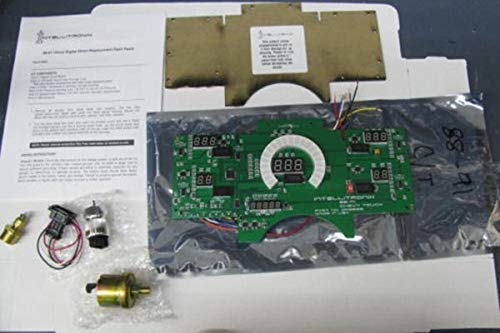
Figure 2.1: Included components of the Intellitronix DP6005R Digital Dash Replacement Panel.
3. Setup u Installazzjoni
Installation of the Intellitronix DP6005R Digital Dash Replacement Panel requires careful attention to electrical connections and sensor placement. It is recommended that installation be performed by a qualified automotive technician if you are not familiar with automotive electrical systems.
3.1. Passi Ġenerali ta 'Installazzjoni
- Skonnettja l-batterija tal-vettura qabel tibda kwalunkwe xogħol elettriku.
- Carefully remove the existing dashboard cluster from your 1988-1991 Chevy Truck.
- Transfer the original housing/bezel to the new Intellitronix digital dash panel.
- Connect the wiring harness from the vehicle to the new digital dash panel according to the provided wiring diagram (refer to the separate installation instructions included in the package).
- Install the necessary sending units as described below.
- Mount the new digital dash panel into the vehicle's dashboard opening.
- Erġa' qabbad il-batterija tal-vettura u ittestja l-funzjonijiet kollha.
3.2. Sending Unit Installation
- Temperature Sending Unit (S8013): Install the included S8013 temperature sender into the engine's coolant system. The standard bushing size provided is 1/2 inch. If a 3/8 inch bushing is required, it must be specified at the time of purchase or acquired separately.
- Oil Pressure Sending Unit: Install the included oil pressure sender into the engine's oil system.
- Speedometer Sending Unit (S9013): If your vehicle is not equipped with a functional electronic cruise control or electronic transmission, install the included S9013 universal speedometer sending unit. If your vehicle has an electronic cruise control sender, it can be utilized.
- Fuel Level Sending Unit: The Intellitronix DP6005R is designed to work with the existing GM fuel level sending unit already present in your vehicle. No new fuel level sender is required.
4. Operazzjoni
The Intellitronix DP6005R Digital Dash provides clear, precise readings for various vehicle parameters. Once installed and powered, the display will illuminate, showing the following information:
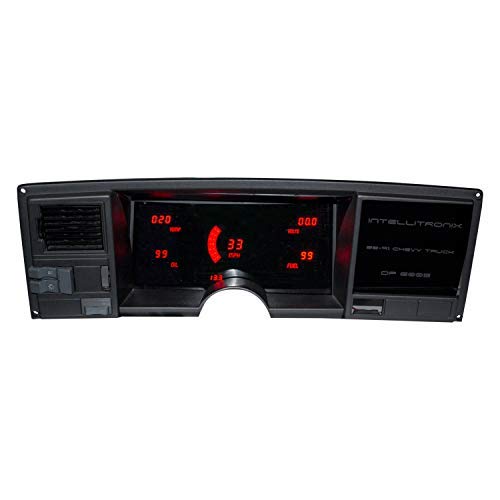
Figure 4.1: The Intellitronix DP6005R Digital Dash in operation, showing various gauge readings.
- Speedometer: Displays vehicle speed up to 255 MPH. Includes odometer, trip meter, 0-60 time, 1/4 mile ET, and high speed recall functions, accessible via a single button.
- Takometru: Shows engine revolutions per minute (RPM) from 0 to 9,900 RPM, in 100 RPM increments.
- Temperatura tal-Ilma: Indicates engine coolant temperature within a range of 100-300°F.
- Pressjoni taż-Żejt: Displays engine oil pressure from 0-100 PSI.
- Voltmetru: Monitors the vehicle's electrical system voltage, ranging from 7.0-25.5 volts.
- Livell tal-Fjuwil: Shows fuel tank level from 0-99% in 1% increments.
- Indikaturi: Integrated turn signal and high beam indicators are also present on the panel.
5. Kalibrazzjoni
The Intellitronix DP6005R Digital Dash features a simplified calibration process for the speedometer.
- Speedometer Calibration: The speedometer can be calibrated with a single button press. This calibration method is designed to be effective regardless of changes to tire size, gear ratio, or transmission type. Refer to the specific calibration instructions provided with your product for the exact procedure.
6. Manutenzjoni
To ensure the longevity and clear visibility of your digital dash panel, follow these simple maintenance guidelines:
- Tindif: Uża artab, damp cloth to gently wipe the Plexiglas faceplate. Avoid using abrasive cleaners, solvents, or harsh chemicals, as these can damage the surface.
- Spezzjoni: Iċċekkja perjodikament il-konnessjonijiet tal-wajers kollha biex tiżgura li jibqgħu sikuri.
7 Issolvi l-problemi
If you encounter issues with your Intellitronix DP6005R Digital Dash, consider the following basic troubleshooting steps:
- Ebda Qawwa/Wiri: Verify that the vehicle's battery is properly connected and charged. Check all power and ground connections to the digital dash panel. Inspect fuses related to the dashboard and electrical system.
- Qari Skorrett: Ensure all sending units (temperature, oil pressure, speedometer) are correctly installed and securely connected. Check for any loose or damaged wiring to the sensors.
- Speedometer Inaccuracy: Perform the speedometer calibration procedure as outlined in the specific installation instructions.
- Operazzjoni intermittenti: Check for loose connections or potential electrical interference.
For persistent issues or complex problems, it is recommended to consult a professional automotive electrician or contact Intellitronix customer support.
8. Speċifikazzjonijiet
| Numru tal-Mudell | DP6005R |
| Brand | Intellitronix |
| Materjal | Copper, Fiberglass, Acrylic |
| Speedometer Range | 0-255 MPH |
| Firxa tat-Takometru | 0-9,900 RPM (in 100 RPM increments) |
| Firxa tat-Temperatura tal-Ilma | 100-300°F |
| Oil Pressure Range | 0-100PSI |
| Voltmeter Range | 7.0-25.5 volt |
| Fuel Level Range | 0-99% (in 1% increments) |
| Piż tal-oġġett | 3 Liri |
9. Garanzija u Appoġġ
Intellitronix stands behind the quality of its products.
- Garanzija tul il-ħajja: This Intellitronix Digital Dash Replacement Panel is backed by a Lifetime Warranty. Please refer to the warranty documentation included with your product for full terms and conditions.
- Manifattura: This product is 100% American Made.
For technical assistance, warranty claims, or further inquiries, please contact Intellitronix customer support through their official webis-sit jew l-informazzjoni ta' kuntatt ipprovduta fl-imballaġġ tal-prodott tiegħek.


