1. Introduzzjoni
Grazzi tax-xiriasing the LEMEGA MSY5 Music System. This device integrates a CD player, FM digital radio, internet radio, Spotify Connect, Bluetooth speaker, USB player, and alarm clock functions. This manual provides essential information for safe and efficient use of your new music system. Please read it thoroughly before operation and retain it for future reference.
2. Informazzjoni Importanti dwar is-Sigurtà
Osserva l-prekawzjonijiet ta' sigurtà li ġejjin biex tevita xokk elettriku, nar, jew ħsara lill-unità:
- Tesponix dan l-apparat għax-xita jew l-umdità.
- Timblokka l-ebda fetħiet tal-ventilazzjoni.
- Ensure the power adapter is easily accessible.
- Uża biss aċċessorji/aċċessorji speċifikati mill-manifattur.
- Spluggja dan l-apparat waqt maltempati tas-sajjetti jew meta ma jintużax għal perjodi twal.
- Irreferi l-manutenzjoni kollha lil persunal tas-servizz kwalifikat.
3. Kontenut tal-Pakkett
Ivverifika li l-oġġetti kollha huma preżenti fil-pakkett:
- Sistema tal-Mużika LEMEGA MSY5
- Adapter tal-Enerġija
- Kontroll mill-bogħod
- Manwal tas-Sid (dan id-dokument)
4. Prodott Aktarview
4.1 Il-Panel ta' Quddiem u l-Kontrolli
The front panel features the display, CD slot, and primary control buttons/knobs for navigation and playback.
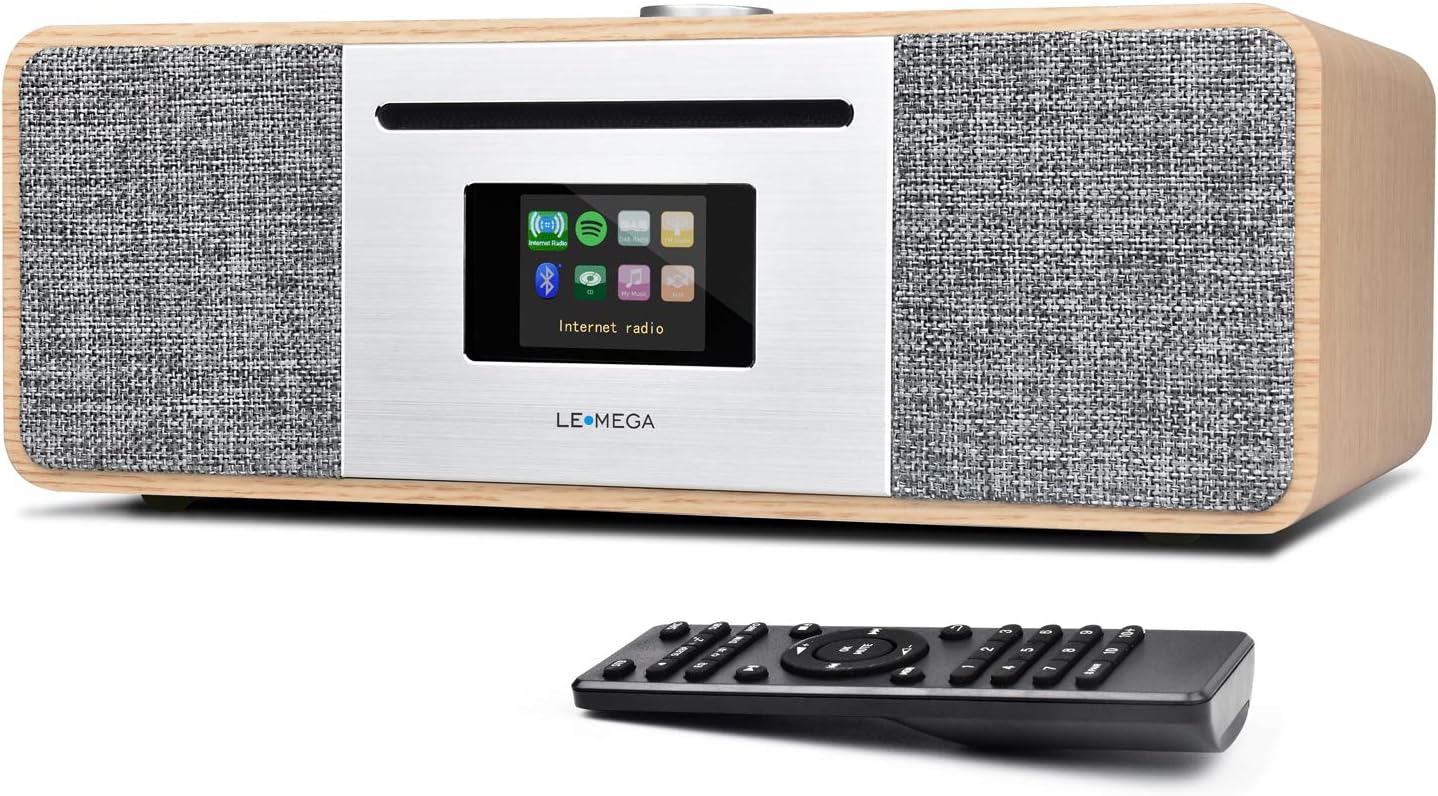
Immaġni: Quddiem view of the LEMEGA MSY5 Music System, showcasing the display, CD slot, and control knob, with the remote control positioned in front.
4.2 Konnessjonijiet tal-Panew ta' wara
The rear panel provides various ports for power, external audio input, USB devices, and the FM antenna.

Immaġni: Dettaljata view of the LEMEGA MSY5's rear panel, labeling connections for Mains Power, Aux Input, USB Charging, USB MP3, Headphone Output, and Antenna.
5. Setup Inizjali
5.1 Konnessjoni tal-Enerġija
- Connect the supplied power adapter to the DC 12V/3A input port on the rear of the MSY5.
- Ipplaggja l-adapter tal-enerġija f'iżbokk tal-ħajt.
5.2 Setup ta' l-antenna
Extend the telescopic antenna fully for optimal FM radio reception.
5.3 First-Time Use Wizard
Upon first power-on, the system will guide you through initial settings:
- Għażla tal-Lingwa: Agħżel il-lingwa ppreferuta tiegħek.
- Setup tan-Netwerk: Connect to your Wi-Fi network for Internet Radio and Spotify Connect functionality. Select your network and enter the password.
- Ħin u Data: Set the current time and date. This can often be synchronized automatically via the internet.
6. Istruzzjonijiet Operattivi
6.1 Għażla tal-Modalità
Use the 'Mode' button on the unit or remote control to switch between available sources: CD, Internet Radio, FM Radio, Bluetooth, USB, and Aux In.

Image: Graphic illustrating the MSY5 Music System's core features: CD Player, Internet Radio, Spotify, Bluetooth, and FM Radio.
6.2 CD Player
- Agħżel il-modalità 'CD'.
- Daħħal CD bil-mod fl-islott sakemm jinġibed 'il ġewwa awtomatikament.
- Playback will begin automatically. Use the Play/Pause, Skip Forward, and Skip Backward buttons for control.
- To eject a CD, press the Eject button.

Image: The LEMEGA MSY5 Music System on a table, highlighting its slot-in CD player and the included remote control.
6.3 Internet Radio & Spotify Connect
- Agħżel il-modalità 'Radju tal-Internet'.
- Browse stations by location, genre, or search.
- To use Spotify Connect, ensure your MSY5 is connected to the same Wi-Fi network as your smartphone/tablet. Open the Spotify app, select a song, and choose your MSY5 as the playback device.

Image: The LEMEGA MSY5 Music System displaying an internet radio station on its screen, emphasizing its smart streaming capabilities.
Radju Diġitali 6.4 FM
- Agħżel il-modalità 'FM'.
- Perform an auto-scan to find available stations or tune manually.
- Save your favorite stations to presets for quick access.
6.5 Tqabbil tal-Bluetooth
- Select 'Bluetooth' mode on the MSY5. The display will show 'Pairing'.
- On your smartphone or tablet, enable Bluetooth and search for 'LEMEGA MSY5'.
- Select the device to pair. Once connected, you can stream audio from your device to the MSY5.

Image: A smartphone displaying a music app, wirelessly connected via Bluetooth to the LEMEGA MSY5 Music System, which is also shown charging a device via USB.
6.6 USB Playback & Charging
- Daħħal USB drive li jkun fih MP3 files fil-port USB fuq il-pannell ta' wara.
- Select 'USB' mode. The system will automatically detect and play audio files.
- The USB port can also be used to charge compatible devices.
6.7 Input Awżiljarju
Connect an external audio device (e.g., an MP3 player) to the 'AUX IN' port on the rear panel using a 3.5mm audio cable. Select 'Aux In' mode to play audio from the connected device.
6.8 Clock and Alarms
The MSY5 features a clock and dual independent alarms. Access these settings through the system menu to set wake-up times, alarm sources (radio, CD, buzzer), and snooze duration.

Image: The LEMEGA MSY5 Music System on a bedside table, with a person sleeping in the background, illustrating its dual alarm clock and sleep/snooze functions.
6.9 Settings tal-Ħoss
Customize your audio experience by adjusting Treble, Bass, and Loudness levels. You can also select from preset equalizer modes such as POP, Classic, Jazz, Rock, and Normal via the system menu.
7. Manutenzjoni
7.1 Tindif tal-Unità
Wipe the exterior of the MSY5 with a soft, dry cloth. Do not use abrasive cleaners or solvents. Ensure the unit is unplugged before cleaning.
7.2 Kura tas-CD
Handle CDs by their edges. Clean discs with a soft, lint-free cloth, wiping from the center outwards. Avoid touching the playing surface.
8 Issolvi l-problemi
| Problema | Kawża Possibbli | Soluzzjoni |
|---|---|---|
| Ebda qawwa | L-adapter tal-enerġija mhux imqabbad; is-sokit mhux attiv. | Iċċekkja l-konnessjoni tal-adapter tal-enerġija; ipprova sokit differenti. |
| L-ebda ħoss | Volume too low; incorrect source selected; headphones connected. | Increase volume; select correct input source; disconnect headphones. |
| Ma tistax tikkonnettja mal-Wi-Fi | Password mhux korretta; barra mill-firxa; problema bir-router. | Verify password; move unit closer to router; restart router. |
| Is-CD mhux qed idoqq | CD inserted incorrectly; disc scratched/dirty; incompatible disc type. | Reinsert CD correctly; clean or replace disc; ensure it's a standard CD/CD-R/CD-RW. |
| Tqabbil Bluetooth ifalli | Device not in pairing mode; MSY5 not in Bluetooth mode; device too far. | Ensure both devices are in pairing mode; move devices closer. |
9. Speċifikazzjonijiet
- Mudell: MSY5
- Ditta: LEMEGA
- Dimensjonijiet tal-pakkett: 16.5 x 12 x 9 pulzieri
- Piż tal-oġġett: 10.83 libbra (4.92 Kilogrammi)
- Teknoloġija tal-Konnettività: Auxiliary, Bluetooth, IR, USB, Wi-Fi
- Teknoloġija tuner: Radju tal-Internet, FM
- Bands tar-Radju Appoġġjati: FM
- Karatteristiċi Speċjali: Internet Radio, Spotify Connect, WiFi Connectivity, CD Player, USB Player, USB Charging, Clock Alarms, Remote & App Control
- Sors tal-Enerġija: Corded Elettriku
- Komponenti Inklużi: Owner's Manual, Power Adapter
10. Garanzija u Appoġġ
LEMEGA products are designed and manufactured to the highest quality standards. For detailed warranty information and technical support, please refer to the warranty card included with your product or visit the official LEMEGA website. You may also contact LEMEGA customer service directly for assistance.
Appoġġ onlajn: Żur il-Ħanut LEMEGA fuq Amazon


