Introduzzjoni
The Directed Electronics DS3 Remote Start Interface System is designed to enhance vehicle security and convenience. As a global leader in security and control telematics, this system aims to make your vehicle experience more secure, comfortable, and enjoyable. This manual provides essential information for the proper setup, operation, and maintenance of your DS3 system.
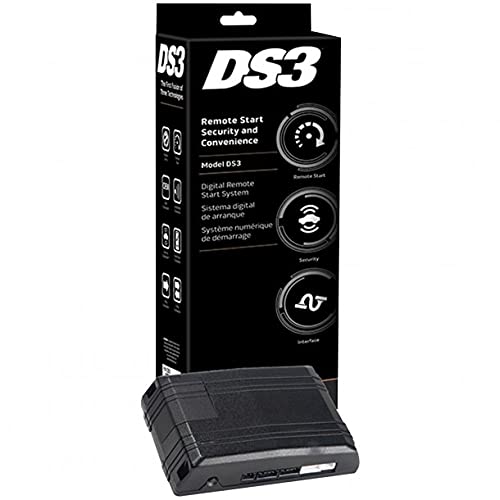
Figure 1: Directed Electronics DS3 Remote Start Interface System module.
Setup u Installazzjoni
Proper installation of the DS3 system is crucial for its functionality and your vehicle's safety. It is highly recommended that installation be performed by a qualified professional installer.
Passi Ġenerali ta' Installazzjoni (Installazzjoni Professjonali Rakkomandata):
- Preparazzjoni tal-Vettura: Kun żgur li l-batterija tal-vettura hija skonnettjata qabel tibda kwalunkwe xogħol elettriku.
- Tqegħid tal-Modulu: Select a secure and discreet location within the vehicle for mounting the DS3 module, away from excessive heat or moisture.
- Konnessjonijiet tal-Wiring: Carefully follow the detailed wiring diagrams provided with the professional installation kit. This typically involves connecting to the vehicle's ignition, power, ground, data bus, and other relevant circuits.
- Programmazzjoni tal-Modulu: Once all physical connections are made, the DS3 module will need to be programmed to your specific vehicle using specialized tools and software. This step integrates the system with the vehicle's onboard computer.
- Ittestjar: After programming, thoroughly test all functions of the remote start and interface system to ensure correct operation and vehicle compatibility.
Note: Incorrect installation can lead to vehicle damage, system malfunction, or safety hazards. Always consult the professional installation guide or a certified technician.
Istruzzjonijiet Operattivi
Once installed and programmed, the DS3 system allows for remote control of various vehicle functions. Specific operations may vary based on your vehicle and the remote control device used (e.g., factory key fob, dedicated remote, smartphone app).
Operazzjonijiet Komuni:
- Bidu mill-bogħod: Typically activated by pressing a specific button sequence on your remote control (e.g., lock button three times, or a dedicated remote start button). The vehicle will start and run for a pre-set duration.
- Waqfien mill-Bogħod: To turn off the engine after remote starting, repeat the remote start button sequence or press a dedicated stop button.
- Akkwist Ewlieni: After remote starting, enter the vehicle, insert the key into the ignition, turn it to the ON/RUN position, and press the brake pedal. This transfers control from the remote start system to the vehicle's ignition.
- Door Lock/Unlock: Use your remote control to lock or unlock the vehicle doors.
- Ħruġ tat-trunk: If configured, a dedicated button on your remote may release the vehicle's trunk.
Refer to your specific remote control's user guide for exact button functions and sequences.
Manutenzjoni
The Directed Electronics DS3 system is designed for reliable operation with minimal maintenance. Follow these general guidelines:
- Żomm Niexef: Kun żgur li l-modulu u l-konnessjonijiet tiegħu jibqgħu niexfa u ħielsa mill-umdità.
- Evita Temperaturi Estremi: While designed for automotive environments, prolonged exposure to extreme temperatures outside normal operating ranges can affect performance.
- Batteriji tal-Kontroll mill-bogħod: Replace batteries in your remote control devices as needed to ensure consistent performance. Refer to your remote's manual for battery type and replacement instructions.
- Aġġornamenti tas-Software: Periodically, your installer may recommend software updates for the DS3 module to improve performance or add new features. These updates should only be performed by a qualified technician.
Issolvi l-problemi
If you experience issues with your DS3 system, consider the following common troubleshooting steps:
- Is-Sistema Mhux Qed Tirrispondi:
- Check the battery in your remote control.
- Ensure you are within range of the vehicle.
- Verify that the vehicle's hood is closed, and the parking brake is engaged (if required by your vehicle's setup).
- Vehicle Fails to Remote Start:
- Confirm the vehicle is in Park (automatic transmission) or Neutral with the parking brake engaged (manual transmission, if configured).
- Check if the vehicle's check engine light is on, which can prevent remote start.
- Ensure all doors, trunk, and hood are securely closed.
- Short Remote Range:
- Ibdel il-batterija tal-kontroll mill-bogħod.
- Evita żoni b'interferenza għolja ta' frekwenza tar-radju.
If problems persist, contact your authorized Directed Electronics dealer or professional installer for assistance.
Speċifikazzjonijiet
| Numru tal-Mudell: | DS3 |
| Dimensjonijiet tal-Prodott: | 10.5 x 4 x 3.5 pulzieri |
| Piż tal-oġġett: | 1.1 liri |
| Ditta: | Imexxi |
| Manifattur: | Viper |
| Pajjiż ta' Oriġini: | Iċ-Ċina |
| Karatteristiċi oħra tal-wiri: | Wireless |
Garanzija u Appoġġ
Directed Electronics products are backed by a limited warranty. For specific warranty terms and conditions, please refer to the documentation provided with your purchase or visit the official Directed Electronics website. For technical support, service, or warranty claims, please contact your authorized dealer or the Directed Electronics customer support team.
Żomm il-prova tax-xiri tiegħek għal skopijiet ta' garanzija.


