Introduzzjoni
The JENSEN JTA-385 is a versatile audio system designed to play music from various sources, including vinyl records, cassette tapes, and AM/FM radio. It features a retro-styled design with a wood-grain finish, woven fabric speaker covers, and gold cabinet accents. This manual provides detailed instructions for setting up and operating your JTA-385 unit.
Il-karatteristiċi ewlenin jinkludu:
- 33-1/3, 45, and 78 RPM speed options for all standard record formats.
- Adjustable pitch control for optimizing record speed.
- AM/FM stereo receiver with a backlit analog tuning dial.
- Built-in cassette player/recorder with auto stop.
- Kelliema integrati għal daqq immedjat.
- Line out and stereo headphone jack for external audio connections.
Komponenti Matulview
Familiarize yourself with the main components of your JTA-385 unit:
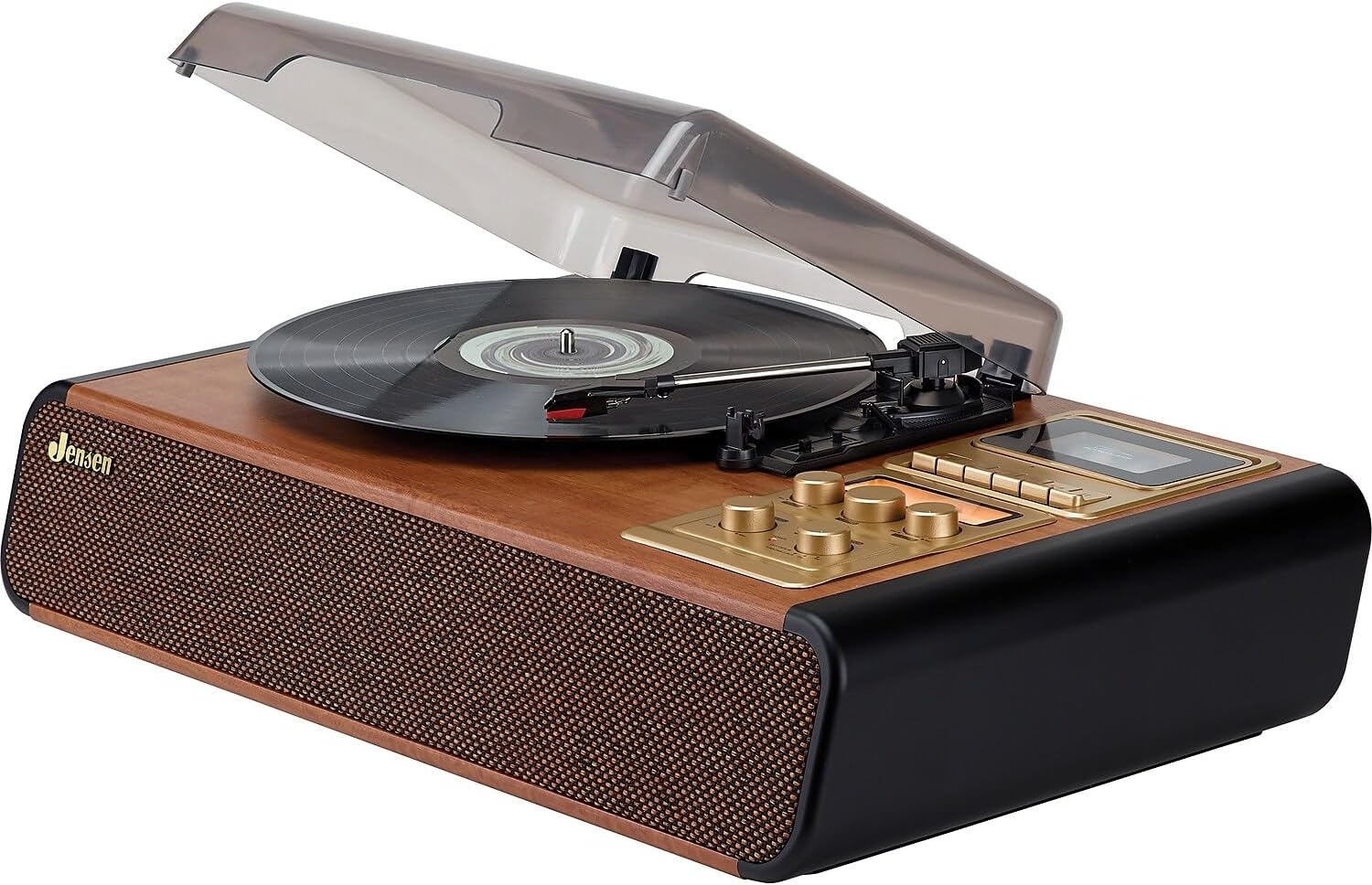
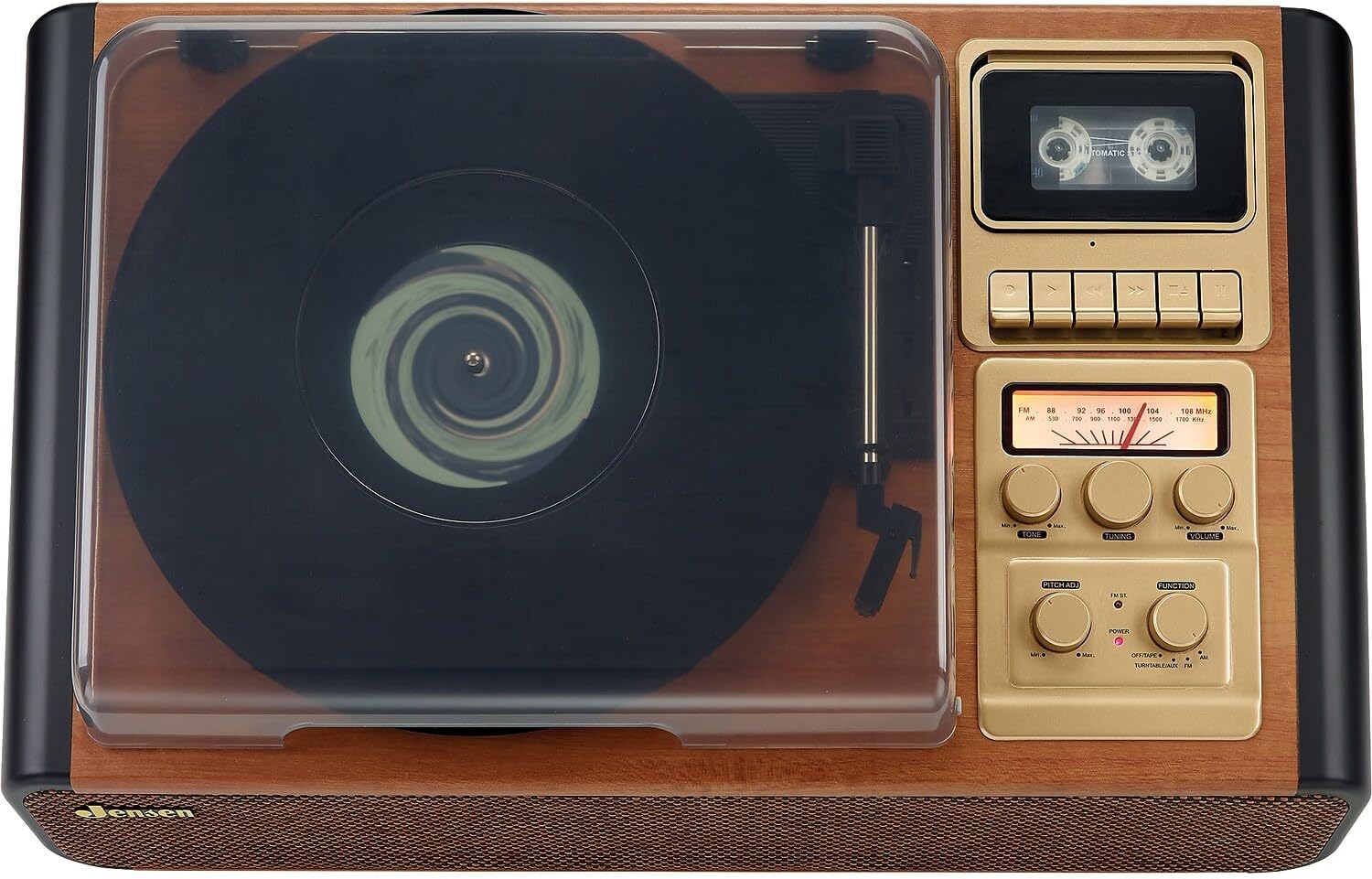
The unit features a top-loading turntable under a clear dust cover, a cassette player/recorder on the right side of the top panel, and an AM/FM radio tuner with various control knobs on the front panel. Built-in speakers are located on the front of the unit.
Setup
- Spakkjar: Neħħi l-unità mill-imballaġġ tagħha bir-reqqa. Żomm il-materjali tal-imballaġġ għal trasport jew ħażna fil-futur.
- Pjazzament: Poġġi l-unità fuq wiċċ stabbli u livellat 'il bogħod mix-xemx diretta, sorsi ta' sħana, u trab jew umdità eċċessiva.
- Konnessjoni tal-Enerġija: Connect the AC power cord to a standard 120V AC wall outlet.
- Qoxra tat-Trab: Ensure the clear dust cover is properly hinged and can be opened and closed smoothly.
- Adapter 45 RPM: The 45 RPM adapter is included for playing 7-inch records with large center holes. Keep it in a safe place when not in use.
It-tħaddim tat-turntable
- Qawwa Mixgħul: Turn the FUNCTION knob to select 'TURNTABLE/AUX'. The POWER indicator will light up.
- Place a Record: Open the dust cover and place a record on the turntable platter. If playing a 45 RPM single, use the included adapter.
- Agħżel Veloċità: Set the SPEED SELECTOR switch to the appropriate speed (33-1/3, 45, or 78 RPM) for your record.
- Ibda l-Daqq: Lift the tone arm using the cueing lever. Position the stylus over the desired track of the record. Gently lower the tone arm onto the record using the cueing lever. The turntable will begin to spin and play.
- Aġġusta l-Pitch: Use the PITCH ADJ control to fine-tune the playback speed if needed.
- Aġġusta Volum: Rotate the VOLUME knob to set the desired listening level.
- Waqfien Awtomatiku: The AUTO STOP switch can be set to ON or OFF. When ON, the turntable will automatically stop spinning when the record finishes. When OFF, the turntable will continue to spin.

Operating the Cassette Player/Recorder
- Select Cassette Function: Turn the FUNCTION knob to 'OFF/TAPE'.
- Daħħal il-Kassett: Open the cassette door and insert a cassette tape. Close the door securely.
- Daqq: Press the PLAY button to start cassette playback. Use the VOLUME knob to adjust the sound level.
- Reġistrazzjoni: To record from the turntable, radio, or AUX input, first select the desired source using the FUNCTION knob. Then, switch the FUNCTION knob to 'OFF/TAPE', insert a blank cassette, and press the RECORD button. The unit will begin recording from the selected source.
- Waqqaf/Eject: Press the STOP/EJECT button to stop playback or recording and eject the cassette.
Operating the AM/FM Radio
- Select Radio Function: Turn the FUNCTION knob to 'AM' or 'FM'.
- Intuna fuq Stazzjon: Rotate the TUNING knob to select your desired radio station. The analog tuning dial will indicate the frequency.
- Aġġusta Volum: Use the VOLUME knob to set the desired listening level.
- Antenna: For optimal FM reception, extend the FM wire antenna. For AM reception, rotate the unit for best signal.
Konnessjonijiet Esterni
- Input AUX: Connect an external audio device (e.g., MP3 player, smartphone) to the AUX IN jack using a 3.5mm audio cable. Select 'TURNTABLE/AUX' with the FUNCTION knob.
- Jack tal-headphone: Plug headphones into the HEADPHONE jack for private listening. The built-in speakers will be muted.
- RCA Line Out: Connect the RCA LINE OUT jacks to an external amplifier or stereo system using RCA cables. This allows you to play audio from the JTA-385 through external speakers.
Manutenzjoni
- Tindif: Imsaħ l-unità b'ċarruta ratba u niexfa. Tużax prodotti tat-tindif jew solventi li joborxu.
- Qoxra tat-Trab: Żomm l-għatu tat-trab magħluq meta ma tkunx qed tużah biex tipproteġi t-turntable mit-trab u l-fdalijiet.
- Kura tal-istilus: Handle the stylus carefully to avoid damage. Clean the stylus periodically with a soft brush.
- Tindif tar-Ras tal-Kassetta: Regularly clean the cassette player's head with a cotton swab lightly dampImħawwar bl-alkoħol isopropiliku biex jiżgura kwalità ottimali tal-ħoss.
Issolvi l-problemi
If you experience issues with your JTA-385, please refer to the troubleshooting section in the full product manual included in the box. Common issues may include:
- No power: Check power connection and outlet.
- No sound: Check volume levels, function selection, and external connections.
- Turntable not spinning: Ensure power is on and tone arm is lifted.
- Poor radio reception: Adjust antenna or unit position.
For further assistance, please contact Jensen customer support.
Speċifikazzjonijiet tal-Prodott
| Dimensjonijiet tal-Prodott | 14 x 22.1 x 5.8 pulzieri |
| Piż tal-oġġett | 11.7 liri |
| Numru tal-Mudell tal-Oġġett | JTA-385 |
| Brand | Jensen |
| Veloċità ta' Rotazzjoni Massima | 78 RPM |
| Materjal | Injam |
| Kulur | Kannella |
| Apparati Kompatibbli | Headphone |
| Tip ta' Mutur | Mutur AC |
Vidjo Uffiċjali tal-Prodott
Garanzija u Appoġġ
This product includes a user manual. For detailed warranty information and customer support, please refer to the documentation provided in the product packaging. If you have any questions or require assistance, please contact Jensen customer service.


