1. Introduzzjoni
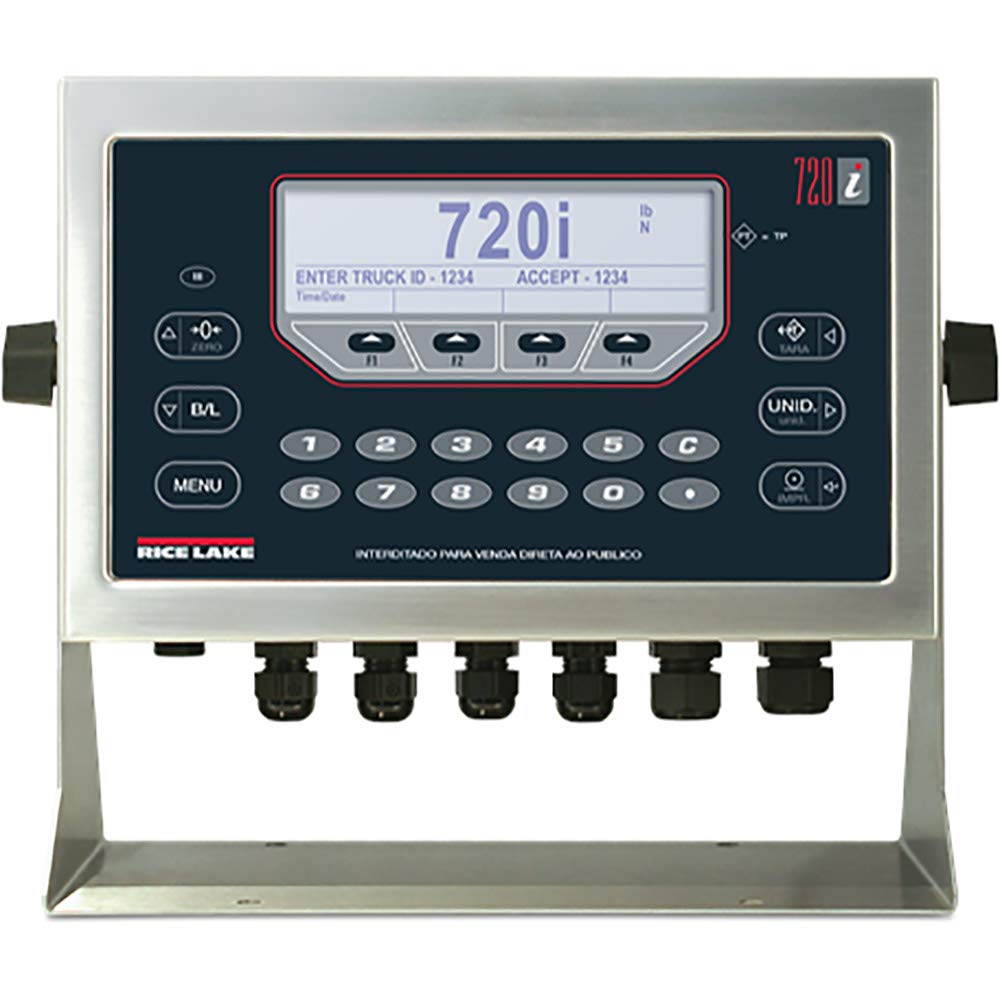
This manual provides comprehensive instructions for the installation, operation, and maintenance of the Rice Lake 720i Universal Indicator. The 720i is a programmable weight indicator/controller designed for industrial applications requiring batch formulation, inventory management, and traceability. It features a robust NEMA Type 4X/IP66 stainless steel enclosure and a user-friendly operator keypad.
Please read this manual thoroughly before operating the device to ensure proper function and safety.
2. Informazzjoni dwar is-Sigurtà
Dejjem osserva l-prekawzjonijiet tas-sigurtà li ġejjin:
- Ensure the power supply (85-260VAC) matches the device requirements.
- Tiftaħx l-għeluq sakemm ma tkunx qed tingħata struzzjonijiet minn persunal kwalifikat.
- Protect the device from extreme temperatures and moisture beyond its NEMA Type 4X/IP66 rating.
- Skonnettja l-enerġija qabel ma twettaq xi proċeduri ta' manutenzjoni jew installazzjoni.
3. Prodott Aktarview u Komponenti
The Rice Lake 720i Universal Indicator is housed in a durable stainless steel enclosure, designed for harsh industrial environments. Key features include:
- Wiri: 5.3 in x 1.5 in LCD display for clear data visualization.
- Tastiera: 22-key membrane panel with tactile feedback for precise input.
- Konnettività: Two full duplex serial ports for peripheral equipment integration.
- Internal Channels: Eight channels on the CPU board for versatile applications.
- Mehmużin: NEMA Type 4X/IP66 rated stainless steel for protection against dust and water.
4. Setup u Installazzjoni
4.1 Disimballaġġ
Carefully remove the 720i indicator from its packaging. Inspect for any signs of damage during transit. Retain all packaging materials for future transport or storage.
4.2 Immuntar
The 720i indicator can be mounted in universal or panel-mount enclosure styles. Ensure the mounting surface is stable and capable of supporting the device's weight (approximately 9.5 pounds). Refer to the specific mounting kit instructions for detailed steps.
4.3 Konnessjonijiet elettriċi
- Provvista tal-Enerġija: Connect the indicator to an 85-260VAC power source. Ensure proper grounding.
- Konnessjonijiet taċ-Ċellola tat-Tagħbija: Connect load cells to the appropriate terminals. The 720i supports eight channels on its CPU board.
- Portijiet Serjali: Utilize the two full duplex serial ports for connecting peripheral devices such as printers, remote displays, or computers.
Attenzjoni: All electrical connections should be performed by a qualified technician to prevent damage to the unit or personal injury.
5. Istruzzjonijiet Operattivi
The 720i indicator features a 22-key membrane keypad for operation. The LCD display provides real-time data and operator prompts.
5.1 Użin Bażiku
- Qawwa Mixgħul: Turn on the indicator. The display will show a self-test sequence, then the current weight.
- Żero: Agħfas il- ŻERO buttuna biex tissettja d-displej għal żero meta l-iskala tkun vojta.
- Taring: Place an empty container on the scale. Press the TARA button to subtract the container's weight. The display will show zero.
- Użin: Place the item to be weighed on the scale. The display will show the net weight.
5.2 Batching Operations
The 720i supports configurable batch engine or ProAction software for batching. Refer to the software manual for detailed programming instructions.
- Use the numeric keypad (0-9) and C (Clear) button for data entry.
- Follow on-screen prompts for entering batch parameters, such as "ENTER TRUCK ID" or "ACCEPT".
- Il- MENU button provides access to advanced settings and batch configurations.
5.3 Tibdil tal-Unità
Agħfas il- UNID button to cycle through available weight units (e.g., pounds (lb), kilograms (kg), Newtons (N)).
6. Manutenzjoni
6.1 Tindif
The stainless steel enclosure can be cleaned with a damp cloth and mild detergent. Avoid abrasive cleaners or solvents that could damage the display or keypad membrane.
6.2 Kalibrazzjoni
Periodic calibration is essential for maintaining accuracy. Refer to the technical service manual or contact authorized service personnel for calibration procedures.
6.3 Spezzjoni
Regularly inspect all cables and connections for wear or damage. Ensure the enclosure seals are intact to maintain the NEMA Type 4X/IP66 rating.
7 Issolvi l-problemi
| Problema | Kawża Possibbli | Soluzzjoni |
|---|---|---|
| Indicator does not power on. | L-ebda provvista tal-enerġija jew konnessjoni difettuża. | Check power cable and source. Ensure correct voltage (85-260VAC). |
| Qari tal-piż mhux preċiż. | Needs calibration, damaged load cell, or unstable environment. | Perform calibration. Inspect load cells and connections. Ensure stable operating conditions. |
| It-tastiera ma tirrispondix. | Keypad membrane damage or internal fault. | Clean keypad surface. If problem persists, contact technical support. |
| Id-displej juri messaġġ ta' żball. | System error or overload. | Refer to the specific error code in the technical manual. Remove any overload. |
For issues not listed here, please contact Rice Lake technical support.
8. Speċifikazzjonijiet
- Mudell: 720i
- Numru tal-Parti: 115448
- Mehmużin: NEMA Tip 4X/IP66, Azzar Inossidabbli
- Wiri: 5.3 in x 1.5 in LCD
- Tastiera: Panel tal-membrana ta '22 ċavetta, sensazzjoni tal-mess
- Portijiet Serjali: 2 Full Duplex
- CPU Board Channels: 8
- Input ta' Enerġija: 85-260VAC
- Dimensjonijiet tal-Prodott: 10.5 x 5.25 x 9.66 pulzieri
- Piż tal-oġġett: 9.5 Liri
- Konformità: ROHS Compliant, NTEP
9. Garanzija u Appoġġ
For warranty information, please refer to the documentation provided with your purchase or visit the official Rice Lake website. Technical support can be reached through the contact information available on the Rice Lake websit.
Sistemi tal-Użin tal-Lag tar-Ross
www.ricelake.com


