1. Introduzzjoni
This manual provides detailed instructions for the installation, operation, and maintenance of your Creative Sound Blaster Z SE Internal PCI-e Sound Card and DAC. Please read this manual thoroughly before installation and use to ensure proper functionality and optimal audio experience.
The Creative Sound Blaster Z SE is designed to deliver high-fidelity audio for gaming and entertainment, featuring advanced audio processing, surround sound capabilities, and clear communication tools.
2. Kontenut tal-Pakkett
- Creative Sound Blaster Z SE Internal PCI-e Sound Card
- Gwida ta' Bidu Mgħaġġel (mhux inkluża f'dan il-manwal diġitali)
- Installation CD (drivers and software, or download from Creative websit)
Note: Contents may vary slightly. Refer to your product packaging for exact details.
3. Rekwiżiti tas-Sistema
- Disponibbli PCI Express x1 slot
- Operating System: Windows 10 or later (64-bit recommended)
- Intel Core i3 or AMD equivalent processor
- 1 GB RAM
- 600 MB spazju ħieles fuq il-hard disk
- Internet connection for driver and software installation/updates
4. Setup u Installazzjoni
4.1 Installazzjoni tal-Ħardwer
- Itfi l-Kompjuter Tiegħek: Kun żgur li l-kompjuter tiegħek ikun mitfi kompletament u skonnettjat mis-sors tal-enerġija.
- Kaxxa Miftuħa tal-Kompjuter: Neħħi l-pannell tal-ġenb tal-kaxxa tal-kompjuter tiegħek biex taċċessa l-motherboard.
- Sib is-Slott tal-PCI Express: Identifika slott PCI Express x1 disponibbli fuq il-motherboard tiegħek.
- Neħħi l-Għatu tas-Slott: Carefully remove the metal slot cover from the back of your computer case corresponding to the chosen PCI-e slot.
- Daħħal il-Karta tal-Ħoss: Align the Sound Blaster Z SE card with the PCI-e slot and press down firmly until it is securely seated. Ensure the gold-plated connectors are fully inserted.
- Karta Sikura: Fasten the sound card with a screw to the computer case to prevent movement.
- Agħlaq il-Kaxxa tal-Kompjuter: Ibdel il-pannell tal-ġenb tal-kaxxa tal-kompjuter tiegħek.
- Erġa' qabbad l-Enerġija: Plug your computer back into the power source and power it on.
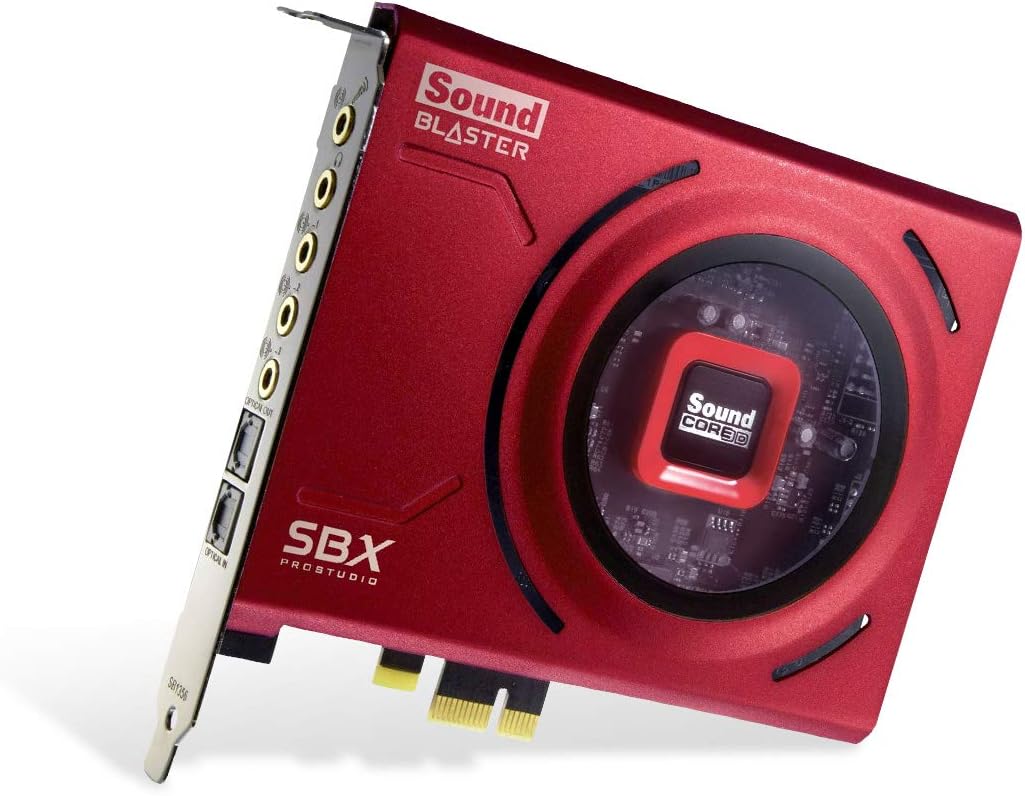
Image: The Creative Sound Blaster Z SE internal PCI-e sound card, showcasing its red design and various audio ports on the bracket.
4.2 Installazzjoni tas-Sewwieq u s-Softwer
- L-Ibbutjar Inizjali: After installing the hardware, boot your computer. Windows may automatically detect new hardware.
- Install Sound Blaster Command Software:
- Insert the provided installation CD, or for the latest version, download the Sound Blaster Command software and drivers from the official Creative websit: creative.com/support/SBZSE.
- Mexxi l-installatur u segwi l-istruzzjonijiet fuq l-iskrin.
- Restart your computer when prompted to complete the installation.
- Qabbad Apparat Awdjo: Connect your speakers, headphones, and microphone to the appropriate ports on the sound card.
- Line Out (Green): Front speakers / Headphones
- Line Out (Black): Spikers ta' wara
- Line Out (Orange): Ċentru / Subwoofer
- Mic In (Red): Input tal-mikrofonu
- Linja Dħul (Blu): Input awdjo
- Optical Out (TOSLINK): Ħruġ ta 'awdjo diġitali
- Optical In (TOSLINK): Input ta 'awdjo diġitali

Image: The Sound Blaster Z SE card highlighting its 116 dB Signal-to-Noise Ratio and 24-bit / 192 kHz Hi-Res audio capabilities.
5. Istruzzjonijiet Operattivi
5.1 Sound Blaster Command Software Overview
The Sound Blaster Command software is your central control panel for managing all audio settings and features of your Sound Blaster Z SE. It allows customization of playback, recording, equalization, and various audio enhancements.

Image: Screenshot of the Sound Blaster Command software interface, displaying options for sound experience, SBX profiles, equalizer, playback, recording, and mixer settings.
5.2 Daqq tal-Awdjo
- Pristine Audio Clarity: The Sound Blaster Z SE supports up to 24-bit / 192 kHz playback with a 116 dB Signal-to-Noise Ratio (SNR), providing clear and detailed audio. It also supports Audio Stream Input / Output (ASIO) for low-latency, high-fidelity audio, beneficial for recordings.
- Ħoss Surround Immersiv:
- Supports 7.1 virtual surround sound for headphones and speakers.
- Provides discrete 5.1 surround sound for speaker setups.
- Features Dolby Digital Live and DTS Encoding for external device compatibility.
- SBX Gaming EQ Profiles: Access pre-tuned audio profiles optimized for popular game titles such as Apex Legends, Fortnite, Overwatch, and PUBG. These profiles can be selected and further customized within the Sound Blaster Command software.
- Headphone Amplifikazzjoni: L-integrat amplifier supports headphones with impedance up to 600Ω, ensuring powerful and clear audio output for a wide range of headphones.

Image: The Sound Blaster Z SE card illustrating its support for Discrete 5.1 Surround, Virtual 7.1 Surround, DTS Connect, and Dolby Digital Live technologies.

Image: A pair of gaming headphones with the Sound Blaster logo, accompanied by a "600Ω AMP" graphic, indicating the sound card's powerful headphone amplifikazzjoni.
5.3 Microphone and Communication
- Microphone EQ Presets: Utilize the included Microphone EQ Presets to optimize your headset's built-in microphone. These presets help to reduce harshness, enhance natural vocal tones, and increase mid-range clarity for improved communication.
- CrystalVoice Technology: The Sound Blaster Command software incorporates CrystalVoice technology, which actively removes echoes and ambient noises, ensuring your voice is heard clearly during gaming sessions or video conferences.

Image: The Sound Blaster Z SE card with a prominent microphone icon and sound wave graphics, illustrating its microphone enhancement features.
6. Manutenzjoni
- Żomm Sewwieqa Aġġornata: Iċċekkja regolarment l-appoġġ Kreattiv websit (creative.com/support/SBZSE) for the latest drivers and Sound Blaster Command software updates to ensure optimal performance and compatibility.
- Tindif Fiżiku: Periodically clean your computer's interior to prevent dust buildup on the sound card, which can affect performance and longevity. Use compressed air for best results.
- Software Reinstallation: In case of persistent software issues, a clean reinstallation of the Sound Blaster Command application and drivers may resolve problems.
7 Issolvi l-problemi
This section addresses common issues you might encounter with your Sound Blaster Z SE.
7.1 No Sound or Distorted Audio
- Iċċekkja l-Konnessjonijiet: Ensure all audio cables (speakers, headphones, microphone) are securely plugged into the correct ports on the sound card.
- Verify Default Playback Device: In Windows Sound Settings, ensure "Sound Blaster Z SE" is set as the default playback device.
- Installazzjoni tas-sewwieq: Confirm that the latest drivers and Sound Blaster Command software are correctly installed. Reinstall if necessary.
- Livelli tal-Volum: Check volume levels in Windows and within the Sound Blaster Command software.
- Audio Breakup: If experiencing intermittent audio breakup, ensure your system meets the minimum requirements and that no conflicting audio drivers are present.
7.2 Headphone Volume Too High
- The Sound Blaster Z SE features a powerful headphone amplifier. If the volume is excessively high even at low Windows settings, open the Sound Blaster Command software.
- Navigate to the "Equalizer" section and adjust the overall sound volume (gain) downwards, typically to -12dB or lower, to achieve a comfortable listening level.
7.3 Sound Blaster Command Software Not Recognizing Card
- This can sometimes occur after driver or software updates.
- Soluzzjoni: Perform a clean reinstallation of the Sound Blaster Command application. Download the latest version from the Creative support websit.
7.4 Subwoofer Disabled or 5.1 Audio Issues
- Ensure your speakers are correctly configured for 5.1 output in the Sound Blaster Command software.
- Verify that the subwoofer is properly connected to the orange output port.
- Check if Dolby Digital Live or DTS Encoder is enabled in the software, as these settings can affect subwoofer output.
7.5 Difficulty Balancing Multiple Outputs (e.g., Speakers and SPDIF)
- The Sound Blaster Command software provides individual volume controls for different outputs.
- Adjust the levels for each output (e.g., Line Out for speakers, Optical Out for SPDIF) within the software's mixer or playback settings to achieve the desired balance.
8. Speċifikazzjonijiet
| Karatteristika | Dettall |
|---|---|
| Numru tal-Mudell | SB1500 |
| Brand | Kreattiv |
| Interface tal-Ħardwer | PCI-Express x1 |
| Modalità tal-Ħruġ tal-Awdjo | Jdawru |
| Kwalità Awdjo | 24-bit / 192 kHz |
| Proporzjon Sinjal-Ħsejjes (SNR) | 116 dB |
| Headphone Ampaktar ħaj | Supports up to 600Ω headphones |
| Appoġġ tal-Ħoss Surround | Discrete 5.1, Virtual 7.1, Dolby Digital Live, DTS Encoding |
| Apparati Kompatibbli | Speakers, Headphones |
| Dimensjonijiet tal-Prodott | 5.35 x 5 x 0.87 pulzieri |
| Piż tal-oġġett | 12.3 uqija |
| Manifattur | Laboratorji Kreattivi |
9. Garanzija u Appoġġ
9.1 Garanzija tal-Prodott
For detailed information regarding the warranty coverage for your Creative Sound Blaster Z SE, please refer to the warranty card included with your product or visit the official Creative websit. It-termini u l-kundizzjonijiet tal-garanzija jistgħu jvarjaw skont ir-reġjun.
9.2 Appoġġ Tekniku
If you encounter any issues not covered in this manual or require further assistance, please contact Creative's technical support:
- Appoġġ onlajn: Visit the Creative support website for FAQs, driver downloads, and contact options: creative.com/support
- Appoġġ Speċifiku għall-Prodott: For Sound Blaster Z SE specific resources, visit: creative.com/support/SBZSE


