Manwal tal-Utent tat-Telefon Robust Ulefone Armor X8
Model: Ulefone Armor X8
1. Prodott Aktarview
The Ulefone Armor X8 is a rugged smartphone designed for durability and performance in challenging environments. It features IP68/IP69K water and dust resistance, a robust build, and a powerful battery, making it ideal for outdoor workers and adventurers.
X'hemm fil-Kaxxa
- 1x Ulefone Armor X8 Phone
- 1x AC Power Charger Adapter (US plug)
- 1x Data Cable (USB Type-C)
- 1x Labra SIM
- 1x Screen Protector (pre-applied or in box)

Figure 1: Ulefone Armor X8 Rugged Phone - Front and Back View
2. Setup
2.1 SIM Card & SD Card Installation
- Sib it-trej tal-kard SIM fuq il-ġenb tat-telefon.
- Daħħal il-labra tas-SIM fit-toqba ż-żgħira ħdejn it-trej biex tneħħiha.
- Place your Nano-SIM cards and/or microSD card into the designated slots on the tray. Ensure correct orientation.
- Erġa' daħħal it-trej fit-telefon bir-reqqa sakemm tikklikkja f'postu.
2.2 Qawwa Inizjali
Press and hold the Power button (located on the right side) until the Ulefone logo appears. Follow the on-screen prompts to complete the initial setup, including language selection, Wi-Fi connection, and Google account setup.
2.3 Setup tan-Netwerk
After inserting your SIM card, the phone should automatically detect your mobile network. If not, navigate to Settings > Netwerk u internet > Netwerk mobbli to configure APN settings manually if required by your carrier.

Figure 2: Key Features of Ulefone Armor X8
3. Istruzzjonijiet Operattivi
3.1 Navigazzjoni Bażika (Android 11)
- Skrin tad-dar: Swipe left/right to access different home screens.
- App Drawer: Swipe 'l fuq mill-qiegħ tal-iskrin għal view l-applikazzjonijiet kollha installati.
- Notifiki u Settings Mgħaġġla: Skrolla 'l isfel minn fuq l-iskrin biex taċċessa n-notifiki u t-toggles tas-settings rapidi.
- Apps riċenti: Swipe up from the bottom and hold, then release to see recently used applications.
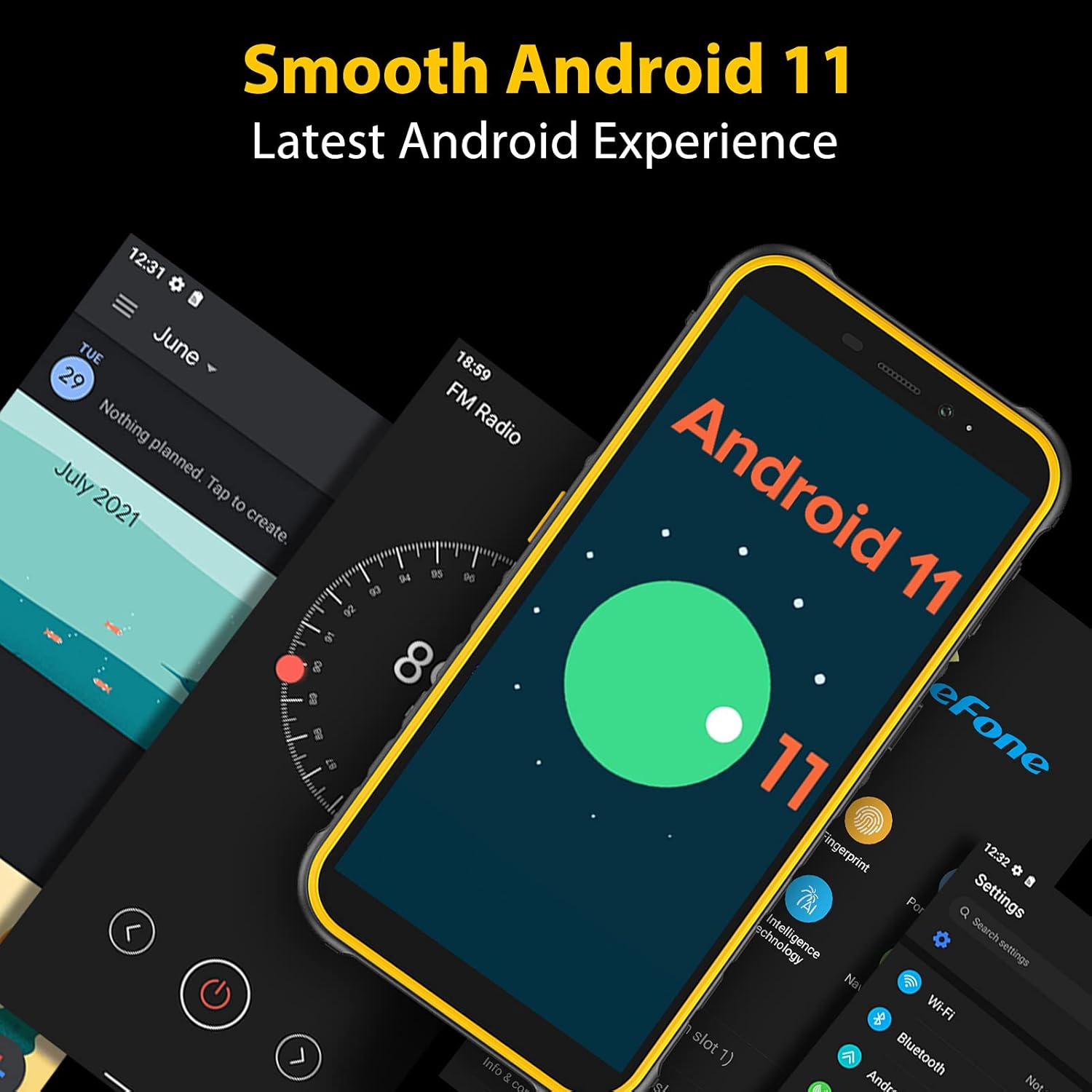
Figure 3: Android 11 Interface on Armor X8
3.2 Making Calls & Sending Messages
- Sejħiet: Tektek l-ikona tat-Telefon, daħħal in-numru, u tektek il-buttuna tas-sejħa.
- Messaġġi: Tap the Messages icon, start a new conversation, enter recipient and message, then send.
3.3 Użu tal-Kamera
The Armor X8 features a 13MP triple rear camera and an 8MP front camera. Open the Camera app to switch between photo and video modes, adjust settings, and capture moments.

Figure 4: Armor X8 Camera System
3.4 Fingerprint ID & Face Unlock
For enhanced security, set up Fingerprint ID and Face Unlock via Settings > Sigurtà. These features provide quick and convenient access to your device.

Figure 5: Biometric Security and NFC Features
3.5 NFC & Google Pay
The Armor X8 supports NFC for contactless payments and data transfer. Enable NFC in Quick Settings or Settings > Apparati konnessi > Preferenzi tal-konnessjoni > NFC. Set up Google Pay for secure mobile payments.
3.6 Custom Key & Digital Toolbox
The customizable side key can be programmed for quick access to frequently used functions like Push-to-Talk (Zello), SOS emergency calls, or the flashlight. The Digital Toolbox includes various utility apps such as a compass, sound meter, and plumb bob, useful for outdoor activities and professional work.
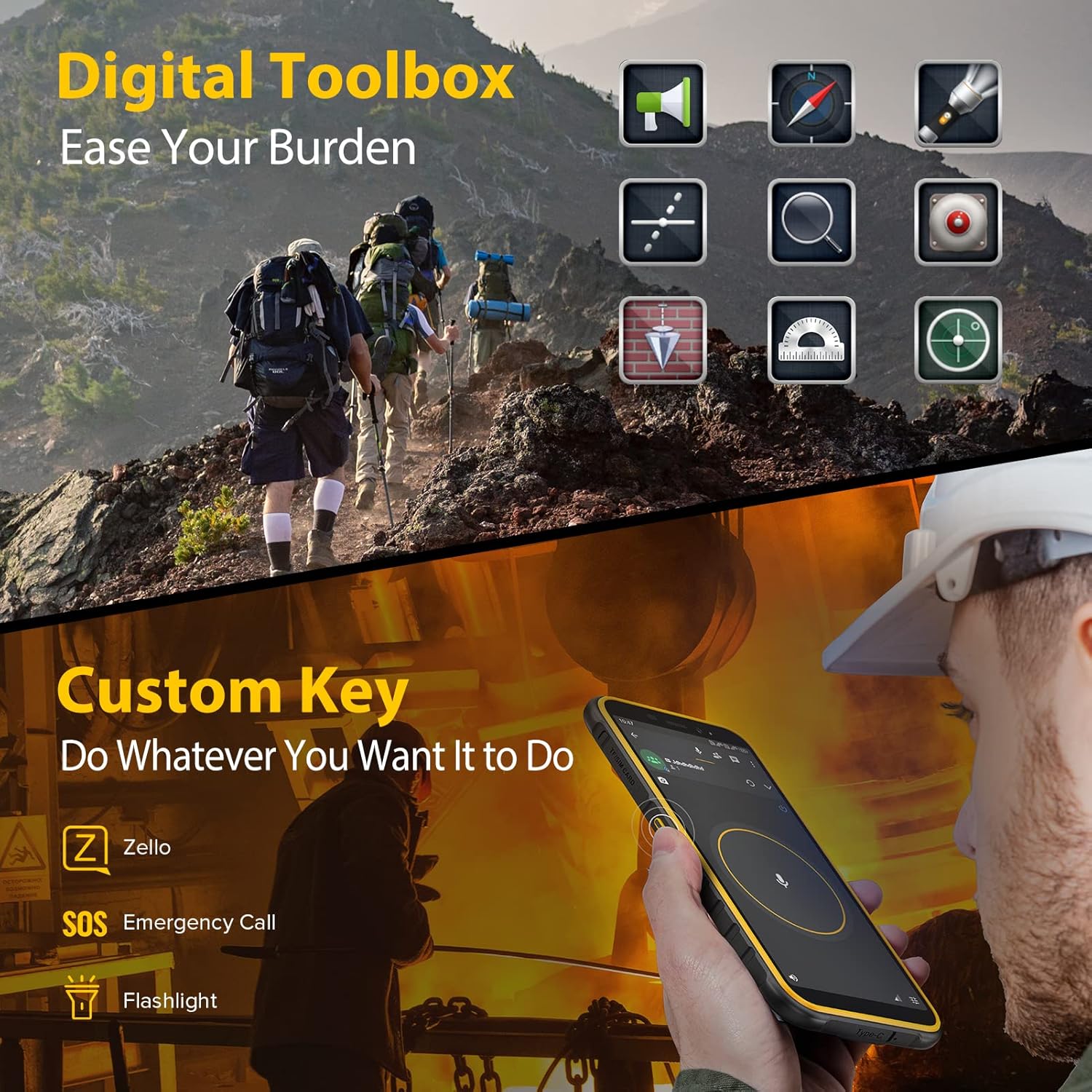
Figure 6: Digital Toolbox and Custom Key Functionality
4. Manutenzjoni
4.1 Kura li ma jgħaddix ilma minnha u mit-trab
While the Armor X8 is IP68/IP69K rated, proper care is essential. Ensure all port covers (USB-C, SIM tray) are securely closed before exposing the phone to water or dust. Rinse the phone with clean water after exposure to saltwater or chemicals and dry thoroughly before charging.

Figure 7: Armor X8 Water Resistance
4.2 Ġestjoni tal-batterija
The 5080mAh battery provides extended usage. To maximize battery life, avoid extreme temperatures, use the provided charger, and manage background app usage. Regular full charge cycles are recommended.
5 Issolvi l-problemi
Kwistjonijiet Komuni u Soluzzjonijiet
- It-telefon mhux qed jixgħel: Kun żgur li l-batterija hija ċċarġjata. Qabbad mal-ċarġer u stenna ftit minuti qabel ma tipprova tixgħelha.
- Poor network reception: Check SIM card insertion. Ensure you are in an area with network coverage. Some carriers may require specific APN settings.
- Apps crashing/slow performance: Neħħi l-cache tal-app (Settings > Apps > [Isem tal-App] > Ħażna > Neħħi l-cache). Restart the phone. Ensure sufficient storage space.
- Batterija tisbat malajr: Reduce screen brightness, disable unused features (Wi-Fi, Bluetooth, GPS), close background apps. Check battery usage in settings to identify power-hungry apps.
- Il-qarrej tal-marki tas-swaba' mhux qed jaħdem: Kun żgur li subgħajk ikun nadif u niexef. Irreġistra l-marki tas-swaba' tiegħek mill-ġdid fis-settings.
6. Speċifikazzjonijiet
| Karatteristika | Dettall |
|---|---|
| Mudell | Ulefone Armor X8 |
| Sistema Operattiva | Android 11.0 |
| Wiri | 5.7 inch Waterdrop Screen |
| Proċessur | MT6762 Octa-Core |
| RAM | 4GB |
| Ħażna Interna | 64GB (espandibbli sa 256GB) |
| Kamera ta' wara | Kamera Tripla ta' 13MP |
| Kamera ta' Quddiem | 8MP |
| Batterija | 5080mAh (10W fast charging) |
| Durabilità | IP68/IP69K Grade, MIL-STD-810G |
| Konnettività | Dual 4G SIM, Wi-Fi, Bluetooth, NFC, GPS |
| Sigurtà | ID tal-Marki tas-Swaba', Wiċċ Miftuħ |
| Dimensjonijiet | 7.28 x 3.9 x 1.93 pulzieri (Pakkett) |
| Piż | 1.12 liri |
7. Garanzija u Appoġġ
7.1 Informazzjoni dwar Garanzija
Ulefone products typically come with a limited manufacturer's warranty. Please refer to the warranty card included with your product or visit the official Ulefone websit għal termini u kundizzjonijiet dettaljati tal-garanzija speċifiċi għar-reġjun tiegħek.
7.2 Appoġġ għall-Klijent
For technical assistance, troubleshooting, or service inquiries, please contact Ulefone customer support through their official website or the contact information provided in your product packaging. Have your model number and purchase details ready when contacting support.


