1. Introduzzjoni
The Quark-elec QK-A032-AIS is a sophisticated bi-directional gateway designed to seamlessly integrate NMEA 2000 and NMEA 0183 marine data networks. This device facilitates the conversion of data between these two widely used protocols, enabling communication between a diverse range of marine electronic equipment. In addition to its primary conversion function, the A032-AIS offers versatile connectivity options including USB and WiFi, allowing users to access and manage their marine data on various platforms such as laptops, tablets, and smartphones running Android, iOS, Windows, or Linux operating systems.
Its robust design and comprehensive features make it an essential component for modern marine navigation and communication systems, providing flexibility and enhanced data accessibility.

Image 1.1: The QK-A032-AIS device, a bi-directional gateway for NMEA 2000 and NMEA 0183 data, featuring USB and WiFi connectivity.
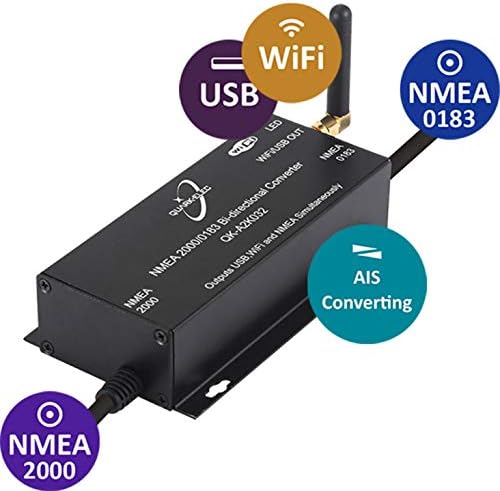
Image 1.2: The QK-A032-AIS highlighting its key features: NMEA 2000, NMEA 0183, USB, WiFi, and AIS converting capabilities.
2. Setup u Installazzjoni
Proper installation of the QK-A032-AIS is crucial for optimal performance. Follow these steps to set up your device:
2.1 Konnessjonijiet Fiżiċi
- Konnessjoni NMEA 2000: Connect the NMEA 2000 cable from the A032-AIS to your existing NMEA 2000 backbone. Ensure a secure connection to allow for bi-directional data flow. The device draws power from the NMEA 2000 network.
- Konnessjoni NMEA 0183: Connect the NMEA 0183 input/output wires to your NMEA 0183 devices (e.g., GPS, depth sounder, AIS receiver). Pay attention to the correct wiring for data input and output.
- Konnessjoni USB: For direct connection to a computer, plug the USB cable into the A032-AIS and your PC. Drivers may be required for certain operating systems (Windows, Linux).
- Antenna WiFi: Screw the provided WiFi antenna onto the designated connector on the A032-AIS. Ensure it is finger-tight for reliable wireless communication.

Image 2.1: Basic connection diagram showing the QK-A032-AIS connected to NMEA 2000 devices, an NMEA 0183 device, a PC via USB, and wireless devices via WiFi.

Image 2.2: Advanced connection diagram illustrating the QK-A032-AIS integrated into a larger NMEA 2000 backbone and connected to an A033 NMEA 0183 multiplexer for multiple NMEA 0183 devices.
2.2 Konfigurazzjoni WiFi
The A032-AIS supports multiple WiFi modes for flexible data access:
- Ad-hoc Mode (Default): The A032-AIS creates its own WiFi network, allowing direct connection from your wireless devices (laptops, tablets, phones). This is ideal for direct peer-to-peer communication without an external router.
- Modalità Stazzjon: The A032-AIS connects to an existing WiFi network (e.g., your boat's router). This allows multiple devices on that network to access the A032-AIS data. Configuration for Station Mode typically involves accessing the device's web interface via its default IP address in Ad-hoc mode first.
- Modalità Standby: Disables the WiFi functionality.
Refer to the device's specific software utility or web interface for detailed instructions on switching between WiFi modes and configuring network settings.

Image 2.3: Diagram illustrating the three WiFi operating modes: Ad-hoc (default), Station (connecting to a router), and Standby (WiFi disabled).
3. Istruzzjonijiet Operattivi
Once installed, the QK-A032-AIS operates by converting data between NMEA 2000 and NMEA 0183 protocols and making it available via USB and WiFi.
3.1 Data Conversion
The gateway automatically translates NMEA 2000 PGNs (Parameter Group Numbers) to NMEA 0183 sentences and vice versa. This allows older NMEA 0183 devices to receive data from a modern NMEA 2000 network, and NMEA 0183 data to be integrated into the NMEA 2000 backbone.
3.2 USB Data Access
When connected via USB, the A032-AIS appears as a virtual COM port on your computer. Marine navigation software (e.g., OpenCPN, MaxSea) can then be configured to read data from this port. The device is compatible with Windows, Linux, and macOS (with appropriate drivers if needed).
3.3 WiFi Data Access
Data is streamed over WiFi using standard TCP/IP protocols. Most marine navigation apps on Android and iOS can connect to the A032-AIS's WiFi network (in Ad-hoc mode) or its IP address (in Station mode) to receive NMEA data. The default IP address and port can be found in the device's detailed manual or configuration utility.
4. Manutenzjoni
The QK-A032-AIS is designed for robust marine environments, but regular maintenance ensures longevity and reliable performance.
- Tindif: Periodically wipe the device exterior with a soft, dry cloth. Avoid using harsh chemicals or abrasive materials.
- Konnessjonijiet: Ensure all cable connections (NMEA 2000, NMEA 0183, USB, WiFi antenna) remain secure and free from corrosion.
- Aġġornamenti tal-Firmware: Check the Quark-elec website periodically for firmware updates. Updating the firmware can provide new features, performance improvements, and bug fixes. Follow the manufacturer's instructions carefully when performing updates.
- Protezzjoni Ambjentali: While designed for marine use, protect the device from direct exposure to extreme temperatures, excessive moisture, and direct sunlight when possible.
5 Issolvi l-problemi
If you encounter issues with your QK-A032-AIS, consider the following troubleshooting steps:
- Ebda Qawwa/LED Mitfi:
- Verify the NMEA 2000 backbone is powered and the A032-AIS is correctly connected. The device draws power from the NMEA 2000 network.
- Iċċekkja għal xi konnessjonijiet laxki jew kejbils bil-ħsara.
- No Data Output (USB/WiFi):
- Ensure NMEA 0183 and NMEA 2000 devices are correctly connected and transmitting data.
- For USB, confirm the correct virtual COM port is selected in your navigation software. Reinstall USB drivers if necessary.
- For WiFi, ensure your device is connected to the A032-AIS's WiFi network (Ad-hoc mode) or that the A032-AIS is successfully connected to your router (Station mode). Check the IP address and port settings in your navigation app.
- Verify the LED indicator on the A032-AIS is showing activity, indicating data processing.
- Kwistjonijiet ta' Konnessjoni WiFi:
- Kun żgur li l-antenna tal-WiFi hija mwaħħla sew.
- If in Ad-hoc mode, check if the A032-AIS's network is visible in your device's WiFi settings.
- If in Station mode, verify the A032-AIS is configured with the correct SSID and password for your router.
- Try power cycling the A032-AIS.
- Incorrect Data:
- Confirm that the NMEA 0183 and NMEA 2000 devices are configured to output the expected data types (e.g., GPS, AIS, depth).
- Check for any configuration settings within the A032-AIS (via its utility software) that might filter or modify data.
6. Speċifikazzjonijiet
Detailed technical specifications for the QK-A032-AIS:
| Karatteristika | Dettall |
|---|---|
| Brand | Quark-elec |
| Mudell | QK-A032-AIS |
| Manifattur | Kuake-yun |
| Kompatibilità tas-Sistema Operattiva | Android, iOS, Linux, Windows |
| Interface tal-Ħardwer | USB |
| Apparati Kompatibbli | Laptop, Desktop |
| Protokoll tal-Kollegament tad-Data | USB, NMEA 0183, NMEA 2000, WiFi (TCP/IP) |
| Dimensjonijiet tal-Pakketti | 17.4 x 10.7 x 4.5 ċm |
| Piż tal-oġġett | 317 g |
| ASIN | B08HM4W1P9 |
| Data L-Ewwel Disponibbli | 11 ta' Settembru 2020 |

Image 6.1: The QK-A032-AIS device shown with its NMEA 2000 cable and WiFi antenna.

Immaġni 6.2: Il-qiegħ view of the QK-A032-AIS, displaying regulatory markings and serial number information.
7. Garanzija u Appoġġ
For detailed warranty information regarding your QK-A032-AIS, please refer to the official Quark-elec website or the documentation included with your purchase. Warranty terms typically cover manufacturing defects for a specified period from the date of purchase.
For technical support, product inquiries, or to download the latest drivers and firmware, please visit the official Quark-elec support page. Providing your product model (QK-A032-AIS) and serial number (found on the device, see Image 6.2) will assist in faster resolution of your queries.


