1. Introduzzjoni
Thank you for choosing Senso Wireless Earbuds. These True Wireless Stereo (TWS) earphones are designed for an active lifestyle, featuring a secure fit, high-quality audio, and sweatproof construction. This manual will guide you through the setup, operation, and maintenance of your new earbuds.
2. X'hemm fil-Kaxxa
- Senso Wireless Earbuds (Left and Right)
- Każ tal-Iċċarġjar li jinġarr
- Cable tal-Iċċarġjar tal-USB
- Gwida għall-Utent
- Daqsijiet Multipli ta' Ponot tal-Widnejn
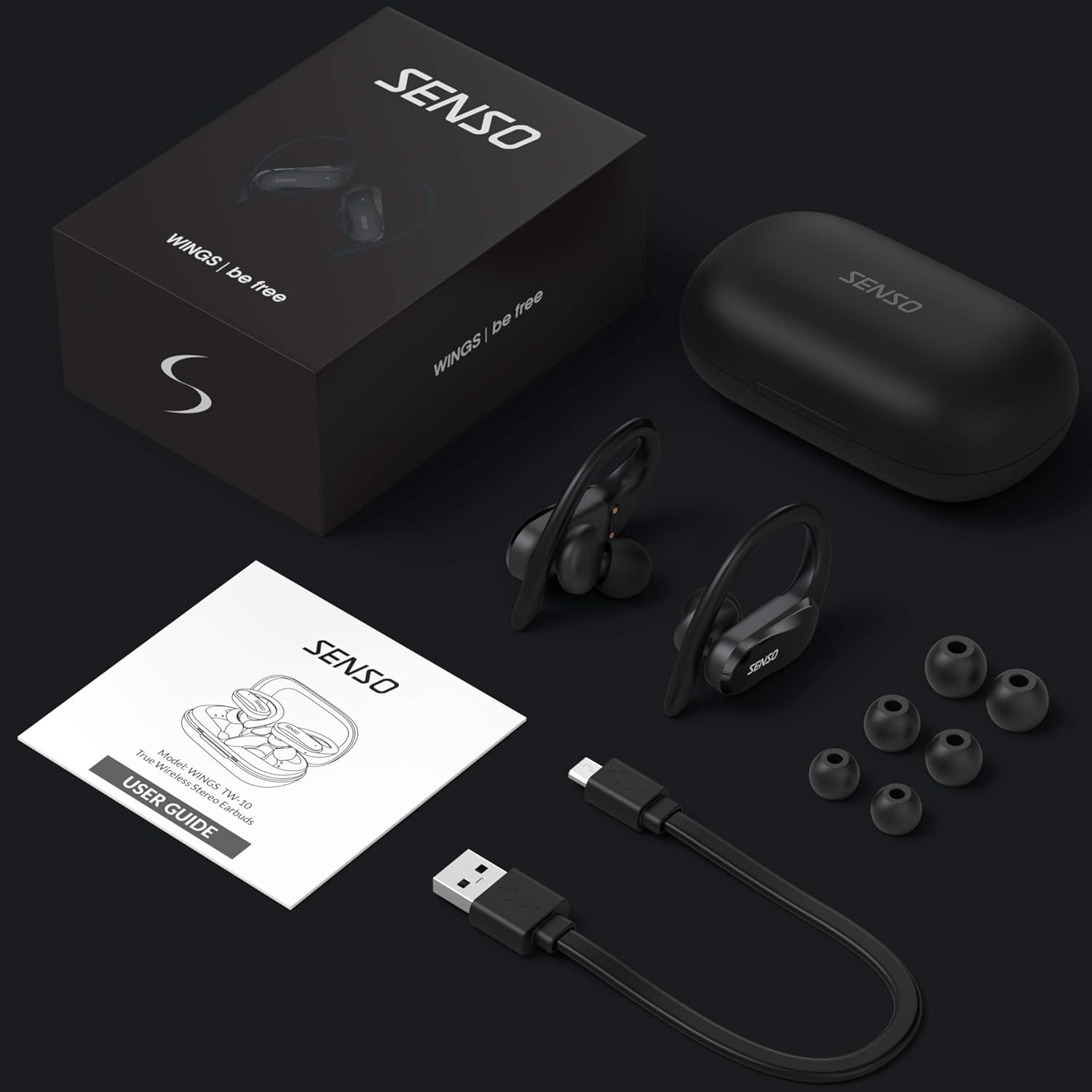
Image: The Senso Wireless Earbuds packaging, displaying the earbuds, charging case, user guide, USB charging cable, and various ear tip sizes.
3. Prodott Aktarview
The Senso Wings TW10 earbuds are designed for comfort and performance, featuring advanced audio technology and a durable build.

Immaġni: Sploda view of the earbud, illustrating the 13mm dynamic driver responsible for delivering premium sound quality with intense bass and dynamic range.

Immaġni: Dettaljata view of the earbud's internal circuitry, emphasizing the Bluetooth 5.0 chipset and CVC 8.0 Noise Cancellation Technology for stable connection and clear audio.

Image: Two scenarios demonstrating the earbuds' versatility: one earbud in use for mono mode (e.g., driving) and both earbuds for dual mode (e.g., binaural calls).

Image: The earbuds are shown resisting water splashes, indicating their IPX6 waterproof rating, suitable for sweat, water, and rain.
4. Setup
4.1 Iċċarġjar tal-Earbuds u l-Kaxxa
Before first use, fully charge the earbuds and the charging case. Place the earbuds into the charging case. Connect the USB charging cable to the case and a power source. The indicator lights on the case will show the charging status.
4.2 It-tqabbil inizjali
- Kun żgur li l-earbuds tiegħek huma ċċarġjati.
- Iftaħ il-kaxxa tal-iċċarġjar. Il-earbuds jinxtegħlu awtomatikament u jidħlu fil-modalità ta' tqabbil.
- Fuq l-apparat tiegħek (smartphone, tablet, eċċ.), attiva l-Bluetooth.
- Fittex għal available Bluetooth devices and select "SENSO Wings TW10" from the list.
- Ladarba tkun konness, tisma' sinjal awdjo, u d-dwal indikatur tal-earbuds jinbidlu.

Image: The earbuds are shown connecting to a smartphone, demonstrating the simple and fast pairing process upon removal from the charging case.
Video: An official product video demonstrating the features and setup of the Senso WINGS Ultra Durable Premium Audio Wireless Earbuds.
5. Istruzzjonijiet Operattivi
5.1 L-Ilbies tal-Earbuds
Place the earbuds in your ears and adjust the ear hooks for a secure and comfortable fit. The 60-degree twist lock system ensures they stay in place during physical activity.

Image: A user demonstrating the secure fit of the earbuds with the 60-degree twist lock system, ideal for sports and exercise.
5.2 Kontrolli Bażiċi
The earbuds feature touch-sensitive controls for media playback and call management. Refer to the detailed user guide included in the box for specific touch commands for functions such as play/pause, skip track, answer/end call, and voice assistant activation.
5.3 Mono or Dual Mode
You can use either earbud independently (mono mode) or both together (dual mode) for a stereo audio experience. This flexibility allows for awareness of your surroundings when needed.
5.4 Funzjonijiet ta' Sejħa
Each earbud is equipped with a microphone, enabling binaural calls for clear communication. Use the touch controls to answer, end, or reject calls.
6. Manutenzjoni
6.1 Tindif
- Naddaf il-earbuds u l-kaxxa tal-iċċarġjar regolarment b'ċarruta ratba, niexfa u mingħajr suf.
- Neħħi l-ponot tal-widnejn u naddafhom b'sapun ħafif u ilma, imbagħad nixxefhom sew qabel ma terġa' twaħħalhom.
- Evita li tuża tindif jew solventi li joborxu.
6.2 Ħażna
- Aħżen il-earbuds fil-każ tal-iċċarġjar tagħhom meta ma tkunx qed tuża biex tipproteġihom u żżommhom iċċarġjati.
- Żomm l-apparat f'post frisk u niexef, 'il bogħod minn temperaturi estremi u dawl tax-xemx dirett.
7 Issolvi l-problemi
7.1 Kwistjonijiet ta' Tqabbil
- Kun żgur li ż-żewġ earbuds huma kompletament iċċarġjati.
- Itfi l-Bluetooth fuq l-apparat tiegħek, imbagħad erġa' ixgħelu.
- Insieh l-apparat mil-lista tal-Bluetooth tiegħek u pprova erġa' qabbad.
- If only one earbud connects, try resetting the earbuds (refer to the full user guide for specific reset instructions).
7.2 Ebda Ħoss jew Volum Baxx
- Iċċekkja l-livelli tal-volum kemm fuq l-apparat tiegħek kif ukoll fuq il-earbuds.
- Kun żgur li l-earbuds huma mqiegħda sew f'widnejk.
- Naddaf kwalunkwe debris mill-ispikers tal-earbuds u l-ear tips.
7.3 Problemi fl-Iċċarġjar
- Iċċekkja li l-kejbil tal-iċċarġjar huwa konness sew kemm mal-kaxxa kif ukoll mas-sors tal-enerġija.
- Kun żgur li l-kuntatti tal-iċċarġjar fuq il-earbuds u ġewwa l-kaxxa huma nodfa u ħielsa minn ostaklu.
- Ipprova kejbil tal-iċċarġjar jew adapter tal-enerġija differenti.
8. Speċifikazzjonijiet
| Karatteristika | Dettall |
|---|---|
| Isem tal-Mudell | Wings TW10 |
| Teknoloġija tal-Konnettività | Bluetooth 5.0, Mingħajr Fili |
| Teknoloġija tal-Komunikazzjoni mingħajr Fili | Bluetooth |
| Kontroll tal-Ħoss | Kanċellazzjoni Attiva tal-Ħoss |
| Livell ta 'Reżistenza għall-Ilma | Li ma jgħaddix ilma minnha (IPX6) |
| Ħajja tal-Batterija (Earbuds) | 8 Sigħat |
| Ħin Totali tal-Logħob (bil-Kaxxa) | Sa 30-il Siegħa |
| Daqs tas-Sewwieq tal-Awdjo | 10 Millimetru |
| Impedenza | 32 Ohms |
| Tip ta' Kontroll | Kontroll tal-Midja |
| Metodu ta' Kontroll | Remote |
| Tqegħid tal-widnejn | Fil-widnejn |
| Fattur tal-Formola | Fil-widnejn |
| Materjal | Silikonju |
| Piż tal-oġġett | 7 uqija |

Image: The earbuds and charging case illustrating the extended playtime: 6 hours for the earbuds and up to 30 hours total with the portable charging case.
9. Garanzija u Appoġġ
Senso offers a standard warranty for its products. Additionally, you may be eligible for an extended warranty.
9.1 Garanzija Estiża
To convert to a two-year extended warranty, visit www.sensoshop.com/warranty. This must be claimed within 7 days of receiving your product.
9.2 Appoġġ għall-Klijent
For any product-related issues or inquiries, please contact Senso customer support. Details can be found on the warranty card included in your product packaging or on the official Senso websit.


