Prodott Overview
The FLYLINKTECH CF500 is a versatile and powerful portable car jump starter and power bank designed for emergency vehicle starting and charging electronic devices. It features a high peak current for reliable jump-starting, a large battery capacity for extended use, and multiple charging options including wireless charging.
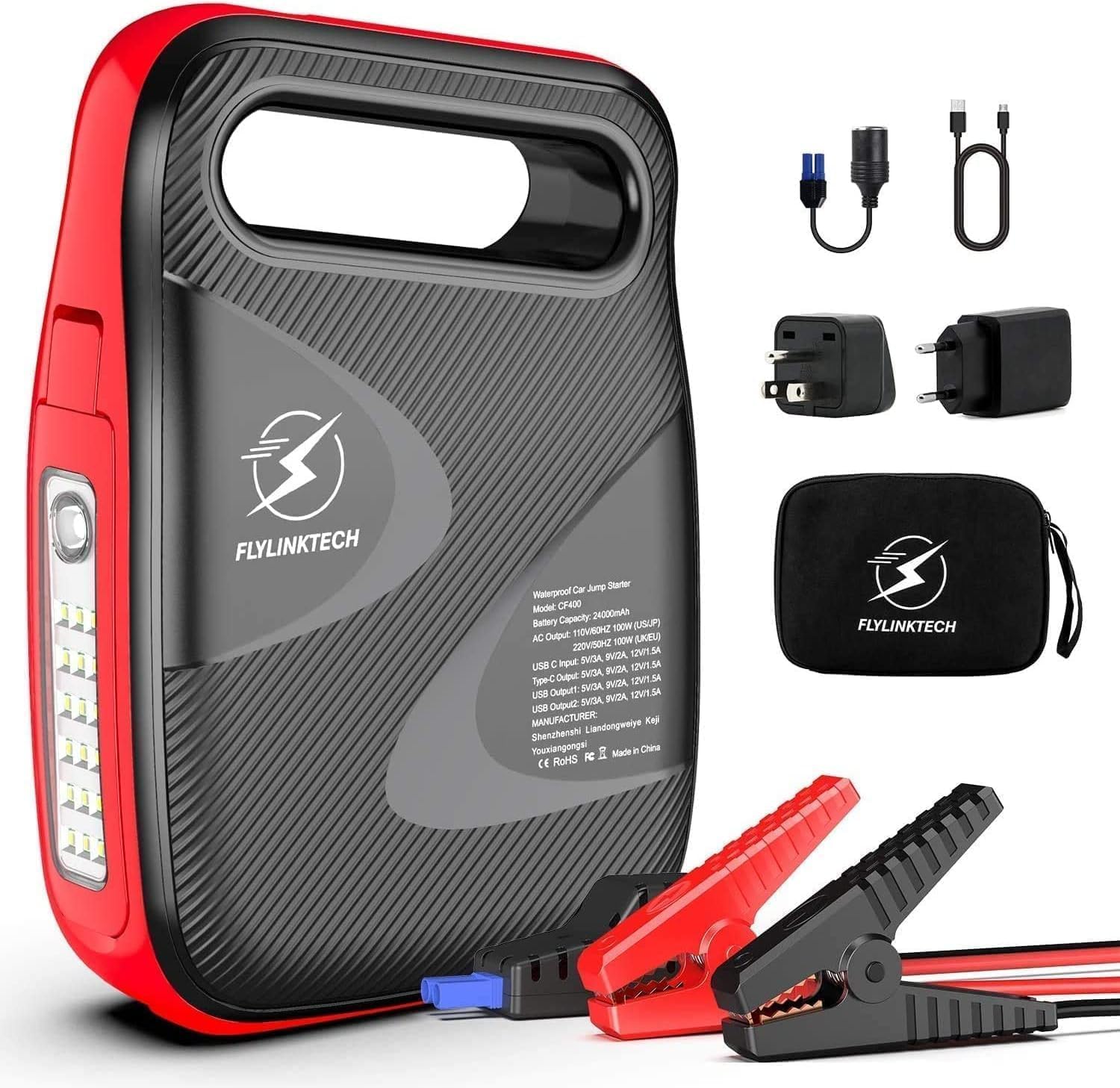
Image: The FLYLINKTECH CF500 jump starter unit shown with its included accessories, including smart clamps, charging cables, and a storage bag.
Karatteristiċi ewlenin:
- Starter tal-Qabża Qawwi: 1500A peak current, capable of starting 12V vehicles (up to 8.0L gasoline or 6.0L diesel engines).
- Bank tal-Enerġija b'Kapaċità Għolja: batterija 18000mAh jipprovdi ample power for smartphones, tablets, and other USB-powered devices.
- Iċċarġjar bla fili: Integrated 10W wireless charging pad for compatible devices.
- Ħlas veloċi 3.0: USB output port for rapid charging of supported devices.
- Multi-mode LED Light: Features a 180° rotatable LED light with Normal, SOS, and Strobe modes for illumination and emergency signaling.
- Bażi manjetika: Allows the unit to be securely attached to metal surfaces for hands-free operation, especially useful during vehicle maintenance.
Prekawzjonijiet tas-Sigurtà
Jekk jogħġbok aqra u ifhem l-informazzjoni kollha dwar is-sigurtà qabel ma tuża dan il-prodott. Jekk ma ssegwix dawn l-istruzzjonijiet, dan jista' jirriżulta f'xokk elettriku, nar, jew korriment serju.
- Do not operate the jump starter if it is damaged or has been modified.
- Taqbiżx il-batterija ffriżata.
- Kun żgur li l-konnessjoni tal-polarità hija xierqa (il-klamp aħmar)amp għal pożittiv, iswed clamp to negative) to avoid sparks or damage.
- Żomm fejn ma jintlaħaqx mit-tfal.
- Tesponix l-unità għax-xita jew kundizzjonijiet imxarrba.
- Aħżen f'post frisk u niexef meta ma tkunx qed tuża.
- Tiżżarmax l-unità. Irreferi kull manutenzjoni lil persunal kwalifikat.
- Ilbes protezzjoni għall-għajnejn meta taħdem bil-batteriji.
Kontenut tal-Pakkett
Ivverifika li l-oġġetti kollha huma preżenti fil-pakkett:
- 1 x FLYLINKTECH CF500 Jump Starter
- 1 x Smart Clamps with 8 Safety Devices
- 1 x 3-in-1 Charging Cable (USB to USB-C, Lightning, Micro USB)
- 1 x Kejbil tal-Iċċarġjar USB għal USB-C
- 1 x Adapter tal-Lajter tas-Sigaretti
- 1 x Borża tal-Ħażna
- 1 x Manwal għall-Utent
- 1 x Karta ta' Garanzija ta' 2 Snin
Komponenti tal-Prodott
Familiarize yourself with the different parts of the FLYLINKTECH CF500 unit:

Image: A detailed diagram illustrating the various ports and buttons on the FLYLINKTECH CF500 jump starter, including the jump starting port, USB outputs, AC output, Type-C input, ON/OFF button, flashlight, and electricity display lamps.
- Jump Starting Port: Connects to the smart clamps for vehicle jump-starting.
- Input tat-Tip C: Għall-iċċarġjar tal-unità tal-jump starter.
- USB Output 1 & 2: For charging electronic devices (USB Output 1 supports Quick Charge 3.0).
- Output AC: For powering small AC appliances (if applicable to model CF500, based on image PT05).
- AC Switch: To activate the AC output.
- Buttuna ON/OFF: Jixgħel jew jitfi l-unità.
- Flashlight: Integrated LED light with multiple modes.
- Electricity Display Lamp: Indicates the remaining battery charge level.
- Magnetic Suction Base: Located on the bottom for attaching to metal surfaces.
Setup and Charging the Unit
Before first use, fully charge the FLYLINKTECH CF500. It is recommended to fully charge the unit every 3-6 months to maintain battery health, especially if stored for long periods.
- Connect the provided USB-C charging cable to the Type-C Input port on the jump starter.
- Connect the other end of the USB-C cable to a suitable USB wall adapter (not included) or a car charger.
- The electricity display lamps will illuminate and flash during charging, indicating the charge progress. All lights will be solid when fully charged.
The unit can also be charged via the cigarette lighter adapter using the DC input port (if available on your model, refer to specifications).
Istruzzjonijiet Operattivi
Aqbeż Tibda Vettura
Segwi dawn il-passi bir-reqqa biex tibda l-vettura tiegħek malajr:

Image: A visual guide demonstrating the four steps to jump start a vehicle: 1. Turn on the power button. 2. Insert the smart clamp plug into the jump starter. 3. Connect the clamps to the car battery. 4. Turn on the car and then remove the clamps.
- Ipprepara l-Vettura: Ensure the vehicle's ignition is off and all accessories (lights, radio, A/C) are turned off. Place the vehicle in park (automatic) or neutral (manual) and engage the parking brake.
- Turn On the Jump Starter: Press the ON/OFF button on the FLYLINKTECH CF500 unit. The battery indicator lights will illuminate.
- Qabbad Smart Clamps: Daħħal il-plagg blu tal-ismart clamps firmly into the jump starting port on the unit. Ensure a secure connection.
- Qabbad mal-Batterija:
- Qabbad il- AĦMAR (+) clamp lill- pożittiv (+) terminal of the vehicle's battery.
- Qabbad il- ISWED (-) clamp lill- negattiv (-) terminal of the vehicle's battery.
The indicator light on the smart clamp will show green if the connection is correct and safe to proceed. If it shows red or flashes, check the connections and battery status.
- Ibda l-Vettura: Once the smart clamp indicator is green, start your vehicle's engine. If it doesn't start on the first attempt, wait at least 30 seconds before trying again. Do not crank for more than 3 seconds per attempt.
- Skonnettja Clamps: As soon as the vehicle starts, immediately remove the smart clamps from the vehicle battery terminals, then disconnect the smart clamps mill-unità tal-jump starter.
Importanti: Do not leave the smart clamps connected to the battery after the vehicle has started for more than 30 seconds.
Using as a Power Bank (Charging Devices)
The FLYLINKTECH CF500 can charge various electronic devices:

Image: The FLYLINKTECH CF500 unit connected via USB cables to charge a smartphone and a tablet, demonstrating its power bank capabilities.
- Iċċarġjar USB: Connect your device's USB charging cable to either USB Output 1 (Quick Charge 3.0) or USB Output 2. The unit will automatically begin charging.
- Iċċarġjar bla fili: Place your Qi-compatible smartphone directly on the wireless charging pad located on top of the unit. Ensure the phone is centered for optimal charging.
- AC Output (if applicable): For models with an AC outlet, press the AC switch to activate the AC output. Plug your small appliance into the AC outlet. Ensure the appliance's power consumption does not exceed the unit's maximum AC output.
Bl-użu tad-Dawl LED
Id-dawl LED integrat joffri diversi modi għal diversi sitwazzjonijiet:

Image: Icons representing the different modes of the FLYLINKTECH CF500's LED light: Strobe, Torch (Normal), SOS, and Glare, indicating its versatility for illumination and emergency signaling.
- Press the flashlight button once for Normali illuminazzjoni.
- Agħfas mill-ġdid għal Strobe mod.
- Agħfas għat-tielet darba għal SOS signal mode.
- Agħfas għar-raba' darba biex titfi d-dawl.

Image: The FLYLINKTECH CF500 unit with its LED light extended and attached to the underside of a car hood via its magnetic base, illustrating its use as a hands-free work light during car repairs.
The LED light can be rotated 180° and features a magnetic base, allowing it to be attached to metal surfaces (e.g., car hood) for hands-free lighting during repairs or in dark environments.
Manutenzjoni
- Iċċarġjar mill-ġdid: For optimal battery life, recharge the unit every 3-6 months, even if not used. This prevents deep discharge and prolongs the lifespan of the internal battery.
- Tindif: Use a soft, dry cloth to clean the unit. Do not use harsh chemicals or abrasive materials.
- Ħażna: Store the jump starter in a cool, dry place, away from direct sunlight, heat sources, and moisture. Ensure it is stored within the recommended temperature range (refer to specifications).
- Kura tal-batterija: Avoid fully depleting the battery frequently. Recharge it when the indicator shows low charge.
Issolvi l-problemi
| Problema | Kawża Possibbli | Soluzzjoni |
|---|---|---|
| L-unità ma tixgħel. | Il-batterija hija skarikata kompletament. | Iċċarġja l-unità kompletament qabel l-użu. |
| Il-vettura ma tibdax b'assistenza. | Inkorretta clamp connection; Battery is severely damaged; Vehicle engine size exceeds unit capacity. | Iċċekkja clamp polarity and ensure secure connection. Ensure battery is not completely dead or damaged. Verify vehicle engine size is within specifications (8.0L Gas / 6.0L Diesel). |
| Smart clamp l-indikatur ikun aħmar/jiteptep. | Polarità inversa; Ċirkwit qasir; Temperatura żejda. | Skonnettja clamps immediately and re-connect with correct polarity. Allow unit to cool down if overheated. |
| Devices not charging via USB/Wireless. | Unit is off; Low battery on unit; Device not Qi-compatible (for wireless). | Turn on the unit. Recharge the unit. Ensure device supports Qi wireless charging. |
Speċifikazzjonijiet
| Karatteristika | Dettall |
|---|---|
| Mudell | CF500 (CEP104) |
| L-ogħla Kurrenti | 1500A |
| Kapaċità tal-batterija | 18000 mAh (jone tal-litju) |
| Kompatibbiltà tal-Vettura | Vetturi ta' 12V, sa magni ta' 8.0L Petrol / 6.0L Diżil |
| Produzzjoni DC | 12-16V / 10A (for cigarette lighter adapter) |
| Output USB 1 (QC 3.0) | 5V/3A, 9V/2A, 12V/1.5A |
| Output USB 2 | 5V/2A |
| Ħruġ ta 'Iċċarġjar Bla Fili | 10W |
| Dimensjonijiet (L x W x H) | 17.5 x 9.5 x 3.8 ċm |
| Piż | 1.15 Kilogrammi |
| Temperatura operattiva | -20°C sa +60°C |
Nota: L-ispeċifikazzjonijiet huma soġġetti għal bidla mingħajr avviż.
Garanzija u Appoġġ
Garanzija: This FLYLINKTECH product comes with a 2-year warranty from the date of purchase. Please retain your proof of purchase for warranty claims. The warranty covers defects in materials and workmanship under normal use.
Esklużjonijiet: The warranty does not cover damage caused by misuse, abuse, unauthorized modification, accident, or natural disasters. It also does not cover normal wear and tear.
Appoġġ għall-Klijent: For technical assistance, warranty claims, or any questions regarding your FLYLINKTECH CF500 jump starter, please contact FLYLINKTECH customer service. Refer to the contact information provided on the warranty card or the official FLYLINKTECH websit.
FLYLINKTECH is committed to providing reliable products and excellent customer service. Your satisfaction is our priority.