1. Introduzzjoni
This manual provides detailed instructions for the IPEGA PG-SW023 Bluetooth Wireless Game Controller. This versatile controller is designed to enhance your gaming experience across multiple platforms, including N-S consoles, PlayStation 3 (PS3), Android devices, and personal computers running Windows 7, 8, or 10.
Jekk jogħġbok aqra dan il-manwal bir-reqqa qabel ma tuża l-prodott biex tiżgura li jaħdem sew u biex timmassimizza l-karatteristiċi tiegħu.
2. Karatteristiċi tal-prodott
- Kompatibilità Multi-Pjattaforma: Suitable for gaming on N-S consoles, PS3, Android devices, and PCs (Windows 7/8/10).
- Esperjenza tal-Logħob Mtejba: Supports vibration feedback and a six-axis gyroscope function for immersive gameplay and precise control.
- Customizable Macro Function: Rear buttons can be configured as common keys or combination keys for simplified actions.
- Continuous TURBO Function: Features a dedicated TURBO button for rapid-fire actions, compatible with N-S Pro gamepads.
- Disinn Ergonomiku: Engineered for comfort during extended gaming sessions, fitting securely in the palm.

Image: The IPEGA PG-SW023 Wireless Game Controller highlighting its key features: two vibrating motors, six-axis design, high-sensitive buttons, and Turbo function.
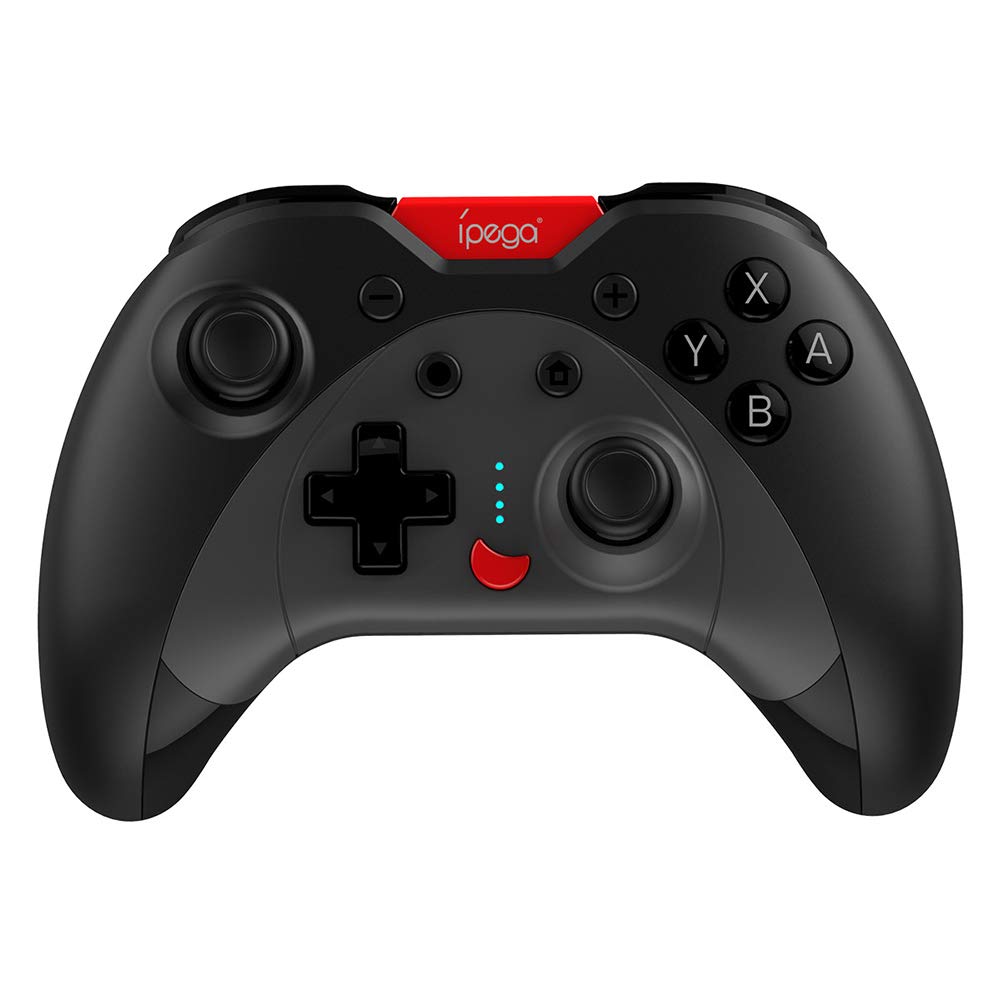
Image: A green IPEGA PG-SW023 controller illustrating its built-in six-axis gyroscope design for improved body feeling and accurate targeting.
3. Kontenut tal-Pakkett
Jekk jogħġbok ivverifika li l-oġġetti kollha huma preżenti fil-pakkett:
- 1 x IPEGA PG-SW023 Wireless Game Controller
- 1 x Cable tal-Iċċarġjar tat-Tip-Ċ
- 1 x Manwal għall-Utent
4. Speċifikazzjonijiet
| Karatteristika | Speċifikazzjoni |
|---|---|
| Brand | Ipega |
| Mudell | PG-SW023 |
| Għażliet tal-Kulur | Black, Green, Blue, Yellow |
| Vol Operattivtage | DC 3.7V |
| Kurrent Operattiv | <30mA |
| Kurrent statiku | <20uA |
| Ħin tal-logħob kontinwu | Appross. 15 sigħat |
| Input Voltage / Kurrenti | DC 5V/500mA |
| Ħin tal-Iċċarġjar | Appross. 2 sigħat |
| Verżjoni Bluetooth | 3.0 |
| Distanza tat-Trażmissjoni | ≤8 metri |
| Kapaċità tal-batterija | 400mAh |
| Dimensjonijiet tal-Prodott | 15 x 10 x 5.5 ċm (5.91 x 3.94 x 2.17 pulzieri) |
| Piż tal-Prodott | Madwar 215g (7.58 uqija) |
| Apparati Kompatibbli | N-S Console, PS3, Android, PC (Win 7/8/10) |
| Konnettività | Wireless (Bluetooth) |
| Sors tal-Enerġija | Mħaddma bil-batterija |
5. Setup
5.1 Iċċarġjar tal-Kontrollur
- Connect the provided Type-C charging cable to the controller's charging port.
- Qabbad it-tarf l-ieħor tal-kejbil ma' sors ta' enerġija USB (eż., PC, adapter tal-ħajt USB).
- The indicator lights on the controller will show charging status. Once fully charged (approx. 2 hours), the lights will indicate completion or turn off.
5.2 Tqabbil ma' Apparati
The pairing method varies slightly depending on the device. Ensure the controller is sufficiently charged before attempting to pair.

Image: A blue IPEGA PG-SW023 controller positioned in front of a Nintendo Switch, PlayStation 3, and a laptop, illustrating its multi-platform compatibility.
5.2.1 Pairing with N-S Console
- On your N-S console, go to the HOME Menu.
- Agħżel 'Kontrolluri' > 'Ibdel il-Qabda/Ordni'.
- Press and hold the pairing button on the IPEGA controller (refer to controller diagram for exact location) until the indicator lights begin to flash rapidly.
- The console will detect the controller. Once paired, the indicator light will become solid.
5.2.2 Pairing with PS3
- Connect the controller to the PS3 console using the Type-C cable.
- Agħfas il-buttuna HOME fuq il-kontrollur.
- Once recognized, you can disconnect the cable and the controller should remain paired wirelessly.
5.2.3 Tqabbil ma' Apparati Android
- Ippermetti Bluetooth fuq it-tagħmir Android tiegħek.
- On the controller, press and hold the Android pairing button combination (refer to controller diagram or quick start guide for specific button combination, usually 'A' + HOME or 'X' + HOME) until the indicator lights flash rapidly.
- On your Android device, search for new Bluetooth devices and select 'IPEGA PG-SW023' (or similar name) from the list.
- Ladarba jkun imqabbad, id-dawl indikatur fuq il-kontrollur jibqa' mixgħul.
5.2.4 Pairing with PC (Windows 7/8/10)
- Kun żgur li l-PC tiegħek għandu l-Bluetooth attivat.
- Go to 'Settings' > 'Devices' > 'Bluetooth & other devices' and click 'Add Bluetooth or other device'.
- Agħżel 'Bluetooth'.
- On the controller, press and hold the PC pairing button combination (refer to controller diagram or quick start guide for specific button combination, usually 'L1' + HOME or 'Y' + HOME) until the indicator lights flash rapidly.
- Select 'IPEGA PG-SW023' (or similar name) from the list of available devices on your PC.
- Ladarba jkun imqabbad, id-dawl indikatur fuq il-kontrollur jibqa' mixgħul.
6. Istruzzjonijiet Operattivi
6.1 Funzjonijiet Bażiċi tal-Buttuni
The controller features standard gaming buttons including directional pad, analog sticks, action buttons (A, B, X, Y), shoulder buttons (L1, R1), and triggers (L2, R2). Specific button mapping may vary by game and platform.

Image: Hands comfortably gripping a black IPEGA PG-SW023 controller, showcasing its ergonomic design for comfortable and convenient use.
6.2 Funzjoni TURBO
The TURBO function allows for continuous rapid input of a selected button. This can be useful in games requiring fast, repeated button presses.
- To activate TURBO: Press and hold the desired action button (e.g., A, B, X, Y) and then press the TURBO button simultaneously. The button will now continuously input as long as it's held down.
- To deactivate TURBO: Repeat the same process (press the action button and TURBO button simultaneously).

Image: A yellow IPEGA PG-SW023 controller with its prominent TURBO button, shown with a Nintendo Switch console, illustrating the auto-fire feature.
6.3-il Funzjoni Makro
The macro function allows you to assign a sequence of button presses or a single common button to the programmable rear buttons. This can simplify complex in-game actions.
- Refer to the specific instructions provided in the quick start guide or on the manufacturer's website for detailed steps on programming macro buttons, as this process can vary.
6.4 Vibration and Gyroscope
The controller features dual motors for vibration feedback, providing tactile sensations that correspond to in-game events. The built-in six-axis gyroscope allows for motion control in supported games, offering a more immersive and precise aiming experience.

Image: A blue IPEGA PG-SW023 controller in use, with visual cues indicating its double motor vibrating design for immersive feedback during gameplay.
7. Manutenzjoni
Kura xierqa testendi l-ħajja tal-kontrollur tiegħek:
- Tindif: Uża drapp artab u niexef biex tnaddaf il-kontrollur. Għal ħmieġ iebes, nixxef ftit.ampLaħlaħ id-drapp bl-ilma jew b'soluzzjoni ħafifa tat-tindif. Evita kimiċi ħarxa.
- Ħażna: Aħżen il-kontrollur f'post frisk u niexef 'il bogħod mix-xemx diretta u minn temperaturi estremi.
- Evita l-Impatt: Twaqqax il-kontrollur jew tissottomettihx għal impatti qawwija, għax dan jista' jagħmel ħsara lill-komponenti interni.
- Espożizzjoni għal Likwidu: Żomm il-kontrollur 'il bogħod mil-likwidi. Jekk jiġi f'kuntatt ma' likwidu, itfih immedjatament u ħallih jinxef kompletament qabel ma tipprova tużah mill-ġdid.
8 Issolvi l-problemi
If you encounter issues with your IPEGA PG-SW023 controller, try the following solutions:
- Il-Kontrollur Mhux Qed Jikkonnettja:
- Kun żgur li l-kontrollur huwa ċċarġjat kompletament.
- Ivverifika li l-Bluetooth huwa attivat fuq it-tagħmir tiegħek.
- Try re-pairing the controller by following the setup instructions for your specific device.
- Mexxi l-kontrollur eqreb lejn l-apparat biex tiżgura li jkun fil-medda ta' trasmissjoni ta' 8 metri.
- Erġa' ibda kemm il-kontrollur kif ukoll l-apparat tal-logħob tiegħek.
- Buttuni li ma jirrispondux:
- Check if the controller is properly connected and paired.
- Test the controller with another game or application to rule out software-specific issues.
- Kun żgur li ma jkun hemm l-ebda debris taħt il-buttuni.
- Il-Vibrazzjoni Ma Taħdimx:
- Verify that the game or system settings have vibration enabled.
- Xi logħob jista' ma jappoġġjax feedback tal-vibrazzjoni.
- Ħajja Qasira tal-Batterija:
- Ensure the controller is fully charged before use.
- Battery life can vary based on usage intensity (e.g., continuous vibration).
- Evita l-iċċarġjar f'ambjenti estremament sħan jew kesħin.
9. Garanzija u Appoġġ
For warranty information, technical support, or service inquiries regarding your IPEGA PG-SW023 Bluetooth Wireless Game Controller, please refer to the product packaging or contact the manufacturer directly through their official website or customer service channels. Keep your purchase receipt as proof of purchase for any warranty claims.


