Introduzzjoni
Grazzi tax-xiriasing the Crown 32-inch HD Ready Smart TV. This manual provides essential information for setting up, operating, maintaining, and troubleshooting your new television. Please read this manual thoroughly before using the product and retain it for future reference.
This television features HD Ready resolution, a 178-degree viewing angle, and an Android operating system for smart functionalities. It includes Dolby Audio for an enhanced sound experience.
Kontenut tal-Pakkett
Iċċekkja li l-oġġetti kollha elenkati hawn taħt huma inklużi fil-pakkett tiegħek:
- Unità tat-TV LED waħda
- 1 Table Stand Pair
- 1 Kontroll mill-Bogħod
- 1 Karta ta' Garanzija
- 1 Manwal tal-Utent (dan id-dokument)
Setup Istruzzjonijiet
1. Żpakkjar u Tqegħid
Neħħi t-TV mill-imballaġġ tiegħu bir-reqqa. Poġġi t-TV fuq wiċċ stabbli u ċatt jew ippreparah għall-immuntar mal-ħajt. Kun żgur li jkun hemm ventilazzjoni adegwata madwar it-TV.
2. Installing the Table Stand
- Poġġi t-TV wiċċu 'l isfel fuq drapp artab u nadif biex tevita li tagħmel ħsara lill-iskrin.
- Align the table stand pair with the corresponding holes on the bottom of the TV.
- Waħħal l-istands billi tuża l-viti pprovduti. Tissikkax iżżejjed.
Note: If wall mounting, refer to the wall mount kit instructions. The TV supports VESA standard wall mounts.
3. Qawwa tal-Konnessjoni
Plug the power cord into the TV's power input, then into a standard electrical outlet. Ensure the power outlet is easily accessible.
4. Konnessjoni ta 'Tagħmir Estern
It-TV joffri diversi għażliet ta’ konnettività:
- Portijiet HDMI (x2): Qabbad set-top boxes, Blu-ray players, consoles tal-logħob.
- Portijiet USB (x2): Connect USB drives for media playback, or other USB devices.
- VGA Port (x1): Qabbad laptop jew PC.
- Input Awdjo: For external audio sources.
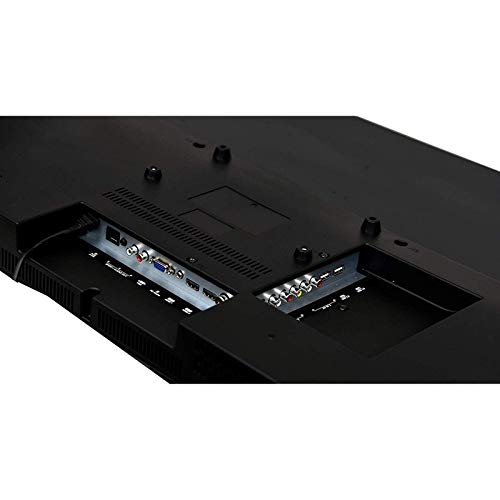
Image: Rear panel of the TV displaying HDMI, USB, and VGA ports for connecting external devices.
Istruzzjonijiet Operattivi
1. First Time Setup and Initial Power On
- Agħfas il- Qawwa buttuna fuq il-kontroll remot jew fuq it-TV.
- Follow the on-screen instructions to select your language, country, and connect to a Wi-Fi network.
- Complete the initial Android TV setup, including signing in with your Google account for full smart TV functionality.

Image: The TV displaying its smart interface with various application shortcuts.
2. Funzjonijiet Bażiċi tat-TV
- Power On/Off: Uża l-buttuna tal-qawwa fuq ir-remote jew it-TV.
- Kontroll tal-Volum: Uża l- VOL +/- buttuni fuq il-remote.
- Għażla tal-Kanal: Uża l- CH +/- buttons or number pad on the remote.
- Sors tad-dħul: Agħfas il- Sors or Input button on the remote to switch between HDMI, USB, VGA, and TV inputs.
- Navigazzjoni fil-menu: Use the arrow keys and OK buttuna biex tinnaviga l-menus.
3. Smart TV Features (Android OS)
Your Crown Smart TV runs on the Android operating system, providing access to a wide range of applications and features:
- Aċċess għall-App: Navigate to the home screen to access pre-installed apps like YouTube, or download new apps from the Google Play Store.
- Konnettività tal-Internet: Connect to your home Wi-Fi network for online streaming and browsing.
- Bluetooth: The TV supports Bluetooth technology for connecting compatible wireless devices.
Manutenzjoni u Kura
- Tindif tal-Iskrin: Imsaħ l-iskrin bil-mod b'ċarruta ratba u mingħajr suf. Għal marki persistenti, nixxef ftit.ampLaħlaħ id-drapp bl-ilma jew b'prodott speċjalizzat għat-tindif tal-iskrin. Tisprejjax likwidu direttament fuq l-iskrin.
- Tindif tal-Kabinett: Uża drapp artab u niexef biex timsaħ il-kabinett tat-TV. Evita li tuża prodotti tat-tindif jew solventi li joborxu.
- Ventilazzjoni: Kun żgur li l-fetħiet tal-ventilazzjoni fuq it-TV mhumiex imblukkati biex tevita li jisħon iżżejjed.
- Korda tal-Enerġija: Iċċekkja regolarment il-korda tal-enerġija għal xi ħsara. Jekk bil-ħsara, ikkuntattja l-appoġġ għall-klijenti biex tissostitwiha.
- Spluggjar: Skonnettja t-TV mill-plagg tal-elettriku waqt maltempati bis-sajjetti jew meta ma jkunx se jintuża għal perjodi twal.
Gwida dwar is-sejbien ta 'problemi
| Problema | Kawża Possibbli | Soluzzjoni |
|---|---|---|
| Ebda qawwa | Il-korda tal-enerġija mhux imqabbda; Is-sokket tal-enerġija mhux qed jaħdem | Ensure power cord is securely plugged in; Test the outlet with another device. |
| L-ebda stampa, iżda l-ħoss huwa preżenti | Incorrect input source selected; External device not connected properly | Agħfas il- Sors button to select the correct input; Check HDMI/VGA cable connections. |
| L-ebda ħoss, iżda l-istampa hija preżenti | Volume is muted or too low; Audio cables not connected; External audio system issue | Increase volume; Check if mute is active; Ensure audio cables are connected correctly; If using external audio, check its settings. |
| Il-kontroll mill-bogħod ma jaħdimx | Il-batteriji huma mejta jew imdaħħla ħażin; Ostruzzjoni bejn ir-remote u t-TV | Replace batteries; Ensure correct polarity; Remove any obstructions; Point remote directly at the TV's IR sensor. |
| Smart TV apps not loading or slow | Poor Wi-Fi connection; App cache issues; Outdated software | Check Wi-Fi signal strength; Restart router; Clear app cache in TV settings; Check for system software updates. |
If the problem persists after trying these solutions, please contact Crown customer support.
Speċifikazzjonijiet Tekniċi
| Brand | Crown (Generic) |
| Isem tal-Mudell | 24DJ |
| Numru tal-Mudell | Crown-SmartTv-32-inch |
| Daqs tal-Iskrin | 32 Pulzier |
| Teknoloġija tal-Wiri | LED |
| Riżoluzzjoni | HD Ready (1366 x 768 pixels) |
| Riffriskar Rata | 60 Hz |
| ViewIng Angolu | 178 Grad |
| Sistema Operattiva | Android |
| Output Awdjo | 150 Watts |
| Formati Awdjo Appoġġjati | MP3, WAV, MKA |
| Konnettività | 2 HDMI, 2 USB, 1 VGA |
| Appoġġ Bluetooth | Iva |
| Dimensjonijiet tal-Prodott (LxWxH) | 7 x 55.5 x 33 Ċentimetru |
| Piż tal-oġġett | 4 kg |
| Tip ta 'Immuntar | Immuntar mal-Ħajt, Stand tal-Mejda |
| Karatteristiċi Speċjali | Flat Panel, Dolby Audio, 178-degree viewing angle, dot noise reduction, A+ grade panel, reduced motion blur, enhanced skin tone, real colors, moisture resistant and dust resistant. |
Garanzija u Appoġġ
Your Crown 32-inch HD Ready Smart TV comes with a garanzija ta 'sena mid-data tax-xiri. Jekk jogħġbok irreferi għall-Karta tal-Garanzija inkluża għal termini u kundizzjonijiet dettaljati.
For technical assistance, troubleshooting beyond this manual, or warranty claims, please contact Crown customer support. Keep your purchase receipt and warranty card handy when contacting support.
Contact information for support is typically found on the warranty card or the manufacturer's official websit.


