1. Introduzzjoni
This manual provides detailed instructions for the setup, operation, maintenance, and troubleshooting of your Sceptre Curved 27" FHD 1080p Gaming Monitor. Please read this manual thoroughly before using your monitor to ensure proper functionality and safety.

Image: Sceptre Curved 27" FHD 1080p Gaming Monitor in a typical desk setup.
2. Kontenut tal-Pakkett
Verify that all items listed below are included in your package. If any items are missing or damaged, please contact Sceptre customer support.
- Sceptre Curved 27" FHD 1080p Gaming Monitor
- Stand tal-Monitor (Bażi u Driegħ)
- Cable HDMI
- Power Supply and Adapter
- Tornavit tar-ras Philips
- Screws and Hardware Kit
- Manwal għall-Utent
- Warranty Information and Customer Service Card

Immaġni: Fuqview of all items included in the Sceptre monitor package, including the monitor, stand components, cables, tools, and documentation.
3. Assemblea
Segwi dawn il-passi biex tiġbor l-istand tal-monitor:
- Attach the metal stand arm to the plastic base. Align the tabs and gently twist until secure.
- Use the provided Philips head screwdriver and the designated base screw to fasten the stand arm to the base.
- Allinja l-istand immuntat mal-punti tal-immuntar fuq wara tal-monitor.
- Insert the two remaining Philips head screws into the designated holes on the monitor's back and tighten them securely.
- Place the plastic cover over the screws on the stand arm.

Image: The Sceptre Curved 27" monitor with its dimensions labeled, showing the curved screen and the stand.
4. Konnessjonijiet
The monitor features various ports for connectivity. Ensure proper connection for optimal performance.
- DC IN: Qabbad l-adapter tal-enerġija hawn.
- Out tal-Awdjo: Qabbad kelliema jew headphones esterni.
- In Audio: Connect an audio source for the built-in speakers.
- VGA: Connect to a computer's VGA port. Supports up to 75Hz refresh rate.
- HDMI 1.4 (x2): Connect to devices with HDMI output. Supports up to 75Hz refresh rate.
- Kensington Security Lock: For securing the monitor.
Immaġni: Dettaljata view of the monitor's rear panel, highlighting the DC IN, Audio In/Out, VGA, and two HDMI 1.4 ports.
5. Istruzzjonijiet Operattivi
The On-Screen Display (OSD) menu allows you to adjust various monitor settings. Use the buttons on the back of the monitor to navigate.
Navigazzjoni tal-Menu OSD
- Bidu malajr: Adjust basic settings like preset modes, aspect ratio, source, volume, Blue Light Shift, and Adaptive Sync.
- Stampa: Fine-tune image settings including brightness, contrast, DCR, aspect ratio, and sharpness.
- Kulur: Adjust color temperature, gamma, tint, saturation, and Blue Light Shift.
- Sistema: Configure overdrive, Adaptive Sync, sleep mode, language, OSD position, timer, transparency, mute, and factory reset.
Video: A user demonstrates the Sceptre monitor's OSD menu, showing navigation through settings like volume and input source while displaying gameplay.
6. Karatteristiċi tal-Wiri
- Wiri Mgħawweġ 1500R: The 1500R curvature immerses you into the content, providing a comfortable viewing esperjenza.
- Rata ta' Aġġornar ta' 100Hz: Experience smoother visuals with a refresh rate of up to 100Hz, reducing screen tearing.
- 98% sRGB: Offers a wider color gamut for deeper and more accurate colors.
- Ċaqliq tad-Dawl Blu: Reduces blue light emission to protect your eyes from fatigue and strain during extended use.
- Sinkronizzazzjoni Adattiva: Jissinkronizza r-rata ta' aġġornament tal-monitor mar-rata tal-frejms tal-karta grafika tiegħek biex jelimina t-tiċrit u t-tfixkil tal-iskrin.
- Modi tal-Logħob FPS-RTS: Pre-set display modes optimized for First Person Shooter (FPS) and Real-Time Strategy (RTS) games.
- Kelliema Mibnija: Integrated speakers provide audio without needing external devices.

Image: Visual representation of the 1500R curvature, highlighting its immersive design.

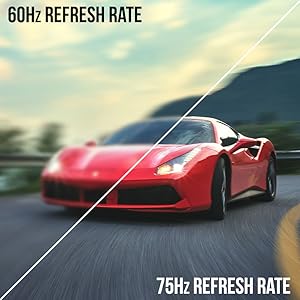
Image: A side-by-side comparison demonstrating the visual smoothness of 75Hz refresh rate versus 60Hz.

Image: A visual comparison highlighting the enhanced color accuracy of 98% sRGB compared to a conventional display.

Image: Split-screen view demonstrating the visual enhancements provided by FPS and RTS game modes.
7. Manutenzjoni
Biex tiżgura l-lonġevità u l-aħjar prestazzjoni tal-monitor tiegħek, segwi dawn il-linji gwida għat-tindif:
- Dejjem aqla’ l-kejbil tal-enerġija qabel ma tnaddaf.
- Uża drapp ratba u mingħajr ħelu ftit dampmaħsul bl-ilma jew b'tindif ħafif u mhux abrażiv.
- Evita li tuża alkoħol, ammonja, jew prodotti tat-tindif li joborxu, għax dawn jistgħu jagħmlu ħsara lill-wiċċ tal-iskrin.
- Gently wipe the screen and exterior surfaces. Do not spray cleaner directly onto the screen.
8 Issolvi l-problemi
Jekk tiltaqa' ma' xi problemi bil-monitor tiegħek, irreferi għas-soluzzjonijiet komuni li ġejjin:
- Ebda Qawwa: Ensure the power cable is securely connected to both the monitor and a working power outlet. Check the power adapter and outlet.
- Ebda Immaġni: Verify that the video cable (HDMI or VGA) is securely connected to both the monitor and your computer/device. Ensure the correct input source is selected in the OSD menu.
- Immaġni Teptip/Distorta: Check the video cable for damage. Try a different cable or port. Ensure your graphics card drivers are up to date. Adjust refresh rate settings in your device's display settings.
- Ebda Awdjo: Check the volume settings in the OSD menu and on your connected device. Ensure external speakers are properly connected if used.
- Buttuni li ma jirrispondux: Perform a factory reset through the OSD menu if accessible.
For further assistance, please refer to the full user manual or contact Sceptre customer support.
9. Speċifikazzjonijiet
| Karatteristika | Speċifikazzjoni |
|---|---|
| Daqs tal-Iskrin | 27 Pulzier |
| Riżoluzzjoni | 1920 x 1080 (FHD 1080p) |
| Riffriskar Rata | Up to 100Hz (75Hz via HDMI/VGA) |
| Kurvatura | 1500R |
| Ħin ta' Rispons | 3ms (GtG) |
| Tip ta' Panel | VA |
| Luminożità | 280 nits |
| Gamut tal-Kulur | 98% sRGB |
| Inputs tal-Vidjo | 2x HDMI 1.4, 1x VGA |
| Portijiet Awdjo | Audio In, Audio Out |
| Kelliema | Mibnija fil- |
| Muntatura VESA | 100mm x 100mm |
| Dimensjonijiet (LxWxH) | 15.09 x 19.97 x 7.02 pulzieri |
| Piż | 5.5 liri |
10. Esperjenza tal-Logħob
The Sceptre Curved 27" monitor is designed to enhance your gaming experience with its high refresh rate, low response time, and immersive curvature.
Vidjo: Wirja uffiċjali tal-vidjo ta' Sceptreasing various gaming monitors, including the Curved 27" model, highlighting their features and performance in gaming scenarios.
For optimal gaming performance, ensure your device's display settings match the monitor's capabilities (e.g., 1920x1080 resolution at 75Hz).
11. Garanzija u Appoġġ
Your Sceptre monitor comes with a Garanzija limitata tal-Prodott ta' 1 Snin. For detailed terms and conditions, please refer to the included warranty information card in your package.
For technical support, troubleshooting, or warranty claims, please contact Sceptre Customer Service. Contact information is provided on the customer service card included with your monitor.


