1. Introduzzjoni
Welcome to the Surfans Kids Tablet T57 user manual. This guide provides detailed instructions on how to set up, operate, maintain, and troubleshoot your new 7-inch Android tablet. Designed specifically for children, this tablet features a durable kid-proof case, parental control functions, and pre-installed educational and entertainment applications.
2. X'hemm fil-Kaxxa
Jekk jogħġbok iċċekkja l-kontenut tal-pakkett tiegħek biex tiżgura li l-oġġetti kollha huma preżenti:
- 1x Surfans Kids Tablet
- 1x Tablet Stand
- 1x USB Cable
- 1x Kids Tablet User Manual (this document)
3. Prodott Aktarview u Karatteristiċi
The Surfans Kids Tablet T57 is built with a robust design and features tailored for young users. Below is an overview of its components and key functionalities.
3.1 Komponenti tal-Pillola
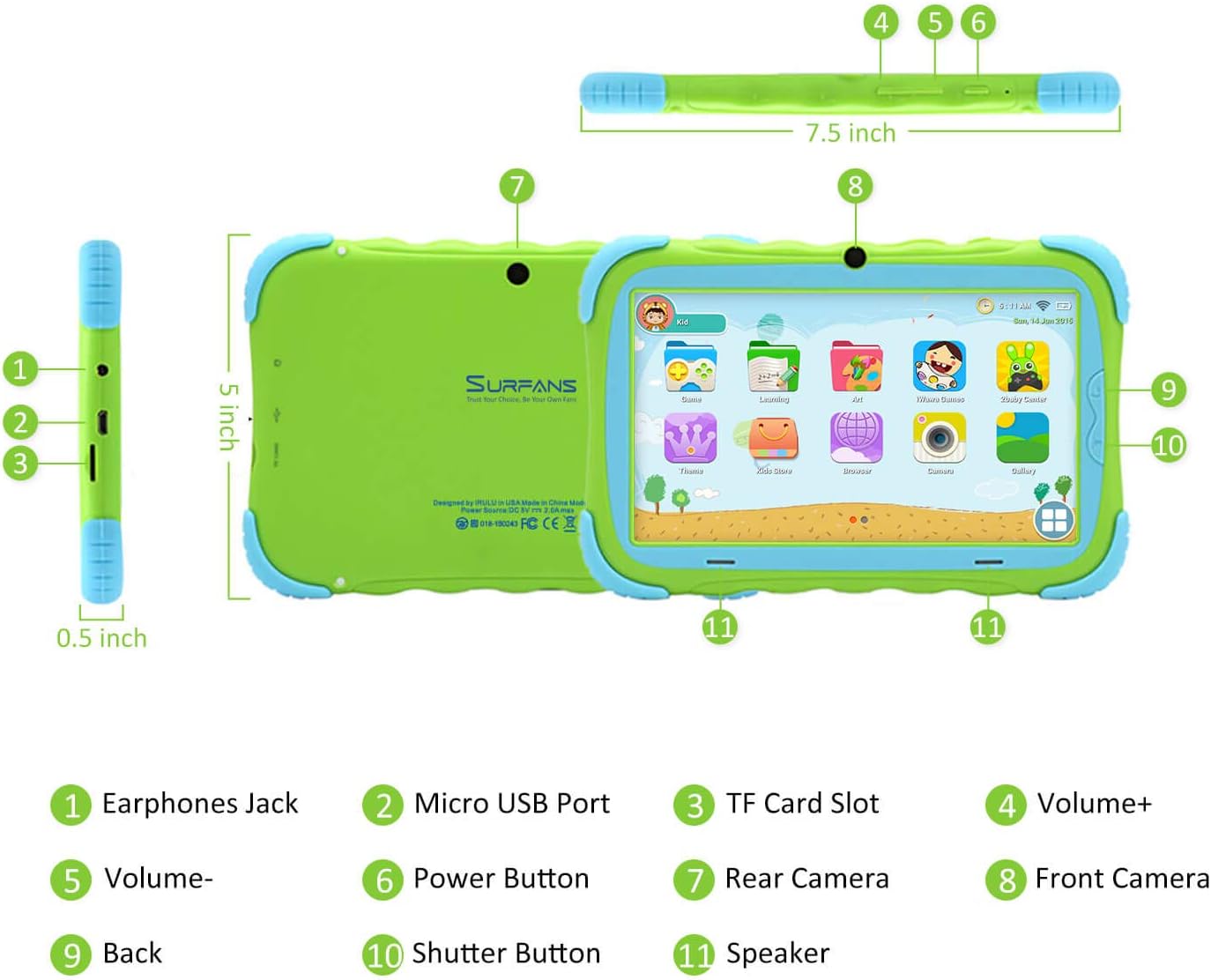
- Jack tal-widnejn: Għall-konnessjoni ta' headphones jew apparati awdjo esterni.
- Port Micro USB: Used for charging the tablet and connecting to a computer for data transfer.
- Slott tal-Karta TF: For inserting a Micro SD card to expand storage capacity (up to 32GB).
- Volum+: Increases the tablet's audio volume.
- Volum-: Decreases the tablet's audio volume.
- Buttuna tal-Qawwa: Press and hold to turn the tablet on/off or restart. Press briefly to turn the screen on/off.
- Kamera ta' wara: The primary camera located on the back of the tablet.
- Kamera ta' quddiem: The camera located on the front, typically used for video calls or selfies.
- Buttuna Lura: Navigates back to the previous screen or closes the current application.
- Buttuna tas-shutter: Used to capture photos or start/stop video recording in the camera application.
- Kelliem: Provides audio output from the tablet.
3.2 Karatteristiċi ewlenin
- Kid-Proof Design: Comes with a durable, lightweight, and skin-friendly case designed to protect against drops and bumps.
- 7-inch IPS HD Eye Protection Display: Provides clear visuals while minimizing eye strain.
- Android 9.0 OS: Runs on the latest Google Android 9.0 Pie operating system for smooth performance.
- Proċessur b'erba' qalba: Ensures responsive performance for apps, games, and videos.
- 1GB RAM & 16GB ROM: Sufficient memory for basic operations and storage, expandable up to 32GB via Micro SD card.
- Parental Control Mode: Allows parents to manage content, set time limits, and configure user settings for a safe digital environment.
- Pre-installed Kids Apps: Includes a variety of educational and entertaining apps, with access to the Google Play Store for more content.
- Konnettività Wi-Fi: Supports 802.11g for fast browsing, streaming, and video calls.
- Ħajja twila tal-batterija: 3000mAh Li-ion Battery provides 3-5 hours of working time, or up to 8 hours of mixed use on a single charge.


4. Gwida ta' Setup
Follow these steps to set up your Surfans Kids Tablet for the first time.
4.1 Ħlas Inizjali
Before first use, fully charge the tablet. Connect the included USB cable to the Micro USB Port (2) on the tablet and plug the other end into a compatible USB power adapter (not included) or a computer USB port. The charging indicator will show the charging status.
4.2 Power On/Off
- Biex Tixgħel: Press and hold the Power Button (6) until the screen lights up.
- Biex Tifi: Press and hold the Power Button (6) until a power-off menu appears. Select "Power off" and confirm.
- Biex terġa' tibda: Press and hold the Power Button (6) until the power-off menu appears. Select "Restart" and confirm.
- Screen mixgħul/mitfi: Briefly press the Power Button (6) to turn the screen on or off without powering down the tablet.
4.3 Konnessjoni Wi-Fi
To access online content and download apps, connect your tablet to a Wi-Fi network:
- Mill-iskrin tad-dar, aqleb 'l isfel minn fuq biex tiftaħ il-pannell tas-Settings Rapidi.
- Tektek u żomm l-ikona tal-Wi-Fi biex tmur fis-settings tal-Wi-Fi.
- Ixgħel il-Wi-Fi jekk ikun mitfi.
- Agħżel in-netwerk Wi-Fi mixtieq tiegħek mil-lista.
- Enter the network password if prompted, then tap "Connect".
4.4 Setting Up Parental Control
The Parental Control mode is a key feature for managing your child's tablet usage. This allows you to filter website content, set time limits, and control app access.

Specific steps for setting up parental controls will be available within the tablet's pre-installed Kids app or settings menu. Look for an icon or section labeled "Parental Control" or "Kids Mode" to configure user profiles, allowed applications, and usage schedules.
5. Tħaddim tat-Tablet
This section covers basic operations and how to use the tablet's features.
5.1 Navigazzjoni Bażika
- Touch and Tap: To open apps, select items, or type.
- Swipe: To scroll through screens, menus, or web paġni.
- Agħfas biex Tiżżumja: Biex tkabbar jew tkabbar l-immaġnijiet jew web paġni.
- Skrin tad-dar: L-iskrin prinċipali fejn tista' taċċessa l-apps u l-widgets.
- Bar tan-Navigazzjoni: Located at the bottom of the screen, typically includes Back, Home, and Recent Apps buttons.
5.2 Using Kids Mode and Apps
The tablet comes with a dedicated Kids Mode interface, providing a safe and engaging environment for children. This mode typically features a simplified layout and access to pre-approved content.

- Accessing Kids Mode: Usually, there's a specific app icon or a setting to switch to Kids Mode.
- Apps installati minn qabel: Explore the various educational games, books, music, and art learning applications.
- Google Play Store: For additional apps, exit Kids Mode (if applicable) and access the Google Play Store. Ensure parental supervision for downloads.


5.3 Media Playback and Camera
- Videos and Music: Use pre-installed media players or download others from the Play Store to enjoy videos and music.
- Kamera: Open the Camera app to use the Front (8) or Rear (7) cameras. Tap the Shutter Button (10) to take photos or record videos.
5.4 Ħażna Espansibbli
To expand the tablet's storage, insert a Micro SD card (up to 32GB, not included) into the TF Card Slot (3). This allows for more space for photos, music, movies, and apps.
6. Manutenzjoni
Manutenzjoni xierqa tiżgura l-lonġevità u l-prestazzjoni ottimali tat-tablet tiegħek.
- Tindif: Uża drapp artab u mingħajr suf biex tnaddaf l-iskrin u l-qafas tat-tablet. Evita prodotti tat-tindif jew solventi li joborxu.
- Kura tal-batterija:
- Evita li tiċċarġja l-batterija kompletament ta' spiss.
- Do not expose the tablet to extreme temperatures.
- Uża biss il-kejbil USB ipprovdut għall-iċċarġjar.
- Aġġornamenti tas-Software: Periodically check for system updates in the tablet's settings to ensure you have the latest features and security patches.
- Ġestjoni tal-Ħażna: Neħħi regolarment bla bżonn files and uninstall unused apps to free up storage space and maintain performance.
7 Issolvi l-problemi
If you encounter issues with your tablet, refer to the following common problems and solutions.
| Problema | Soluzzjoni Possibbli |
|---|---|
| It-tablet ma jixgħelx. | Ensure the battery is charged. Connect the charger and wait a few minutes before attempting to power on again. If unresponsive, press and hold the Power Button for 10-15 seconds to force a restart. |
| Problemi bil-konnessjoni tal-Wi-Fi. | Iċċekkja jekk il-Wi-Fi huwiex attivat fis-settings. Erġa' ibda r-router Wi-Fi tiegħek. Insieh in-netwerk u erġa' qabbad. Kun żgur li tinsab fil-firxa tas-sinjal Wi-Fi. |
| Prestazzjoni bil-mod jew apps li jiġġarraf. | Close unused apps. Clear app caches. Free up storage space by deleting unnecessary files or uninstalling unused apps. Restart the tablet. |
| L-iskrin ma jirrispondix. | Restart the tablet by holding the Power Button. Ensure the screen is clean and dry. |
| Cannot download apps from Google Play Store. | Check your Wi-Fi connection. Ensure sufficient storage space. Verify parental control settings are not blocking downloads. Clear cache and data for Google Play Store app. |
| It-tablet mhux qed jiċċarġja. | Check the USB cable and charger for damage. Try a different USB port or power adapter. Ensure the Micro USB Port is clean and free of debris. |
If the problem persists after trying these solutions, please contact Surfans customer support for further assistance.
8. Speċifikazzjonijiet
Detailed technical specifications for the Surfans Kids Tablet T57:
| Karatteristika | Dettall |
|---|---|
| Isem tal-Mudell | T57 |
| Sistema Operattiva | Android 9 Pie |
| Daqs tal-Iskrin | 7 Pulzier |
| Riżoluzzjoni tal-Iskrin | 1024x600 IPS HD |
| Proċessur | 1.5 GHz Quad-core Cortex-X7 (ARM) |
| RAM | 1GB |
| Ħażna Interna (ROM) | 16GB |
| Ħażna espansibbli | Jappoġġja karta Micro SD sa 32GB |
| Tip bla fili | Wi-Fi 802.11g |
| Kameras | Front Camera, Rear Camera (2 MP) |
| Batterija | 3000mAh Li-ion Battery |
| Ħajja Medja tal-Batterija | 3-5 hours (working time), 8 hours (mixed use) |
| Dimensjonijiet (LxWxH) | 7.5 x 5 x 0.5 pulzieri |
| Piż tal-oġġett | 1.22 liri |
| Kulur | Aħdar |
9. Garanzija u Appoġġ
For warranty information, technical support, or any inquiries regarding your Surfans Kids Tablet T57, please refer to the contact details provided on the product packaging or the official Surfans website. Surfans is committed to providing fast response and technical assistance for any issues encountered during use.


