1. Introduzzjoni
The SKYLOONG GK61/SK61 is a compact 60% mechanical gaming keyboard designed for performance and customization. Featuring 61 keys, RGB illumination, and Gateron Optical Brown Switches, it offers a responsive and tactile typing experience. This keyboard is wired, programmable, and built with durability in mind, including waterproof capabilities.

Figura 1: Aktarview of the SKYLOONG GK61/SK61 Mechanical Gaming Keyboard with its vibrant RGB backlighting.
2. Kontenut tal-Pakkett
Jekk jogħġbok ivverifika li l-oġġetti kollha huma preżenti fil-pakkett tiegħek:
- SKYLOONG GK61/SK61 Mechanical Gaming Keyboard
- Kejbil USB Type-C
- Keycap Puller
- Iswiċċ Puller
- Manwal għall-Utent (dan id-dokument)

Figure 2: Contents typically found in the SKYLOONG GK61/SK61 keyboard retail box, showing the keyboard, USB cable, and included tools.
3. Gwida ta' Setup
3.1 Konnessjoni tat-Tastiera
The SKYLOONG GK61/SK61 keyboard connects via a detachable USB Type-C cable, ensuring a stable and reliable connection for gaming and typing.
- Sib il-port USB Type-C fuq wara tat-tastiera.
- Qabbad tarf wieħed tal-kejbil USB Type-C ipprovdut mal-port tat-tastiera.
- Connect the other end of the USB cable to an available USB port on your computer (PC or Mac).
- The keyboard will be automatically recognized by your operating system, and the RGB backlighting will illuminate.

Figure 3: The USB Type-C interface for connecting the keyboard to your computer.
3.2 Installazzjoni tas-Softwer (Mhux Obbligatorja għal Karatteristiċi Avvanzati)
For full customization, including advanced RGB lighting effects, key remapping, and macro programming, download the official SKYLOONG software (often referred to as GK6XPlus driver). This software is compatible with Windows and macOS.
- Visit the official SKYLOONG websit biex tniżżel l-aħħar verżjoni tas-softwer.
- Installa s-softwer billi ssegwi l-istruzzjonijiet fuq l-iskrin.
- Launch the software to access customization options.
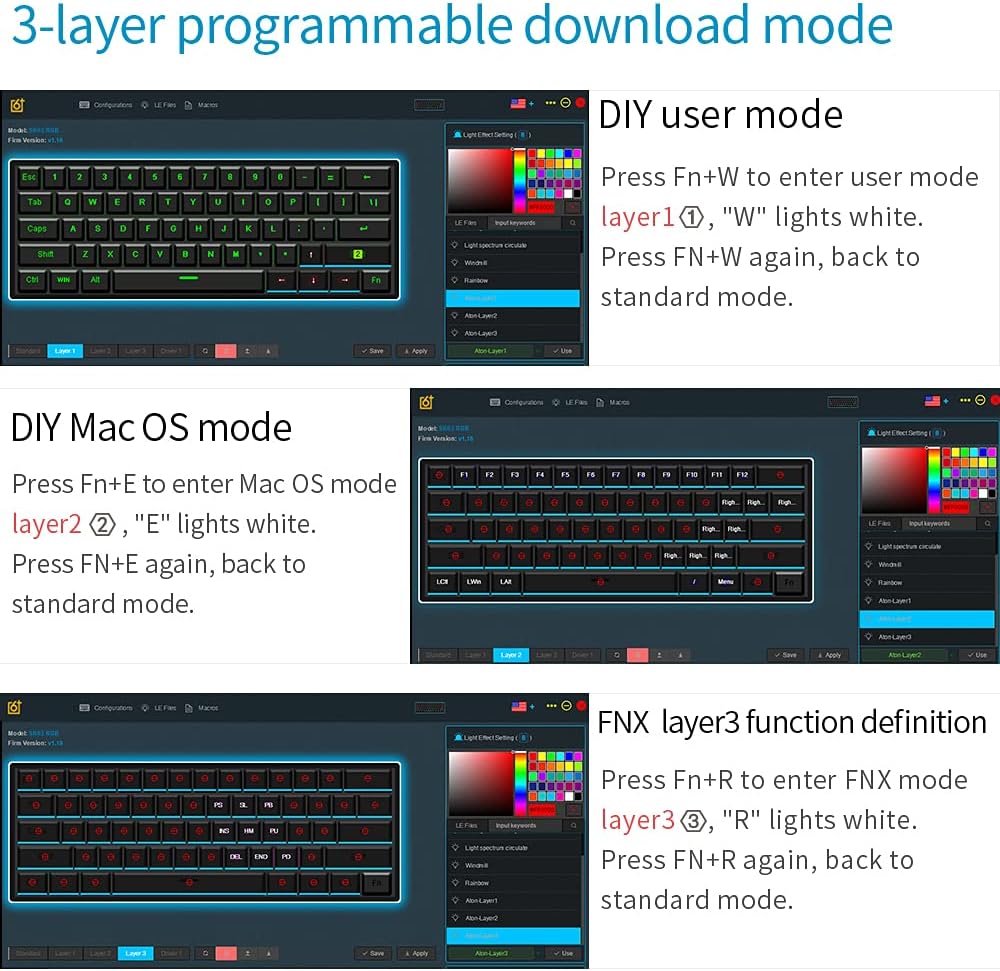
Figure 4: The software interface for managing the keyboard's programmable layers and lighting effects.
4. Istruzzjonijiet Operattivi
4.1 Basic Functions and Fn Layer
The GK61/SK61 is a 60% keyboard, meaning some functions are accessed via a Function (Fn) layer. The Fn key is typically located on the bottom right of the keyboard.
| Kombinazzjoni | Funzjoni |
|---|---|
| Fn + 1! - 0) | F1 - F10 |
| Fn + -= | F11 |
| Fn + [+={ | F12 |
| Fn+Q | Layer 1 (User Mode) |
| Fn+E | Layer 2 (Mac OS Mode) |
| Fn + R | Layer 3 (FNX Mode) |
| Fn + W | Switch between User Mode and Standard Mode |
| Fn + Spacebar | Change RGB lighting effects |
| Fn + Alt (Right) | Adjust RGB brightness |
4.2 Kontroll tad-Dawl ta' Wara RGB
The keyboard features 16.8 million color RGB backlighting with multiple adjustable modes. Use the following combinations to control the lighting:
- Fn + Spazju: Cycle through various RGB lighting effects.
- Fn + Right Alt: Adjust the brightness of the backlighting.
- Fn + Right Ctrl: Change the speed of dynamic lighting effects.
4.3 Ċwievet u Makros Programmabbli
The SKYLOONG GK61/SK61 supports full key programmability and on-the-fly macro recording through its 3-layer programmable download mode. This allows for extensive customization of key functions and complex command sequences.
- DIY User Mode (Layer 1): Agħfas Fn + W to enter. The 'W' key will light white. Press Fn + W again to return to standard mode. This layer is for user-defined key mappings.
- DIY Mac OS Mode (Layer 2): Agħfas Fn+E to enter. The 'E' key will light white. Press Fn+E again to return to standard mode. This layer is optimized for macOS specific functions.
- FNX Layer 3 Function Definition (Layer 3): Agħfas Fn + R to enter. The 'R' key will light white. Press Fn + R again to return to standard mode. This layer allows for advanced function definitions.
Detailed programming instructions are available within the GK6XPlus software.
5. Manutenzjoni
5.1 Tindif tat-Tastiera
Tindif regolari jgħin biex tinżamm il-prestazzjoni u d-dehra tat-tastiera.
- Skonnettja t-tastiera mill-kompjuter tiegħek qabel ma tnaddafha.
- Uża pinzell artab jew arja kkompressata biex tneħħi t-trab u l-fdalijiet minn bejn il-keycaps.
- For surface cleaning, gently wipe the keycaps and chassis with a slightly damp, drapp mingħajr suf. Evita umdità eċċessiva.
- The keyboard has an IP68 waterproof rating, offering protection against spills. However, it is recommended to clean up any liquid spills immediately to prevent long-term damage.

Figure 5: The keyboard's waterproof design, allowing for enhanced durability against spills.
5.2 Sostituzzjoni tas-Swiċċ (Karatteristika ta' Hot-Swap)
The SKYLOONG GK61/SK61 features hot-swappable Gateron Optical Switches, allowing you to easily change switches without soldering. This is only compatible with other Gateron Optical Switches.
- Bl-użu tal-puller tal-keycap provdut, neħħi bir-reqqa l-keycap mixtieq.
- Insert the switch puller around the top and bottom clips of the switch.
- Gently squeeze the clips and pull the switch straight up to remove it from the PCB.
- Align the pins of the new Gateron Optical Switch with the holes on the PCB.
- Press the new switch firmly into place until it clicks. Ensure it is seated properly.
- Ibdel il-għatu taċ-ċwievet.

Figure 6: The hot-swap capability of the Gateron optical switches, allowing for easy replacement.
6 Issolvi l-problemi
If you encounter issues with your SKYLOONG GK61/SK61 keyboard, please refer to the following common solutions:
- It-tastiera ma tirrispondix:
- Kun żgur li l-kejbil USB tat-Tip C huwa konness sew kemm mat-tastiera kif ukoll mal-kompjuter.
- Ipprova qabbad it-tastiera ma' port USB differenti fuq il-kompjuter tiegħek.
- Ittestja t-tastiera fuq kompjuter ieħor biex teskludi problemi speċifiċi tas-sistema.
- Id-dawl RGB mhux qed jaħdem jew imwaħħal:
- Agħfas Fn + Spacebar biex tiċċikla bejn il-modi tad-dawl.
- Agħfas Fn + Dritt Alt biex taġġusta l-luminożità.
- Ensure the keyboard is not in a specific programmable layer that might override lighting settings.
- If using the software, check lighting settings within the application.
- Ċwievet mhux qed jirreġistraw jew qed jittajpjaw darbtejn:
- Carefully remove the keycap and switch (if hot-swappable) for the affected key. Check for any debris or obstruction.
- Re-seat the switch firmly. If the issue persists, consider replacing the switch.
- Ensure the keyboard firmware is up to date via the official software.
- Programmable functions not working:
- Ensure you are in the correct programmable layer (Fn + W, Fn + E, or Fn + R).
- Verify your settings within the GK6XPlus software.
- Make sure the software is running and properly communicating with the keyboard.
7. Speċifikazzjonijiet
| Karatteristika | Dettall |
|---|---|
| Mudell | GK61 / SK61 |
| Tqassim | 60% (61 Ċwievet) |
| Tip ta' Swiċċ | Gateron Optical Brown (Hot-swappable for optical switches only) |
| Konnettività | Wired (USB Type-C detachable cable) |
| Backlighting | RGB (16.8 miljun kulur, modi multipli) |
| Programmabilità | Full keys programmable, 3-layer download mode, on-the-fly macro recording |
| Durabilità | IP68 Waterproof/Dustproof/Anti-Corrosion, 100 million keystrokes lifetime |
| Tappijiet ewlenin | ABS dual-color |
| Kompatibilità | Windows 2000/XP/Vista/Win7/Win8/Win10, Mac OS |
| Dimensjonijiet | Approx. 292mm x 104mm (Refer to Figure 2 for visual) |
| Piż | Appross. 1.32 libbra (0.6 kg) |

Figure 7: Ergonomic design of the keyboard, featuring a five-level height arc surface for comfortable typing.

Figure 8: Internal hardware architecture, highlighting the 32-bit M3 MCU, 8M Flash memory, and 3 channels 256 professional level RGB color management chip.
8. Garanzija u Appoġġ
SKYLOONG products are designed for reliability and performance. For warranty information, technical support, or service inquiries, please refer to the official SKYLOONG webis-sit jew ikkuntattja lill-bejjiegħ tiegħek. Żomm il-prova tax-xiri tiegħek għal talbiet ta' garanzija.
For the latest drivers and software, please visit the official SKYLOONG support page.


