1. Prodott Aktarview
The Baseus Heyo Rotation Countdown Timer is a versatile digital timer designed for various scenarios, including kitchen cooking, study, work, and exercise. It features an intuitive rotary adjustment, a clear LCD display, and intelligent energy-saving functions.

Stampa 1.1: Quddiem view of the Baseus Heyo Rotation Countdown Timer, showcasing its sleek design and clear digital display.
2. Karatteristiċi ewlenin
- Intuitive Rotary Adjustment: Easily set time by rotating the outer ring, supporting both countdown and count-up functions.
- Clear LCD Digital Display: Large, easy-to-read numbers for minutes and seconds.
- Volum aġġustabbli: Three volume settings (Loud, Low, Mute) to suit different environments.
- Iffrankar Intelliġenti tal-Enerġija: The display dims after 5 seconds of inactivity and shuts down after another 5 seconds to conserve battery life.
- Sostenn manjetiku: Allows for convenient placement on metallic surfaces like refrigerators or whiteboards.
- Materjal Durabbli: Constructed from Acrylonitrile Butadiene Styrene for longevity.

Image 2.1: Demonstrates the easy rotation mechanism for efficient timing adjustments.

Image 2.2: Illustrates the adjustable volume settings located on the back of the timer.
3. Setup
3.1. Kontenut tal-Pakkett
- Baseus Heyo Rotation Countdown Timer (1 unit)
- Manwal għall-Utent (dan id-dokument)
- Nota: Il-batteriji AAA mhumiex inklużi u jridu jinxtraw separatament.
3.2. Installazzjoni tal-batterija
- Sib il-kompartiment tal-batterija fuq wara tat-tajmer.
- Iftaħ l-għatu tal-batterija.
- Daħħal tliet (3) batteriji AAA, waqt li tiżgura l-polarità korretta (+/-).
- Close the battery cover securely. The LCD display will light up, indicating successful installation.

Stampa 3.1: View of the battery compartment, showing where to insert three AAA batteries.
4. Istruzzjonijiet Operattivi
4.1. Power On/Off
The timer automatically powers on when batteries are installed. It enters an energy-saving mode after 5 seconds of inactivity and fully shuts down after another 5 seconds of no operation. To reactivate, simply rotate the dial or press the "O" button.
4.2. Setting the Timer (Countdown)
- Ħin ta' Aġġustament: Rotate the outer ring clockwise to increase the time (minutes and seconds) and counter-clockwise to decrease it. The adjustable range is 00:00 to 99:55.
- Ibda l-Countdown: Once the desired time is set, press the "O" button on the front of the timer to begin the countdown.
- Pause / Resume: Press the "O" button again during a countdown to pause it. Press it once more to resume.
- Irrisettja: To reset the timer to 00:00, press and hold the "O" button for approximately 3 seconds.
- Allarm: When the countdown reaches 00:00, the timer will sound an alarm according to the selected volume setting.
4.3. Using as a Stopwatch (Count-up)
- Ensure the timer display is at 00:00. If not, reset it by holding the "O" button.
- Press the "O" button to start counting up from 00:00.
- Press the "O" button again to pause the count-up.
- Press and hold the "O" button to reset the stopwatch.
4.4. Volum ta 'aġġustament
On the back of the timer, there is a switch to adjust the alarm volume. Select from three modes:
- Għoli: For noisy environments or when a strong alert is needed.
- Baxx: For quiet environments or subtle alerts.
- Siekta: The display will blink when the time is up, providing a silent notification. Ideal for libraries, offices, or study areas.
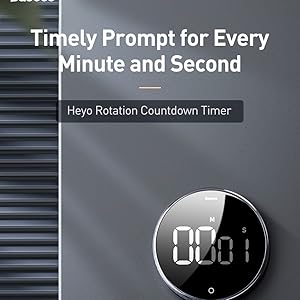
Image 4.1: The timer can be conveniently placed on magnetic surfaces for easy visibility.

Image 4.2: The timer is suitable for various settings, including professional and educational environments.
5. Manutenzjoni
- Tindif: Imsaħ it-tajmer b'ċarruta ratba u niexfa. Tużax prodotti tat-tindif li joborxu jew tgħaddasx fl-ilma.
- Sostituzzjoni tal-batterija: Replace batteries when the display becomes dim or the timer functions erratically. Always use new AAA batteries.
- Ħażna: Store the timer in a cool, dry place when not in use for extended periods. Remove batteries if storing for more than a month to prevent leakage.
- Evita Kundizzjonijiet Estremi: Do not expose the timer to extreme temperatures, direct sunlight, or high humidity.
6 Issolvi l-problemi
| Problema | Kawża Possibbli | Soluzzjoni |
|---|---|---|
| Id-displej huwa vojt jew mudlam. | Batteriji baxxi jew mejta; installazzjoni ħażina tal-batterija. | Ibdel b'batteriji AAA ġodda, waqt li tiżgura l-polarità korretta. |
| Timer does not start/stop. | "O" button not pressed firmly; timer in sleep mode. | Press the "O" button firmly. Rotate the dial to wake the timer from sleep mode. |
| L-allarm mhux qed idoqq. | Volume set to Mute; low battery. | Check the volume switch on the back and set it to Loud or Low. Replace batteries if needed. |
| Numbers are incorrect or flickering. | Faulty unit; very low battery. | Ibdel il-batteriji. Jekk il-problema tippersisti, ikkuntattja l-appoġġ għall-klijenti. |
7. Speċifikazzjonijiet
- Numru tal-Mudell: ACDJS-01
- Ditta: Baseus
- Materjal: Acrylonitrile Butadiene Styrene (ABS)
- Kulur: Iswed
- Dimensjonijiet: 5 ċm (Fond) x 5 ċm (Wisa') x 3 ċm (Għoli)
- Piż tal-oġġett: 150 Gramm
- Medda ta' ħin: 00:00 - 99:55
- Sors tal-Enerġija: 3 x Batteriji AAA (mhux inklużi)
- Numru ta' Settings: 4 (referring to volume settings and timing modes)
- Pajjiż ta' Oriġini: Iċ-Ċina
- UPC: 738633769932
8. Garanzija u Appoġġ
Baseus products are manufactured with high-quality standards. For warranty information and customer support, please refer to the warranty card included with your purchase or visit the official Baseus websit. Jekk jogħġbok żomm l-irċevuta tax-xiri tiegħek għal talbiet ta' garanzija.
Manifattur: Baseus, Store2508, Dankuni, West Bengal
Importatur/Min Ippakkja: MP International - Authorised Distributor
For technical assistance or inquiries, please contact your local distributor or the seller.


