1. Introduzzjoni
This manual provides comprehensive instructions for the ProCase Slim Case, designed to protect and enhance the functionality of your compatible iPad Air model. Please read this manual thoroughly to ensure proper installation and utilization of all features.
2. Kompatibilità
The ProCase Slim Case is specifically designed for the following iPad Air models:
- iPad Air 11-inch 7th Generation (M3) 2025 (Model numbers: A3266, A3267, A3270)
- iPad Air 6th Generation 11-inch (M2) 2024 (Model numbers: A2902, A2903, A2904)
- iPad Air 5th Generation 10.9-inch 2022 (Model numbers: A2588, A2589, A2591)
- iPad Air 4th Generation 10.9-inch 2020 (Model numbers: A2324, A2072, A2316, A2325)
To verify your iPad model number, please check the back bottom of your device. This case is not compatible with any other iPad models.

Figure 2.1: iPad Model Compatibility Chart. This image displays a table listing compatible iPad Air models (11-inch M3 2025, 11-inch M2 2024, 10.9-inch 5th Gen 2022, 10.9-inch 4th Gen 2020) alongside their respective model numbers. A diagram below the table illustrates how to locate the model number on the back of your iPad for verification.
3. Karatteristiċi
- Built-in Pencil Holder: Securely stores your Apple Pencil (USB-C or 2nd Gen) and supports magnetic attachment and wireless charging. (Apple Pencil not included).
- Qtugħ Preċiż: Allows full access to all ports, buttons, and features without removing the case.
- Lightweight & Shockproof: Constructed with quality ABS material back to add minimal bulk while providing protection against drops and scratches.
- Dual Standing Positions: Designed for adjusting your iPad into different viewing angles for typing, viewing, or video calls.
- Funzjoni ta' Sleep/Wake Awtomatika: Magnets secure the case closure and automatically put your iPad to sleep when closed and wake it when opened.
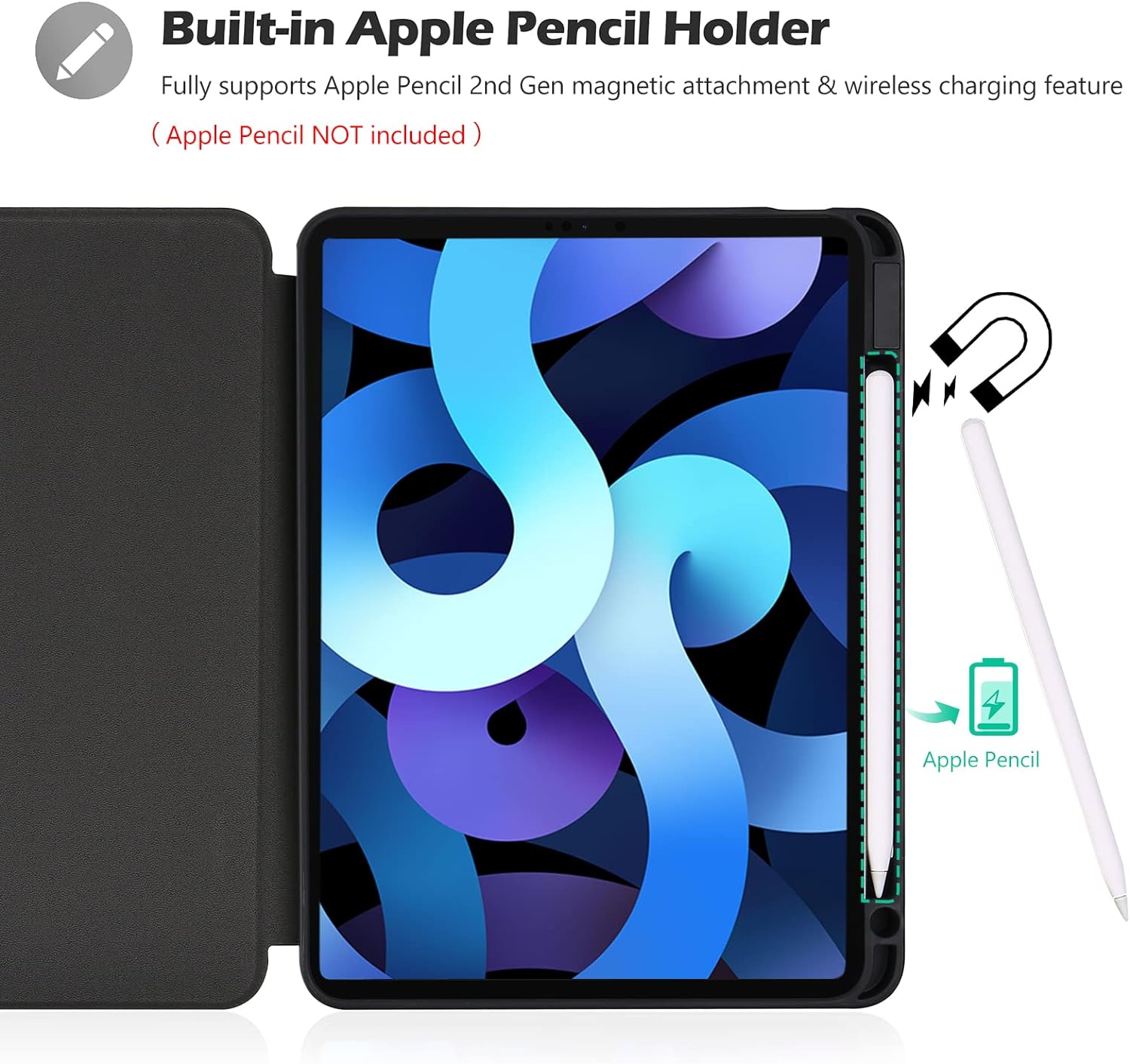
Figure 3.1: Built-in Apple Pencil Holder. This image highlights the integrated Apple Pencil holder within the case, demonstrating its compatibility with magnetic attachment and wireless charging for the Apple Pencil (2nd Gen or USB-C).

Figure 3.2: Auto Sleep/Wake Functionality. This image illustrates the case's auto sleep/wake feature, where closing the cover puts the iPad to sleep and opening it wakes the device, conserving battery life.

Figure 3.3: Shock & Drop Resistance. This image demonstrates the case's ability to protect the iPad from impacts, featuring a close-up of the slim yet robust back material and reinforced corners designed for shock absorption.

Figure 3.4: Precise Cutouts and Snug Fit. This image highlights the accurate cutouts for the iPad's camera, speakers, USB-C connector, and volume buttons, ensuring all features are accessible without removing the case. It also shows the snug fit of the iPad within the case.
4. Setup
Follow these steps to properly install your iPad into the ProCase Slim Case:
- Ensure your iPad is clean and free of debris.
- Align the iPad with the case, starting with the side opposite the Apple Pencil holder.
- Gently press the iPad into the case, ensuring all corners snap securely into place. The flexible material allows for a snug fit.
- Before installing the case, complete the Touch ID settings if applicable to your iPad model.
Video 4.1: ProCase iPad Air 5 2022 / Air 4 Case Installation. This video demonstrates the process of installing an iPad Air 5th Gen (2022) or iPad Air 4th Gen (2020) into the ProCase Slim Case, highlighting how the iPad snaps securely into the protective shell.
5. It-Tħaddim tal-Kaxxa
5.1 Using the Stand Function
The front cover of the ProCase Slim Case can be folded into two different standing positions, providing versatile viewing angles for various activities such as watching videos, typing, or video calls.

Figure 5.1: Dual Viewing Angles. This image demonstrates how the case's front cover can be folded to create two distinct stand positions, offering different viewing angles for optimal user experience.
5.2 Auto Sleep/Wake
The case features a magnetic closure that automatically puts your iPad to sleep when the cover is closed and wakes it up when opened. This helps conserve battery life.
Video 5.2: ProCase Auto Sleep/Wake and Pencil Charging Demonstration. This video illustrates the auto sleep/wake functionality of the ProCase, showing the iPad screen turning on and off as the cover is opened and closed. It also demonstrates the Apple Pencil charging while attached to the case.
6. Manutenzjoni
To ensure the longevity and appearance of your ProCase Slim Case, follow these maintenance guidelines:
- Tindif: Imsaħ il-barra b'artab, damp drapp. Evita kimiċi ħarxa jew prodotti tat-tindif li joborxu.
- Ħażna: Aħżen il-kaxxa f'post frisk u niexef 'il bogħod mix-xemx diretta meta ma tkunx qed tużaha.
- Evita li Tiġġebbed Żżejjed: While the case is flexible, avoid excessive bending or stretching of the material to prevent damage.
7 Issolvi l-problemi
If you encounter any issues with your ProCase Slim Case, refer to the following common solutions:
- Il-Kaxxa Ma Toqgħodx: Double-check your iPad model number against the compatibility list in Section 2. Ensure all corners of the iPad are properly seated within the case.
- Auto Sleep/Wake Not Working: Ensure the iPad is correctly aligned within the case and the cover is fully closed. Verify that the auto-lock/sleep feature is enabled in your iPad's settings.
- Apple Pencil Not Charging: Confirm the Apple Pencil is correctly placed in the designated holder and that your iPad model supports wireless charging for the Apple Pencil.
- Buttons or Ports Blocked: Ensure the iPad is fully seated in the case. The precise cutouts should allow full access. If not, re-adjust the iPad's position.
8. Speċifikazzjonijiet
| Karatteristika | Dettall |
|---|---|
| Brand | ProCase |
| Numru tal-Mudell | PC-08362688 |
| Apparati Kompatibbli | iPad Air 6 Gen 11 inch 2024, 5 10.9 2022, 4 2020 |
| Materjal | Quality ABS material (back) |
| Kulur | Iswed |
| Piż tal-oġġett | 11.5 uqija |
| Dimensjonijiet tal-Prodott | 9.8 x 7.4 x 0.72 pulzieri |
| Karatteristiċi Speċjali | Built-in Pencil Holder, Auto Sleep/Wake, Dual Standing Positions, Shockproof |
9. Appoġġ
For further assistance, product inquiries, or troubleshooting not covered in this manual, please visit the official ProCase website or contact their customer support. Refer to the product packaging or the ProCase brand store on Amazon for specific contact details.
ProCase Store Link: Visit the ProCase Store on Amazon


