1. Introduzzjoni
This manual provides comprehensive instructions for the installation, operation, and maintenance of your Intellitronix LED Digital Replacement Gauge Panel. This product is specifically designed for 1992-1995 Jeep YJ models, offering a modern digital display for essential vehicle metrics. Please read this manual thoroughly before beginning installation to ensure proper function and safety.

Image 1.1: The Intellitronix LED Digital Replacement Gauge Panel, showing the upper and lower sections with digital readouts for fuel, temperature, oil pressure, volts, RPM, and MPH.
2. Kontenut tal-Pakkett
Verify that all components listed below are present in your package. If any items are missing or damaged, please contact Intellitronix customer support.
- Intellitronix LED Digital Gauge Panel (Upper and Lower sections)
- Oil Pressure Sending Unit
- Water Temperature Sending Unit (S8013)
- Ċineg tal-Wajers
- Installation Hardware (specific to model)
Note: The factory bezel/housing is NOT included. You must retain and utilize your original OEM dash bezel and indicators (turn signals, high beam, brake, 4WD) as they are not part of this replacement panel.

Immaġni 2.1: Fuqview of the main components included in the kit, showing the circuit boards for the upper and lower gauge sections, along with associated wiring and sending units.
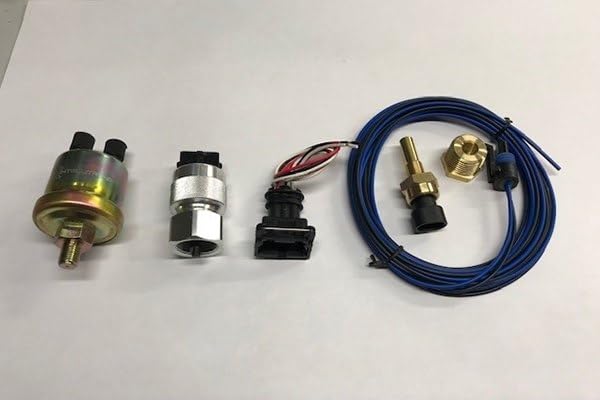
Image 2.2: Close-up of the included sending units, typically for oil pressure and water temperature, which are essential for the digital gauges to function.
3. Informazzjoni dwar is-Sigurtà
Always prioritize safety during installation and operation. Failure to follow these guidelines may result in injury or damage to your vehicle.
- Skonnettja l-batterija tal-vettura qabel tibda kwalunkwe xogħol elettriku.
- Ilbes tagħmir protettiv personali xieraq, inklużi nuċċalijiet tas-sigurtà.
- Kun żgur li l-konnessjonijiet tal-wajers kollha huma sikuri u iżolati sew biex tevita short circuits.
- Ikkonsulta tekniku professjonali tal-karozzi jekk m'intix ċert dwar xi parti tal-proċess tal-installazzjoni.
- This product is intended for use in 1992-1995 Jeep YJ vehicles only.
4. Istruzzjonijiet ta 'installazzjoni
This section outlines the general steps for installing the Intellitronix LED Digital Gauge Panel. Specific wiring details may vary slightly based on your vehicle's existing harness. It is recommended to have a factory service manual for your Jeep YJ for reference.
4.1. Preparazzjoni
- Skonnettja t-terminal negattiv tal-batterija tal-vettura tiegħek.
- Carefully remove the existing instrument cluster from your Jeep YJ dashboard. Refer to your vehicle's service manual for specific removal procedures.
- Disassemble your original instrument cluster to separate the factory bezel/housing and the original indicator lights (turn signals, high beam, brake, 4WD). These components will be reused.
4.2. Gauge Panel Assembly
The Intellitronix gauge panel consists of circuit boards that fit into your existing factory bezel.

Image 4.1: The reverse side of the main circuit board, showing the wiring connections for the various digital gauges.

Immaġni 4.2: Dettaljata view of the RPM gauge circuit board, indicating connections for power and signal input.
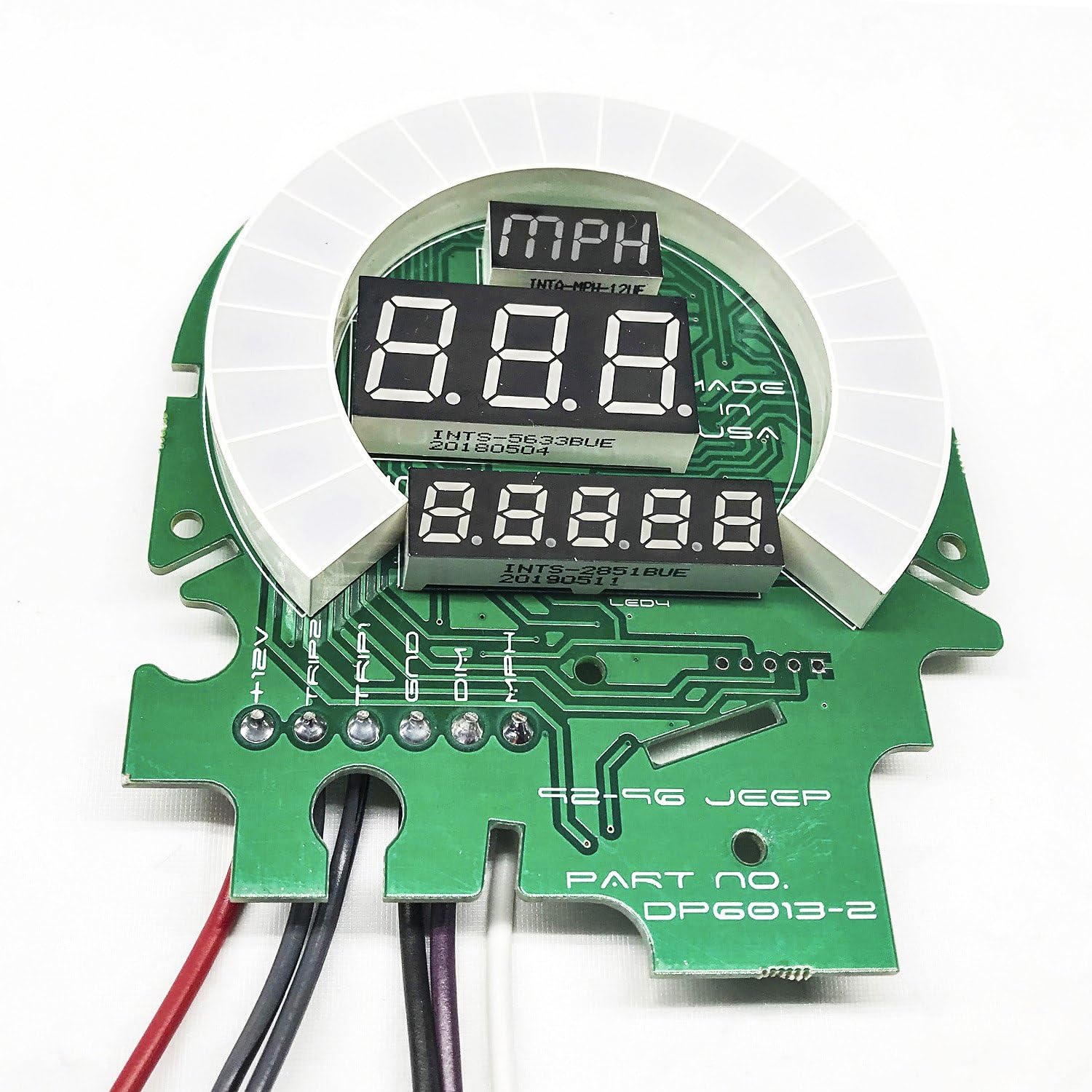
Immaġni 4.3: Dettaljata view of the MPH gauge circuit board, showing connections for speed sensor input and power.
- Carefully install the Intellitronix circuit boards into your factory bezel. Ensure they are seated correctly and securely.
- Reinstall the original indicator lights (turn signals, high beam, brake, 4WD) into their respective positions on the factory bezel.
4.3. Konnessjonijiet tal-Wiring
Connect the provided wiring harnesses to the Intellitronix gauge panel and to your vehicle's electrical system. Refer to the color-coded wires and the following guidelines:
- Power (12V Switched): Connect to a switched 12-volt source that is active when the ignition is on.
- Art: Connect to a reliable chassis ground point.
- Illuminazzjoni: Connect to your vehicle's dash illumination circuit for dimming functionality.
- Takometru: Connect to the negative side of the ignition coil or a dedicated tachometer signal wire. Displays 0-9900 RPM in 100 RPM increments.
- Pressjoni taż-Żejt: Connect the provided oil pressure sending unit to the engine block's oil pressure port. Connect the sending unit wire to the gauge panel. Reads 0-100 PSI.
- Voltmetru: No separate sending unit required. Connect the voltmeter input wire to a 12-volt source. Displays 7.0-25.5 volt range.
- Livell tal-Fjuwil: Connect to your vehicle's existing fuel level sending unit wire. This gauge is programmable for Jeep/Chrysler, Ford, GM, VDO (10-180 ohms), and aftermarket (240-33 ohms) sending units.
- Temperatura tal-Ilma: Install the provided S8013 sending unit into an appropriate port on your engine's cooling system. Connect the sending unit wire to the gauge panel. Displays 100-300°F. A 1/2" bushing is typically supplied; if a 3/8" bushing is required, it must be sourced separately.
- Speedometer (MPH): Connect to your vehicle's speed sensor output.
Important: Ensure all connections are correct before reconnecting the battery.
4.4. Assemblea Finali
- Once all wiring is complete and secure, carefully reinstall the assembled gauge panel into your dashboard.
- Erġa' qabbad it-terminal negattiv tal-batterija tal-vettura tiegħek.
- Turn the ignition to the "ON" position and verify that all gauges power on and display readings.
5. Operazzjoni
The Intellitronix LED Digital Gauge Panel provides real-time digital readouts for your vehicle's critical functions.
- Takometru: Displays engine RPM.
- Pressjoni taż-Żejt: Shows engine oil pressure in PSI.
- Voltmetru: Indicates vehicle system voltage.
- Livell tal-Fjuwil: Displays remaining fuel as a percentage.
- Temperatura tal-Ilma: Shows engine coolant temperature in Fahrenheit.
- Speedometer: Displays vehicle speed in MPH.
The panel does not include a clock or integrated indicators for turn signals, high beam, brake, or 4WD. These functions rely on your original OEM dash indicators.
6. Calibration (Fuel Level)
The fuel level gauge requires calibration to match your vehicle's sending unit. Follow these steps:
- Ensure your fuel tank is either completely full or completely empty for accurate calibration.
- Locate the calibration button or jumper on the fuel gauge circuit board (refer to specific product diagrams if available).
- With the ignition on, press and hold the calibration button (or activate the jumper) until the display shows "CAL" or begins flashing.
- Release the button/jumper. The gauge will now read the current fuel level and store this as the full or empty reference point.
- Repeat the process for the opposite fuel level (empty if you calibrated full, or full if you calibrated empty) to set the full range.
The gauge supports various sending unit resistances: Jeep/Chrysler, Ford, GM, VDO (10-180 ohms), and aftermarket (240-33 ohms).
7. Manutenzjoni
The Intellitronix LED Digital Gauge Panel is designed for long-term reliability and requires minimal maintenance.
- Keep the display clean using a soft, dry cloth. Avoid abrasive cleaners or solvents.
- Iċċekkja l-konnessjonijiet tal-wajers perjodikament għal issikkar u korrużjoni.
- Ensure sending units are free from debris and properly seated.
8 Issolvi l-problemi
If you encounter issues with your gauge panel, refer to the following common problems and solutions:
| Problema | Kawża Possibbli | Soluzzjoni |
|---|---|---|
| Il-gauge ma jixgħelx. | No power connection, faulty ground, blown fuse. | Check 12V switched power connection, verify ground connection, inspect vehicle fuses. |
| Inaccurate gauge reading. | Incorrect sending unit, faulty sending unit, improper wiring, calibration issue (fuel). | Verify correct sending unit for the gauge, check sending unit functionality, inspect wiring for damage or loose connections, recalibrate fuel gauge. |
| Gauge flickers or displays erratic readings. | Loose wiring connection, electrical interference, poor ground. | Secure all wiring connections, ensure proper grounding, check for sources of electrical interference. |
| Fuel gauge reads incorrectly after installation. | Fuel gauge not calibrated. | Perform fuel gauge calibration as described in Section 6. |
If troubleshooting steps do not resolve the issue, please contact Intellitronix customer support for further assistance.
9. Speċifikazzjonijiet
- Numru tal-Mudell: DP6013
- Dimensjonijiet tal-Prodott: 10 x 8 x 4 pulzieri
- Piż tal-oġġett: 3 Liri
- Materjal: Akriliku
- Firxa tat-Takometru: 0-9900 RPM (100 RPM increments)
- Oil Pressure Range: 0-100 PSI
- Voltmeter Range: 7.0-25.5 Volts
- Fuel Level Range: 0-99% (1% increments), programmable for various sending units (10-180 ohms, 240-33 ohms)
- Firxa tat-Temperatura tal-Ilma: 100-300°F (includes S8013 sending unit)
- UPC: 818731015923
10. Garanzija u Appoġġ
Intellitronix products are backed by a manufacturer's warranty. For specific warranty details, registration, or technical support, please visit the official Intellitronix websit jew ikkuntattja lid-dipartiment tas-servizz tal-konsumatur tagħhom.
Manifattur: Intellitronix
Informazzjoni ta' Kuntatt: Refer to the Intellitronix official webis-sit għad-dettalji ta' kuntatt tal-appoġġ l-aktar aġġornati.


